its software that is required by something to be running and not something u use everyday as in software that you install on your devices and use everyday, its a operating system for a device, and even tho if u do decide u can flash openwrt on them anyway.
I didn't get the impression that this is open source and i read that off your messages earlier and i just said that if its not open source i don't use it.
Yes it is new, something we are testing at the moment.
Let me answer you later, I have to go "try" to sleep now... If you don't answer, remind me, and I'll seriously give you the list.
Just out of curiousity, is it because you want to read the source so nothing funny is in it ? because we understand that opinion.
Will do, i am also going to sleep soon, sleep well! And thanks for beeing a positive critic!
Got it. You do not use software unless it is open source and software is open source if you define it as open source otherwise it counts as open source equivalent because you use it but if you don't use it then you wouldn't use it because it isn't open source, apart from the open source you don't use.
It is good to know your principles are no impediment to your practice.
I find it a little bit more interesting that he is not willing to use a website (because that is what the configurator is) if it is not open-source, i wonder why he then is willing to make an account to this forum while it is not open source, or visit other websites because they are not open source....
All right, we've had our FOSS vs closed philosophy battle for the day. Let it rest. There's no further point flooding the OP's thread with a decades-old argument. We won't settle it here.
If you want a serious answer, i like reading the source code, i like editing stuff, sometimes maybe even send some patches to further improve it.
I do think that the idea is good, and this is basically what Quick setup by mikrotik should be in the first place (imo).
Short answer is this encourages tool buildout, security audits by people who may know more than you, maybe some open source forks, you can also get suggestions that way and since its open source you could help mikrotik implement it into winbox by showing them what and how you did it; its a different story if you decide to sell it to them by having everyone here test it out before you do (im not saying you are but i dislike people who use forums as QA as i said, got me a little heated).
Depending what it is especially since its generating something as cruical as a configuration for networking devices that someone may run in critical infrastructure because yes networking is everywhere and a cruical backbone of most corpo's these days, it can be really bad, someone can do a lot of damage, either by themselves or by using your tool.
If you wanted you can easly sneakly inject open ports for you to sneak around the network if someone didn't care to look at the configuration that the tool generates and blindly pastes it in, the possibilities are endless (mostly people who buy mikrotik because its cheap not because they need a capable router/switch/ap/whatever).
Actually, what's your reason to not open source it? how secret can secret sauce be secret that you have that you don't want to share? (Out of curiousity, you don't have to answer.)
Given that the result of the process Is a plain text file (because RouterOS configurations are plain text files) and what Is ultimately applied and used Is this plain text file, I really cannot see what all the fuss Is about.
If the result Is valid there Is not one reason in the word for asking how It was produced for (IMHO fictitious) security reasons.
How much Is 2+2?
4
i used xkcd random number generator to obtain this result, JFYI;
https://xkcd.com/221/
and - coincidentally - It provided an accurate enough answer.
Currently, you are still able to read all the code, because all the logic runs in the browser (as I mentioned above).
It's also easy if you want everything to run locally (with no internet access), but of course only for private use, the project is not open source, you are not allowed to redistribute its content, with or without modifications.
If you have improvements to the JS code, I guess posting it here in this thread would work too.
But the project is not open source so of course many will by principe never be willing to contribute any code modifications, and that's perfectly fine. Also, you are not forbidden to make the modification locally on your private computer and run the modified version yourself for your own need.
Regarding potential injection of nefarious code, there is a freely available configuration comparator which has been mentioned on this site, and I wrote my own detailed one a few years ago to track changes precisely, as any programmer could.
As an experiment, I took two versions of a configuration for one of my Mikrotiks and [sloppily] handed these to a local model (Qwen3.6 a35b/a3b) asking for significant differences. After scrambling through about 3000 tokens at 50 t/s it produced the important differences while ignoring the trivial (serials, dates etc) including picking up the small error in the older file.
Thus, the output from Marcel's company's tool is readily verifiable against your prior version or baseline, whether by using comparators or a public or local LLM.
Noting that I do not use LLMs to create or modify ROS configs for various obvious reasons. The config generator works from current source documents.
I don't know if I can think of 10, but for now:
- Prevent invalid configurations at the start as much as possible.
Like using VLAN1,
activating VLAN filtering without a port, something, that can connect to the CPU,
assigning the same IP to two different interfaces,
I don't know...
Mainly, it's all about preventing the user from making stupid mistakes as much as possible.
Uh, despite the bleats and rants, VLAN1 works fine . . . . just keep it untagged as intended. It's on all 10 devices I own (ROS and SwOS) and never a single lockout or issue.
But then again, some folks could break an anvil . . . . 
It is reasonably hard to misconfigure using the tool, but it is possible.
Recipe to reproduce:
- open generator
- choose single device mode
- choose HEX S RB760iGS (but I doubt this is device specific)
- Choose advanced mode
- Select VLANs section and enable by turning on the "include in script" switch
- It will create 3 vlans 10,20,30 (this won't be a problem, but now we introduce a problem)
- Change ID 10 to ID 1, I also changed name to vlan1-lan and interface ip to 192.168.1.1/24
- Press generate
This will throw a warning, but there are now two interfaces using the same vlan id 1. The bridge itself (because it always uses untagged traffic, and the default pvid is 1 (and the generator does not override it in this case, which it arguably should). But in general you shouldn't be creating a vlan interface for vlan 1 unless you really understand what you are doing, and most home users do not).
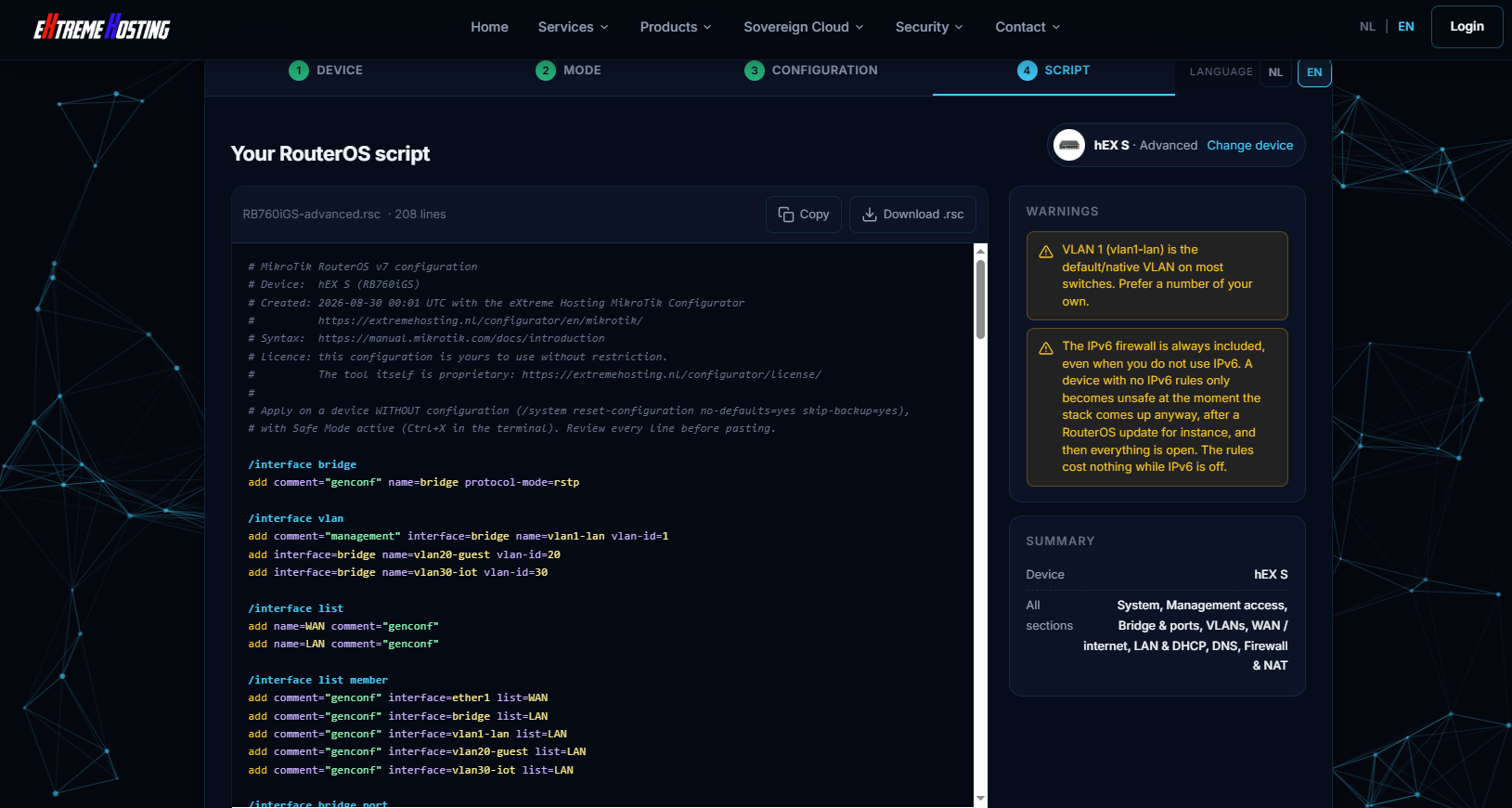
Here's the generated config and json export
RB760iGS-advanced-with-vlan1.rsc
# MikroTik RouterOS v7 configuration
# Device:  hEX S (RB760iGS)
# Created: 2026-08-30 00:01 UTC with the eXtreme Hosting MikroTik Configurator
#          https://extremehosting.nl/configurator/en/mikrotik/
# Syntax:  https://manual.mikrotik.com/docs/introduction
# Licence: this configuration is yours to use without restriction.
#          The tool itself is proprietary: https://extremehosting.nl/configurator/license/
#
# Apply on a device WITHOUT configuration (/system reset-configuration no-defaults=yes skip-backup=yes),
# with Safe Mode active (Ctrl+X in the terminal). Review every line before pasting.

/interface bridge
add comment="genconf" name=bridge protocol-mode=rstp

/interface vlan
add comment="management" interface=bridge name=vlan1-lan vlan-id=1
add interface=bridge name=vlan20-guest vlan-id=20
add interface=bridge name=vlan30-iot vlan-id=30

/interface list
add name=WAN comment="genconf"
add name=LAN comment="genconf"

/interface list member
add comment="genconf" interface=ether1 list=WAN
add comment="genconf" interface=bridge list=LAN
add comment="genconf" interface=vlan1-lan list=LAN
add comment="genconf" interface=vlan20-guest list=LAN
add comment="genconf" interface=vlan30-iot list=LAN

/interface bridge port
add bridge=bridge comment="genconf" frame-types=admit-only-untagged-and-priority-tagged ingress-filtering=yes interface=ether2 pvid=1
add bridge=bridge comment="genconf" frame-types=admit-only-untagged-and-priority-tagged ingress-filtering=yes interface=ether3 pvid=1
add bridge=bridge comment="genconf" frame-types=admit-only-untagged-and-priority-tagged ingress-filtering=yes interface=ether4 pvid=1
add bridge=bridge comment="genconf" frame-types=admit-only-untagged-and-priority-tagged ingress-filtering=yes interface=ether5 pvid=1
add bridge=bridge comment="genconf" frame-types=admit-all ingress-filtering=yes interface=sfp1 pvid=1

/interface bridge vlan
add bridge=bridge comment="vlan1-lan" tagged=bridge untagged=ether2,ether3,ether4,ether5,sfp1 vlan-ids=1
add bridge=bridge comment="vlan20-guest" tagged=bridge,sfp1 vlan-ids=20
add bridge=bridge comment="vlan30-iot" tagged=bridge,sfp1 vlan-ids=30

/interface bridge
set bridge vlan-filtering=yes

/ip pool
add name=pool-vlan1-lan ranges=192.168.1.10-192.168.1.254
add name=pool-vlan20-guest ranges=192.168.20.10-192.168.20.254
add name=pool-vlan30-iot ranges=192.168.30.10-192.168.30.254
add name=dhcp ranges=192.168.88.10-192.168.88.254

/ip dhcp-server
add address-pool=pool-vlan1-lan interface=vlan1-lan lease-time=1d name=dhcp-vlan1-lan
add address-pool=pool-vlan20-guest interface=vlan20-guest lease-time=1d name=dhcp-vlan20-guest
add address-pool=pool-vlan30-iot interface=vlan30-iot lease-time=1d name=dhcp-vlan30-iot

/ip dhcp-server network
add address=192.168.1.0/24 comment="vlan1-lan" dns-server=192.168.1.1 gateway=192.168.1.1
add address=192.168.20.0/24 comment="vlan20-guest" dns-server=192.168.20.1 gateway=192.168.20.1
add address=192.168.30.0/24 comment="vlan30-iot" dns-server=192.168.30.1 gateway=192.168.30.1

/ip dhcp-client
add add-default-route=yes comment="WAN1" default-route-distance=1 interface=ether1 use-peer-dns=yes use-peer-ntp=no

/ip dhcp-server
add address-pool=dhcp interface=bridge lease-time=1d name=genconf

/ip dhcp-server network
add address=192.168.88.0/24 comment="genconf" dns-server=192.168.88.1 gateway=192.168.88.1

/ip address
add address=192.168.1.1/24 comment="vlan1-lan" interface=vlan1-lan
add address=192.168.20.1/24 comment="vlan20-guest" interface=vlan20-guest
add address=192.168.30.1/24 comment="vlan30-iot" interface=vlan30-iot
add address=192.168.88.1/24 comment="genconf" interface=bridge

/ip dns
set allow-remote-requests=yes cache-size=4096 servers=9.9.9.9,149.112.112.112

/ip firewall address-list
add address=127.0.0.0/8 comment="genconf: RFC6890" list=bad_ipv4
add address=192.0.0.0/24 comment="genconf: RFC6890" list=bad_ipv4
add address=192.0.2.0/24 comment="genconf: RFC6890 documentation" list=bad_ipv4
add address=198.51.100.0/24 comment="genconf: RFC6890 documentation" list=bad_ipv4
add address=203.0.113.0/24 comment="genconf: RFC6890 documentation" list=bad_ipv4
add address=240.0.0.0/4 comment="genconf: RFC6890 reserved" list=bad_ipv4
add address=0.0.0.0/8 comment="genconf: RFC6890" list=not_global_ipv4
add address=10.0.0.0/8 comment="genconf: RFC6890" list=not_global_ipv4
add address=100.64.0.0/10 comment="genconf: RFC6890" list=not_global_ipv4
add address=169.254.0.0/16 comment="genconf: RFC6890" list=not_global_ipv4
add address=172.16.0.0/12 comment="genconf: RFC6890" list=not_global_ipv4
add address=192.0.0.0/29 comment="genconf: RFC6890" list=not_global_ipv4
add address=192.168.0.0/16 comment="genconf: RFC6890" list=not_global_ipv4
add address=198.18.0.0/15 comment="genconf: RFC6890 benchmark" list=not_global_ipv4
add address=255.255.255.255/32 comment="genconf: RFC6890" list=not_global_ipv4
add address=224.0.0.0/4 comment="genconf: multicast" list=bad_src_ipv4
add address=255.255.255.255/32 comment="genconf: RFC6890" list=bad_src_ipv4
add address=0.0.0.0/8 comment="genconf: RFC6890" list=bad_dst_ipv4
add address=224.0.0.0/4 comment="genconf: RFC6890" list=bad_dst_ipv4

/ip firewall raw
add action=drop chain=prerouting comment="genconf: drop bogon IP's" src-address-list=bad_ipv4
add action=drop chain=prerouting comment="genconf: drop bogon IP's" dst-address-list=bad_ipv4 in-interface-list=WAN
add action=drop chain=prerouting comment="genconf: drop bogon IP's" src-address-list=bad_src_ipv4
add action=drop chain=prerouting comment="genconf: drop bogon IP's" dst-address-list=bad_dst_ipv4 in-interface-list=WAN
add action=drop chain=prerouting comment="genconf: drop non global from WAN" in-interface-list=WAN src-address-list=not_global_ipv4
add action=drop chain=prerouting comment="genconf: drop bad UDP" port=0 protocol=udp

/ip firewall filter
add action=accept chain=input comment="genconf: accept established,related,untracked" connection-state=established,related,untracked
add action=drop chain=input comment="genconf: drop invalid" connection-state=invalid
add action=accept chain=input comment="genconf: accept ICMP" protocol=icmp
add action=accept chain=input comment="genconf: accept to local loopback (for CAPsMAN)" dst-address=127.0.0.1
add action=drop chain=input comment="drop DNS from WAN (no open resolver)" dst-port=53 in-interface-list=WAN protocol=udp
add action=drop chain=input comment="drop DNS from WAN (no open resolver)" dst-port=53 in-interface-list=WAN protocol=tcp
add action=drop chain=input comment="genconf: drop all not coming from LAN" in-interface-list=!LAN
add action=accept chain=forward comment="genconf: accept in ipsec policy" ipsec-policy=in,ipsec
add action=accept chain=forward comment="genconf: accept out ipsec policy" ipsec-policy=out,ipsec
add action=fasttrack-connection chain=forward comment="genconf: fasttrack" connection-state=established,related hw-offload=yes
add action=accept chain=forward comment="genconf: accept established,related, untracked" connection-state=established,related,untracked
add action=drop chain=forward comment="genconf: drop invalid" connection-state=invalid
add action=drop chain=forward comment="isolate vlan20-guest: internet only" connection-state=new in-interface=vlan20-guest out-interface-list=!WAN
add action=drop chain=forward comment="isolate vlan30-iot: internet only" connection-state=new in-interface=vlan30-iot out-interface-list=!WAN
add action=drop chain=forward comment="genconf: drop all from WAN not DSTNATed" connection-nat-state=!dstnat connection-state=new in-interface-list=WAN

/ip firewall nat
add action=masquerade chain=srcnat comment="genconf: masquerade" ipsec-policy=out,none out-interface-list=WAN

/ipv6 firewall address-list
add address=::/128 comment="genconf: unspecified address" list=bad_ipv6
add address=::1/128 comment="genconf: lo" list=bad_ipv6
add address=fec0::/10 comment="genconf: site-local" list=bad_ipv6
add address=::ffff:0.0.0.0/96 comment="genconf: ipv4-mapped" list=bad_ipv6
add address=::/96 comment="genconf: ipv4 compat" list=bad_ipv6
add address=100::/64 comment="genconf: discard only" list=bad_ipv6
add address=2001:db8::/32 comment="genconf: documentation" list=bad_ipv6
add address=2001:10::/28 comment="genconf: ORCHID" list=bad_ipv6
add address=3ffe::/16 comment="genconf: 6bone" list=bad_ipv6

/ipv6 firewall filter
add action=accept chain=input comment="genconf: accept established,related,untracked" connection-state=established,related,untracked
add action=drop chain=input comment="genconf: drop invalid" connection-state=invalid
add action=accept chain=input comment="genconf: accept ICMPv6" protocol=icmpv6
add action=accept chain=input comment="genconf: accept UDP traceroute" port=33434-33534 protocol=udp
add action=accept chain=input comment="genconf: accept DHCPv6-Client prefix delegation." dst-port=546 protocol=udp src-address=fe80::/10
add action=accept chain=input comment="genconf: accept IKE" dst-port=500,4500 protocol=udp
add action=accept chain=input comment="genconf: accept ipsec AH" protocol=ipsec-ah
add action=accept chain=input comment="genconf: accept ipsec ESP" protocol=ipsec-esp
add action=accept chain=input comment="genconf: accept all that matches ipsec policy" ipsec-policy=in,ipsec
add action=drop chain=input comment="genconf: drop everything else not coming from LAN" in-interface-list=!LAN
add action=accept chain=forward comment="genconf: accept established,related,untracked" connection-state=established,related,untracked
add action=drop chain=forward comment="genconf: drop invalid" connection-state=invalid
add action=drop chain=forward comment="genconf: drop packets with bad src ipv6" src-address-list=bad_ipv6
add action=drop chain=forward comment="genconf: drop packets with bad dst ipv6" dst-address-list=bad_ipv6
add action=drop chain=forward comment="genconf: rfc4890 drop hop-limit=1" hop-limit=equal:1 protocol=icmpv6
add action=accept chain=forward comment="genconf: accept ICMPv6" protocol=icmpv6
add action=accept chain=forward comment="genconf: accept HIP" protocol=139
add action=accept chain=forward comment="genconf: accept IKE" dst-port=500,4500 protocol=udp
add action=accept chain=forward comment="genconf: accept ipsec AH" protocol=ipsec-ah
add action=accept chain=forward comment="genconf: accept ipsec ESP" protocol=ipsec-esp
add action=accept chain=forward comment="genconf: accept all that matches ipsec policy" ipsec-policy=in,ipsec
add action=drop chain=forward comment="genconf: drop everything else not coming from LAN" in-interface-list=!LAN

/system clock
set time-zone-autodetect=no time-zone-name=UTC

/system ntp client
set enabled=yes mode=unicast servers=nl.pool.ntp.org,time.cloudflare.com

/system package update
set channel=stable

/system routerboard settings
set auto-upgrade=yes

/ip service
set winbox address=192.168.88.0/24,192.168.1.0/24 disabled=no
set ssh address=192.168.88.0/24,192.168.1.0/24 disabled=no
set www disabled=yes
set www-ssl disabled=yes
set api disabled=yes
set api-ssl disabled=yes
set ftp disabled=yes
set telnet disabled=yes

/ip ssh
set strong-crypto=yes

/tool mac-server
set allowed-interface-list=none

/tool mac-server mac-winbox
set allowed-interface-list=LAN

/tool mac-server ping
set enabled=no

/ip neighbor discovery-settings
set discover-interface-list=LAN

/tool bandwidth-server
set enabled=no

/system identity
set name=hEX-S

/user
set admin password=demochangeme
RB760iGS-advanced-with-vlan1.json
{
  "app": "extremehosting-mikrotik-configurator",
  "v": 1,
  "device": {
    "sku": "RB760iGS"
  },
  "mode": "advanced",
  "profile": null,
  "step": 0,
  "enabled": {
    "system": true,
    "access": true,
    "ports": true,
    "vlans": true,
    "wan": true,
    "lan": true,
    "dns": true,
    "ipv6": false,
    "firewall": true,
    "wifi": false,
    "capsman": false,
    "vpn": false,
    "routing": false,
    "qos": false,
    "hotspot": false,
    "ha": false,
    "services": false,
    "containers": false,
    "imported": false
  },
  "system": {
    "identity": "hEX-S",
    "admin_password": "demochangeme",
    "admin_rename": "",
    "timezone": "UTC",
    "ntp": true,
    "ntp_servers": "nl.pool.ntp.org,time.cloudflare.com",
    "note": "",
    "note_show_at_login": true,
    "logging": "default",
    "syslog_server": "",
    "syslog_port": 514,
    "log_firewall": false,
    "watchdog": false,
    "watchdog_address": "",
    "update_channel": "stable",
    "device_mode_bootstrap": false,
    "device_mode_scope": "minimal",
    "auto_upgrade": false,
    "rb_auto_upgrade": true
  },
  "access": {
    "mgmt_source": "",
    "services": [
      "winbox",
      "ssh"
    ],
    "winbox_port": 8291,
    "ssh_port": 22,
    "www_port": 80,
    "www_ssl_port": 443,
    "ssh_strong": true,
    "www_ssl_cert": true,
    "mac_server": "none",
    "mac_winbox": "LAN",
    "mac_ping": false,
    "discovery": "LAN",
    "bandwidth_server": false,
    "romon": false,
    "romon_secret": "",
    "cloud_ddns": false,
    "cloud_time": false,
    "cloud_bth": false,
    "users": [],
    "user_ssh_keys": [],
    "ssh_no_password": false
  },
  "ports": {
    "bridge_name": "bridge",
    "lan_ports": [
      "ether2",
      "ether3",
      "ether4",
      "ether5",
      "sfp1"
    ],
    "bridge_mac": "auto",
    "bridge_mac_manual": "",
    "protocol_mode": "rstp",
    "igmp_snooping": false,
    "dhcp_snooping": false,
    "dhcp_trusted": [],
    "hw_offload": true,
    "mtu": "",
    "disable_unused": false,
    "bonds": [],
    "comments": [],
    "poe": [],
    "ether_mtu": ""
  },
  "vlans": {
    "vlans": [
      {
        "id": 1,
        "name": "vlan1-lan",
        "address": "192.168.1.1/24",
        "dhcp": true,
        "internet": true,
        "isolated": false,
        "mgmt": true
      },
      {
        "id": 20,
        "name": "vlan20-guest",
        "address": "192.168.20.1/24",
        "dhcp": true,
        "internet": true,
        "isolated": true,
        "mgmt": false
      },
      {
        "id": 30,
        "name": "vlan30-iot",
        "address": "192.168.30.1/24",
        "dhcp": true,
        "internet": true,
        "isolated": true,
        "mgmt": false
      }
    ],
    "ports": [
      {
        "iface": "ether2",
        "mode": "access",
        "pvid": 1,
        "tagged": []
      },
      {
        "iface": "ether3",
        "mode": "access",
        "pvid": 1,
        "tagged": []
      },
      {
        "iface": "ether4",
        "mode": "access",
        "pvid": 1,
        "tagged": []
      },
      {
        "iface": "ether5",
        "mode": "access",
        "pvid": 1,
        "tagged": []
      },
      {
        "iface": "sfp1",
        "mode": "trunk",
        "pvid": 1,
        "tagged": [
          1,
          20,
          30
        ]
      }
    ],
    "lease_time": "1d",
    "dns_server": "router",
    "dns_custom": "",
    "domain": ""
  },
  "wan": {
    "wans": [
      {
        "iface": "ether1",
        "type": "dhcp",
        "lte_apn": "internet",
        "lte_auth": "none",
        "pppoe_name": "pppoe-out1",
        "use_peer_dns": true,
        "add_default_route": true,
        "check_gateway": "ping",
        "distance": 1
      }
    ],
    "failover": "distance",
    "probe1": "1.1.1.1",
    "probe2": "9.9.9.9",
    "iptv": false,
    "iptv_iface": "",
    "mss_clamp": true,
    "static_routes": []
  },
  "lan": {
    "lan_iface": "",
    "mgmt_mode": "static",
    "address": "192.168.88.1/24",
    "gateway": "",
    "dhcp": true,
    "pool": "",
    "lease_time": "1d",
    "dns_server": "router",
    "dns_custom": "",
    "domain": "",
    "ntp_server": "",
    "authoritative": "yes",
    "add_arp": false,
    "static_leases": [],
    "options": [],
    "relay": false,
    "relay_server": ""
  },
  "dns": {
    "upstream": "quad9",
    "custom_servers": "",
    "doh": false,
    "doh_url": "",
    "doh_verify": true,
    "allow_remote": true,
    "cache_size": 4096,
    "redirect": false,
    "static": [],
    "adblock": false
  },
  "ipv6": {
    "wan_mode": "pd",
    "wan_iface": "ether1",
    "pd_length": "56",
    "pd_address": false,
    "static_prefix": "",
    "static_wan": "",
    "static_gw": "",
    "lan": true,
    "nd_dns": true,
    "firewall": true,
    "wan_allow": []
  },
  "firewall": {
    "style": "genconf",
    "defaults": true,
    "input_only": false,
    "fasttrack": true,
    "nat": "masquerade",
    "srcnat_address": "",
    "forwards": [],
    "hairpin": true,
    "wan_allow": [],
    "bruteforce": false,
    "bogons": true,
    "block_dns_wan": true,
    "drop_ping_wan": false,
    "log_drops": false,
    "vlan_isolation": true,
    "mgmt_vlan_only": false,
    "address_lists": [],
    "rules": [],
    "conntrack_tcp_established": ""
  },
  "wifi": {
    "mode": "ap",
    "country": "netherlands",
    "ssids": [
      {
        "ssid": "MikroTik-1685",
        "security": "wpa2wpa3",
        "passphrase": "",
        "bands": [],
        "vlan": "",
        "isolation": false,
        "hidden": false
      }
    ],
    "width_5": "20/40/80mhz",
    "width_2": "20mhz",
    "freq_5": "",
    "freq_2": "",
    "tx_power": "",
    "mlo": false,
    "mlo_bands": [],
    "mlo_ssid": "",
    "mlo_passphrase": "",
    "band_steering": true,
    "ft": false,
    "pmf": "auto",
    "access_list": [],
    "access_list_default_reject": false,
    "cap_controllers": "",
    "cap_discovery": "bridge",
    "cap_lock": false,
    "cap_certificate": false,
    "st_ssid": "",
    "st_passphrase": "",
    "st_security": "wpa2wpa3",
    "st_radio": "",
    "st_mode": "station-bridge",
    "st_bssid": "",
    "st_protocol": "802.11",
    "rp_ssid": "",
    "rp_passphrase": "",
    "rp_security": "wpa2",
    "rp_radio": "",
    "rp_mode": "station-bridge",
    "rp_same_ssid": true,
    "rp_out_ssid": "",
    "rp_out_passphrase": "",
    "rp_rebroadcast_uplink": true
  },
  "capsman": {
    "stack": "wifi",
    "country": "netherlands",
    "ssids": [
      {
        "ssid": "Office",
        "security": "wpa2wpa3",
        "passphrase": "",
        "bands": [
          "2.4ghz",
          "5ghz"
        ],
        "vlan": "",
        "isolation": false
      }
    ],
    "width_5": "20/40/80mhz",
    "width_2": "20mhz",
    "ft": true,
    "local_forwarding": true,
    "identity_regexp": "",
    "cap_mgmt_iface": "vlan10-lan",
    "controller_cap": true
  },
  "vpn": {
    "public_endpoint": "",
    "wireguard": [
      {
        "name": "wg-rw",
        "listen_port": 13231,
        "address": "10.10.10.1/24",
        "keys": null,
        "lan_member": true,
        "peers": [
          {
            "name": "laptop",
            "kind": "client",
            "allowed": "10.10.10.2/32",
            "keys": null,
            "public_key": "",
            "endpoint": "",
            "remote_subnets": "",
            "keepalive": 25,
            "full_tunnel": true
          }
        ]
      }
    ],
    "ike2": false,
    "ike2_auth": "cert",
    "ike2_fqdn": "",
    "ike2_psk": "",
    "ike2_pool": "192.168.77.2-192.168.77.254",
    "ike2_clients": [
      {
        "name": "phone1",
        "export_pw": ""
      }
    ],
    "l2tp": false,
    "l2tp_secret": "",
    "sstp": false,
    "ovpn": false,
    "ovpn_port": 1194,
    "ovpn_proto": "udp",
    "pptp": false,
    "ppp_pool": "192.168.89.2-192.168.89.254",
    "ppp_local": "192.168.89.1",
    "ppp_users": [
      {
        "name": "vpnuser",
        "password": "",
        "service": "any"
      }
    ],
    "tunnels": [],
    "zerotier": ""
  },
  "routing": {
    "addresses": [],
    "loopback": "",
    "ospf": false,
    "ospf_router_id": "",
    "ospf_areas": [
      {
        "name": "backbone",
        "area_id": "0.0.0.0",
        "type": "default"
      }
    ],
    "ospf_ifaces": [],
    "ospf_auth_key": "",
    "ospf_redistribute": [
      "connected"
    ],
    "ospf_default": "never",
    "bgp": false,
    "bgp_as": "",
    "bgp_router_id": "",
    "bgp_networks": "",
    "bgp_peers": [],
    "rip": false,
    "rip_ifaces": [],
    "tables": [],
    "ecmp": ""
  },
  "qos": {
    "mode": "fair",
    "down": 500,
    "up": 50,
    "algo": "cake",
    "pcq_rate": 0,
    "prio_voip": true,
    "prio_gaming": true,
    "prio_dns_icmp": true,
    "hosts": []
  },
  "hotspot": {
    "hotspot": true,
    "hs_iface": "",
    "hs_address": "10.5.50.1/24",
    "hs_dns_name": "hotspot.local",
    "hs_login": [
      "http-chap",
      "cookie"
    ],
    "hs_trial_time": "30m",
    "hs_rate": "5M/20M",
    "hs_shared": 1,
    "hs_session": "1d",
    "hs_idle": "10m",
    "hs_users": [
      {
        "name": "guest",
        "password": "guest",
        "limit": ""
      }
    ],
    "hs_walled": "*.apple.com\ncaptive.apple.com\nconnectivitycheck.gstatic.com\n*.gstatic.com\nwww.msftconnecttest.com",
    "hs_https": false,
    "pppoe": false,
    "pppoe_iface": "",
    "pppoe_service": "isp",
    "pppoe_local": "10.9.0.1",
    "pppoe_pool": "10.9.0.2-10.9.255.254",
    "pppoe_dns": "",
    "pppoe_users": [],
    "radius": false,
    "radius_server": "",
    "radius_secret": "",
    "radius_services": [
      "hotspot"
    ],
    "radius_coa": false
  },
  "ha": {
    "vrrp": [],
    "vrrp_password": "",
    "netwatch": []
  },
  "services": {
    "snmp": "off",
    "snmp_community": "monitoring",
    "snmp_auth_pw": "",
    "snmp_priv_pw": "",
    "snmp_from": "",
    "snmp_contact": "",
    "snmp_location": "",
    "netflow": false,
    "netflow_target": "",
    "netflow_port": 2055,
    "netflow_version": "9",
    "upnp": false,
    "ntp_server": false,
    "proxy": false,
    "socks": false,
    "smb": false,
    "graphing": false,
    "email": false,
    "email_server": "",
    "email_port": 587,
    "email_tls": "starttls",
    "email_user": "",
    "email_password": "",
    "email_from": "",
    "email_to": "",
    "backup": false,
    "backup_password": "",
    "letsencrypt": "",
    "scripts": []
  },
  "containers": {
    "disk": "disk1",
    "subnet": "172.17.0.1/24",
    "registry": "https://registry-1.docker.io",
    "containers": [
      {
        "name": "pihole",
        "image": "pihole/pihole:latest",
        "ip": "172.17.0.2",
        "envs": "TZ=Europe/Amsterdam\nWEBPASSWORD=changeme",
        "mounts": "etc-pihole:/etc/pihole",
        "ports": ""
      }
    ]
  },
  "imported": {
    "lines": ""
  }
}
This leaves the bridge interface itself isolated from the the switch. Here are the relevant sections of the generated config.
/interface bridge
add comment="genconf" name=bridge protocol-mode=rstp # note this has pvid=1 by default but not shown except in verbose export

/interface vlan
add comment="management" interface=bridge name=vlan1-lan vlan-id=1
add interface=bridge name=vlan20-guest vlan-id=20
add interface=bridge name=vlan30-iot vlan-id=30

/interface list
add name=WAN comment="genconf"
add name=LAN comment="genconf"

/interface list member
add comment="genconf" interface=ether1 list=WAN
add comment="genconf" interface=bridge list=LAN  # this is now disconnected from switch
add comment="genconf" interface=vlan1-lan list=LAN
add comment="genconf" interface=vlan20-guest list=LAN
add comment="genconf" interface=vlan30-iot list=LAN

/interface bridge port
add bridge=bridge comment="genconf" frame-types=admit-only-untagged-and-priority-tagged ingress-filtering=yes interface=ether2 pvid=1
add bridge=bridge comment="genconf" frame-types=admit-only-untagged-and-priority-tagged ingress-filtering=yes interface=ether3 pvid=1
add bridge=bridge comment="genconf" frame-types=admit-only-untagged-and-priority-tagged ingress-filtering=yes interface=ether4 pvid=1
add bridge=bridge comment="genconf" frame-types=admit-only-untagged-and-priority-tagged ingress-filtering=yes interface=ether5 pvid=1
add bridge=bridge comment="genconf" frame-types=admit-all ingress-filtering=yes interface=sfp1 pvid=1

/interface bridge vlan
add bridge=bridge comment="vlan1-lan" tagged=bridge untagged=ether2,ether3,ether4,ether5,sfp1 vlan-ids=1
add bridge=bridge comment="vlan20-guest" tagged=bridge,sfp1 vlan-ids=20
add bridge=bridge comment="vlan30-iot" tagged=bridge,sfp1 vlan-ids=30

/interface bridge
set bridge vlan-filtering=yes
by creating vlan interface one, the interface that is associated with vlan on the switch is now vlan1-lan, not bridge.
My guess is that when @tadawson says he uses vlan1, what he means is that he applies an ip address to the bridge interface and that connects to vlan 1 on the bridge via pvid.
I use VLAN1 as it's intended - default untagged. All my trunks are hybrid - untagged VLAN1 and other tagged VLANs. It's configured as untagged on the bridge as well as (dynamically) the bridge associated interfaces. PVID is 1 on all ports on the router - the specific PVID is handed to ports as needed on the associated switches (although nothing is stopping me from doing so on the router, other than not really using it as a switch . . . . It's an RB5009, and I trunk out to separate switches on 10G optical.
Others have mentioned other use cases, but learned this in Cisco certs, and never found a networking product it won't work on or be compatible with. (I generally don't run tagged to end user devices - the associated switch port assigned the corred VLAN untagged. Servers get tagged, though.
An American visits a small village in rural France and rents a quiet cottage by the sea. While walking along the rocky coast, he slips, falls onto a sharp cluster of barnacles, and gasps in pain as a deep gash opens up on his hand.
He hobbles into the local cafe bleeding profusely, and demands to know where the nearest hospital is. The French bartender calmly pours a glass of wine, slides it across the counter, and says, "Relax, monsieur. Just wrap it in a handkerchief. It is only a scratch."
The American stares at him in absolute horror, pulls out his smartphone, and shouts, "A scratch?! I am going to sue the municipality, the coastal commission, the pebble manufacturer, and your great-great-grandfather for failing to erect a warning sign!"
The bartender sighs, wipes down the counter with a rag, and replies, "Ah, I see. In America, you sue when you bleed. In Europe, we just look at the sea and accept that nature does not have a liability insurance policy."
The generator configures an ip address on the bridge, but doesn't seem to make it possible to get access to it from an access port on the router's bridge, since the generator will only let you configure access ports for vlans you have defined, and it has created vlan interfaces for; there isn't a "default" option to choose from. If you configure the port as a trunk port and select "-" as the vlan, it will remove the pvid from the trunk port, so it will use the default pvid=1, but it will also change the port's frame-types=admit-all to frame-types=admit-only-vlan-tagged so the port to only accept tagged traffic. If you set the port as access, it seem to just ignore it and use the previously configured pvid (10 in this case). I thought it might just remove the pvid specification (which would set it to the default 1). It seems there shoud be some way to access the untagged bridge interface. And there is no way I discovered to have a hybrid port that uses pvid 1, at least not without creating a vlan 1 interface, and then specifying 1 as the pvid for the hybrid link, but that will then use a different interface (vlan1) instead of the bridge itself. At least when using the advance mode, I think it should have the ability to set the pvid of an access port to the pvid associated with the bridge interface.
The only way I see to do it woud be to manually edit the output, or to change the port pvid after the fact using winbox or cli.
For the vlan purist like @anav, he would like it as it is, because he's a "once you go vlans - go all vlans" type guy, and there are arguments for that position. But then he also argues for having an interface off the bridge to prevent locking oneself out. Something that won't happen nearly as often if you can access the bridge itself from an access port.
The advantage of using the bridge with pvid=1 and a port with pvid=1 is that in that state you can be logged into the port and switch vlan-filtering on or off and not be disconnected, and keep the same ip address, because you are still "connected" to the same L3 interface (the bridge).
Still, the twelve Rules of Mikrotik Club are there for a reason:
The twelve Rules of Mikrotik Club
An American visits a small village in rural France and rents a quiet cottage by the sea. While walking along the rocky coast, he slips
What a dramatic story of a random walk. No lawyer as a trip buddy? Definitely it wasn't an American vacationer.