Free RouterOS configuration generator (browser-based, no account)

We build and maintain MikroTik-based networks for a living, and we got tired of writing the same base configuration by hand for every new device. So we built a generator and put it online for free:

https://extremehosting.nl/configurator/mikrotik/

What it does

  • Pick a device (136 models, from hAP/hEX up to CRS, CCR and CHR), pick a role, answer a handful of questions, get a complete .rsc you paste into a terminal.

  • 11 roles: home router, office router with VLANs, switch, AP, CAPsMAN, CPE/PtP, VPN gateway, LTE, hotspot, core router (OSPF/BGP), and a hardening baseline.

  • An advanced mode with 18 sections if you want to set everything yourself: bridge/VLAN, firewall, QoS, WireGuard/IPsec/L2TP, routing, containers, etc.

  • You can paste your existing /export and edit that instead of starting fresh. Anything the tool does not model is preserved verbatim in the output rather than dropped, so you do not lose parts of your config.

  • Output is checked before it is shown: overlapping subnets, duplicate VLAN IDs, a missing admin password, fasttrack conflicting with queues, and similar.

How it is built

Syntax follows the official documentation, and every section links to the relevant manual page. Where the manual gives a complete example (the default firewall, the IPv6 defconf rules, the PCC example) the generated output matches it.

Everything runs in your browser. There is no account, no upload, and nothing is stored server-side: the page ships a device catalogue and does the generating locally. Your configuration, including passwords and keys, does not leave your machine. WireGuard keypairs are generated with WebCrypto in the browser.

Known limitations

  • RouterOS v7 only. No v6 syntax.

  • Interface names are verified for most models but derived from the spec sheet for some older boards; those are flagged in the UI and in the script header. Check /interface print if your model shows that warning.

  • CSS switches (SwOS) get a note, not a config.

  • It generates a starting configuration. Read it before you apply it, use Safe Mode, and keep access to the device.

Disclosure: I own eXtreme Hosting, a Dutch MSP and MikroTik reseller. The tool is free, has no ads, no signup and no upsell, and we are not collecting anything from it. We built it because we love the community and want to contribute to it.

Feedback welcome, especially: missing models, wrong port layouts, and anything in the generated output you would do differently.

We hope you guys will love it, we will add more languages and functionality while we go.
Looks nice :slightly_smiling_face:, thanks for sharing the tool.

Two (actually three) things I noticed:

  1. the entries are often tagged "defconf", this is not (IMHO) correct, "defconf" should be reaserved to the default configurations provided by Mikrotik, and there is the risk of confusing matters if a device is using "real" defconf settings and another one is using "your" defconf ones. Possibly calling what is generated "genconf" or "wizconf" or "ExtHconf" would be advisable.
  2. There is a seemingly missing (but AFAIK useful) "Mode" that is "Wifi Repeater/Extender"
  3. I find extremely useful the bottom "Live Example" as it is an immediate bridge/connection between concept and actual CLI settings, if possible it would be nice to have it also on "Advanced" tab.

Hi,

Thanks for the feedback, much appreciated! Our reply per item:

1. We're renaming "defconf" to "genconf" to make the distinction clearer.
2. We're adding this.
3. This will be added as well, it is already nearly ready and should be deployed shortly.

I'll let you know once everything is completed.

@jaclaz It has been added.

I just tried this out - see this post.

Observations:

When adding vlans, the following flow seemed to work best (to require least modifications).

In the case I was trying 42,70,80,90 were the vlans being added.

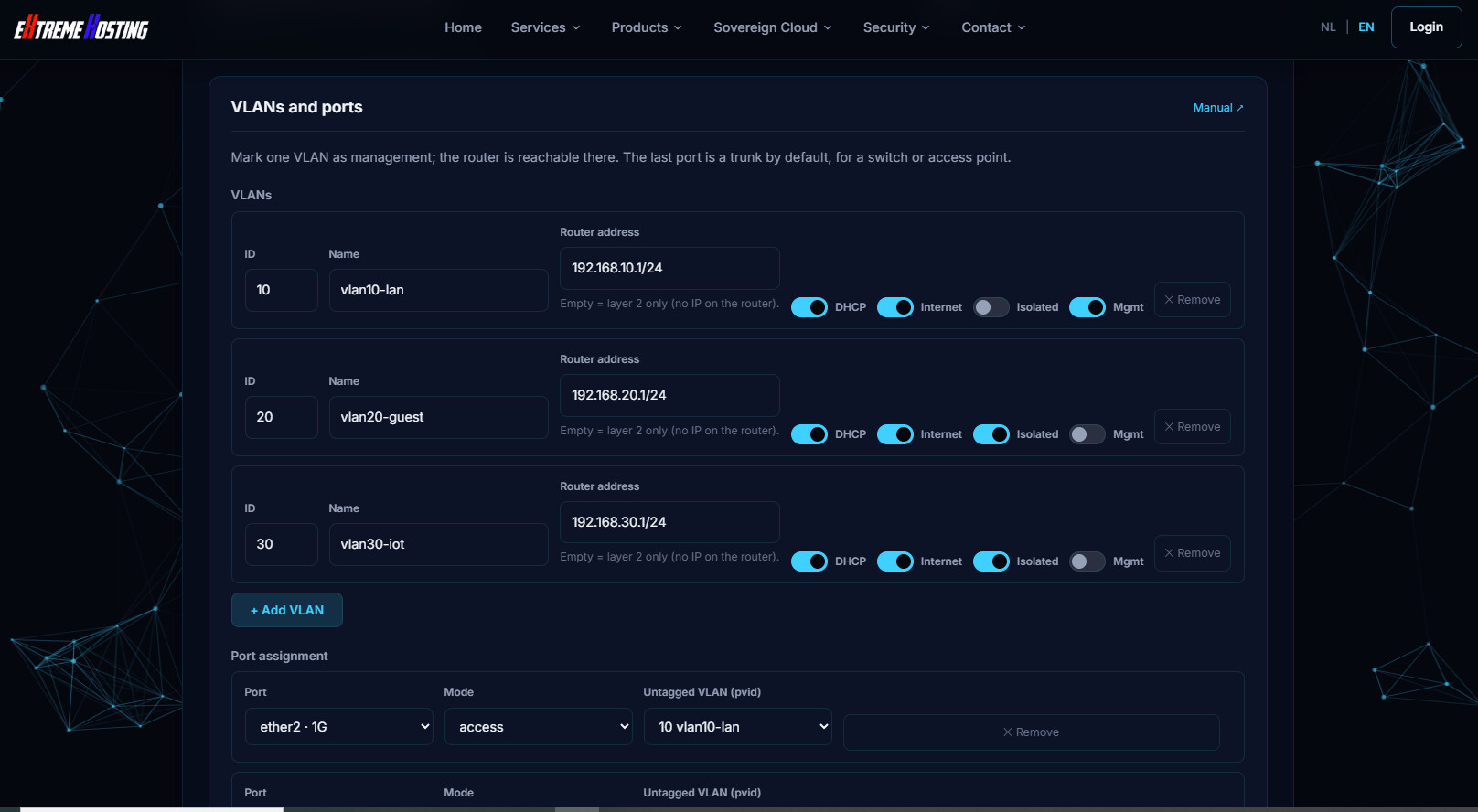
When you choose the template I chose office with vlans.

This created three pre-configured vlans 10, 20 and 30

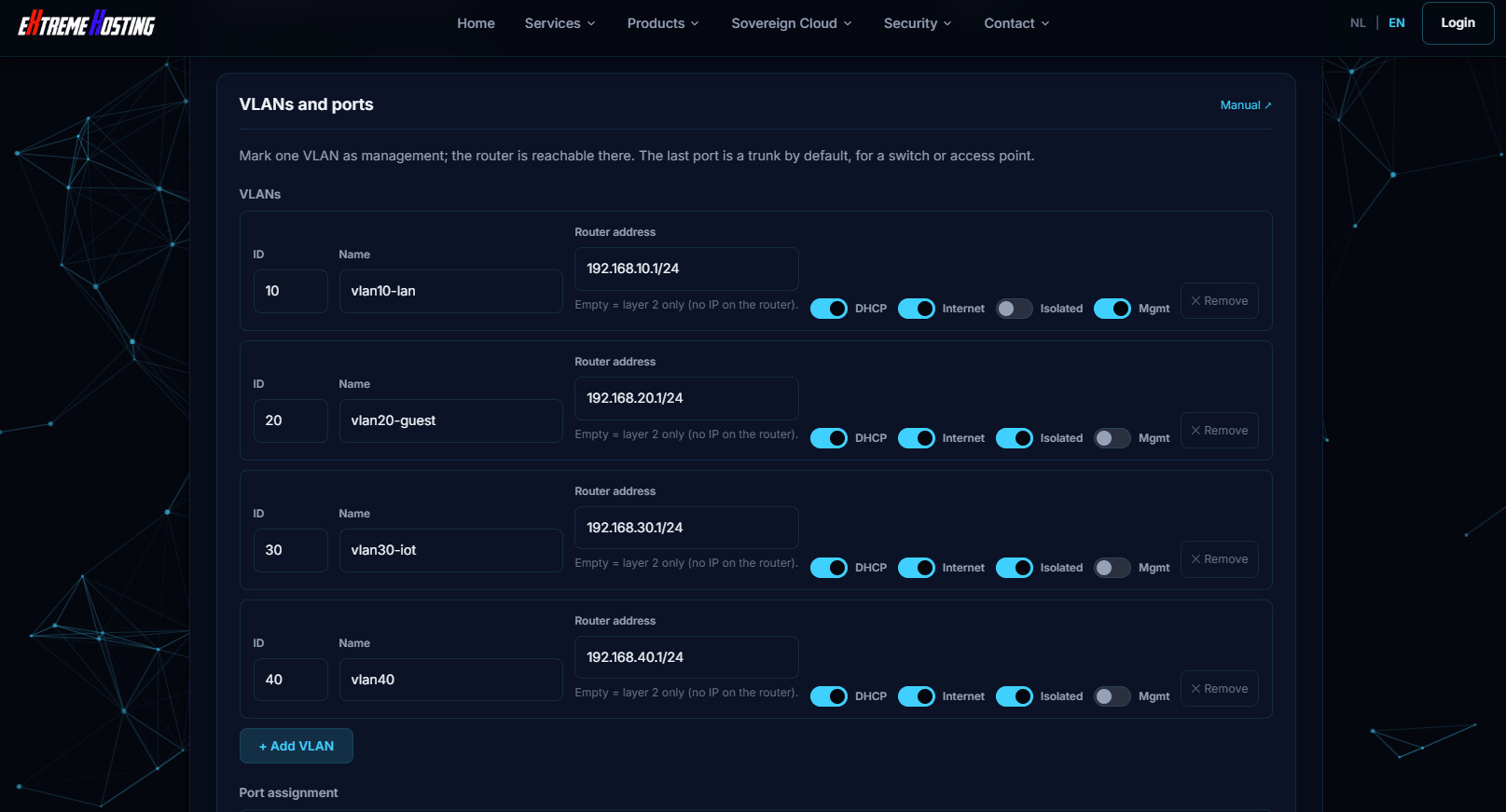
When you add a new vlan, it will increment vlan id by 10, but if you then change the name, that name won't be updated in the "internal" vlan table. But if you add another after it, then the previous entry will be updated.

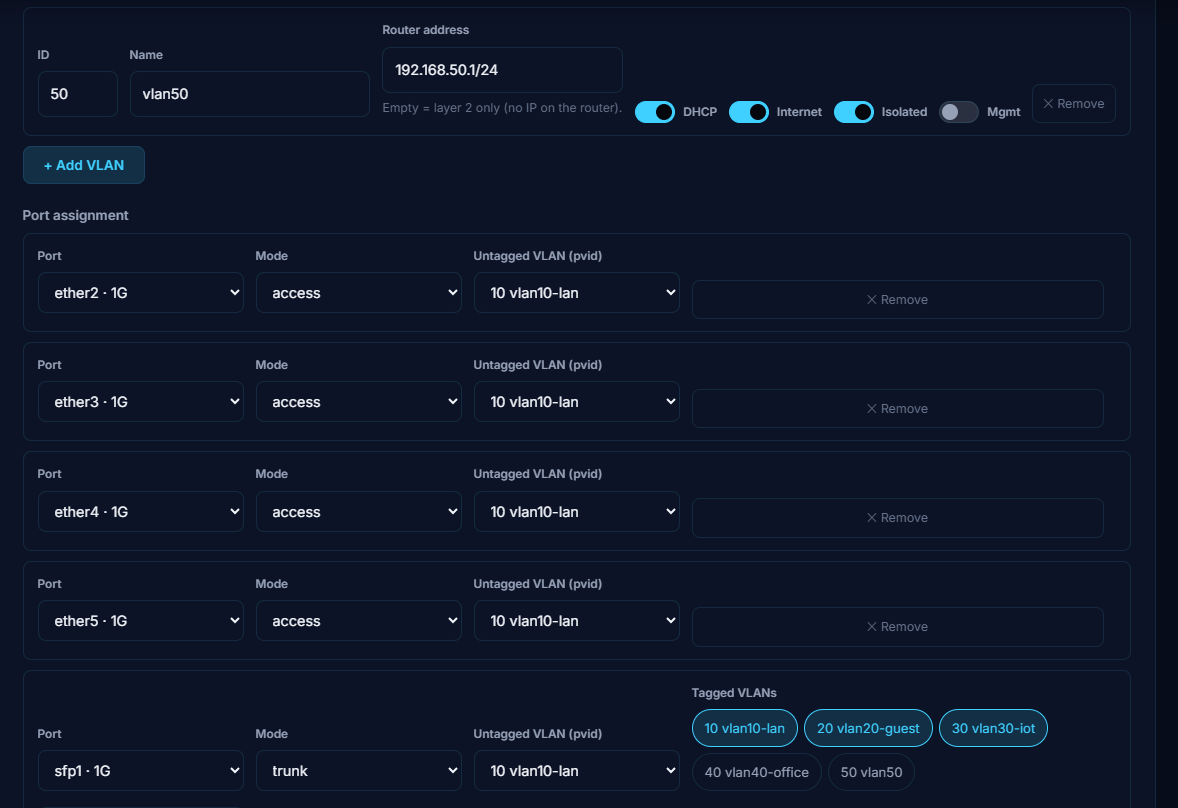
Here is after pressing "+Add VLAN" (all that gets filled in automatically, the vlan name, the subnet, etc.)

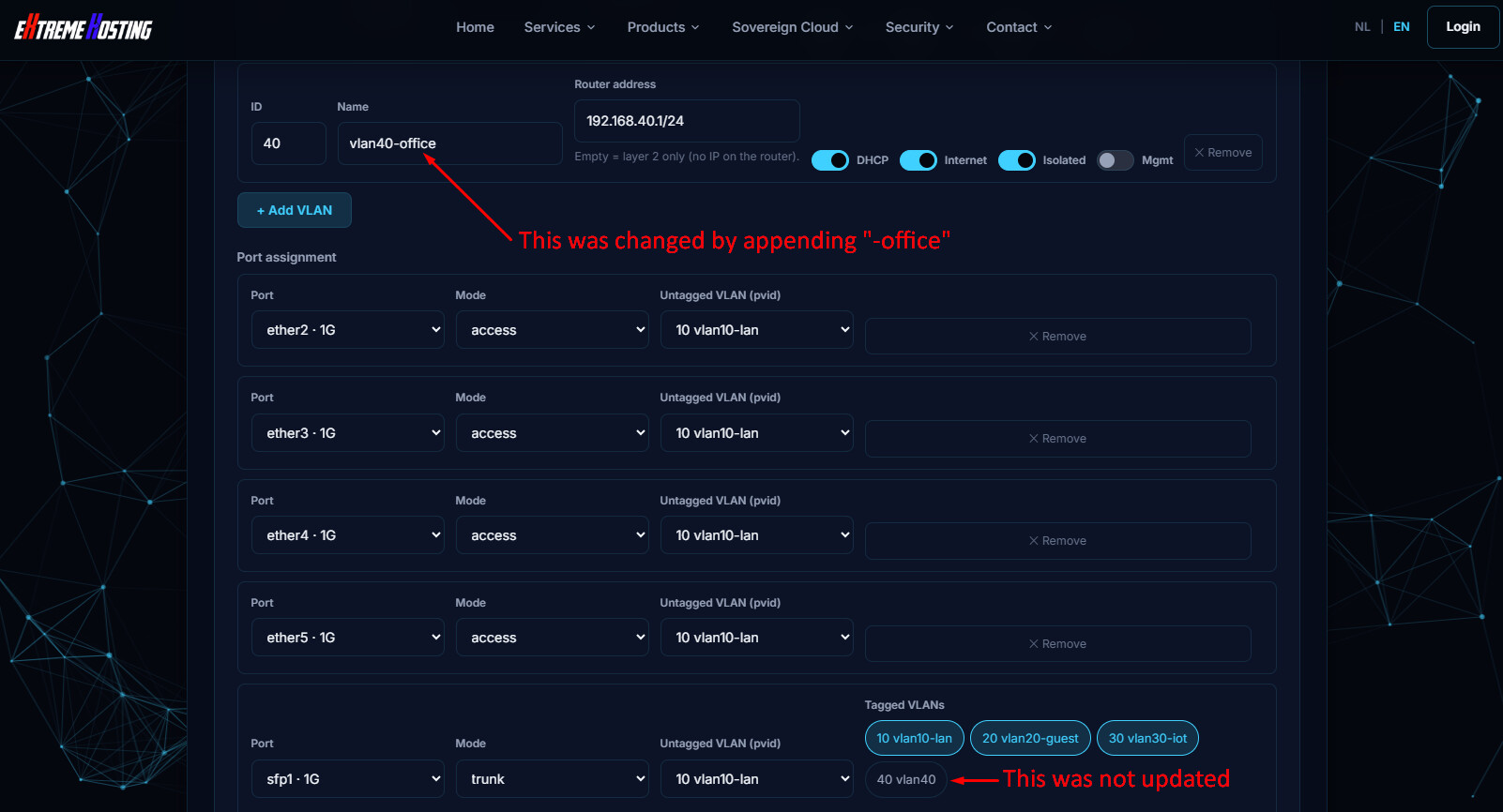
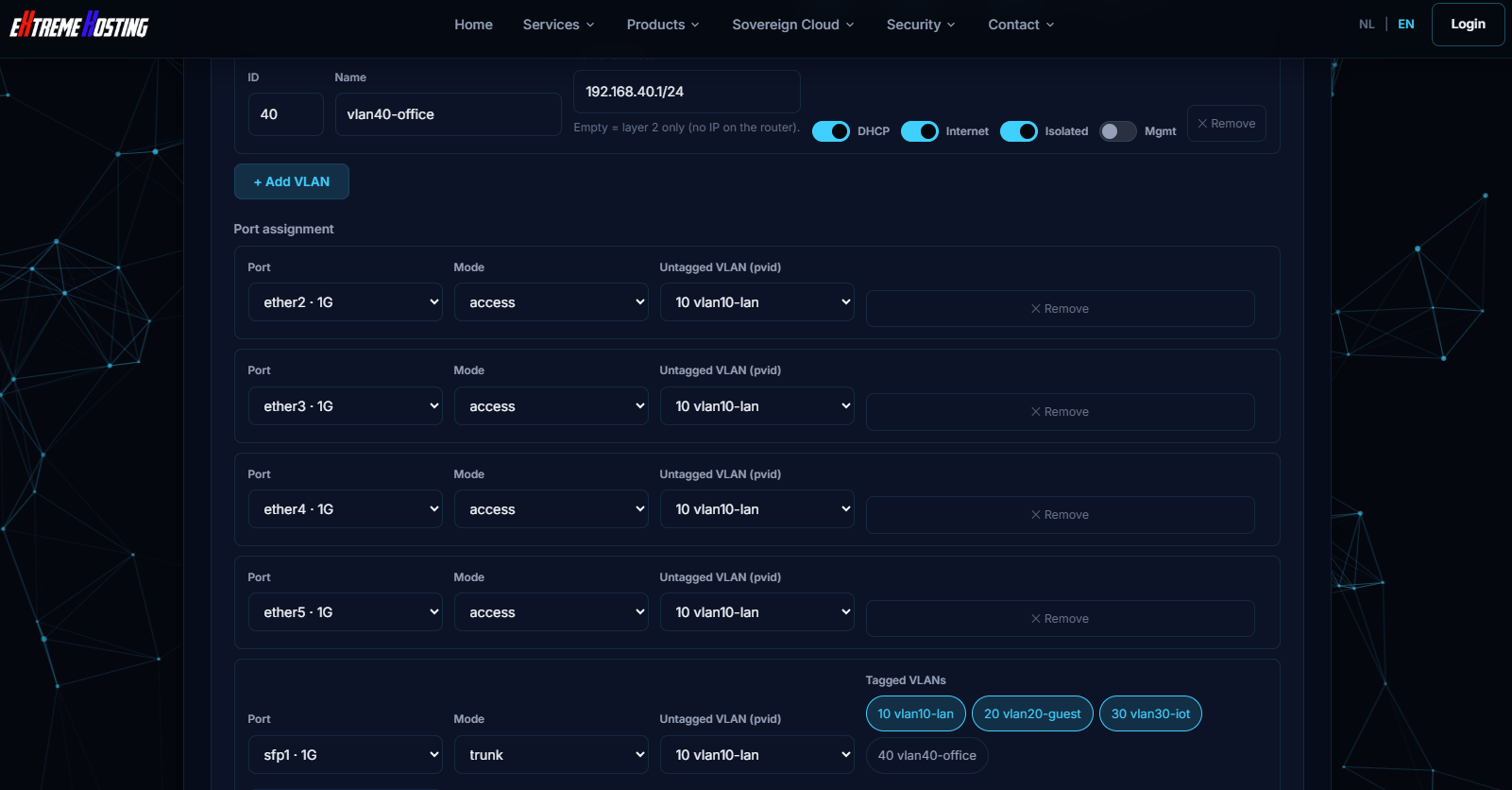
However if we now modify the name from "vlan40" to "vlan40-office", and then go to the next part and try to create an access port for vlan40-office, it won't show vlan40-office in the dropdown.

But if we press +Add VLAN again it will get updated. Then we can delete the just added vlan. That's a work around. It would be better if it updated the internal table when the vlan was renamed.

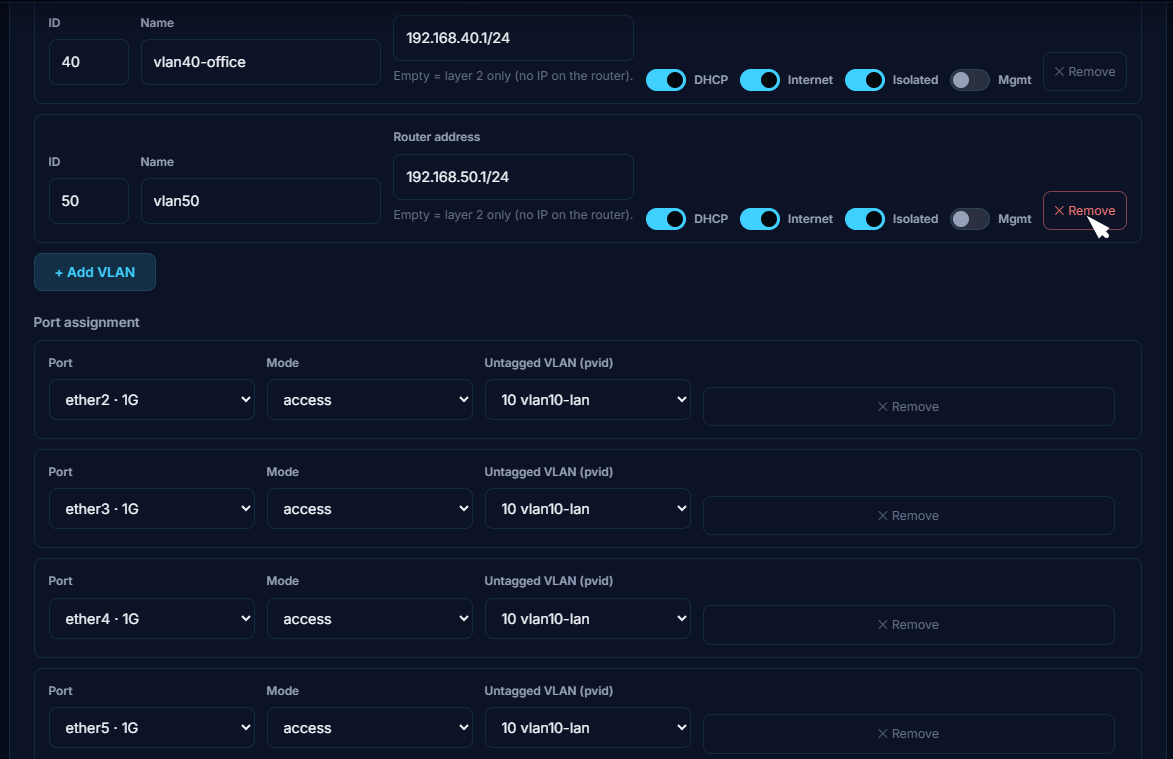
Now we can remove vlan 50

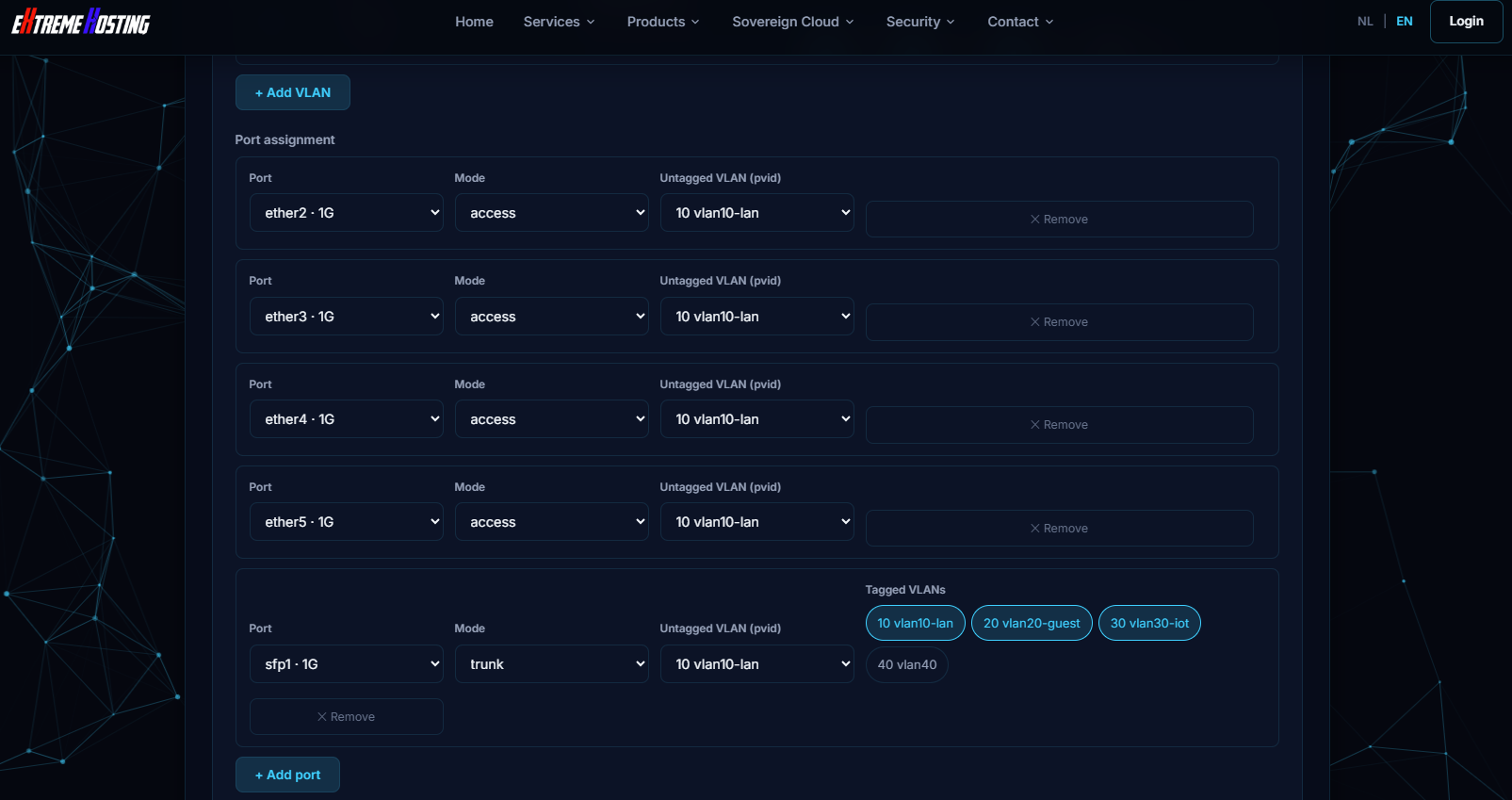
After removing it looks like this:

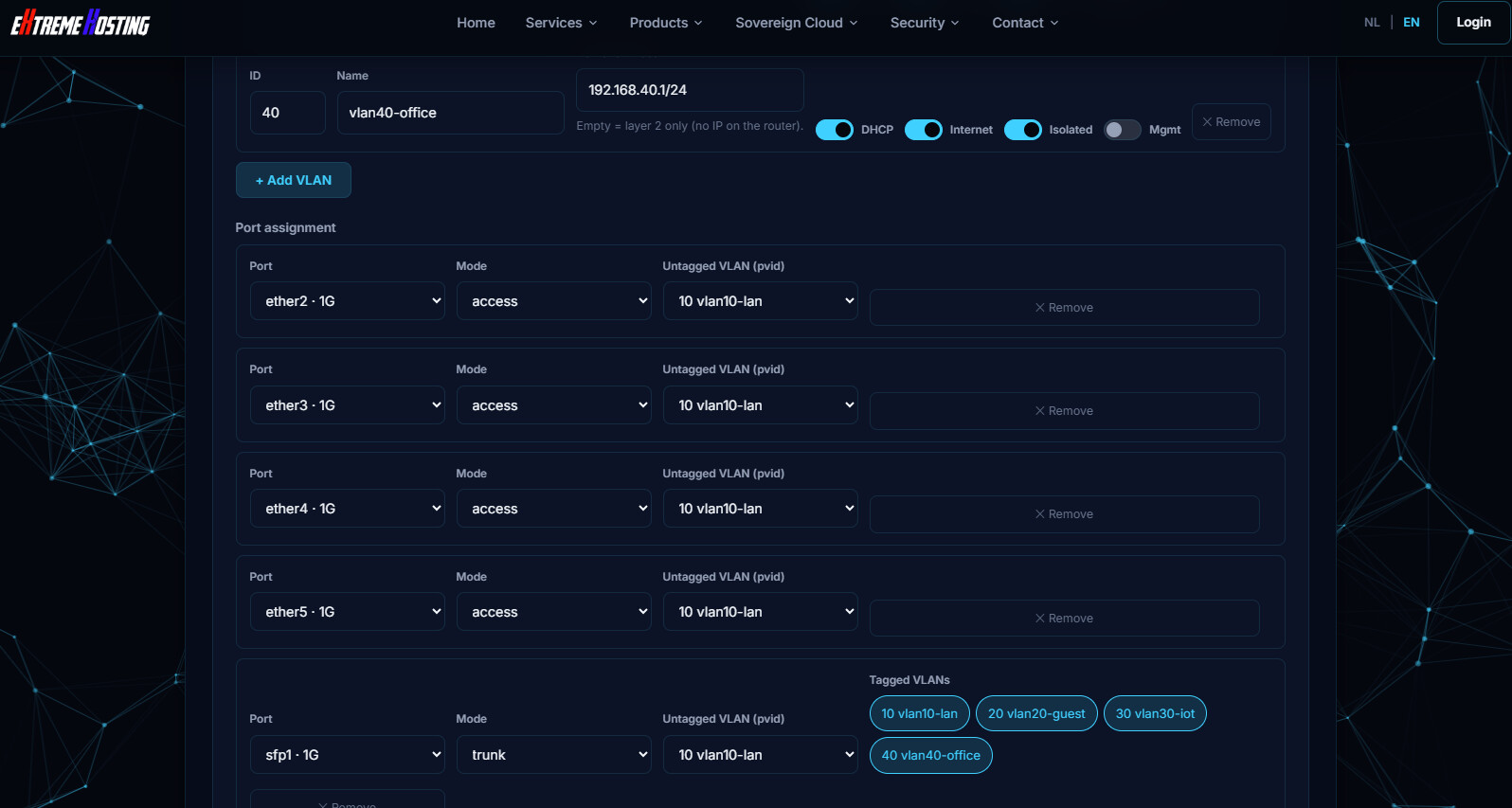
These screenshots were from RB760iGS (HEX S), and the generator pre-configures the SFP as a trunk port. But when adding additional vlans, it does not add the new vlans as tagged. But you can click on them to make them tagged. It's still a lot more straight forward that doing everything by hand.

After clicking on "40 Vlan40-office" it gets highlighted. I think it should be tagged by default on a trunk port.

Maybe it is not changing the tag status, but whether the port is a member of the vlan.

These were just observations... no real testing done.

This link downloads a zero-byte file in Safari, and produces a 403 error in Mullvad (Firefox).

Yes, I get a 403 error too, same when trying to access the top-level website. Probably my 3rd world country is blacklisted by eXtreme Hosting.


I took a look at the generated .rsc as posted by @Buckeye and I think the IPv6 part will cause issue with 7.23 & 7.24 due to this:

From 7.23+, options like DNS should no longer be advertised on the entry with the all interface, or there will be big problems. Version 7.24 only pauses the RA spamming when upgraded from older version, but not when you make change to the setting and save afterwards (what the script above will do).

It would be better to turn off everything on the interface=all entry and create individual /ipv6 nd entries for each of the LAN interfaces instead.


add-default-route=yes is a hack from MikroTik (DHCPv6 has no default gateway information). It would be better if the configuration disables that and enable accept-router-advertisements (normally also not needed for P2P interfaces like PPPoE client that already have their own add-default-route=yes) and set the accept-router-advertisements-on parameter to the proper WAN interface list instead.


This is something I find very much useless. You are only wasting resources tracking stuffs that are dropped anyway, with no improvements whatever, because your drop rule is still in the firewall filter table.

Same with these rules.

Four things (only the first two possibly relevant, the other two are minor).

Test on hAP lite -> Advanced -> Bridge & Gates

  1. adding ether1 to bridge can be done visually but is not refelected in the config below

  2. spaces are added in the configuration, i.e. :

/interface bridge
add  name = bridge  protocol-mode = none  comment = "genconf"

should really be:

/interface bridge
add  name=bridge  protocol-mode=none  comment="genconf"

or am I missing something?
Nothing that cannot be fixed by a search and replace, of course.

  1. Spanning tree, "Out" should be called "None" (or "none") as it is in the settings

  2. This is (obviously) up to debate but the " Hardware offloading (switch chip)" which is (correctly) set, is a "default" and so the toggle is between "nothing" and "hw=no" it has to be thought if it is the case of actually showing "hw=yes"

Our source for building this is the Mikrotik documentation, will test this with specific devices, and make adjustment accordingly, thanks for reporting and testing this.

Thank you so much for all the feedback, there have been testing, tool is brand new, so we will take this into account these bugs and fix them as fast as possible.

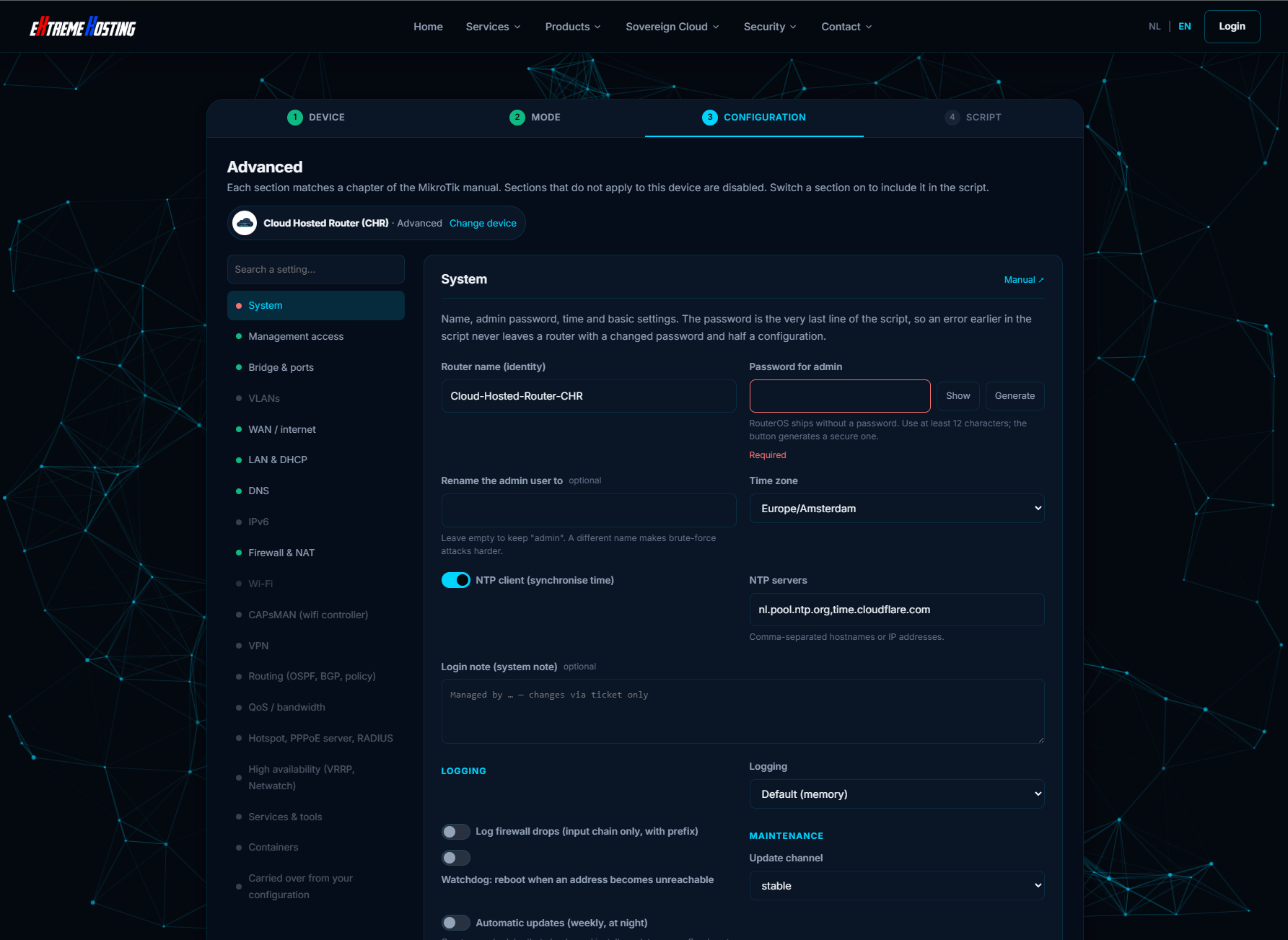
Automatic updates (weekly, at night)

Are you pushing this $ht to spread?


Brute-force protection for SSH/WinBox

= Helping DDoS


"defconf" must still on the REAL defaults from RouterOS


Aside from my harsh criticisms of the first two points,
congratulations on the idea,
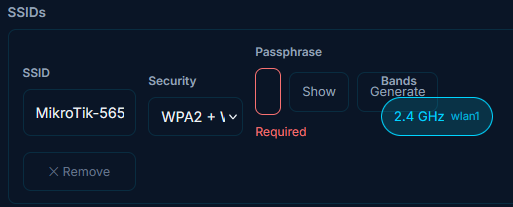
aside from a few graphical glitches (see image) (wpa2 password field size),
it seems like a valid idea.

Although defaults should be respected, such as RSTP,
which in some configurations prevents hardware offload, as also stated in the MikroTik guides.


/tool bandwidth-server
set enabled=no

This reminded me...
You also need to consider device mode on your devices.
Not all devices accept certain commands by default unless you set device mode before setting up the device itself.

If you want, I have some suggestions on how to bypass this (delay=1d and self-destructing schedule delayed at the start).
These are already mentioned in other posts of mine, by the way, nothing secret.


I don't think I need to add anything to the previous post for now. Thanks.


The configuration could generate some errors,
especially with VLANs and firewalls,
and could cut off the person configuring the device.

I would set everything to "disabled=yes"
and, if the script works correctly, only at the bottom would I "run through" the settings
and change them from "disabled=yes" to "disabled=no."


Then, in the future,
I would add something to ensure I can still access the device, such as if I accidentally disable all the configuration protocols, or disable them while pasting the script into the terminal, for example.

Avoid VLAN 1, and other "reserved" numbres.
"Sure" VLAN IDs are only from 2 to 511, or if you avoid some vendors, from 2 to 1005...

@rextended No, we're working across different time zones, so for some of us it's daytime while others may be working outside regular business hours. I also occasionally work during the night/weekend myself. During the day there tends to be more chaos and interruptions, so sometimes it's easier to pick up and focus on these items outside of normal hours.

I will take your points into consideration, and we'll work on addressing them.

P.S. We don't mind harsh criticism, as long as it's fair, constructive, and based on valid observations.

@rextended Another interesting point is that every time we respond, it takes several hours before a moderator approves the message. However, once approved, the displayed timestamp reflects the approval time rather than the time we originally submitted our response. That can be a bit frustrating, as it makes it appear as though we replied much later than we actually did.

It's not true, interesting what observation it's based on?
We, moderators, don't mind harsh criticism, as long as it's fair, constructive, and based on valid observations.

Mind that we, moderators, do not have shifts covering whole World timezones. We need to sleep from time to time and have free time when we have free time.

Aside from the router's memory running out easily in the event of a DDoS attack, combined with those rules,
updating RouterOS only seven days (or less) after its release,
especially in the "stable" channel, is suicide...
There are frequent cases where the update has blocked previously functioning services, requiring multiple customer visits to resolve everything...
And I'm not the one saying it, just read the forum...

I really appreciate it.

jaclaz posted his message, i was still working, after that i reply 30 minutes later, post got posted 5 hours later, it is not a problem, it just takes a while before reply`s are send, in the mean time we already fix some stuff, so what you get is while you get to wait for your reply to get approved we already look at any issues, we love the feedback of the community, it would help us to be able to respond immediatly instead of waiting for a moderator. thats all.

Same here, we don`t mind it takes a little longer, but the form is showing the date and time of posting of approval, not when we reply`d, that can be confusing :wink:

Please be patient,
as the system,
not the moderators (who are NOT administrators),
will determine that you are not a spammer.
From that moment on there is no need to wait for the moderators.