Free RouterOS configuration generator (browser-based, no account)

I can verify that it works now. Thanks again!

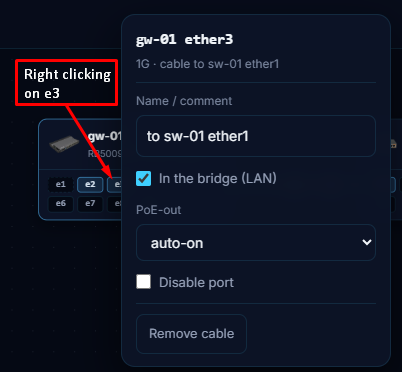
In addition to the things in this post that describe new behaviour of the way cables are selected and displayed, now left clicking an empty port does nothing, left clicking and drag to another port creates cable, left click on occupied port will select the cable that is attached. Right clicking a port will display more information about the port, including controls for PoE out, disabling port, and viewing/updating comment for port, in addition to an option to delete the cable.

Here's an example of the type of info displayed with right click.

A manual for the configurator

Until now the best documentation for this tool was this thread. That is not a good place to look something up: a post is unfindable after 260 replies and it never gets updated when the tool changes. So there is a manual now, in Dutch and English:

https://extremehosting.nl/configurator/en/mikrotik/guide/

What is in it at the moment, roughly 150 chapters:

  • From nothing to a script, the wizard, advanced mode, and sites with several devices.
  • Every part in detail: WAN and multi-WAN, VLANs, firewall and NAT, DNS, IPv6, WireGuard and the other VPNs, tunnels, QoS, OSPF, BGP, hotspot, VRRP, containers, MTU.
  • Worked examples and recipes: replacing an ISP router, an office with VLANs, a guest network that is actually separate, two locations with a tunnel, a camera network, LTE as a backup line, IPTV, a hotel hotspot.
  • Per model: ports, radios, which v7 Wi-Fi package it uses, which roles fit, and what trips people up on that particular box.
  • What the checks mean: every warning and error the tool can raise has its own section, and the message in the tool links straight to it.
  • Search by what you see: no internet on one VLAN, websites that hang, Wi-Fi gone after a v7 upgrade, a switch that disappeared after pasting its script.
  • Coming from something else: an ISP router, a Fritz!Box, UniFi, pfSense, older MikroTik hardware.

New chapters go live as they are finished, so the list grows through the day. Next up: the rest of the models, more symptom pages, and the multi-device designs (hub and spoke, a ring with RSTP, a VRRP pair, one CAPsMAN across buildings, replacing a live network device by device).

Great Job! or as Project Farm's Todd Osgood would say "Very impressive"

The Configurator Manual has a lot of good "intro" material for "home users" that is well presented at a level that doesn't require a CCNA's level of knowledge.

I am not sure the best place to send feedback. The links on this page get 404's
E.g. NAT and ports

It is possible to hand edit the .json files and feed an edited file back to the generator. See example in this post

@Buckeye Thanks,

The 404s: a chapter links to its siblings relatively, so the address has to end in a slash. Without it every link on the page resolved one level too high, which is why "NAT and ports" ended up at /mikrotik/basics-nat/ instead of /mikrotik/guide/basics-nat/. An address without the slash now redirects to the one with it, so both work and the links on that page are fine.

Feedback: the link sat only on the manual's index page. It is under every chapter now, next to the link back to the tool.

On hand editing the .json: that works, and the file format follows the tool, so it will keep working. But you wrote you got lazy because VLANs go in one at a time, and that part was on us. There is a range field next to "Add VLAN" now: type 101-104, 1101-1104 and every number becomes a row. Single numbers and ranges can be mixed, up to 64 at a time. The rows get the name vlan plus the number, ids up to 254 get 192.168..1/24 with DHCP if that address is still free, and everything above that stays layer 2 with DHCP off, which is what a VLAN on a switch usually is. New VLANs are added to the trunk ports that already exist, same as when you add one by hand.

This way you can be more lazy :wink:

https://extremehosting.nl/configurator/en/mikrotik/guide/vlans/#add-a-range

Not that I have a "proper" (or "intelligent") suggestion to make, but "as is" the guide is "unreferenced".

If I go on the page I find a zillion titles each one bringing me to what you call a "chapter", if they are chapters, at least provide an index to them, something sequential tabular would make miracles, example snippet:

Column 1 Column 2 Column 3
RouterOS itself
WinBox, WebFig and the terminal How you reach a MikroTik, including when its address does not match yours.
Safe mode The difference between a mistake and a drive to the site.
Packages What is in the base system, what you add separately, and why the version has to match.
Licence levels and CHR What a level limits, and why the answer for a RouterBOARD is usually nothing you will notice.
Backup and export Two ways to save a configuration, and they are not interchangeable.
Netinstall The last resort, and the one that always works. It also wipes the device.

ohh, and your "dark theme" sucks. :astonished_face:

The title of the chapter is readable, the description below it has not enough contrast, and the result is that it is unreadable.

@jaclaz Both fair, so both are in.

There is a switch above the index now: cards or list. The list is a numbered table, one row per chapter with what it covers, grouped by part, so a chapter has a number you can point at. 4.12 is a chapter and not a scroll position. Your browser remembers which of the two you picked, because the next reader is going to want the other one. The buttons at the top still jump to a part, and every chapter has previous and next at the bottom, so it reads in order too.

The dark theme: you are right, the grey under the titles was too grey. It is brighter now, so the descriptions read without leaning towards the screen. "Sucks" has been filed as a formal defect report, right between "does not work" and "please fix".

One question back, and this one is serious: do you have an HDR screen, yes or no? Half the people who tell me a dark theme is unreadable turn out to be looking at it through a panel that treats dark grey as a personal opinion. If yes, I will go and look at it on one. If no, it was simply too dark and you did me a favour.

It is refreshing to see that a few people still exist with some sense of humour. :slightly_smiling_face:

Thank you, now it is much more readable and accessible.

Maybe it is my eyes that are simply too old for low contrast, but I have what should be "fair enough", a Dell E2216HV at 1920 x 1080, 60 Hz. Still, believe me, before it was really hardly readable.

To be fair, it has a TN panel so due to the restrictions the colors are not very accurate, and the contrast also greatly suffers when you are not looking at it at a 90° angle.

For non-gaming usage I would always try to get an IPS panel.

The angle interval I look at it is between 88 and 92°[1], as said it is "fair enough", and probably better than what a lot of people are using.

But I could rephrase the whole stuff as :wink::

The monitor I use is not a top notch retina or IPS display, but at 1920 x 1080 is good enough for me to view clearly ALL web sites, BUT those that hipsters, wannabe designers, followers of the stupid minimalist looks, etc. decide to implement with low contrast colours, possibly with a dark theme, believing (wrongly) to be doing a service to their visitors.

Forrestreversedisappear_version1

[1], I have a sensor that records my head movements and while it recorded a warning on the 15th of August for a peak at 87.5° around 15:38, there are no other entries in the log.

I keep it simpler than that: everyone has to be able to read the tool. That is the whole rule.

On another note, @jaclaz are you suspended in the air? because that would explain a lot :wink:

New: let the router fetch its own configuration

Pasting a long script into a terminal is where configurations lose lines. A window scrolls, a line wraps, the paste outruns the console, and you end up with half a firewall without knowing which half.

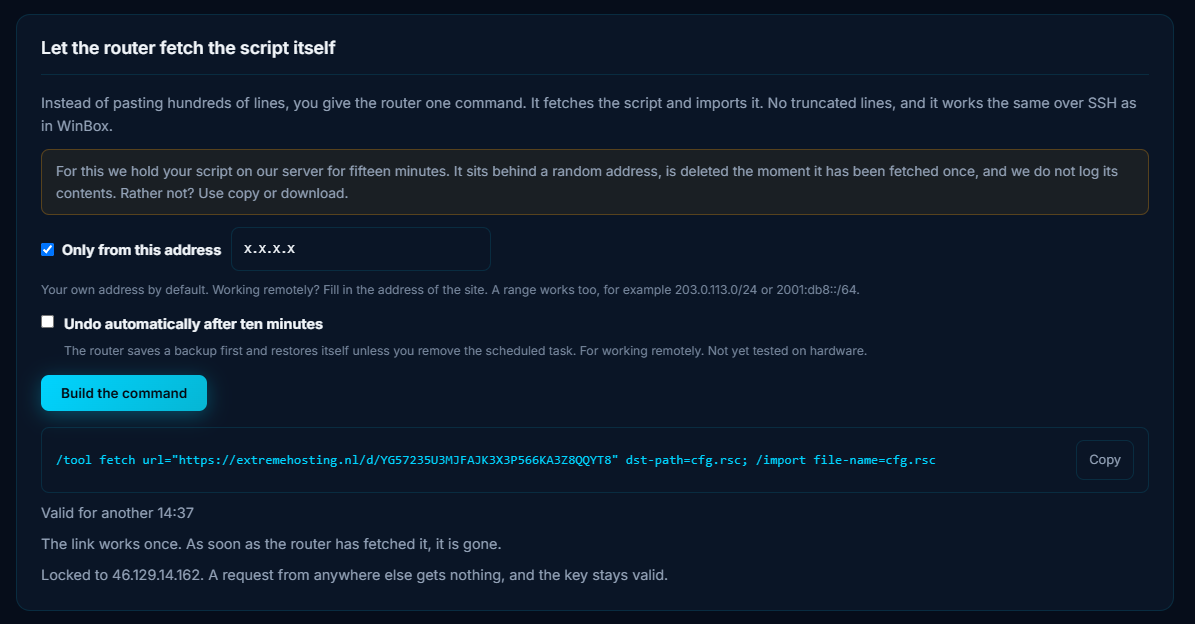
So the configurator can now hand you one command instead. Under every generated script there is a button that puts the script behind a single use key, and gives you this:

The router downloads the file itself and imports it. The transfer either completes or fails loudly, which is the point. It works the same in WinBox, in SSH and over a serial console, and it needs nothing on your side beyond the router being able to reach the internet.

Nothing is uploaded until you ask for it, You are in control!

The tool still builds everything in your browser. Your configuration is only sent to our server at the moment you press that button, and only the script itself. Generating, reading, copying, downloading and the rollback file all happen without anything leaving your browser, exactly as before. Do not press the button and there is no key and nothing stored.

About that key:

It is 32 characters from a 31 symbol alphabet, about 158 bits, generated per script from a cryptographic random source. Longer than a typical API key.

It authorises exactly one download. The script is deleted the moment it has been fetched, so a spent key is worth nothing.

If the router never fetches it, the script is deleted automatically after 15 minutes and the key stops working.

By default it only works from your own public address, which the tool fills in for you. Configuring a router somewhere else? Put that site's address in the field, or a range such as 203.0.113.0/24 or 2001:db8::/64. A request from any other address is refused and the key stays valid for the router that is supposed to use it.

Ten refused attempts destroy the key.

The key never appears in our logs. The web server writes the request without it.

If you would rather nothing left your browser at all, copy and download still work exactly as before.

Optional: undo after ten minutes

There is a tick box for applying a configuration over the network. With it on, the script first saves a backup and schedules its restore ten minutes later. If the new configuration locks you out, the router brings itself back and reboots. If you are still connected, you cancel the undo:

/system scheduler remove [find name="cfg-undo"]

That part is beta. It is built from /system backup save, /system scheduler and /system backup load, and it has not been run on real hardware yet, so treat it as such.

Where the button shows up: under a single device script, under each device in a multi device site, and under the comparison when you paste the export of a router that is already running, so you can apply only the differences.

https://extremehosting.nl/configurator/en/mikrotik/

You know what, i don't like to admit it, but here we are, i gave the tool a chance and i actually can't really say anything other than its actually quite good and useful not gonna lie.

The generator itself generally uses best practices when making a very usable and "by the book" correct principles of router configuration, i can't speak for anything other than an Rb5009Upr (because i haven't tried it), but i cant imagine its much different other than user options and obvious stuff like port numbers, etc etc...
And some of the stuff i actually implemented into my configs and stuff works even better than before and the firewall rules are way more defined by making address lists for raw blocking and filtering.

Also kudos to you for giving warnings when generating configs for users so they know how to fix it before they ruin their configs and lock themselves out.

And a killer feature for me was the "Compare with the device".

TLDR: I like the tool and its actually quite useful. It wont configure your whole router for you, but it gives u a very very solid baseline to go off of.
Good job.

With all due respect, It seems to me one time too many.

Maybe It Is useful, but no matter how well you protect It It does look like a potential vulnerability.

If It Is "unavoidable" I can understand the reasons why - in order to offer an added feature - you thought of this.

But are you really sure that the same cannot be done "offline" or using a "local" server that can be under "total control" of the user?

Because ROS allows you to reset and keep existing users and passwords, couldn't you provide a mode that will not add any users at all? And if the option is chosen, the instructions would be to save the generated configuration and to reset using the "keep-users=yes" option.

Also, instead of having the router download the config and import, if you have access to the router with winbox already, it is easy to downloadng the rsc file to the PC running the config generator and uploading the file to /flash on the target and then using the command command:

/system/reset-configuration keep-users=yes no-defaults=yes skip-backup=yes run-after-reset=flash/your-generated-cfg.rsc

But the config generator is still not creating 100% correct configs. The syntax of the the generated firewall forward chain rule for at least the RB760iGS was not correct

It had this line:

/ip firewall filter
add action=fasttrack-connection chain=forward comment="genconf: fasttrack" connection-state=established,related hw-offload=yes

And to get it to accept the command, I had to remove " hw-offload=yes"; changing it to " hw-offload=no" was not enough.

Also, the following allow-from syntax was not allowed. I ended up removing the who ip services section to get it to load without error.

2026-10-04 03:02:59 system,critical,info cloud change time Sep/03/2026 05:33:18 => Oct/04/2026 03:02:59
2026-09-03 01:33:04 system,error,critical error while running run-after-reset script: bad parameter available-from (line 153 column 26)
2026-09-03 01:33:04 system,error,critical 
2026-10-04 00:10:49 system,clock,critical,info ntp change time Sep/03/2026 0file to /flash on the target and then using the command command:

Then I was able to get it to load the rest of the config using

/system/reset-configuration keep-users=yes no-defaults=yes skip-backup=yes run-after-reset=flash/RB760iGS-office-20261003-nobogon-filter-WAN_edited_no_user_hw_removed_ip_services_removed.rsc

Here's the .json file i used.

The original .rsc file generated

saved setting .json file
{
  "app": "extremehosting-mikrotik-configurator",
  "kind": "device",
  "_notice": "This file holds passwords, Wi-Fi passphrases and private keys in plain text. Keep it with the customer records, not in e-mail or a shared folder.",
  "v": 1,
  "device": {
    "sku": "RB760iGS"
  },
  "mode": "wizard",
  "profile": "office",
  "step": 8,
  "enabled": {
    "system": true,
    "access": true,
    "ports": true,
    "vlans": true,
    "wan": true,
    "lan": false,
    "dns": true,
    "ipv6": true,
    "firewall": true,
    "wifi": true,
    "capsman": false,
    "vpn": false,
    "routing": false,
    "qos": false,
    "hotspot": false,
    "ha": false,
    "services": false,
    "containers": false,
    "imported": false
  },
  "extras": [],
  "system": {
    "identity": "hEX-S",
    "admin_password": "demochangeme",
    "admin_rename": "",
    "timezone": "America/New_York",
    "ntp": true,
    "ntp_servers": "nl.pool.ntp.org,time.cloudflare.com",
    "note": "",
    "note_show_at_login": true,
    "logging": "default",
    "syslog_server": "",
    "syslog_port": 514,
    "log_firewall": false,
    "watchdog": false,
    "watchdog_address": "",
    "ros_target": "latest",
    "update_channel": "stable",
    "device_mode_bootstrap": false,
    "device_mode_scope": "minimal",
    "auto_upgrade": false,
    "rb_auto_upgrade": true
  },
  "access": {
    "mgmt_source": "",
    "services": [
      "winbox",
      "ssh"
    ],
    "winbox_port": 8291,
    "ssh_port": 22,
    "www_port": 80,
    "www_ssl_port": 443,
    "ssh_strong": true,
    "www_ssl_cert": true,
    "mac_server": "none",
    "mac_winbox": "LAN",
    "mac_ping": false,
    "discovery": "LAN",
    "bandwidth_server": false,
    "romon": false,
    "romon_secret": "",
    "cloud_ddns": false,
    "cloud_time": false,
    "cloud_bth": false,
    "users": [],
    "user_ssh_keys": [],
    "ssh_no_password": false
  },
  "ports": {
    "bridge_name": "bridge",
    "lan_ports": [
      "ether2",
      "ether3",
      "ether4",
      "ether5",
      "sfp1"
    ],
    "bridge_mac": "auto",
    "bridge_mac_manual": "",
    "protocol_mode": "rstp",
    "igmp_snooping": false,
    "dhcp_snooping": false,
    "dhcp_trusted": [],
    "hw_offload": true,
    "mtu": "",
    "disable_unused": false,
    "disabled_ports": [],
    "offbridge": false,
    "offbridge_port": "ether5",
    "offbridge_address": "192.168.254.1/24",
    "offbridge_dhcp": true,
    "bonds": [],
    "comments": [],
    "poe": [],
    "ether_mtu": ""
  },
  "vlans": {
    "vlans": [
      {
        "id": 10,
        "name": "vlan10-lan",
        "address": "192.168.10.1/24",
        "dhcp": true,
        "internet": true,
        "isolated": false,
        "mgmt": true
      },
      {
        "id": 20,
        "name": "vlan20-guest",
        "address": "192.168.20.1/24",
        "dhcp": true,
        "internet": true,
        "isolated": true,
        "mgmt": false
      },
      {
        "id": 30,
        "name": "vlan30-iot",
        "address": "192.168.30.1/24",
        "dhcp": true,
        "internet": true,
        "isolated": true,
        "mgmt": false
      }
    ],
    "ports": [
      {
        "iface": "ether2",
        "mode": "access",
        "pvid": 10,
        "tagged": []
      },
      {
        "iface": "ether3",
        "mode": "access",
        "pvid": 10,
        "tagged": []
      },
      {
        "iface": "ether4",
        "mode": "access",
        "pvid": 10,
        "tagged": []
      },
      {
        "iface": "ether5",
        "mode": "access",
        "pvid": 10,
        "tagged": []
      },
      {
        "iface": "sfp1",
        "mode": "trunk",
        "pvid": 10,
        "tagged": [
          10,
          20,
          30
        ]
      }
    ],
    "lease_time": "1d",
    "dns_server": "router",
    "dns_custom": "",
    "domain": ""
  },
  "wan": {
    "provider": "",
    "wans": [
      {
        "iface": "ether1",
        "type": "dhcp",
        "lte_apn": "internet",
        "lte_auth": "none",
        "pppoe_name": "pppoe-out1",
        "use_peer_dns": true,
        "add_default_route": true,
        "check_gateway": "ping",
        "distance": 1,
        "pppoe_vlan": "",
        "mac_clone": "",
        "mtu": "",
        "comment": ""
      }
    ],
    "failover": "distance",
    "probe1": "1.1.1.1",
    "probe2": "9.9.9.9",
    "iptv": false,
    "iptv_iface": "",
    "mss_clamp": true,
    "static_routes": []
  },
  "lan": {
    "lan_iface": "",
    "mgmt_mode": "static",
    "address": "192.168.88.1/24",
    "gateway": "",
    "dhcp": true,
    "pool": "",
    "lease_time": "1d",
    "dns_server": "router",
    "dns_custom": "",
    "domain": "",
    "ntp_server": "",
    "authoritative": "yes",
    "add_arp": false,
    "static_leases": [],
    "options": [],
    "relay": false,
    "relay_server": ""
  },
  "dns": {
    "upstream": "quad9",
    "custom_servers": "",
    "doh": false,
    "doh_url": "",
    "doh_verify": true,
    "allow_remote": true,
    "cache_size": 4096,
    "redirect": false,
    "static": [],
    "adblock": false
  },
  "ipv6": {
    "wan_mode": "none",
    "off_l2": true,
    "wan_iface": "ether1",
    "pd_length": "56",
    "pd_address": false,
    "static_prefix": "",
    "static_wan": "",
    "static_gw": "",
    "lan": true,
    "nd_dns": true,
    "firewall": true,
    "wan_allow": []
  },
  "firewall": {
    "style": "genconf",
    "defaults": true,
    "input_only": false,
    "fasttrack": true,
    "nat": "masquerade",
    "srcnat_address": "",
    "forwards": [],
    "hairpin": true,
    "wan_allow": [],
    "bruteforce": false,
    "bogons": false,
    "block_dns_wan": true,
    "drop_ping_wan": false,
    "log_drops": false,
    "vlan_isolation": true,
    "vlan_policy": "matrix",
    "vlan_matrix": [
      "10>20",
      "10>30"
    ],
    "mgmt_vlan_only": false,
    "address_lists": [],
    "rules": [],
    "conntrack_tcp_established": ""
  },
  "wifi": {
    "mode": "ap",
    "country": "netherlands",
    "ssids": [
      {
        "ssid": "MikroTik-7806",
        "security": "wpa2wpa3",
        "passphrase": "",
        "bands": [],
        "vlan": "",
        "isolation": false,
        "hidden": false
      }
    ],
    "width_5": "20/40/80mhz",
    "width_2": "20mhz",
    "freq_5": "",
    "freq_2": "",
    "tx_power": "",
    "mlo": false,
    "mlo_bands": [],
    "mlo_ssid": "",
    "mlo_passphrase": "",
    "band_steering": true,
    "ft": false,
    "pmf": "auto",
    "access_list": [],
    "access_list_default_reject": false,
    "cap_controllers": "",
    "cap_discovery": "bridge",
    "cap_lock": false,
    "cap_certificate": false,
    "st_ssid": "",
    "st_passphrase": "",
    "st_security": "wpa2wpa3",
    "st_radio": "",
    "st_mode": "station-bridge",
    "st_bssid": "",
    "st_protocol": "802.11",
    "rp_ssid": "",
    "rp_passphrase": "",
    "rp_security": "wpa2",
    "rp_radio": "",
    "rp_mode": "station-bridge",
    "rp_same_ssid": true,
    "rp_out_ssid": "",
    "rp_out_passphrase": "",
    "rp_rebroadcast_uplink": true
  },
  "capsman": {
    "stack": "wifi",
    "country": "netherlands",
    "ssids": [
      {
        "ssid": "Office",
        "security": "wpa2wpa3",
        "passphrase": "",
        "bands": [
          "2.4ghz",
          "5ghz"
        ],
        "vlan": "",
        "isolation": false
      }
    ],
    "width_5": "20/40/80mhz",
    "width_2": "20mhz",
    "ft": true,
    "local_forwarding": true,
    "identity_regexp": "",
    "cap_mgmt_iface": "vlan10-lan",
    "controller_cap": true
  },
  "vpn": {
    "public_endpoint": "",
    "wireguard": [
      {
        "name": "wg-rw",
        "listen_port": 13231,
        "address": "10.10.10.1/24",
        "keys": null,
        "lan_member": true,
        "peers": [
          {
            "name": "laptop",
            "kind": "client",
            "allowed": "10.10.10.2/32",
            "keys": null,
            "public_key": "",
            "endpoint": "",
            "remote_subnets": "",
            "keepalive": 25,
            "full_tunnel": true
          }
        ]
      }
    ],
    "ike2": false,
    "ike2_auth": "cert",
    "ike2_fqdn": "",
    "ike2_psk": "",
    "ike2_pool": "192.168.77.2-192.168.77.254",
    "ike2_clients": [
      {
        "name": "phone1",
        "export_pw": ""
      }
    ],
    "l2tp": false,
    "l2tp_secret": "",
    "sstp": false,
    "ovpn": false,
    "ovpn_port": 1194,
    "ovpn_proto": "udp",
    "pptp": false,
    "ppp_pool": "192.168.89.2-192.168.89.254",
    "ppp_local": "192.168.89.1",
    "ppp_users": [
      {
        "name": "vpnuser",
        "password": "",
        "service": "any"
      }
    ],
    "tunnels": [],
    "zerotier": ""
  },
  "routing": {
    "addresses": [],
    "loopback": "",
    "ospf": false,
    "ospf_router_id": "",
    "ospf_areas": [
      {
        "name": "backbone",
        "area_id": "0.0.0.0",
        "type": "default"
      }
    ],
    "ospf_ifaces": [],
    "ospf_auth_key": "",
    "ospf_redistribute": [
      "connected"
    ],
    "ospf_default": "never",
    "bgp": false,
    "bgp_as": "",
    "bgp_router_id": "",
    "bgp_networks": "",
    "bgp_peers": [],
    "rip": false,
    "rip_ifaces": [],
    "tables": [],
    "ecmp": ""
  },
  "qos": {
    "mode": "fair",
    "down": 500,
    "up": 50,
    "algo": "cake",
    "pcq_rate": 0,
    "prio_voip": true,
    "prio_gaming": true,
    "prio_dns_icmp": true,
    "hosts": []
  },
  "hotspot": {
    "hotspot": true,
    "hs_iface": "",
    "hs_address": "10.5.50.1/24",
    "hs_dns_name": "hotspot.local",
    "hs_login": [
      "http-chap",
      "cookie"
    ],
    "hs_trial_time": "30m",
    "hs_rate": "5M/20M",
    "hs_shared": 1,
    "hs_session": "1d",
    "hs_idle": "10m",
    "hs_users": [
      {
        "name": "guest",
        "password": "guest",
        "limit": ""
      }
    ],
    "hs_walled": "*.apple.com\ncaptive.apple.com\nconnectivitycheck.gstatic.com\n*.gstatic.com\nwww.msftconnecttest.com",
    "hs_https": false,
    "pppoe": false,
    "pppoe_iface": "",
    "pppoe_service": "isp",
    "pppoe_local": "10.9.0.1",
    "pppoe_pool": "10.9.0.2-10.9.255.254",
    "pppoe_dns": "",
    "pppoe_users": [],
    "radius": false,
    "radius_server": "",
    "radius_secret": "",
    "radius_services": [
      "hotspot"
    ],
    "radius_coa": false
  },
  "ha": {
    "vrrp": [],
    "vrrp_password": "",
    "netwatch": []
  },
  "services": {
    "snmp": "off",
    "snmp_community": "monitoring",
    "snmp_auth_pw": "",
    "snmp_priv_pw": "",
    "snmp_from": "",
    "snmp_contact": "",
    "snmp_location": "",
    "netflow": false,
    "netflow_target": "",
    "netflow_port": 2055,
    "netflow_version": "9",
    "upnp": false,
    "ntp_server": false,
    "proxy": false,
    "socks": false,
    "smb": false,
    "graphing": false,
    "email": false,
    "email_server": "",
    "email_port": 587,
    "email_tls": "starttls",
    "email_user": "",
    "email_password": "",
    "email_from": "",
    "email_to": "",
    "backup": false,
    "backup_password": "",
    "letsencrypt": "",
    "scripts": []
  },
  "containers": {
    "disk": "disk1",
    "subnet": "172.17.0.1/24",
    "registry": "https://registry-1.docker.io",
    "containers": [
      {
        "name": "pihole",
        "image": "pihole/pihole:latest",
        "ip": "172.17.0.2",
        "envs": "TZ=Europe/Amsterdam\nWEBPASSWORD=changeme",
        "mounts": "etc-pihole:/etc/pihole",
        "ports": ""
      }
    ]
  },
  "imported": {
    "lines": ""
  }
}
Original .rsc generated from above .json file
# MikroTik RouterOS v7 configuration
# Device:  hEX S (RB760iGS)
# Role:    Office router with VLANs
# Created: 2026-10-03 23:33 UTC with the eXtreme Hosting MikroTik Configurator
#          https://extremehosting.nl/configurator/en/mikrotik/
# Syntax:  https://manual.mikrotik.com/docs/introduction
# Target:  RouterOS 7.24 or newer
# Licence: this configuration is yours to use without restriction.
#          The tool itself is proprietary: https://extremehosting.nl/configurator/license/
#
# Apply on a device WITHOUT configuration (/system reset-configuration no-defaults=yes skip-backup=yes),
# with Safe Mode active (Ctrl+X in the terminal). Review every line before pasting.

/interface bridge
add comment="genconf" name=bridge protocol-mode=rstp

/interface vlan
add comment="management" interface=bridge name=vlan10-lan vlan-id=10
add interface=bridge name=vlan20-guest vlan-id=20
add interface=bridge name=vlan30-iot vlan-id=30

/interface list
add name=WAN comment="genconf"
add name=LAN comment="genconf"

/interface list member
add comment="genconf" interface=ether1 list=WAN
add comment="genconf" interface=bridge list=LAN
add comment="genconf" interface=vlan10-lan list=LAN
add comment="genconf" interface=vlan20-guest list=LAN
add comment="genconf" interface=vlan30-iot list=LAN

/interface bridge port
add bridge=bridge comment="genconf" frame-types=admit-only-untagged-and-priority-tagged ingress-filtering=yes interface=ether2 pvid=10
add bridge=bridge comment="genconf" frame-types=admit-only-untagged-and-priority-tagged ingress-filtering=yes interface=ether3 pvid=10
add bridge=bridge comment="genconf" frame-types=admit-only-untagged-and-priority-tagged ingress-filtering=yes interface=ether4 pvid=10
add bridge=bridge comment="genconf" frame-types=admit-only-untagged-and-priority-tagged ingress-filtering=yes interface=ether5 pvid=10
add bridge=bridge comment="genconf" frame-types=admit-all ingress-filtering=yes interface=sfp1 pvid=10

/interface bridge vlan
add bridge=bridge comment="vlan10-lan" tagged=bridge untagged=ether2,ether3,ether4,ether5,sfp1 vlan-ids=10
add bridge=bridge comment="vlan20-guest" tagged=bridge,sfp1 vlan-ids=20
add bridge=bridge comment="vlan30-iot" tagged=bridge,sfp1 vlan-ids=30

/interface bridge
set bridge vlan-filtering=yes

/ip pool
add name=pool-vlan10-lan ranges=192.168.10.10-192.168.10.254
add name=pool-vlan20-guest ranges=192.168.20.10-192.168.20.254
add name=pool-vlan30-iot ranges=192.168.30.10-192.168.30.254

/ip dhcp-server
add address-pool=pool-vlan10-lan interface=vlan10-lan lease-time=1d name=dhcp-vlan10-lan
add address-pool=pool-vlan20-guest interface=vlan20-guest lease-time=1d name=dhcp-vlan20-guest
add address-pool=pool-vlan30-iot interface=vlan30-iot lease-time=1d name=dhcp-vlan30-iot

/ip dhcp-server network
add address=192.168.10.0/24 comment="vlan10-lan" dns-server=192.168.10.1 gateway=192.168.10.1
add address=192.168.20.0/24 comment="vlan20-guest" dns-server=192.168.20.1 gateway=192.168.20.1
add address=192.168.30.0/24 comment="vlan30-iot" dns-server=192.168.30.1 gateway=192.168.30.1

/ip dhcp-client
add add-default-route=yes comment="WAN1" default-route-distance=1 interface=ether1 use-peer-dns=yes use-peer-ntp=no

/ip address
add address=192.168.10.1/24 comment="vlan10-lan" interface=vlan10-lan
add address=192.168.20.1/24 comment="vlan20-guest" interface=vlan20-guest
add address=192.168.30.1/24 comment="vlan30-iot" interface=vlan30-iot

/ipv6 settings
set accept-router-advertisements=no disable-ipv6=no

/ip dns
set allow-remote-requests=yes cache-size=4096 servers=9.9.9.9,149.112.112.112

/ip firewall filter
add action=accept chain=input comment="genconf: accept established,related,untracked" connection-state=established,related,untracked
add action=drop chain=input comment="genconf: drop invalid" connection-state=invalid
add action=accept chain=input comment="genconf: accept ICMP" protocol=icmp
add action=accept chain=input comment="genconf: accept to local loopback (for CAPsMAN)" dst-address=127.0.0.1
add action=drop chain=input comment="drop DNS from WAN (no open resolver)" dst-port=53 in-interface-list=WAN protocol=udp
add action=drop chain=input comment="drop DNS from WAN (no open resolver)" dst-port=53 in-interface-list=WAN protocol=tcp
add action=drop chain=input comment="genconf: drop all not coming from LAN" in-interface-list=!LAN
add action=accept chain=forward comment="genconf: accept in ipsec policy" ipsec-policy=in,ipsec
add action=accept chain=forward comment="genconf: accept out ipsec policy" ipsec-policy=out,ipsec
add action=fasttrack-connection chain=forward comment="genconf: fasttrack" connection-state=established,related hw-offload=yes
add action=accept chain=forward comment="genconf: accept established,related, untracked" connection-state=established,related,untracked
add action=drop chain=forward comment="genconf: drop invalid" connection-state=invalid
add action=accept chain=forward comment="matrix: 10 vlan10-lan may reach 20 vlan20-guest" connection-state=new in-interface=vlan10-lan out-interface=vlan20-guest
add action=accept chain=forward comment="matrix: 10 vlan10-lan may reach 30 vlan30-iot" connection-state=new in-interface=vlan10-lan out-interface=vlan30-iot
add action=drop chain=forward comment="matrix: 10 vlan10-lan to other internal networks" connection-state=new in-interface=vlan10-lan out-interface=!vlan10-lan out-interface-list=LAN
add action=drop chain=forward comment="matrix: 20 vlan20-guest to other internal networks" connection-state=new in-interface=vlan20-guest out-interface=!vlan20-guest out-interface-list=LAN
add action=drop chain=forward comment="matrix: 30 vlan30-iot to other internal networks" connection-state=new in-interface=vlan30-iot out-interface=!vlan30-iot out-interface-list=LAN
add action=drop chain=forward comment="genconf: drop all from WAN not DSTNATed" connection-nat-state=!dstnat connection-state=new in-interface-list=WAN

/ip firewall nat
add action=masquerade chain=srcnat comment="genconf: masquerade" ipsec-policy=out,none out-interface-list=WAN

/ipv6 firewall address-list
add address=::/128 comment="genconf: unspecified address" list=bad_ipv6
add address=::1/128 comment="genconf: lo" list=bad_ipv6
add address=fec0::/10 comment="genconf: site-local" list=bad_ipv6
add address=::ffff:0.0.0.0/96 comment="genconf: ipv4-mapped" list=bad_ipv6
add address=::/96 comment="genconf: ipv4 compat" list=bad_ipv6
add address=100::/64 comment="genconf: discard only" list=bad_ipv6
add address=2001:db8::/32 comment="genconf: documentation" list=bad_ipv6
add address=2001:10::/28 comment="genconf: ORCHID" list=bad_ipv6
add address=3ffe::/16 comment="genconf: 6bone" list=bad_ipv6

/ipv6 firewall filter
add action=accept chain=input comment="genconf: accept established,related,untracked" connection-state=established,related,untracked
add action=drop chain=input comment="genconf: drop invalid" connection-state=invalid
add action=accept chain=input comment="genconf: accept ICMPv6" protocol=icmpv6
add action=accept chain=input comment="genconf: accept UDP traceroute" port=33434-33534 protocol=udp
add action=accept chain=input comment="genconf: accept DHCPv6-Client prefix delegation." dst-port=546 protocol=udp src-address=fe80::/10
add action=accept chain=input comment="genconf: accept IKE" dst-port=500,4500 protocol=udp
add action=accept chain=input comment="genconf: accept ipsec AH" protocol=ipsec-ah
add action=accept chain=input comment="genconf: accept ipsec ESP" protocol=ipsec-esp
add action=accept chain=input comment="genconf: accept all that matches ipsec policy" ipsec-policy=in,ipsec
add action=drop chain=input comment="genconf: drop everything else not coming from LAN" in-interface-list=!LAN
add action=accept chain=forward comment="genconf: accept established,related,untracked" connection-state=established,related,untracked
add action=drop chain=forward comment="genconf: drop invalid" connection-state=invalid
add action=drop chain=forward comment="genconf: drop packets with bad src ipv6" src-address-list=bad_ipv6
add action=drop chain=forward comment="genconf: drop packets with bad dst ipv6" dst-address-list=bad_ipv6
add action=drop chain=forward comment="genconf: rfc4890 drop hop-limit=1" hop-limit=equal:1 protocol=icmpv6
add action=accept chain=forward comment="genconf: accept ICMPv6" protocol=icmpv6
add action=accept chain=forward comment="genconf: accept HIP" protocol=139
add action=accept chain=forward comment="genconf: accept IKE" dst-port=500,4500 protocol=udp
add action=accept chain=forward comment="genconf: accept ipsec AH" protocol=ipsec-ah
add action=accept chain=forward comment="genconf: accept ipsec ESP" protocol=ipsec-esp
add action=accept chain=forward comment="genconf: accept all that matches ipsec policy" ipsec-policy=in,ipsec
add action=accept chain=forward comment="matrix: 10 vlan10-lan may reach 20 vlan20-guest (IPv6)" connection-state=new in-interface=vlan10-lan out-interface=vlan20-guest
add action=accept chain=forward comment="matrix: 10 vlan10-lan may reach 30 vlan30-iot (IPv6)" connection-state=new in-interface=vlan10-lan out-interface=vlan30-iot
add action=drop chain=forward comment="matrix: 10 vlan10-lan to other internal networks (IPv6)" connection-state=new in-interface=vlan10-lan out-interface=!vlan10-lan out-interface-list=LAN
add action=drop chain=forward comment="matrix: 20 vlan20-guest to other internal networks (IPv6)" connection-state=new in-interface=vlan20-guest out-interface=!vlan20-guest out-interface-list=LAN
add action=drop chain=forward comment="matrix: 30 vlan30-iot to other internal networks (IPv6)" connection-state=new in-interface=vlan30-iot out-interface=!vlan30-iot out-interface-list=LAN
add action=drop chain=forward comment="genconf: drop everything else not coming from LAN" in-interface-list=!LAN

/system clock
set time-zone-autodetect=no time-zone-name=America/New_York

/system ntp client
set enabled=yes mode=unicast servers=nl.pool.ntp.org,time.cloudflare.com

/system package update
set channel=stable

/system routerboard settings
set auto-upgrade=yes

/ip service
set winbox available-from=192.168.10.0/24 disabled=no
set ssh available-from=192.168.10.0/24 disabled=no
set www disabled=yes
set www-ssl disabled=yes
set api disabled=yes
set api-ssl disabled=yes
set ftp disabled=yes
set telnet disabled=yes

/ip ssh
set strong-crypto=yes

/tool mac-server
set allowed-interface-list=none

/tool mac-server mac-winbox
set allowed-interface-list=LAN

/tool mac-server ping
set enabled=no

/ip neighbor discovery-settings
set discover-interface-list=LAN

/tool bandwidth-server
set enabled=no

/system identity
set name=hEX-S

/user
set admin password=demochangeme

Having to split this to upload due to 32K char limit

Post continued - part two of split post.

and the edited .rsc file that was able to load on the Rb760iGS (note that the generator claims to be generating for 7.24 or newer, and I am running 7.23.5 (in case that make any difference).

manually edited .rsc that removed user and removed parts that would not import
# MikroTik RouterOS v7 configuration
# Device:  hEX S (RB760iGS)
# Role:    Office router with VLANs
# Created: 2026-10-03 23:33 UTC with the eXtreme Hosting MikroTik Configurator
#          https://extremehosting.nl/configurator/en/mikrotik/
# Syntax:  https://manual.mikrotik.com/docs/introduction
# Target:  RouterOS 7.24 or newer
# Licence: this configuration is yours to use without restriction.
#          The tool itself is proprietary: https://extremehosting.nl/configurator/license/
#
# Apply on a device WITHOUT configuration (/system reset-configuration no-defaults=yes skip-backup=yes),
# with Safe Mode active (Ctrl+X in the terminal). Review every line before pasting.

/interface bridge
add comment="genconf" name=bridge protocol-mode=rstp

/interface vlan
add comment="management" interface=bridge name=vlan10-lan vlan-id=10
add interface=bridge name=vlan20-guest vlan-id=20
add interface=bridge name=vlan30-iot vlan-id=30

/interface list
add name=WAN comment="genconf"
add name=LAN comment="genconf"

/interface list member
add comment="genconf" interface=ether1 list=WAN
add comment="genconf" interface=bridge list=LAN
add comment="genconf" interface=vlan10-lan list=LAN
add comment="genconf" interface=vlan20-guest list=LAN
add comment="genconf" interface=vlan30-iot list=LAN

/interface bridge port
add bridge=bridge comment="genconf" frame-types=admit-only-untagged-and-priority-tagged ingress-filtering=yes interface=ether2 pvid=10
add bridge=bridge comment="genconf" frame-types=admit-only-untagged-and-priority-tagged ingress-filtering=yes interface=ether3 pvid=10
add bridge=bridge comment="genconf" frame-types=admit-only-untagged-and-priority-tagged ingress-filtering=yes interface=ether4 pvid=10
add bridge=bridge comment="genconf" frame-types=admit-only-untagged-and-priority-tagged ingress-filtering=yes interface=ether5 pvid=10
add bridge=bridge comment="genconf" frame-types=admit-all ingress-filtering=yes interface=sfp1 pvid=10

/interface bridge vlan
add bridge=bridge comment="vlan10-lan" tagged=bridge untagged=ether2,ether3,ether4,ether5,sfp1 vlan-ids=10
add bridge=bridge comment="vlan20-guest" tagged=bridge,sfp1 vlan-ids=20
add bridge=bridge comment="vlan30-iot" tagged=bridge,sfp1 vlan-ids=30

/interface bridge
set bridge vlan-filtering=yes

/ip pool
add name=pool-vlan10-lan ranges=192.168.10.10-192.168.10.254
add name=pool-vlan20-guest ranges=192.168.20.10-192.168.20.254
add name=pool-vlan30-iot ranges=192.168.30.10-192.168.30.254

/ip dhcp-server
add address-pool=pool-vlan10-lan interface=vlan10-lan lease-time=1d name=dhcp-vlan10-lan
add address-pool=pool-vlan20-guest interface=vlan20-guest lease-time=1d name=dhcp-vlan20-guest
add address-pool=pool-vlan30-iot interface=vlan30-iot lease-time=1d name=dhcp-vlan30-iot

/ip dhcp-server network
add address=192.168.10.0/24 comment="vlan10-lan" dns-server=192.168.10.1 gateway=192.168.10.1
add address=192.168.20.0/24 comment="vlan20-guest" dns-server=192.168.20.1 gateway=192.168.20.1
add address=192.168.30.0/24 comment="vlan30-iot" dns-server=192.168.30.1 gateway=192.168.30.1

/ip dhcp-client
add add-default-route=yes comment="WAN1" default-route-distance=1 interface=ether1 use-peer-dns=yes use-peer-ntp=no

/ip address
add address=192.168.10.1/24 comment="vlan10-lan" interface=vlan10-lan
add address=192.168.20.1/24 comment="vlan20-guest" interface=vlan20-guest
add address=192.168.30.1/24 comment="vlan30-iot" interface=vlan30-iot

/ipv6 settings
set accept-router-advertisements=no disable-ipv6=no

/ip dns
set allow-remote-requests=yes cache-size=4096 servers=9.9.9.9,149.112.112.112

/ip firewall filter
add action=accept chain=input comment="genconf: accept established,related,untracked" connection-state=established,related,untracked
add action=drop chain=input comment="genconf: drop invalid" connection-state=invalid
add action=accept chain=input comment="genconf: accept ICMP" protocol=icmp
add action=accept chain=input comment="genconf: accept to local loopback (for CAPsMAN)" dst-address=127.0.0.1
add action=drop chain=input comment="drop DNS from WAN (no open resolver)" dst-port=53 in-interface-list=WAN protocol=udp
add action=drop chain=input comment="drop DNS from WAN (no open resolver)" dst-port=53 in-interface-list=WAN protocol=tcp
add action=drop chain=input comment="genconf: drop all not coming from LAN" in-interface-list=!LAN
add action=accept chain=forward comment="genconf: accept in ipsec policy" ipsec-policy=in,ipsec
add action=accept chain=forward comment="genconf: accept out ipsec policy" ipsec-policy=out,ipsec
add action=fasttrack-connection chain=forward comment="genconf: fasttrack" connection-state=established,related
add action=accept chain=forward comment="genconf: accept established,related, untracked" connection-state=established,related,untracked
add action=drop chain=forward comment="genconf: drop invalid" connection-state=invalid
add action=accept chain=forward comment="matrix: 10 vlan10-lan may reach 20 vlan20-guest" connection-state=new in-interface=vlan10-lan out-interface=vlan20-guest
add action=accept chain=forward comment="matrix: 10 vlan10-lan may reach 30 vlan30-iot" connection-state=new in-interface=vlan10-lan out-interface=vlan30-iot
add action=drop chain=forward comment="matrix: 10 vlan10-lan to other internal networks" connection-state=new in-interface=vlan10-lan out-interface=!vlan10-lan out-interface-list=LAN
add action=drop chain=forward comment="matrix: 20 vlan20-guest to other internal networks" connection-state=new in-interface=vlan20-guest out-interface=!vlan20-guest out-interface-list=LAN
add action=drop chain=forward comment="matrix: 30 vlan30-iot to other internal networks" connection-state=new in-interface=vlan30-iot out-interface=!vlan30-iot out-interface-list=LAN
add action=drop chain=forward comment="genconf: drop all from WAN not DSTNATed" connection-nat-state=!dstnat connection-state=new in-interface-list=WAN

/ip firewall nat
add action=masquerade chain=srcnat comment="genconf: masquerade" ipsec-policy=out,none out-interface-list=WAN

/ipv6 firewall address-list
add address=::/128 comment="genconf: unspecified address" list=bad_ipv6
add address=::1/128 comment="genconf: lo" list=bad_ipv6
add address=fec0::/10 comment="genconf: site-local" list=bad_ipv6
add address=::ffff:0.0.0.0/96 comment="genconf: ipv4-mapped" list=bad_ipv6
add address=::/96 comment="genconf: ipv4 compat" list=bad_ipv6
add address=100::/64 comment="genconf: discard only" list=bad_ipv6
add address=2001:db8::/32 comment="genconf: documentation" list=bad_ipv6
add address=2001:10::/28 comment="genconf: ORCHID" list=bad_ipv6
add address=3ffe::/16 comment="genconf: 6bone" list=bad_ipv6

/ipv6 firewall filter
add action=accept chain=input comment="genconf: accept established,related,untracked" connection-state=established,related,untracked
add action=drop chain=input comment="genconf: drop invalid" connection-state=invalid
add action=accept chain=input comment="genconf: accept ICMPv6" protocol=icmpv6
add action=accept chain=input comment="genconf: accept UDP traceroute" port=33434-33534 protocol=udp
add action=accept chain=input comment="genconf: accept DHCPv6-Client prefix delegation." dst-port=546 protocol=udp src-address=fe80::/10
add action=accept chain=input comment="genconf: accept IKE" dst-port=500,4500 protocol=udp
add action=accept chain=input comment="genconf: accept ipsec AH" protocol=ipsec-ah
add action=accept chain=input comment="genconf: accept ipsec ESP" protocol=ipsec-esp
add action=accept chain=input comment="genconf: accept all that matches ipsec policy" ipsec-policy=in,ipsec
add action=drop chain=input comment="genconf: drop everything else not coming from LAN" in-interface-list=!LAN
add action=accept chain=forward comment="genconf: accept established,related,untracked" connection-state=established,related,untracked
add action=drop chain=forward comment="genconf: drop invalid" connection-state=invalid
add action=drop chain=forward comment="genconf: drop packets with bad src ipv6" src-address-list=bad_ipv6
add action=drop chain=forward comment="genconf: drop packets with bad dst ipv6" dst-address-list=bad_ipv6
add action=drop chain=forward comment="genconf: rfc4890 drop hop-limit=1" hop-limit=equal:1 protocol=icmpv6
add action=accept chain=forward comment="genconf: accept ICMPv6" protocol=icmpv6
add action=accept chain=forward comment="genconf: accept HIP" protocol=139
add action=accept chain=forward comment="genconf: accept IKE" dst-port=500,4500 protocol=udp
add action=accept chain=forward comment="genconf: accept ipsec AH" protocol=ipsec-ah
add action=accept chain=forward comment="genconf: accept ipsec ESP" protocol=ipsec-esp
add action=accept chain=forward comment="genconf: accept all that matches ipsec policy" ipsec-policy=in,ipsec
add action=accept chain=forward comment="matrix: 10 vlan10-lan may reach 20 vlan20-guest (IPv6)" connection-state=new in-interface=vlan10-lan out-interface=vlan20-guest
add action=accept chain=forward comment="matrix: 10 vlan10-lan may reach 30 vlan30-iot (IPv6)" connection-state=new in-interface=vlan10-lan out-interface=vlan30-iot
add action=drop chain=forward comment="matrix: 10 vlan10-lan to other internal networks (IPv6)" connection-state=new in-interface=vlan10-lan out-interface=!vlan10-lan out-interface-list=LAN
add action=drop chain=forward comment="matrix: 20 vlan20-guest to other internal networks (IPv6)" connection-state=new in-interface=vlan20-guest out-interface=!vlan20-guest out-interface-list=LAN
add action=drop chain=forward comment="matrix: 30 vlan30-iot to other internal networks (IPv6)" connection-state=new in-interface=vlan30-iot out-interface=!vlan30-iot out-interface-list=LAN
add action=drop chain=forward comment="genconf: drop everything else not coming from LAN" in-interface-list=!LAN

/system clock
set time-zone-autodetect=no time-zone-name=America/New_York

/system ntp client
set enabled=yes mode=unicast servers=nl.pool.ntp.org,time.cloudflare.com

/system package update
set channel=stable

/system routerboard settings
set auto-upgrade=yes

/ip ssh
set strong-crypto=yes

/tool mac-server
set allowed-interface-list=none

/tool mac-server mac-winbox
set allowed-interface-list=LAN

/tool mac-server ping
set enabled=no

/ip neighbor discovery-settings
set discover-interface-list=LAN

/tool bandwidth-server
set enabled=no

/system identity
set name=hEX-S

Note that I unselected the bogon filter using the advanced mode, because the is "behind" my home router, and getting its "WAN" ip address from an rfc1918 address.

Finally here is the export after reset-configuration done with run-after-reset (SN sanitized)

exported config after successful import
# 2026-10-04 01:40:31 by RouterOS 7.23.5
# software id = ****-****
#
# model = RB760iGS
# serial number = ************
/interface bridge
add comment=genconf name=bridge vlan-filtering=yes
/interface vlan
add comment=management interface=bridge name=vlan10-lan vlan-id=10
add interface=bridge name=vlan20-guest vlan-id=20
add interface=bridge name=vlan30-iot vlan-id=30
/interface list
add comment=genconf name=WAN
add comment=genconf name=LAN
/ip pool
add name=pool-vlan10-lan ranges=192.168.10.10-192.168.10.254
add name=pool-vlan20-guest ranges=192.168.20.10-192.168.20.254
add name=pool-vlan30-iot ranges=192.168.30.10-192.168.30.254
/ip dhcp-server
add address-pool=pool-vlan10-lan interface=vlan10-lan lease-time=1d name=\
    dhcp-vlan10-lan
add address-pool=pool-vlan20-guest interface=vlan20-guest lease-time=1d name=\
    dhcp-vlan20-guest
add address-pool=pool-vlan30-iot interface=vlan30-iot lease-time=1d name=\
    dhcp-vlan30-iot
/interface bridge port
add bridge=bridge comment=genconf frame-types=\
    admit-only-untagged-and-priority-tagged interface=ether2 pvid=10
add bridge=bridge comment=genconf frame-types=\
    admit-only-untagged-and-priority-tagged interface=ether3 pvid=10
add bridge=bridge comment=genconf frame-types=\
    admit-only-untagged-and-priority-tagged interface=ether4 pvid=10
add bridge=bridge comment=genconf frame-types=\
    admit-only-untagged-and-priority-tagged interface=ether5 pvid=10
add bridge=bridge comment=genconf interface=sfp1 pvid=10
/ip neighbor discovery-settings
set discover-interface-list=LAN
/ipv6 settings
set accept-router-advertisements=no
/interface bridge vlan
add bridge=bridge comment=vlan10-lan tagged=bridge untagged=\
    ether2,ether3,ether4,ether5,sfp1 vlan-ids=10
add bridge=bridge comment=vlan20-guest tagged=bridge,sfp1 vlan-ids=20
add bridge=bridge comment=vlan30-iot tagged=bridge,sfp1 vlan-ids=30
/interface list member
add comment=genconf interface=ether1 list=WAN
add comment=genconf interface=bridge list=LAN
add comment=genconf interface=vlan10-lan list=LAN
add comment=genconf interface=vlan20-guest list=LAN
add comment=genconf interface=vlan30-iot list=LAN
/ip address
add address=192.168.10.1/24 comment=vlan10-lan interface=vlan10-lan network=\
    192.168.10.0
add address=192.168.20.1/24 comment=vlan20-guest interface=vlan20-guest \
    network=192.168.20.0
add address=192.168.30.1/24 comment=vlan30-iot interface=vlan30-iot network=\
    192.168.30.0
/ip dhcp-client
add comment=WAN1 interface=ether1 name=client1 use-peer-ntp=no
/ip dhcp-server network
add address=192.168.10.0/24 comment=vlan10-lan dns-server=192.168.10.1 \
    gateway=192.168.10.1
add address=192.168.20.0/24 comment=vlan20-guest dns-server=192.168.20.1 \
    gateway=192.168.20.1
add address=192.168.30.0/24 comment=vlan30-iot dns-server=192.168.30.1 \
    gateway=192.168.30.1
/ip dns
set allow-remote-requests=yes cache-size=4096KiB servers=\
    9.9.9.9,149.112.112.112
/ip firewall filter
add action=accept chain=input comment=\
    "genconf: accept established,related,untracked" connection-state=\
    established,related,untracked
add action=drop chain=input comment="genconf: drop invalid" connection-state=\
    invalid
add action=accept chain=input comment="genconf: accept ICMP" protocol=icmp
add action=accept chain=input comment=\
    "genconf: accept to local loopback (for CAPsMAN)" dst-address=127.0.0.1
add action=drop chain=input comment="drop DNS from WAN (no open resolver)" \
    dst-port=53 in-interface-list=WAN protocol=udp
add action=drop chain=input comment="drop DNS from WAN (no open resolver)" \
    dst-port=53 in-interface-list=WAN protocol=tcp
add action=drop chain=input comment="genconf: drop all not coming from LAN" \
    in-interface-list=!LAN
add action=accept chain=forward comment="genconf: accept in ipsec policy" \
    ipsec-policy=in,ipsec
add action=accept chain=forward comment="genconf: accept out ipsec policy" \
    ipsec-policy=out,ipsec
add action=fasttrack-connection chain=forward comment="genconf: fasttrack" \
    connection-state=established,related
add action=accept chain=forward comment=\
    "genconf: accept established,related, untracked" connection-state=\
    established,related,untracked
add action=drop chain=forward comment="genconf: drop invalid" \
    connection-state=invalid
add action=accept chain=forward comment=\
    "matrix: 10 vlan10-lan may reach 20 vlan20-guest" connection-state=new \
    in-interface=vlan10-lan out-interface=vlan20-guest
add action=accept chain=forward comment=\
    "matrix: 10 vlan10-lan may reach 30 vlan30-iot" connection-state=new \
    in-interface=vlan10-lan out-interface=vlan30-iot
add action=drop chain=forward comment=\
    "matrix: 10 vlan10-lan to other internal networks" connection-state=new \
    in-interface=vlan10-lan out-interface=!vlan10-lan out-interface-list=LAN
add action=drop chain=forward comment=\
    "matrix: 20 vlan20-guest to other internal networks" connection-state=new \
    in-interface=vlan20-guest out-interface=!vlan20-guest out-interface-list=\
    LAN
add action=drop chain=forward comment=\
    "matrix: 30 vlan30-iot to other internal networks" connection-state=new \
    in-interface=vlan30-iot out-interface=!vlan30-iot out-interface-list=LAN
add action=drop chain=forward comment=\
    "genconf: drop all from WAN not DSTNATed" connection-nat-state=!dstnat \
    connection-state=new in-interface-list=WAN
/ip firewall nat
add action=masquerade chain=srcnat comment="genconf: masquerade" \
    ipsec-policy=out,none out-interface-list=WAN
/ip service
set winbox address=192.168.10.0/24
/ip ssh
set strong-crypto=yes
/ipv6 firewall address-list
add address=::/128 comment="genconf: unspecified address" list=bad_ipv6
add address=::1/128 comment="genconf: lo" list=bad_ipv6
add address=fec0::/10 comment="genconf: site-local" list=bad_ipv6
add address=::ffff:0.0.0.0/96 comment="genconf: ipv4-mapped" list=bad_ipv6
add address=::/96 comment="genconf: ipv4 compat" list=bad_ipv6
add address=100::/64 comment="genconf: discard only" list=bad_ipv6
add address=2001:db8::/32 comment="genconf: documentation" list=bad_ipv6
add address=2001:10::/28 comment="genconf: ORCHID" list=bad_ipv6
add address=3ffe::/16 comment="genconf: 6bone" list=bad_ipv6
/ipv6 firewall filter
add action=accept chain=input comment=\
    "genconf: accept established,related,untracked" connection-state=\
    established,related,untracked
add action=drop chain=input comment="genconf: drop invalid" connection-state=\
    invalid
add action=accept chain=input comment="genconf: accept ICMPv6" protocol=\
    icmpv6
add action=accept chain=input comment="genconf: accept UDP traceroute" port=\
    33434-33534 protocol=udp
add action=accept chain=input comment=\
    "genconf: accept DHCPv6-Client prefix delegation." dst-port=546 protocol=\
    udp src-address=fe80::/10
add action=accept chain=input comment="genconf: accept IKE" dst-port=500,4500 \
    protocol=udp
add action=accept chain=input comment="genconf: accept ipsec AH" protocol=\
    ipsec-ah
add action=accept chain=input comment="genconf: accept ipsec ESP" protocol=\
    ipsec-esp
add action=accept chain=input comment=\
    "genconf: accept all that matches ipsec policy" ipsec-policy=in,ipsec
add action=drop chain=input comment=\
    "genconf: drop everything else not coming from LAN" in-interface-list=\
    !LAN
add action=accept chain=forward comment=\
    "genconf: accept established,related,untracked" connection-state=\
    established,related,untracked
add action=drop chain=forward comment="genconf: drop invalid" \
    connection-state=invalid
add action=drop chain=forward comment=\
    "genconf: drop packets with bad src ipv6" src-address-list=bad_ipv6
add action=drop chain=forward comment=\
    "genconf: drop packets with bad dst ipv6" dst-address-list=bad_ipv6
add action=drop chain=forward comment="genconf: rfc4890 drop hop-limit=1" \
    hop-limit=equal:1 protocol=icmpv6
add action=accept chain=forward comment="genconf: accept ICMPv6" protocol=\
    icmpv6
add action=accept chain=forward comment="genconf: accept HIP" protocol=139
add action=accept chain=forward comment="genconf: accept IKE" dst-port=\
    500,4500 protocol=udp
add action=accept chain=forward comment="genconf: accept ipsec AH" protocol=\
    ipsec-ah
add action=accept chain=forward comment="genconf: accept ipsec ESP" protocol=\
    ipsec-esp
add action=accept chain=forward comment=\
    "genconf: accept all that matches ipsec policy" ipsec-policy=in,ipsec
add action=accept chain=forward comment=\
    "matrix: 10 vlan10-lan may reach 20 vlan20-guest (IPv6)" \
    connection-state=new in-interface=vlan10-lan out-interface=vlan20-guest
add action=accept chain=forward comment=\
    "matrix: 10 vlan10-lan may reach 30 vlan30-iot (IPv6)" connection-state=\
    new in-interface=vlan10-lan out-interface=vlan30-iot
add action=drop chain=forward comment=\
    "matrix: 10 vlan10-lan to other internal networks (IPv6)" \
    connection-state=new in-interface=vlan10-lan out-interface=!vlan10-lan \
    out-interface-list=LAN
add action=drop chain=forward comment=\
    "matrix: 20 vlan20-guest to other internal networks (IPv6)" \
    connection-state=new in-interface=vlan20-guest out-interface=\
    !vlan20-guest out-interface-list=LAN
add action=drop chain=forward comment=\
    "matrix: 30 vlan30-iot to other internal networks (IPv6)" \
    connection-state=new in-interface=vlan30-iot out-interface=!vlan30-iot \
    out-interface-list=LAN
add action=drop chain=forward comment=\
    "genconf: drop everything else not coming from LAN" in-interface-list=\
    !LAN
/system clock
set time-zone-autodetect=no time-zone-name=America/New_York
/system identity
set name=hEX-S
/system ntp client
set enabled=yes
/system ntp client servers
add address=nl.pool.ntp.org
add address=time.cloudflare.com
/system routerboard settings
set auto-upgrade=yes
/tool bandwidth-server
set enabled=no
/tool mac-server
set allowed-interface-list=none
/tool mac-server mac-winbox
set allowed-interface-list=LAN
/tool mac-server ping
set enabled=no

Thank you!

@jaclaz The offline function is that you download the script, but think about it like this, we use this tool internally to, and we are actually connecting devices and uploading configs this way.
It is a perfect way to fast deploy, we did add it to the tool for that simple reason it is fast.
But i wanted to be sure that it is the choise of the user that is using it and not automaticly, so yes i am sure this is the right balance at this moment.

@Buckeye Thank you, both bugs were real and both are fixed, and your two suggestions are in the tool as of today.

The fasttrack line. You were right that hw-offload had to go rather than be set to no. MikroTik marks that parameter syscap="crs_prestera": it only exists on switches with a Marvell Prestera chip, so on an hEX S RouterOS does not know the word at all. The tool wrote it on every device. It now only writes it for devices whose catalogue entry shows a Prestera chip, which is 30 of the 139 models, and leaves it off everywhere else.

Worth saying out loud: that bug was in there for weeks without anyone hitting it. When you paste a script, RouterOS reports the bad line and carries on, so you end up with one rule missing and no reason to look. An /import stops. So the import path did not create the bug, it made it visible, and your report is what found it.

available-from. That one is on me. Last week MikroTik renamed address to available-from in /ip service in 7.24, and I made 7.24 the default target the same day. You are on 7.23.5, so you got syntax your router does not have yet. Under System there is "RouterOS version on the device" where 7.21 up to 7.23 is one of the options, and picking it writes address= again. The default stays at the newest release, because that is where the tool follows MikroTik, but every script now says which version it was written for and how to check yours with /system resource print.

Your two suggestions are both in:

A tick box under System, "Keep the existing users". With it on the script contains no users and no password at all, and the instructions in the script switch to /system reset-configuration keep-users=yes no-defaults=yes skip-backup=yes. One less secret in a file.

A second panel under every script, "Or put the file there yourself": download the file, drag it into WinBox under Files into flash, and run the command it shows you, with your file name already in it:

/system/reset-configuration no-defaults=yes skip-backup=yes run-after-reset=flash/RB760iGS-advanced.rsc

With the tick box above on, that command comes out with keep-users=yes in it.

That last one also answers the concern about the deploy link, since nothing leaves the browser on that route.

# on next rule, from 7.21, the default is hw-offload=yes if your HW support this
add chain=forward action=fasttrack-connection connection-state=established,related

Simply do not specify anything, since from 7.21 the default is =yes if hardware support this.