Free RouterOS configuration generator (browser-based, no account)

Wizard: Wi-Fi repeater / extender

Device: hap lite

This is inverted:

station bridge (parent router is Mikrotik)
station pseudo bridge (other brand or Mikrotik AC/Legacy)

the hap lite is "legacy", so it will work as station bridge if parent router is also "legacy".

More generally, if possible, a table like this one:

should be included somewhere.

The wording should be IMHO more like:
station bridge (parent router is Mikrotik AND uses the same driver (wireless vs. wifi))
station pseudo bridge (other brand or different Mikrotik driver)

BTW there are reports (to be fair not entirely confirmed) that station pseudo-bridge on v 7.x doesn't work if bridge has rstp, and it is needed to be forced to protocol-mode "none".

A more generic thing to maybe give a thought:
the usual advice is to manually assign a MAC to the bridge, because otherwise it may change and in order to avoid (possible though not really common) duplication when fiddling with ports belonging to the bridge in some cases.
The default Mikrotik configuraton assigns to bridge the MAC of the first interface belonging to it (in the default configuration) i.e. normally ether2, but this may create a duplicate when/if the port is removed from bridge, the debate is still open, JFYI:

Also, maybe it is more complex to implement (or downright impossible), but what I meant with using "genconf" instead of "defconf" was that the wizard should be capable of checking if a setting is actually "defconf" (and in this case leave it as "defconf") or if it is different (and then mark it as "genconf").
Settings like (example):

/interface list 
add  name = WAN  comment = "genconf" 
add  name = LAN  comment = "genconf"

are actually "defconf".

@jaclaz Fixed, and thank you, that one was a genuine error and your hAP lite example is exactly the case that exposed it. (We where already tracking these items during the day and just had the fix ready)

You are right that the criterion is the driver rather than the brand. The wording came from MikroTik's own repeater guide, which is written from the point of view of an AX device and says to use pseudobridge towards "3rd-party or MikroTik legacy AC and below". I generalised that into "MikroTik AC/legacy means pseudobridge", which is wrong the moment the repeater itself is legacy, as yours is. Two legacy devices bridge together fine.

The option is now built from the driver of the device you picked, so on an hAP lite it reads:

station-bridge (upstream is a MikroTik on the same driver as this device: wireless (AC and older))
station-pseudobridge (another brand, or a MikroTik on the other driver)

and on an hAP ax3 the first line says wifi (AX and newer) instead. The warning in the generated output follows the same rule. Thank you also for the cross-driver table, that is the reference I should have had in front of me.

On RSTP and pseudobridge: added, but phrased as reports rather than fact, since you say it is not fully confirmed and I have no way to verify it here. It now says that if the link will not come up, try protocol-mode=none on the bridge.

On the bridge MAC: I take the point, and MikroTik's own repeater example does use auto-mac=no. Since you say the debate is still open, and a generator cannot invent a sensible fixed MAC by itself, I would rather add it as an explicit option than make it a silent default. If you have a view on what the tool should offer there, I would like to hear it.

On defconf versus genconf, I am going to disagree, with respect. You are right that some of what we emit is identical to real defconf entries, the WAN and LAN interface lists among them. But our scripts are meant to be applied to a device reset with no-defaults=yes, so nothing in the output was actually created by MikroTik's default configuration. Labelling a line defconf because it happens to match would claim an origin it does not have, which is the ambiguity rextended asked us to remove in the first place. It would also age badly: a rule that matches defconf on one release may not on the next, and then the tag is quietly wrong. Marking everything the tool generates as genconf is at least always true.

Is it possible to extend the configurator to include a combination of MikroTik devices?
For example, an RB5009 as a router and one or more CAPs (e.g. cAPax or similar).
Would this then allow you to configure Capsman, VLANs, guest Wi-Fi etc., and obtain the configuration for both the router and the CAPs?

Yep, I have a hap lite using station pseudo-bridge in operation (but running v 6.x) and I have done nothing to the bridge defconf.
But there are reports that rstp needs to be turned off, at least in some cases, on v7.x. so the "if... try this" approach is fine.

Aboout bridge MAC, as said it is debatable, so an option (actually two of them) should be the most sensible one:
0) the default and current (implied) auto mac=yes

  1. the same way the Mikrotik script assigns it, getting the MAC from the first interface added to the bridge
  2. my (perverted mind) way, invent a MAC that is 1 or 2 MORE THAN THE HIGHEST already existing MAC

I perfectly understand your point of view, and I do understand your reasons, the issue (or non-issue) is for when you want to compare the output of the generator with an already existing configuration. "dumb" comparers like any generic diff tools or my own (admittedly simple to say the least) spreadsheet:
Terse export converter and config compare
will mark

add name = WAN comment = "genconf"

as different from:

add name = WAN comment = "defconf"

thus vanifying the comparison.

BUT IF the "genconf" is considered "stable" as a label I could try modifying the spreadsheet to consider "genconf" the same as "defconf" IF the rest of the line is the same.

btw:

add chain=forward action=drop connection-state=new connection-nat-state=!dstnat in-interface-list=WAN comment="genconf: drop all from WAN not DSTNATed"

has been changed in newer ROS versions to:

add chain=forward action=drop connection-nat-state=!dstnat in-interface-list=WAN comment="genconf: drop all from WAN not DSTNATed"

so connection-state=new has been removed.

Perhaps I've been doing this too long . . . . For me, a product that purports to "protect me from me" by hiding/locking/obfuscating things is about the fastest way a vendor can get me to abandon them. Just like telling someone that there is a gun shop a few blocks over does not cause them to shoot themself, or giving someone access to a shovel will cause them to fall into a hole, neither does feature availability. I'm a fan of advanced mode and all on on a Mikrotik since nothing gets any harder or more complex (just more choices . . . some vendors make the same things get insanely more complex . . .)

And if a user does something stupid that they don't understand and have to start over, that's called "learning" . . . There are plenty of crippled/dumbed down products out there if that's what they really want. My "fresh air" is that Mikrotik doesn't seem to subscribe to that mindset (much) . . .

@roe1974 Yes, and it is live now.

Part of what you asked for already existed: the Router + CAPsMAN role produces the controller configuration plus a second script for the CAP devices. But you were asking for something broader, so we built it.

There is now a button at the top of the device screen with two settings, One device and Multiple devices. One device is the default and behaves exactly as before. Switch to multiple and you get a site.

A site is a list of devices plus one block of shared settings: VLAN table, SSIDs, administrator password, country, time zone and the router LAN address. Each device gets a role, and each device gets its own script. Your example works as you described it: an RB5009 as the router, one or more cAP ax as access points, add a switch if you have one, set the VLANs and the guest Wi-Fi once, and you get a script per device.

The VLAN table goes to every device so a tag means the same network everywhere, but only the router carries the layer-3 side of it. A switch or an access point needs the table to tag and untag with, and must not hold the VLAN router address or run a DHCP server on it. That was actually a bug in the first version, caught by our own cross-device check before it ever shipped: every device was claiming 192.168.10.1.

Each device also opens in the full advanced editor, not just its role. That was the second half of your question and it matters: a site router can run BGP, and the same site can have CAPsMAN, wifi, VPN, containers, QoS, VRRP, whatever the device needs. All nineteen sections are available per device.

One design point worth spelling out, because the obvious implementation is wrong. Configuring a device by hand does not detach it from the site. Only the difference from what the site and the role already produce is stored. So if you set up BGP on the router and then change the site password a week later, the new password still reaches that router and its BGP configuration survives. A device with its own settings is marked as such in the list, with a button to put it back to the site defaults.

The part we think is worth more than the extra scripts is the checks that only exist once there is more than one device:

  • a device using a VLAN that is not in the site table
  • two devices with the same identity
  • two devices claiming the same address
  • a site with no router, or with two
  • access points not broadcasting the same SSID set, which quietly breaks roaming
  • no administrator password for the site

Anyone can produce three configurations. Noticing that the access point tags a VLAN the router never defined is the thing nobody does by hand.

Output is one tab per device, with a download per device and a single file with all of them, separated by headers that say plainly that the blocks belong on different devices.

Two limits so nobody is surprised. The per-device editor is the advanced screen only, since the role already covers the guided path. And the cross-device checks do not yet understand relationships like two BGP routers agreeing on AS numbers, or whether a CAP management VLAN can actually reach its controller. That is the next layer if there is appetite for it. (It is also the easiest to create in short amount of time)

Your other point about connection-state=new having been dropped from the WAN forward rule in newer RouterOS is on the list, we want to check it against the current default configuration before changing ours.

@jaclaz Both of your open points are done, and on the third you have talked me round to a solution.

Bridge MAC. Added, as three options rather than one, since you are right that it is debatable:

  1. Automatic. The default, unchanged, RouterOS behaviour. Emits nothing.
  2. Pin to the first LAN port. This is your first option.
  3. Enter a MAC by hand.

The awkward part is that a generator running in a browser never sees the hardware, so it cannot know any real MAC. Pinning is therefore written as something RouterOS resolves when you paste it:

/interface bridge
add name=bridge protocol-mode=rstp comment="genconf"
set bridge auto-mac=no admin-mac=[/interface ethernet get [find default-name=ether2] mac-address] comment="genconf: bridge MAC pinned to ether2"

Same address auto-mac would have chosen, but fixed, so removing that port later cannot move it. One caveat that matters specifically to you: this single line will not match a real /export character for character, because the device stores the resolved address rather than the expression.

On your second option I want to push back a little. "Highest existing MAC plus one or two" worries me, because MikroTik hands the ports of one unit consecutive addresses, so the next one up may well belong to a different unit from the same batch. That trades a rare, mild problem for a rare, nasty one. The version that cannot collide is an address with the locally administered bit set, which is guaranteed never to be factory assigned. So the manual option accepts anything, but if the address you type looks factory assigned, the generator says so and suggests something like 02:.... Given the title of the thread you linked, I suspect you already have views on this and I would rather hear them than guess.

On RSTP and pseudobridge, thank you for confirming. The wording stays as "if it will not come up, try protocol-mode=none".

On defconf and genconf: you have convinced me, though not of what you first argued. Your explanation of why is the part that changed my mind. I still think tagging our output defconf would be claiming an origin it does not have, and rextended was right to object to that. But your actual problem is not provenance, it is that a plain diff marks comment="genconf" against comment="defconf" as a change and the comparison falls apart. That is a real cost, and it is our doing.

So let us take the deal you offered: genconf is a stable label. It will not be renamed, and generated lines will keep using it, so you can safely treat genconf and defconf as equivalent when the rest of the line matches. If we ever need another tag for something new, it will be an addition rather than a rename of this one.

If your comparison spreadsheet ends up handling it, link it here. It sounds more useful than what most people do by hand, and it is the sort of thing this tool should be pointing people at rather than reinventing.

@roe1974 I looked into this one properly and we are not changing it, but your point is half right in a way that is worth spelling out.

On the factual side I cannot reproduce the change. Everything I can reach still has connection-state=new in that rule:

  • the Building Advanced Firewall page
  • RouterMode.txt, the default configuration script MikroTik publishes from the default-configurations page
  • CPE_Router.txt
  • LTE_CPE_AP_router.txt

The CCR and switch defaults do not contain the rule at all, but those are IP-only and layer 2 defaults, so that is expected rather than evidence either way.

Those published scripts could lag what is actually baked into a very recent build, and you may well have read it off a real device rather than off the website. If so, tell me which version and where you saw it, because we would want to follow the current default rather than a stale copy of it.

On the substance you are right that the matcher is redundant, just not for the reason of MikroTik having dropped it. Look at the order:

accept established,related,untracked
drop invalid
drop connection-state=new connection-nat-state=!dstnat in-interface-list=WAN

Anything that reaches the third rule has already had established, related and untracked accepted and invalid dropped. The only state left is new. So the matcher changes no behaviour, and it costs one comparison on a path that fasttrack mostly bypasses anyway.

We are keeping it, for a reason particular to what this tool is. That redundancy only holds while the rules above it are intact. Our output is meant to be edited: the advanced mode lets you switch the default rule set off, reorder rules, and insert your own. If someone removes or moves the established accept, then with connection-state=new only new inbound connections are dropped and return traffic keeps flowing, while without it every non-dstnat forward packet from WAN is dropped, including the return traffic of outbound connections, and the internet stops.

A hand-maintained configuration can safely rely on rule order, because the person who wrote it knows what is above what. A generated one that invites people to rearrange it should not. So the extra matcher stays as cheap insurance in exactly the case where it is most likely to matter.

If it turns out MikroTik really has dropped it in a newer build, we would still keep it and say why in the output, rather than match the default and lose the property.

@tadawson No argument from me on the principle, and nothing here is hidden or locked. Advanced mode gives you all nineteen sections on every device, the output is plain text you can read and diff, and the unlock everything option sits right next to the other one. If we ever start deciding what you are allowed to see, please do abandon us.

I think we were talking past each other slightly. Hiding a feature and picking a default are different things. A generator has to write something in every field, so the question was never whether you may switch containers on, it was what the tool should put there when nobody has said. Granting everything is just as much a decision made on your behalf, only a broader one.

And here is the bit I keep having to remind myself of, because it is easy to lose in this crowd. We all suffer a degree of tunnel vision. In this thread everyone reads a firewall chain for fun and treats a lockout as Tuesday. (just kidding!) Most people who open this tool are not us. Some are setting up their first MikroTik, having bought it because someone on a forum said it was better than the router their ISP sent. For them "start over, that is called learning" is not a lesson, it is the point where they give up and go back to the ISP box.

So the tool is built for both. You get every option, we get out of your way, and the person on day one gets defaults that will not quietly hand out more than they asked for, with a warning that explains why rather than a wall that stops them. Nobody is protected from themselves, they are just told what the switch does before they flip it.

Also, for what it is worth, on the specific point you raised, rextended's one-liner that turns everything on is in there as a first-class choice, not buried. You are well catered for.

You’re right, of course – if there’s something wrong with the rules beforehand, connection-state=new won’t do any harm!
However, when I run /system default-configuration print on an rb5009 or wAPax (ROS 7.21.5 LT), that rule is there without connection-state=new :wink:
br Richard

PS: Thanks for making this tool available—great job!

First, thanks for making your tool available to the community, even though it was developed for your internal use. I did notice that the only countries that can be specified are in Europe, and I can understand why. What does the country selection control? Is it only related to wifi band selection?

Edit: Tool has been updated, hiding to make it easier to scroll past. If you are interested, you can click to unhide.

Click to see details, screenshots and generated configs

I see that the timezones allow for American time zones.

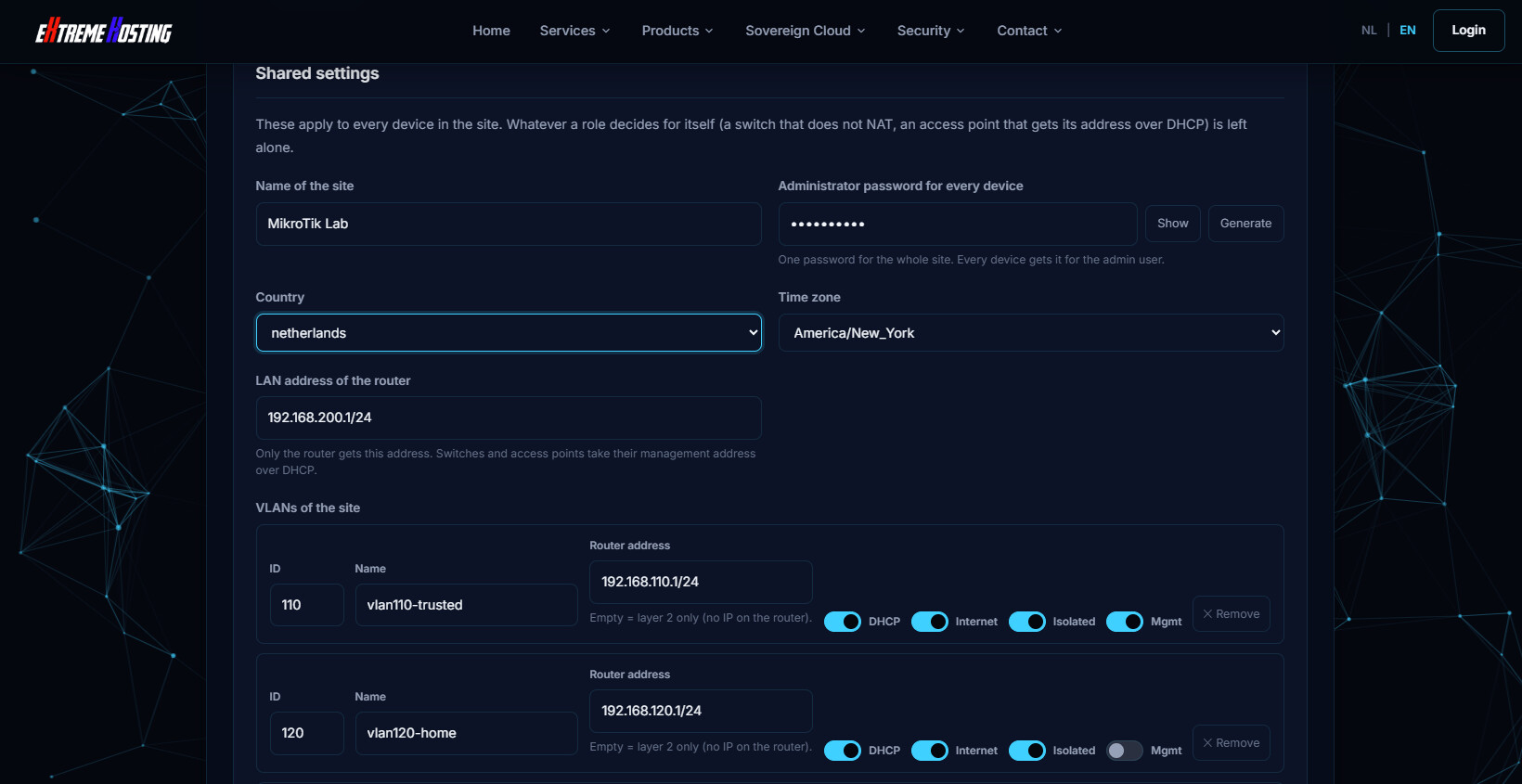
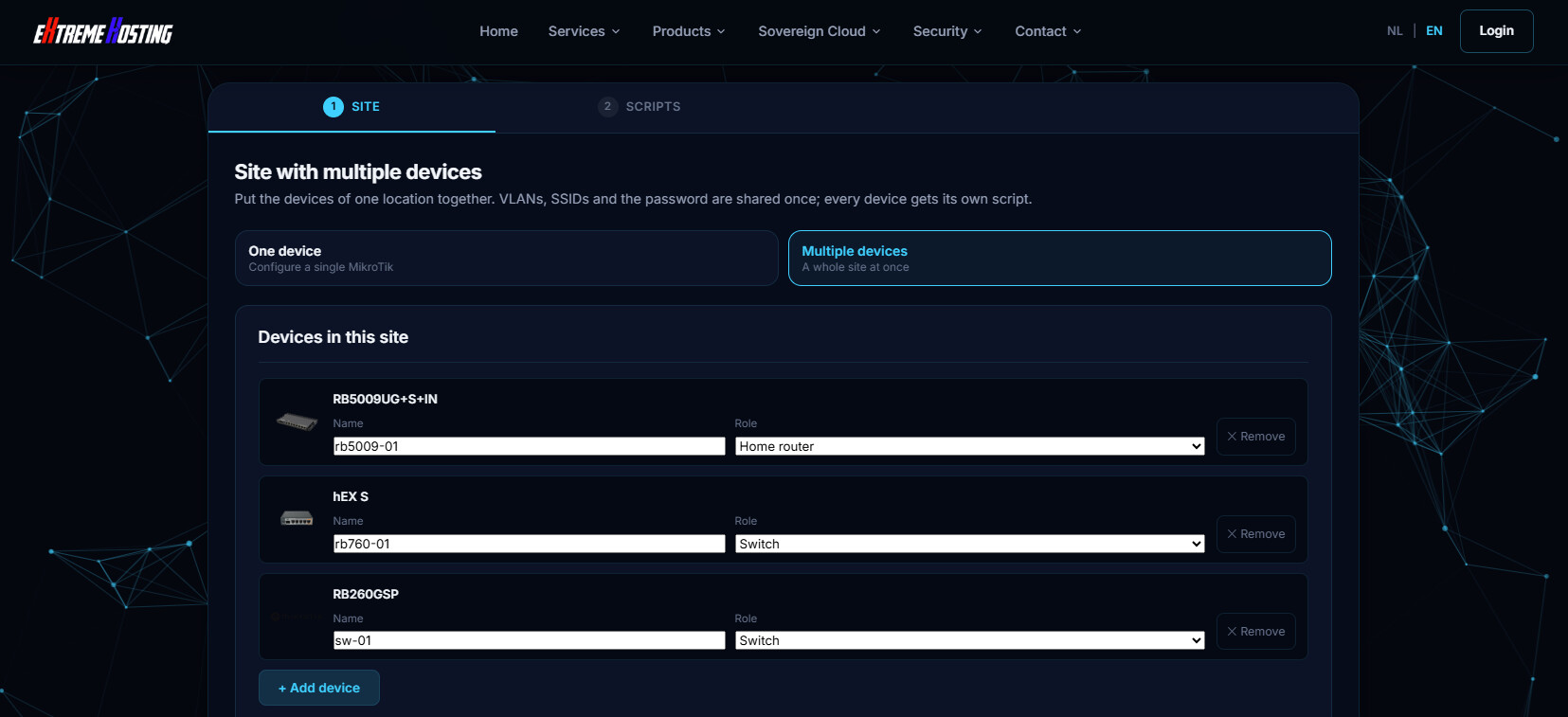
I just tried the site with multiple devices mode, and used an RB5009 in router role, an RB760iGS in switch role, and RB260GSP (there is no RB260GS, but other than PoE they are the same).

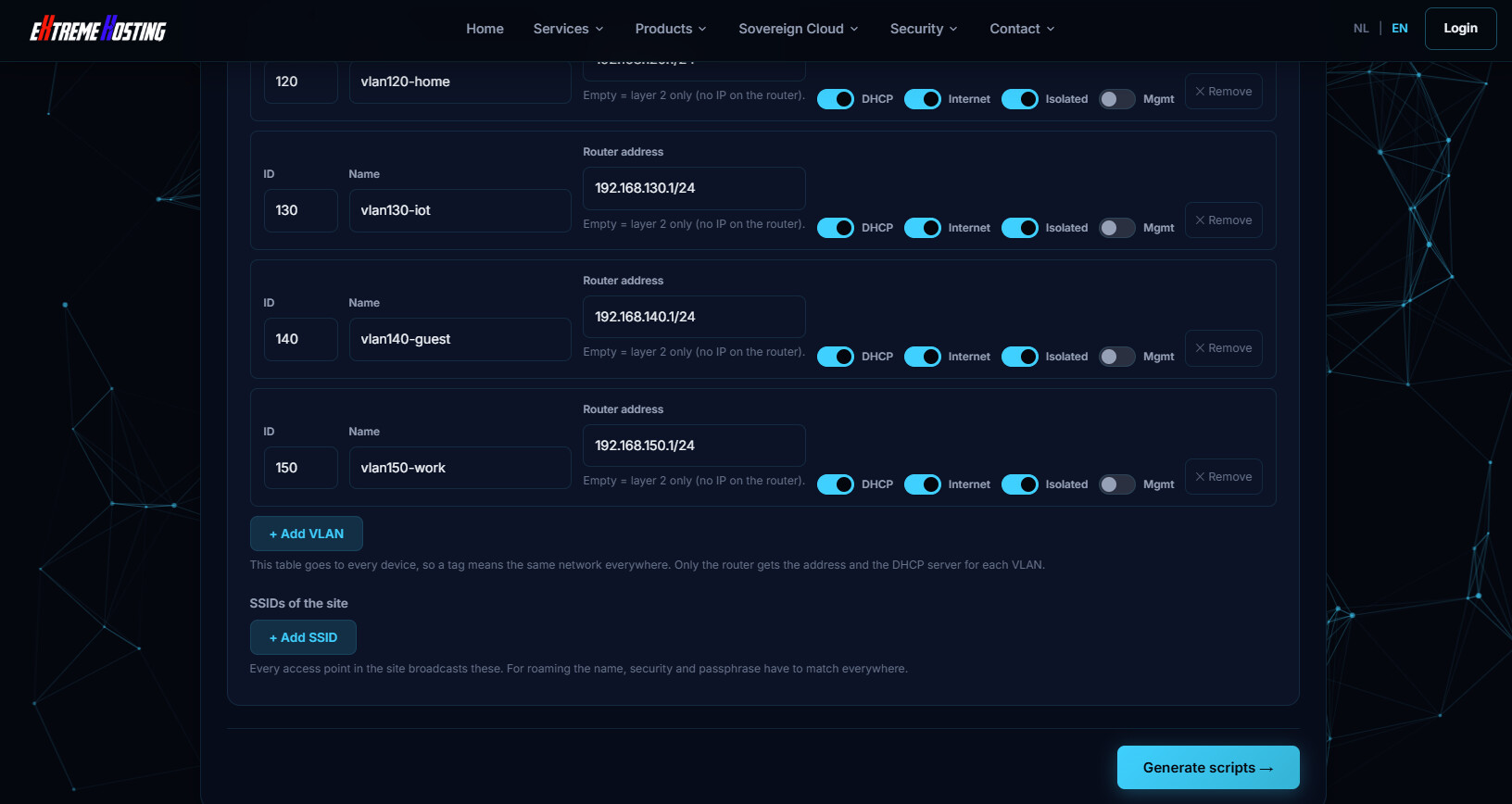
I changed the LAN address of router to 192.168.200.1/24 and then added vlans (starting with 110)

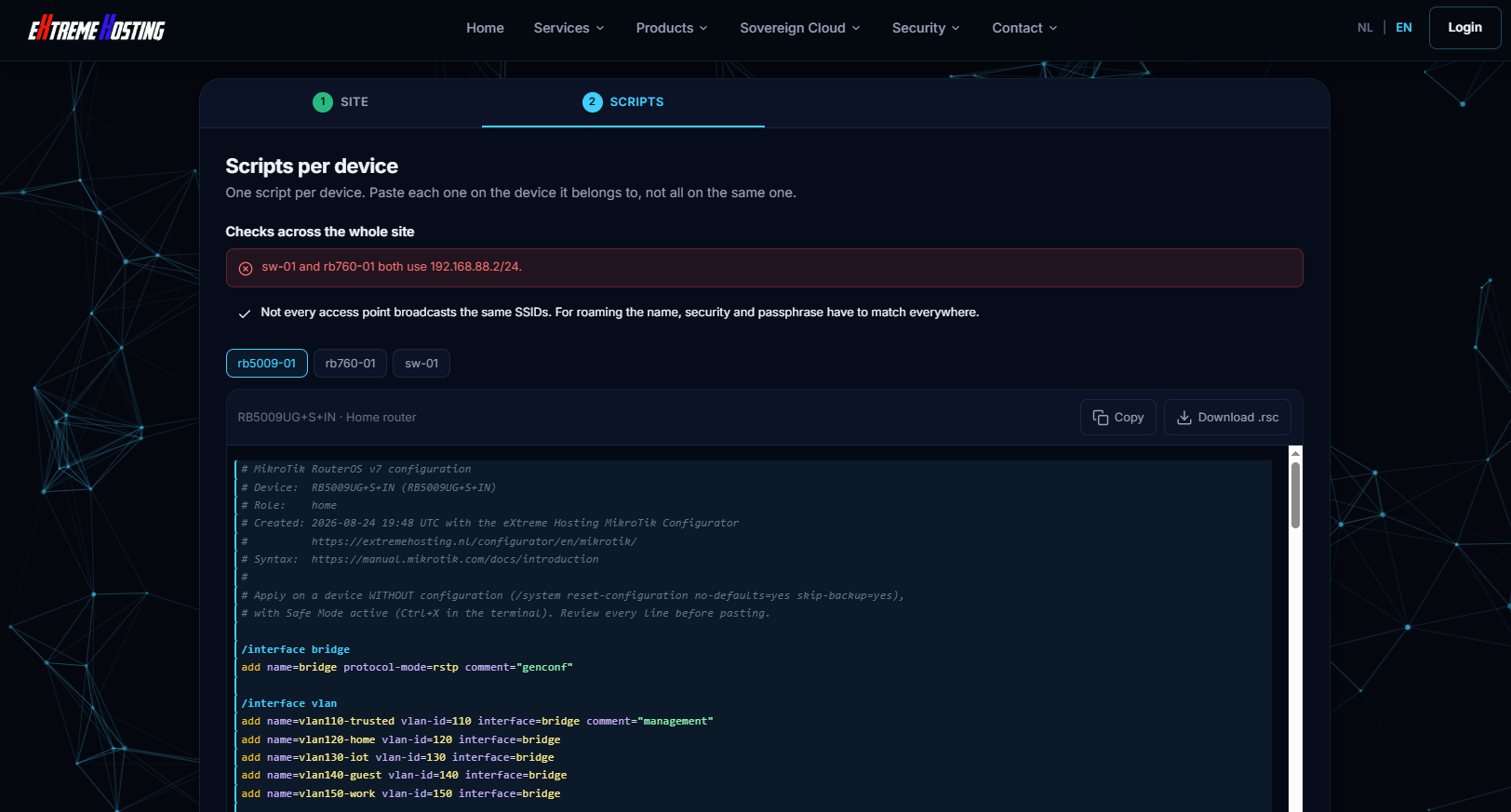
Pressing Generate scripts ... gets this message:

Is the intent that after you generate the config, that you then manually edit the scripts for the devices?

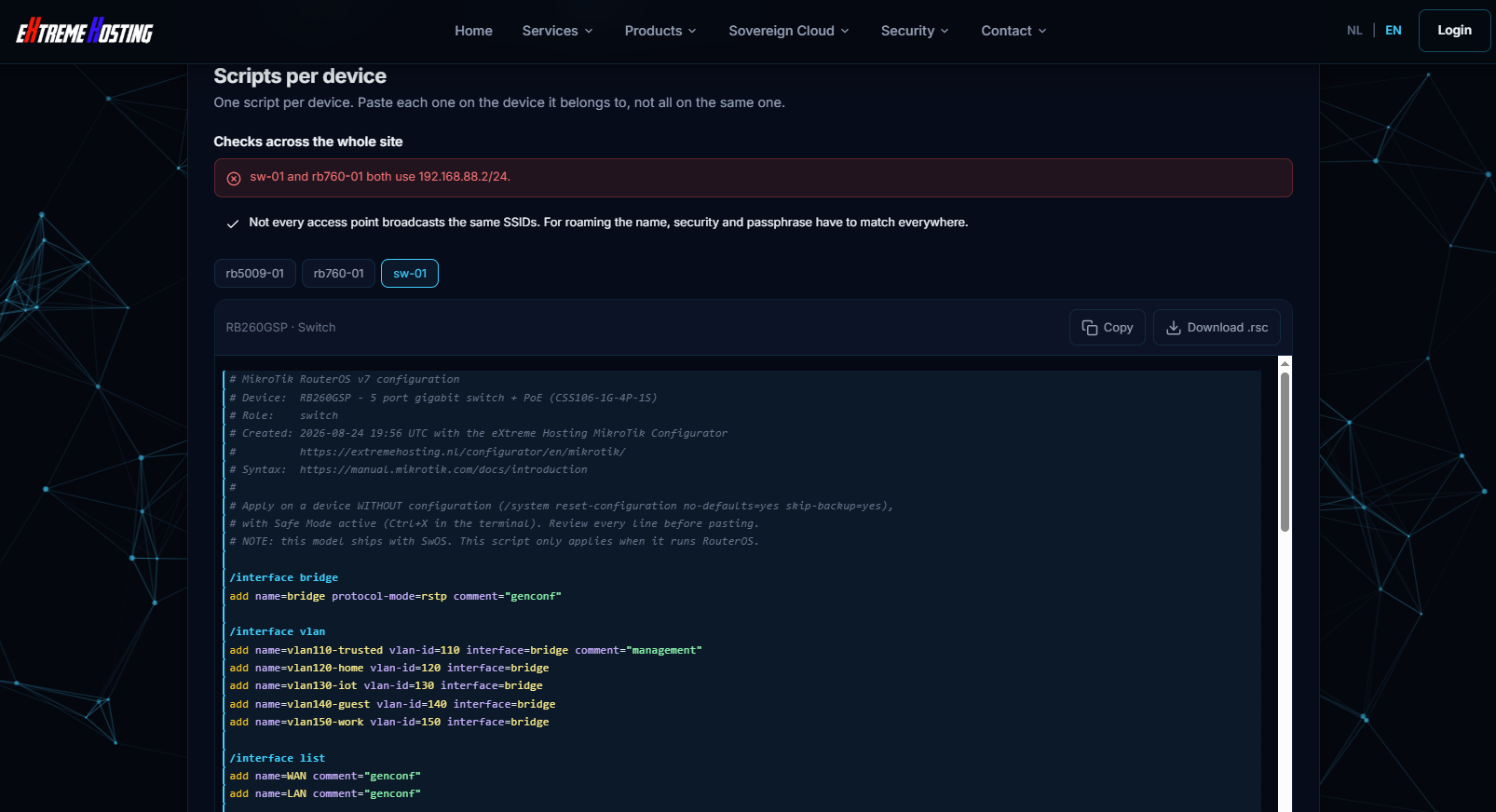
I was a bit surprised that the RB260 model generated an ROS config at all. But having the config is still useful for the setup of the SwOS devices, if for no other reason than it having a list of the vlans, etc.

And the header comment does warn that it ships with SwOS and that this only applies to ROS.

Generated configs for 3 devices in MikroTik Lab site
# MikroTik Lab
# 3 devices. Each block below belongs on a DIFFERENT device.
# Do not paste this whole file into one router.

# ======================================================================
# rb5009-01  (RB5009UG+S+IN)
# ======================================================================
# MikroTik RouterOS v7 configuration
# Device:  RB5009UG+S+IN (RB5009UG+S+IN)
# Role:    home
# Created: 2026-08-24 19:56 UTC with the eXtreme Hosting MikroTik Configurator
#          https://extremehosting.nl/configurator/en/mikrotik/
# Syntax:  https://manual.mikrotik.com/docs/introduction
#
# Apply on a device WITHOUT configuration (/system reset-configuration no-defaults=yes skip-backup=yes),
# with Safe Mode active (Ctrl+X in the terminal). Review every line before pasting.

/interface bridge
add name=bridge protocol-mode=rstp comment="genconf"

/interface vlan
add name=vlan110-trusted vlan-id=110 interface=bridge comment="management"
add name=vlan120-home vlan-id=120 interface=bridge
add name=vlan130-iot vlan-id=130 interface=bridge
add name=vlan140-guest vlan-id=140 interface=bridge
add name=vlan150-work vlan-id=150 interface=bridge

/interface list
add name=WAN comment="genconf"
add name=LAN comment="genconf"

/interface list member
add list=WAN interface=ether1 comment="genconf"
add list=LAN interface=bridge comment="genconf"
add list=LAN interface=vlan110-trusted comment="genconf"
add list=LAN interface=vlan120-home comment="genconf"
add list=LAN interface=vlan130-iot comment="genconf"
add list=LAN interface=vlan140-guest comment="genconf"
add list=LAN interface=vlan150-work comment="genconf"

/interface bridge port
add bridge=bridge interface=ether2 comment="genconf" pvid=10 frame-types=admit-only-untagged-and-priority-tagged ingress-filtering=yes
add bridge=bridge interface=ether3 comment="genconf" pvid=10 frame-types=admit-only-untagged-and-priority-tagged ingress-filtering=yes
add bridge=bridge interface=ether4 comment="genconf" pvid=10 frame-types=admit-only-untagged-and-priority-tagged ingress-filtering=yes
add bridge=bridge interface=ether5 comment="genconf" pvid=10 frame-types=admit-only-untagged-and-priority-tagged ingress-filtering=yes
add bridge=bridge interface=ether6 comment="genconf" pvid=10 frame-types=admit-only-untagged-and-priority-tagged ingress-filtering=yes
add bridge=bridge interface=ether7 comment="genconf" pvid=10 frame-types=admit-only-untagged-and-priority-tagged ingress-filtering=yes
add bridge=bridge interface=ether8 comment="genconf" pvid=10 frame-types=admit-only-untagged-and-priority-tagged ingress-filtering=yes
add bridge=bridge interface=sfp-sfpplus1 comment="genconf" frame-types=admit-all pvid=10 ingress-filtering=yes

/interface bridge vlan
add bridge=bridge vlan-ids=110 tagged=bridge comment="vlan110-trusted"
add bridge=bridge vlan-ids=120 tagged=bridge comment="vlan120-home"
add bridge=bridge vlan-ids=130 tagged=bridge comment="vlan130-iot"
add bridge=bridge vlan-ids=140 tagged=bridge comment="vlan140-guest"
add bridge=bridge vlan-ids=150 tagged=bridge comment="vlan150-work"

/interface bridge
set bridge vlan-filtering=yes

/ip pool
add name=pool-vlan110-trusted ranges=192.168.110.10-192.168.110.254
add name=pool-vlan120-home ranges=192.168.120.10-192.168.120.254
add name=pool-vlan130-iot ranges=192.168.130.10-192.168.130.254
add name=pool-vlan140-guest ranges=192.168.140.10-192.168.140.254
add name=pool-vlan150-work ranges=192.168.150.10-192.168.150.254
add name=dhcp ranges=192.168.200.10-192.168.200.254

/ip dhcp-server
add name=dhcp-vlan110-trusted interface=vlan110-trusted address-pool=pool-vlan110-trusted lease-time=1d
add name=dhcp-vlan120-home interface=vlan120-home address-pool=pool-vlan120-home lease-time=1d
add name=dhcp-vlan130-iot interface=vlan130-iot address-pool=pool-vlan130-iot lease-time=1d
add name=dhcp-vlan140-guest interface=vlan140-guest address-pool=pool-vlan140-guest lease-time=1d
add name=dhcp-vlan150-work interface=vlan150-work address-pool=pool-vlan150-work lease-time=1d

/ip dhcp-server network
add address=192.168.110.0/24 gateway=192.168.110.1 dns-server=192.168.110.1 comment="vlan110-trusted"
add address=192.168.120.0/24 gateway=192.168.120.1 dns-server=192.168.120.1 comment="vlan120-home"
add address=192.168.130.0/24 gateway=192.168.130.1 dns-server=192.168.130.1 comment="vlan130-iot"
add address=192.168.140.0/24 gateway=192.168.140.1 dns-server=192.168.140.1 comment="vlan140-guest"
add address=192.168.150.0/24 gateway=192.168.150.1 dns-server=192.168.150.1 comment="vlan150-work"

/ip dhcp-client
add interface=ether1 add-default-route=yes default-route-distance=1 use-peer-dns=yes use-peer-ntp=no comment="WAN1"

/ip dhcp-server
add name=genconf interface=bridge address-pool=dhcp lease-time=1d

/ip dhcp-server network
add address=192.168.200.0/24 gateway=192.168.200.1 dns-server=192.168.200.1 comment="genconf"

/ip address
add address=192.168.110.1/24 interface=vlan110-trusted comment="vlan110-trusted"
add address=192.168.120.1/24 interface=vlan120-home comment="vlan120-home"
add address=192.168.130.1/24 interface=vlan130-iot comment="vlan130-iot"
add address=192.168.140.1/24 interface=vlan140-guest comment="vlan140-guest"
add address=192.168.150.1/24 interface=vlan150-work comment="vlan150-work"
add address=192.168.200.1/24 interface=bridge comment="genconf"

/ipv6 settings
set disable-ipv6=no accept-router-advertisements=no

/ipv6 dhcp-client
add interface=ether1 request=prefix pool-name=ipv6-pool pool-prefix-length=64 prefix-hint=::/56 add-default-route=yes use-peer-dns=no comment="IPv6 prefix delegation"

/ipv6 address
add address=::1/64 from-pool=ipv6-pool interface=bridge advertise=yes comment="bridge"
add address=::1/64 from-pool=ipv6-pool interface=vlan110-trusted advertise=yes comment="vlan110-trusted"
add address=::1/64 from-pool=ipv6-pool interface=vlan120-home advertise=yes comment="vlan120-home"
add address=::1/64 from-pool=ipv6-pool interface=vlan130-iot advertise=yes comment="vlan130-iot"
add address=::1/64 from-pool=ipv6-pool interface=vlan140-guest advertise=yes comment="vlan140-guest"
add address=::1/64 from-pool=ipv6-pool interface=vlan150-work advertise=yes comment="vlan150-work"

/ipv6 nd
set [ find default=yes ] interface=all advertise-dns=self managed-address-configuration=no other-configuration=no

/ip dns
set allow-remote-requests=yes cache-size=4096 servers=9.9.9.9,149.112.112.112

/ip firewall address-list
add list=bad_ipv4 address=127.0.0.0/8 comment="genconf: RFC6890"
add list=bad_ipv4 address=192.0.0.0/24 comment="genconf: RFC6890"
add list=bad_ipv4 address=192.0.2.0/24 comment="genconf: RFC6890 documentation"
add list=bad_ipv4 address=198.51.100.0/24 comment="genconf: RFC6890 documentation"
add list=bad_ipv4 address=203.0.113.0/24 comment="genconf: RFC6890 documentation"
add list=bad_ipv4 address=240.0.0.0/4 comment="genconf: RFC6890 reserved"
add list=not_global_ipv4 address=0.0.0.0/8 comment="genconf: RFC6890"
add list=not_global_ipv4 address=10.0.0.0/8 comment="genconf: RFC6890"
add list=not_global_ipv4 address=100.64.0.0/10 comment="genconf: RFC6890"
add list=not_global_ipv4 address=169.254.0.0/16 comment="genconf: RFC6890"
add list=not_global_ipv4 address=172.16.0.0/12 comment="genconf: RFC6890"
add list=not_global_ipv4 address=192.0.0.0/29 comment="genconf: RFC6890"
add list=not_global_ipv4 address=192.168.0.0/16 comment="genconf: RFC6890"
add list=not_global_ipv4 address=198.18.0.0/15 comment="genconf: RFC6890 benchmark"
add list=not_global_ipv4 address=255.255.255.255/32 comment="genconf: RFC6890"
add list=bad_src_ipv4 address=224.0.0.0/4 comment="genconf: multicast"
add list=bad_src_ipv4 address=255.255.255.255/32 comment="genconf: RFC6890"
add list=bad_dst_ipv4 address=0.0.0.0/8 comment="genconf: RFC6890"
add list=bad_dst_ipv4 address=224.0.0.0/4 comment="genconf: RFC6890"

/ip firewall raw
add action=accept chain=prerouting comment="genconf: accept DHCP discover" dst-address=255.255.255.255 dst-port=67 in-interface-list=LAN protocol=udp src-address=0.0.0.0 src-port=68
add action=drop chain=prerouting comment="genconf: drop bogon IP's" src-address-list=bad_ipv4
add action=drop chain=prerouting comment="genconf: drop bogon IP's" dst-address-list=bad_ipv4 in-interface-list=WAN
add action=drop chain=prerouting comment="genconf: drop bogon IP's" src-address-list=bad_src_ipv4
add action=drop chain=prerouting comment="genconf: drop bogon IP's" dst-address-list=bad_dst_ipv4 in-interface-list=WAN
add action=drop chain=prerouting comment="genconf: drop non global from WAN" src-address-list=not_global_ipv4 in-interface-list=WAN
add action=drop chain=prerouting comment="genconf: drop bad UDP" port=0 protocol=udp

/ip firewall filter
add chain=input action=accept connection-state=established,related,untracked comment="genconf: accept established,related,untracked"
add chain=input action=drop connection-state=invalid comment="genconf: drop invalid"
add chain=input action=accept protocol=icmp comment="genconf: accept ICMP"
add chain=input action=accept dst-address=127.0.0.1 comment="genconf: accept to local loopback (for CAPsMAN)"
add chain=input action=drop protocol=udp dst-port=53 in-interface-list=WAN comment="drop DNS from WAN (no open resolver)"
add chain=input action=drop protocol=tcp dst-port=53 in-interface-list=WAN comment="drop DNS from WAN (no open resolver)"
add chain=input action=drop in-interface-list=!LAN comment="genconf: drop all not coming from LAN"
add chain=forward action=accept ipsec-policy=in,ipsec comment="genconf: accept in ipsec policy"
add chain=forward action=accept ipsec-policy=out,ipsec comment="genconf: accept out ipsec policy"
add chain=forward action=fasttrack-connection connection-state=established,related hw-offload=yes comment="genconf: fasttrack"
add chain=forward action=accept connection-state=established,related,untracked comment="genconf: accept established,related, untracked"
add chain=forward action=drop connection-state=invalid comment="genconf: drop invalid"
add chain=forward action=drop in-interface=vlan110-trusted out-interface-list=!WAN connection-state=new comment="isolate vlan110-trusted: internet only"
add chain=forward action=drop in-interface=vlan120-home out-interface-list=!WAN connection-state=new comment="isolate vlan120-home: internet only"
add chain=forward action=drop in-interface=vlan130-iot out-interface-list=!WAN connection-state=new comment="isolate vlan130-iot: internet only"
add chain=forward action=drop in-interface=vlan140-guest out-interface-list=!WAN connection-state=new comment="isolate vlan140-guest: internet only"
add chain=forward action=drop in-interface=vlan150-work out-interface-list=!WAN connection-state=new comment="isolate vlan150-work: internet only"
add chain=forward action=drop connection-state=new connection-nat-state=!dstnat in-interface-list=WAN comment="genconf: drop all from WAN not DSTNATed"

/ip firewall nat
add chain=srcnat action=masquerade out-interface-list=WAN ipsec-policy=out,none comment="genconf: masquerade"

/ipv6 firewall address-list
add list=bad_ipv6 address=::/128 comment="genconf: unspecified address"
add list=bad_ipv6 address=::1/128 comment="genconf: lo"
add list=bad_ipv6 address=fec0::/10 comment="genconf: site-local"
add list=bad_ipv6 address=::ffff:0.0.0.0/96 comment="genconf: ipv4-mapped"
add list=bad_ipv6 address=::/96 comment="genconf: ipv4 compat"
add list=bad_ipv6 address=100::/64 comment="genconf: discard only"
add list=bad_ipv6 address=2001:db8::/32 comment="genconf: documentation"
add list=bad_ipv6 address=2001:10::/28 comment="genconf: ORCHID"
add list=bad_ipv6 address=3ffe::/16 comment="genconf: 6bone"

/ipv6 firewall filter
add chain=input action=accept connection-state=established,related,untracked comment="genconf: accept established,related,untracked"
add chain=input action=drop connection-state=invalid comment="genconf: drop invalid"
add chain=input action=accept protocol=icmpv6 comment="genconf: accept ICMPv6"
add chain=input action=accept protocol=udp port=33434-33534 comment="genconf: accept UDP traceroute"
add chain=input action=accept protocol=udp dst-port=546 src-address=fe80::/10 comment="genconf: accept DHCPv6-Client prefix delegation."
add chain=input action=accept protocol=udp dst-port=500,4500 comment="genconf: accept IKE"
add chain=input action=accept protocol=ipsec-ah comment="genconf: accept ipsec AH"
add chain=input action=accept protocol=ipsec-esp comment="genconf: accept ipsec ESP"
add chain=input action=accept ipsec-policy=in,ipsec comment="genconf: accept all that matches ipsec policy"
add chain=input action=drop in-interface-list=!LAN comment="genconf: drop everything else not coming from LAN"
add chain=forward action=accept connection-state=established,related,untracked comment="genconf: accept established,related,untracked"
add chain=forward action=drop connection-state=invalid comment="genconf: drop invalid"
add chain=forward action=drop src-address-list=bad_ipv6 comment="genconf: drop packets with bad src ipv6"
add chain=forward action=drop dst-address-list=bad_ipv6 comment="genconf: drop packets with bad dst ipv6"
add chain=forward action=drop protocol=icmpv6 hop-limit=equal:1 comment="genconf: rfc4890 drop hop-limit=1"
add chain=forward action=accept protocol=icmpv6 comment="genconf: accept ICMPv6"
add chain=forward action=accept protocol=139 comment="genconf: accept HIP"
add chain=forward action=accept protocol=udp dst-port=500,4500 comment="genconf: accept IKE"
add chain=forward action=accept protocol=ipsec-ah comment="genconf: accept ipsec AH"
add chain=forward action=accept protocol=ipsec-esp comment="genconf: accept ipsec ESP"
add chain=forward action=accept ipsec-policy=in,ipsec comment="genconf: accept all that matches ipsec policy"
add chain=forward action=drop in-interface=vlan110-trusted out-interface-list=!WAN comment="isolate vlan110-trusted (IPv6)"
add chain=forward action=drop in-interface=vlan120-home out-interface-list=!WAN comment="isolate vlan120-home (IPv6)"
add chain=forward action=drop in-interface=vlan130-iot out-interface-list=!WAN comment="isolate vlan130-iot (IPv6)"
add chain=forward action=drop in-interface=vlan140-guest out-interface-list=!WAN comment="isolate vlan140-guest (IPv6)"
add chain=forward action=drop in-interface=vlan150-work out-interface-list=!WAN comment="isolate vlan150-work (IPv6)"
add chain=forward action=drop in-interface-list=!LAN comment="genconf: drop everything else not coming from LAN"

/system clock
set time-zone-name=America/New_York time-zone-autodetect=no

/system ntp client
set enabled=yes mode=unicast servers=nl.pool.ntp.org,time.cloudflare.com

/system package update
set channel=stable

/system routerboard settings
set auto-upgrade=yes

/ip service
set winbox disabled=no address=192.168.200.0/24,192.168.110.0/24
set ssh disabled=no address=192.168.200.0/24,192.168.110.0/24
set www disabled=yes
set www-ssl disabled=yes
set api disabled=yes
set api-ssl disabled=yes
set ftp disabled=yes
set telnet disabled=yes

/ip ssh
set strong-crypto=yes

/tool mac-server
set allowed-interface-list=none

/tool mac-server mac-winbox
set allowed-interface-list=LAN

/tool mac-server ping
set enabled=no

/ip neighbor discovery-settings
set discover-interface-list=LAN

/tool bandwidth-server
set enabled=no

/system identity
set name=rb5009-01

/user
set admin password=demochange

# ======================================================================
# rb760-01  (hEX S)
# ======================================================================
# MikroTik RouterOS v7 configuration
# Device:  hEX S (RB760iGS)
# Role:    switch
# Created: 2026-08-24 19:56 UTC with the eXtreme Hosting MikroTik Configurator
#          https://extremehosting.nl/configurator/en/mikrotik/
# Syntax:  https://manual.mikrotik.com/docs/introduction
#
# Apply on a device WITHOUT configuration (/system reset-configuration no-defaults=yes skip-backup=yes),
# with Safe Mode active (Ctrl+X in the terminal). Review every line before pasting.

/interface bridge
add name=bridge protocol-mode=rstp comment="genconf"

/interface vlan
add name=vlan110-trusted vlan-id=110 interface=bridge comment="management"
add name=vlan120-home vlan-id=120 interface=bridge
add name=vlan130-iot vlan-id=130 interface=bridge
add name=vlan140-guest vlan-id=140 interface=bridge
add name=vlan150-work vlan-id=150 interface=bridge

/interface list
add name=WAN comment="genconf"
add name=LAN comment="genconf"

/interface list member
add list=LAN interface=bridge comment="genconf"
add list=LAN interface=vlan110-trusted comment="genconf"
add list=LAN interface=vlan120-home comment="genconf"
add list=LAN interface=vlan130-iot comment="genconf"
add list=LAN interface=vlan140-guest comment="genconf"
add list=LAN interface=vlan150-work comment="genconf"

/interface bridge port
add bridge=bridge interface=ether1 comment="genconf" pvid=10 frame-types=admit-only-untagged-and-priority-tagged ingress-filtering=yes
add bridge=bridge interface=ether2 comment="genconf" pvid=10 frame-types=admit-only-untagged-and-priority-tagged ingress-filtering=yes
add bridge=bridge interface=ether3 comment="genconf" pvid=10 frame-types=admit-only-untagged-and-priority-tagged ingress-filtering=yes
add bridge=bridge interface=ether4 comment="genconf" pvid=10 frame-types=admit-only-untagged-and-priority-tagged ingress-filtering=yes
add bridge=bridge interface=ether5 comment="genconf" pvid=10 frame-types=admit-only-untagged-and-priority-tagged ingress-filtering=yes
add bridge=bridge interface=sfp1 comment="genconf" frame-types=admit-all pvid=10 ingress-filtering=yes

/interface bridge vlan
add bridge=bridge vlan-ids=110 tagged=bridge comment="vlan110-trusted"
add bridge=bridge vlan-ids=120 tagged=bridge comment="vlan120-home"
add bridge=bridge vlan-ids=130 tagged=bridge comment="vlan130-iot"
add bridge=bridge vlan-ids=140 tagged=bridge comment="vlan140-guest"
add bridge=bridge vlan-ids=150 tagged=bridge comment="vlan150-work"

/interface bridge
set bridge vlan-filtering=yes

/ip address
add address=192.168.88.2/24 interface=vlan110-trusted comment="management VLAN"

/ip firewall filter
add chain=input action=accept connection-state=established,related,untracked comment="genconf: accept established,related,untracked"
add chain=input action=drop connection-state=invalid comment="genconf: drop invalid"
add chain=input action=accept protocol=icmp comment="genconf: accept ICMP"
add chain=input action=accept dst-address=127.0.0.1 comment="genconf: accept to local loopback (for CAPsMAN)"
add chain=input action=drop in-interface-list=!LAN comment="genconf: drop all not coming from LAN"

/ip route
add dst-address=0.0.0.0/0 gateway=192.168.88.1 comment="default via the existing router"

/system clock
set time-zone-name=America/New_York time-zone-autodetect=no

/system ntp client
set enabled=yes mode=unicast servers=nl.pool.ntp.org,time.cloudflare.com

/system package update
set channel=stable

/system routerboard settings
set auto-upgrade=yes

/ip service
set winbox disabled=no address=192.168.88.0/24
set ssh disabled=no address=192.168.88.0/24
set www disabled=yes
set www-ssl disabled=yes
set api disabled=yes
set api-ssl disabled=yes
set ftp disabled=yes
set telnet disabled=yes

/ip ssh
set strong-crypto=yes

/tool mac-server
set allowed-interface-list=none

/tool mac-server mac-winbox
set allowed-interface-list=LAN

/tool mac-server ping
set enabled=no

/ip neighbor discovery-settings
set discover-interface-list=LAN

/tool bandwidth-server
set enabled=no

/system identity
set name=rb760-01

/user
set admin password=demochange

# ======================================================================
# sw-01  (RB260GSP)
# ======================================================================
# MikroTik RouterOS v7 configuration
# Device:  RB260GSP - 5 port gigabit switch + PoE (CSS106-1G-4P-1S)
# Role:    switch
# Created: 2026-08-24 19:56 UTC with the eXtreme Hosting MikroTik Configurator
#          https://extremehosting.nl/configurator/en/mikrotik/
# Syntax:  https://manual.mikrotik.com/docs/introduction
#
# Apply on a device WITHOUT configuration (/system reset-configuration no-defaults=yes skip-backup=yes),
# with Safe Mode active (Ctrl+X in the terminal). Review every line before pasting.
# NOTE: this model ships with SwOS. This script only applies when it runs RouterOS.

/interface bridge
add name=bridge protocol-mode=rstp comment="genconf"

/interface vlan
add name=vlan110-trusted vlan-id=110 interface=bridge comment="management"
add name=vlan120-home vlan-id=120 interface=bridge
add name=vlan130-iot vlan-id=130 interface=bridge
add name=vlan140-guest vlan-id=140 interface=bridge
add name=vlan150-work vlan-id=150 interface=bridge

/interface list
add name=WAN comment="genconf"
add name=LAN comment="genconf"

/interface list member
add list=LAN interface=bridge comment="genconf"
add list=LAN interface=vlan110-trusted comment="genconf"
add list=LAN interface=vlan120-home comment="genconf"
add list=LAN interface=vlan130-iot comment="genconf"
add list=LAN interface=vlan140-guest comment="genconf"
add list=LAN interface=vlan150-work comment="genconf"

/interface bridge port
add bridge=bridge interface=ether1 comment="genconf" pvid=10 frame-types=admit-only-untagged-and-priority-tagged ingress-filtering=yes
add bridge=bridge interface=ether2 comment="genconf" pvid=10 frame-types=admit-only-untagged-and-priority-tagged ingress-filtering=yes
add bridge=bridge interface=ether3 comment="genconf" pvid=10 frame-types=admit-only-untagged-and-priority-tagged ingress-filtering=yes
add bridge=bridge interface=ether4 comment="genconf" pvid=10 frame-types=admit-only-untagged-and-priority-tagged ingress-filtering=yes
add bridge=bridge interface=ether5 comment="genconf" pvid=10 frame-types=admit-only-untagged-and-priority-tagged ingress-filtering=yes
add bridge=bridge interface=sfp1 comment="genconf" frame-types=admit-all pvid=10 ingress-filtering=yes

/interface bridge vlan
add bridge=bridge vlan-ids=110 tagged=bridge comment="vlan110-trusted"
add bridge=bridge vlan-ids=120 tagged=bridge comment="vlan120-home"
add bridge=bridge vlan-ids=130 tagged=bridge comment="vlan130-iot"
add bridge=bridge vlan-ids=140 tagged=bridge comment="vlan140-guest"
add bridge=bridge vlan-ids=150 tagged=bridge comment="vlan150-work"

/interface bridge
set bridge vlan-filtering=yes

/ip address
add address=192.168.88.2/24 interface=vlan110-trusted comment="management VLAN"

/ip firewall filter
add chain=input action=accept connection-state=established,related,untracked comment="genconf: accept established,related,untracked"
add chain=input action=drop connection-state=invalid comment="genconf: drop invalid"
add chain=input action=accept protocol=icmp comment="genconf: accept ICMP"
add chain=input action=accept dst-address=127.0.0.1 comment="genconf: accept to local loopback (for CAPsMAN)"
add chain=input action=drop in-interface-list=!LAN comment="genconf: drop all not coming from LAN"

/ip route
add dst-address=0.0.0.0/0 gateway=192.168.88.1 comment="default via the existing router"

/system clock
set time-zone-name=America/New_York time-zone-autodetect=no

/system ntp client
set enabled=yes mode=unicast servers=nl.pool.ntp.org,time.cloudflare.com

/system package update
set channel=stable

/system routerboard settings
set auto-upgrade=yes

/ip service
set winbox disabled=no address=192.168.88.0/24
set ssh disabled=no address=192.168.88.0/24
set www disabled=yes
set www-ssl disabled=yes
set api disabled=yes
set api-ssl disabled=yes
set ftp disabled=yes
set telnet disabled=yes

/ip ssh
set strong-crypto=yes

/tool mac-server
set allowed-interface-list=none

/tool mac-server mac-winbox
set allowed-interface-list=LAN

/tool mac-server ping
set enabled=no

/ip neighbor discovery-settings
set discover-interface-list=LAN

/tool bandwidth-server
set enabled=no

/system identity
set name=sw-01

/user
set admin password=demochange

Observations: Switches (only looking at RB760iGS) has vlan-aware bridge, with SFP as trunk ports and other ports as access ports for vlan 10. But the CPU has no path to vlan 10 (the bridge by default has pvid=1), so without testing in a lab by loading this , it would seem that all ports will share an isolated vlan 10. I would expect devices plugged into the ports to be able to see broadcasts from other devices plugged into other ports, but not to have access to the router or internet.

Is that an incorrect assumption?

I was not faulting you, but rather Mikrotik for the rather idiotic concept of modes, which make some rudimentary features (such as e-mail) a "mother may I" item. For me, "Advanced" and enable everything is step one out of the box (and the corresponding comfort that I can never screw myself on an inaccessible device to do a mode change.)

It would make more sense to me for the generator to look at the device model, and if someone, say, asked to setup a container on an inadequate device, to pop up a message in the spirit of "Are you serious???" and politely decline, not screw with the mode.

"For them "start over, that is called learning" is not a lesson, it is the point where they give up and go back to the ISP box."

But those same folks, if using your tool, would not be inclined to go blindly play in the config anyhow (and there are 1000's more ways to screw yourself in ROS that device-mode doesn't control, so I really see that at a moot argument.)

You perfectly caught the essence of the MAC issue, as always It Is a matter of which risk you want to minimize (or what one finds prettier or uglier).
leaving automac yes = risk of change of MAC of the bridge
making the MAC address static same as first port inside of bridge = risk or duplication of port Is later taken out of the bridge
inventing and increased MAC = risks of duplication with other Mikrotik devices +rare but possible)
using a LAA address = altering the OUI and thus potentially invalidate tools/utilities that use It to identify as Routerboard.com or Mikrotik

The LAA address Is all in all the one that seems to carry the least consequences from a network point of view.

But using that will probably raise complaints from people using network discovery/inventory tools that use OUI database.

So, giving the user a choice seems to me the perfect way to pass the hot potato to the user who can evaluate these hypothetical risks/adverse side effects depending on their own specific situation.

Only from an aesthetic point of view, I like the EE BartoszP proposes, because It reminds me of the EE partition identifier used as "protective ID" on MBR's for GPT (UEFI) disks and after all this modified MAC Is a form of protection.

The "Dynamic" script for the MAC generation looks fine to me (and even if It will appear different in a compare/diff the reasons why will be evident).

What I don't know/I am not sure about Is whether ether2 Is the right choice or if It should be linked to "first item" of the bridge, Independently from which port It Is.

@Buckeye Thank you, this was the most useful kind of report: you built a real site, predicted what would happen, and you were right. All of it is fixed and live. (Took me and a college a while to debug, so nice one!)

Your VLAN assumption was correct. With a site numbered from 110, every port still carried pvid=10 and the trunk still tagged 10,20,30, because those are the module defaults and replacing the site VLAN table never repointed them. With ingress filtering on, those ports sat in a VLAN the bridge did not know, and the bridge VLAN entries had tagged=bridge and no member ports at all. So yes: devices on those ports would have seen each other and nothing else, exactly as you described. Your switch would have been isolated.

For the record on where the fault lies, since it came up earlier in this thread with the multicast rule: this one is entirely ours and entirely new. The single-device switch role has always done it properly, with a VLAN interface on the bridge for the CPU, the bridge tagged in the VLAN table and untagged members per VLAN. It was the multi-device code, a few hours old at the time you tested it, that swapped the VLAN table without touching the port assignment. No MikroTik documentation involved.

Now, on your site:

add bridge=bridge vlan-ids=110 tagged=bridge,sfp1 untagged=ether1,ether2,ether3,ether4,ether5
add bridge=bridge vlan-ids=120 tagged=bridge,sfp1
add address=192.168.110.3/24 interface=vlan110-lan comment="management VLAN"

Three more things came out of chasing yours, all found by tests rather than in production:

  • The first fix put access ports on the guest VLAN, because I picked "the first VLAN that is not management". A default that quietly puts every wired port on the guest network is worse than the bug it replaced.
  • Trunks were coming out tagged and untagged in the same VLAN entry, which contradicts itself. That one also affected single-device configurations and is fixed there too.
  • An access point ended up with no trunk at all, so a guest SSID on a tagged VLAN existed on the bridge with no way off the device. It looks configured and is not.

Management addressing. You did not raise this, but your screenshots led me to it: every non-routing device was keeping the role default of 192.168.88.2, on a site addressed 192.168.200.x and 192.168.110.x. Reachable by coincidence only, and identical on every device. They are now numbered from the site management VLAN, one each.

On the country list. You are right that it was Europe only, and that was an inconsistency rather than a policy: the shared site block borrowed a shorter list than the per-device Wi-Fi section, which already had the United States, Canada and Australia. It is now one list of 39 across both.

To answer what it controls: today, only the wireless regulatory domain, the country= on /interface wifi, /interface wireless and CAPsMAN. Nothing else depends on it, which is why the time zones are a separate field and have always had the American ones.

It is EU-weighted because we are a Dutch company and the defaults are built around European practice, and that is deliberate rather than accidental. It is also going to matter more than Wi-Fi shortly: the country selection is what we intend to hang ISP and IPTV presets on, so that picking the Netherlands offers the KPN and Ziggo specifics, IPTV VLAN tagging included, and other countries can gain the same for their providers. That does not exist yet, so I am flagging it as intent rather than a feature. If it is useful for American providers we would take suggestions on what belongs there.

On the RB260GSP: agreed, and no change planned. It ships with SwOS, the header says so, and as you say the generated configuration is still a useful reference for the VLAN numbering even when you then set it up in SwOS.

@tadawson Understood, and thanks for the clarification. For what it is worth I am not defending device-mode either. A tool like this just has to emit something, and "what did you actually ask for" is an easier rule to defend than "everything, because it is free". That is the whole of our position, and you can have rextended's one-liner that turns it all on with one click if you would rather not think about it again.

On your suggestion, the sensible half of it is already in there, minus the theatre. The generator knows what each model is and refuses sections the hardware cannot run. Ask for containers on something that is not ARM64 or x86 and the section is not offered at all, with the reason shown: "Containers require ARM64 or x86". Same idea for wifi sections on a device with no radio, VLANs on something with no ports, and so on.

What we are not going to add is the "Are you serious???" dialog. It is a good line and it made me laugh, but a tool that answers back gets tiresome by the third time you see it, and we would rather spend the space on saying what the limitation actually is. The polite decline you described is the behaviour, just without the personality.

On the beginners point, you have a fair hit. There are indeed a thousand ways to lock yourself out of RouterOS that device-mode has no opinion about, and someone using a generator is by definition not poking around blind. I will concede that one. Where I still land differently is that it is not about protecting anyone from themselves. It is that a generator writing a value nobody asked for is making a decision on their behalf, and doing that expansively is still doing it. The switch is there, clearly labelled, and it is one click.

@jaclaz That is a better summary of the trade-offs than I managed, and you caught something I glossed over.

When I recommended the locally administered address as the collision-proof option, I left out its cost, which you named: it changes the OUI. Anyone running discovery or inventory tooling that identifies MikroTik hardware by OUI would stop seeing that bridge as a MikroTik. For a home lab that is nothing. For someone with a few hundred devices and an asset system, that is the whole point of the OUI. I should have said so, and it does weaken "just use an LAA" as blanket advice. It is now written next to the option itself rather than left in a forum post.

Which lands where you land: there is no answer that is right for everyone, so the user picks. Your framing of it as passing the hot potato is fair and I am content with it.

On your open question, whether it should be ether2 or "the first item of the bridge" whatever that turns out to be, there is a concrete reason for naming the port. Look at where the line sits in the generated script:

set bridge auto-mac=no admin-mac=[/interface ethernet get [find default-name=ether2] mac-address]
...27 lines later...
/interface bridge port
add bridge=bridge interface=ether2

The MAC is pinned immediately after the bridge is created and before a single port has joined it. A lookup for "the first port in the bridge" would run against an empty bridge and come back with nothing. So it has to be a port named in advance.

It is not hardcoded to ether2 though. It is whichever port this configuration puts into the bridge first, which is the same port auto-mac would have taken its address from anyway. On a device whose first LAN port is something else, the expression names that one, and it resolves through default-name= so renaming the interface afterwards does not break it.

And since you liked the EE idea, it is now in as a fourth option:

set bridge auto-mac=no admin-mac=("EE" . [:pick [/interface ethernet get [find default-name=ether2] mac-address] 2 17])

Rather than inventing an address it keeps the last five octets of the device's own port MAC and puts EE in front, so it stays as unique as the hardware without any randomness, and it can never collide with a factory address. It costs us nothing to offer and it is the option with the cleanest network behaviour of the four, so it may as well be there for anyone who wants it. For the protective-MBR resemblance you mentioned, it is doing much the same job here: an address that announces it was set deliberately.

Again thanks for your imput, my team is working hard on making all the improvements happen that you guys are supplying, we had extra people on standby for the launch to fix bug`s, but this is more we could hope for, we love the community and what Mikrotik and its community is :slight_smile:

Good! That was the goal. I wasn't serious! :slight_smile:

@phascogale Sorry, your report got lost in the thread and you were the first to spot this.

Both symptoms were the same cause: we had a geographic allowlist in front of the site, and anything outside it got a 403. Your Mullvad exit was outside it. The zero-byte file in Safari was that same 403 arriving with an empty body and no content type, which Safari saves instead of showing, so you got a 0 KB download rather than an error page.

The allowlist is gone from the public site. I have checked that the page now returns a proper text/html response on every form of the URL, with or without the trailing slash. It should simply work from wherever you are, Mullvad included.

If you still get a zero-byte download, that would be something different and I would like to hear about it, because my explanation above is an inference rather than something I could reproduce after removing the block.

@Marcel_Balk, it is working now thank you.

I was not using Mullvad's VPN, only the browser which is Firefox-based.

Odd that Australia should be excluded from an allow list. I can think of worse places. :slight_smile: