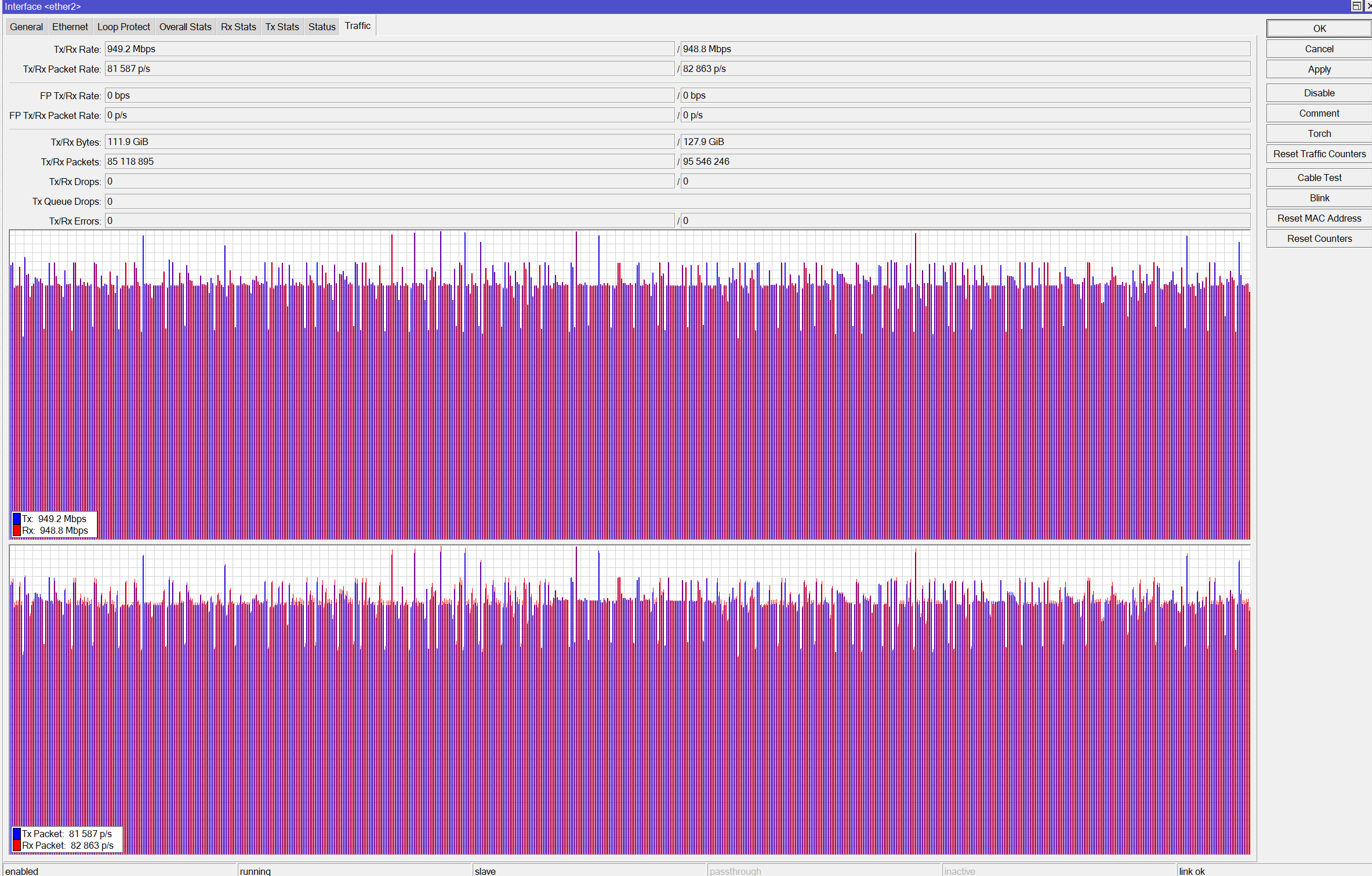
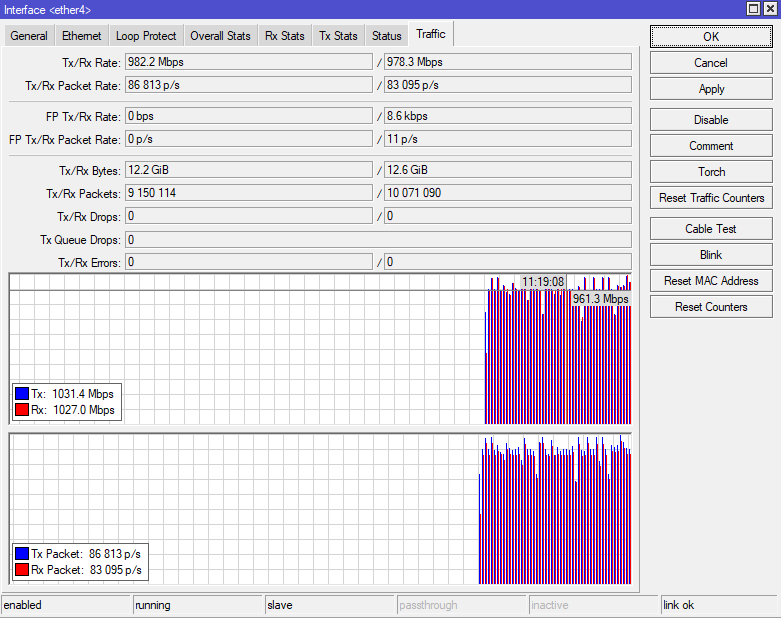
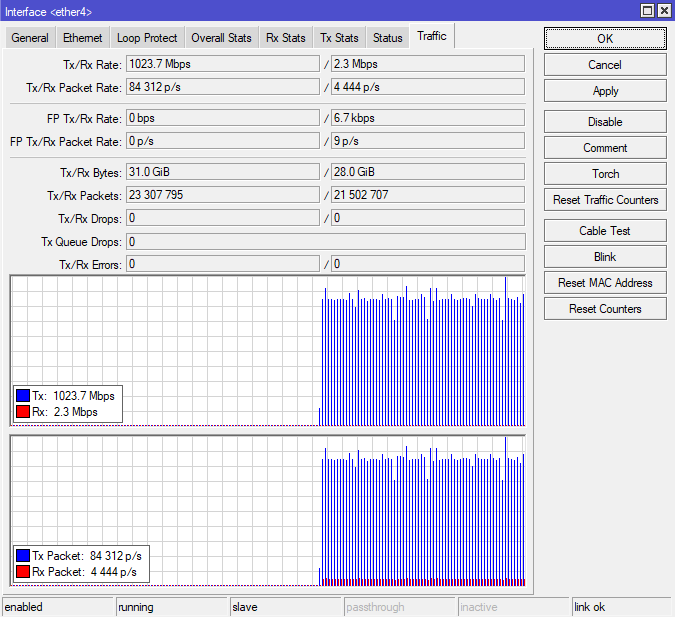
First (without checking the block diagram) I’ve only got 100MBit/s between Eth1 and Eth2 … which is clear to me now
I use the HexS “upside-down” to get secure access to the private IPv4 network on the WAN side (192.168.100.0/24) of my main router from my LAN (192.168.254.0/24): eth2-5 is WAN, eth1 is LAN.
My main router creates on WAN a PPPoE via VLAN connection to an ONT. Thats why I set the MTU=1512. Which I thought was the issue, but changing it to 1512 didn’t help.
So when using an unmanaged switch instead of the HexS I get full 1000MBit/s download and 260MBit/s upload on my internet speed test.
When using the hexS (eth4 & eth5) between the main-routers-WAN-interace and the ONT download is always between 700-800MBit/s.
I’ve tested this thoroughly of course and over a longer period of time to make sure the internet itself isn’t the issue Its the HexS for sure.
Any ideas how to get full 1000MBit/s? Maybe I forgot to set the MTU to 1512 somewhere and the speed decrease is due to fragmentation? CPU load is below 10% as the CPU should/is doing nothing anyhow.
Hardware-Offload seems to be working, although I can’t set/enable it on the bridge:
#    INTERFACE  BRIDGE     HW   HORIZON  TRUSTED  FAST-LEAVE  BPDU-GUARD  EDGE  POINT-TO-POINT  PVID  FRAME-TYPES
0 IH ether3     bridgeWAN  yes  none     no       no          no          auto  auto               1  admit-all
1  H ether4     bridgeWAN  yes  none     no       no          no          auto  auto               1  admit-all
2  H ether5     bridgeWAN  yes  none     no       no          no          auto  auto               1  admit-all
3    ether1     bridgeLAN  yes  none     no       no          no          auto  auto               1  admit-all
4 IH ether2     bridgeWAN  yes  none     no       no          no          auto  auto               1  admit-all
Thanks in advance
Soko
Config:
# 2025-07-27 11:53:26 by RouterOS 7.19.4
# software id = RLG7-LQJJ
#
# model = E60iUGS
# serial number = HJP0AXQN365
/interface bridge
add mtu=1512 name=bridgeLAN protocol-mode=none
add mtu=1512 name=bridgeWAN protocol-mode=none
/interface ethernet
set [ find default-name=ether1 ] mtu=1512
set [ find default-name=ether2 ] mtu=1512
set [ find default-name=ether3 ] mtu=1512
set [ find default-name=ether4 ] mtu=1512
set [ find default-name=ether5 ] mtu=1512
set [ find default-name=sfp1 ] mtu=1512
/interface list
add comment="=bridgeLAN" name=LAN
add comment="=bridgeWAN" name=WAN
/interface bridge port
add bridge=bridgeWAN interface=ether3
add bridge=bridgeWAN interface=ether4
add bridge=bridgeWAN interface=ether5
add bridge=bridgeLAN interface=ether1
add bridge=bridgeWAN interface=ether2
/ipv6 settings
set accept-redirects=no accept-router-advertisements=no allow-fast-path=no \
    disable-ipv6=yes forward=no
/interface list member
add interface=bridgeLAN list=LAN
add interface=bridgeWAN list=WAN
/ip address
add address=192.168.254.251/24 interface=bridgeLAN network=192.168.254.0
add address=192.168.100.254/24 interface=bridgeWAN network=192.168.100.0
/ip firewall filter
add action=accept chain=input comment="established related untracked" \
    connection-state=established,related,untracked
add action=drop chain=input comment=invalid connection-state=invalid
add action=drop chain=input comment="not LAN" in-interface=!bridgeLAN
add action=accept chain=forward comment="estalished related untracked" \
    connection-state=established,related,untracked
add action=drop chain=forward comment=invalid connection-state=invalid
add action=drop chain=forward comment="new, not destNAT" \
    connection-nat-state=!dstnat connection-state=new in-interface=bridgeWAN
/ip firewall nat
add action=masquerade chain=srcnat
/ip service
set ftp disabled=yes
set ssh disabled=yes
set telnet disabled=yes
set winbox disabled=yes
set api disabled=yes
set api-ssl disabled=yes
/ipv6 firewall filter
add action=drop chain=forward
add action=drop chain=input
add action=drop chain=output
/tool mac-server
set allowed-interface-list=LAN
/tool mac-server mac-winbox
set allowed-interface-list=LAN
/tool mac-server ping
set enabled=no
I did not look at your config but have you already tried latest beta version ?
I think since 7.20b5 or so that speed issue should have been addressed (or some other version but I know it works now, tested it myself on Hex Refresh).
Thanks for the quick reply and tip!
Just installed 7.20b7 but the speedtest doesn’t hit the 1000MBit barrier full on as it does with the unmanaged switch
For your ether1 issue, the suggested upgrade will fix it.
Without fasttrack what you’re seeing is all this device is capable of.
Disregard the advice from the other thread, it’s totally confused. Notrack is faster than no notrack, but slower than fasttrack (as funny as it sounds)
Hmmm…I can also remove eth2 and eth3 from the bridgeWAN to get a single-pair if it helps. Not quite sure if you mean bidirectional by up/download at the same time (which I’m not doing) or bidirection by using TCP connection. Anyhow…I hadn’t had a detailed look on how those numbers are tested, you are correct. In the end I was hoping any switch hardware designed in 2025 can do full 1GBit/s on two ports…
I’m new to Mikrotik and read a lot since a week…but I can’t see why fasttrack in the IP firewall settings should help with switching speed issues. Can you elaborate?
My point is the exact opposite. The official tests you reference run the ports in pairs as fast as they will go, bidirectionally and in parallel. In an ideal world, a 6xGigE device would give 6 Gbit/sec on this test, 1G for every possible direction traffic could flow. The actual results give less than this, which tells you this device has not been engineered to provide a full-rate switching fabric.
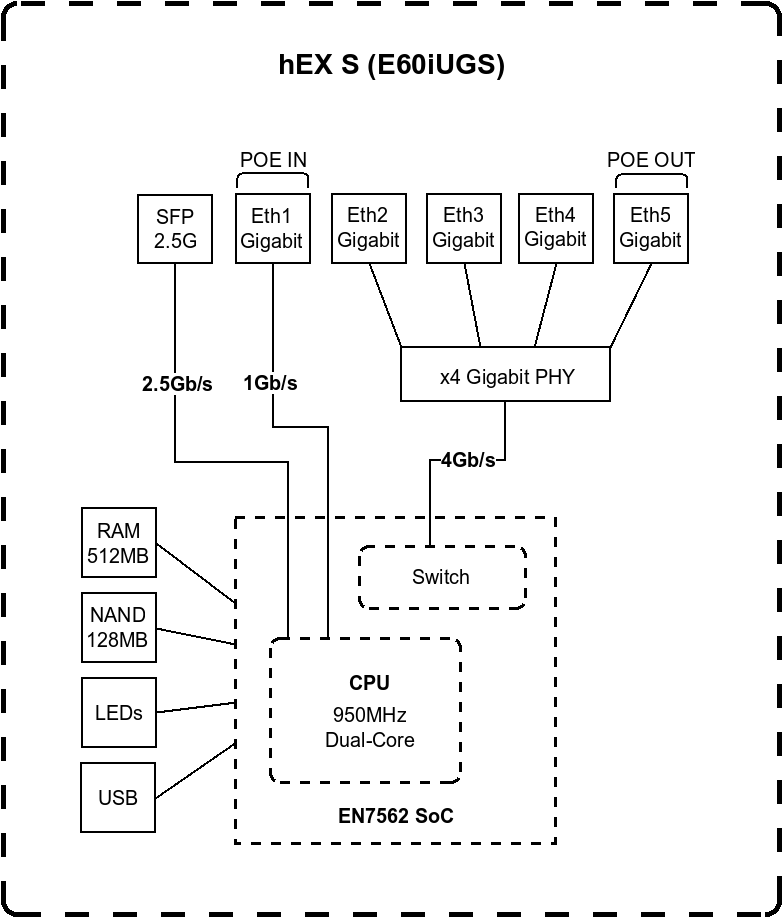
The posted block diagram confirms it: some traffic bypasses the switch chip, bottlenecking in the CPU.
You’re on the right path to mention a test between two hardware-switched ports.
Best case will not be 1000 Mbit/sec; it will be closer to 940 Mbit/sec owing to TCP overhead. The question then becomes, why can’t you hit that?
That’s disappointing. I’d expect even a $10 hunk-a-junk switch to hit 940 Mbit/sec bidirectionally. I was doing that something like a decade ago on Walmart-grade Netgear GS105s.
Alas, this is but one of multiple disappointments for me on this product. ARMv5 core, nerfed SFP+ cage…
The product I wanted would have had ARMv7 minimum, a 5G cage to allow each 1G copper port a dedicated path back to the core, and enough CPU to drive it all. That would make it a perfect “room” switch, for fanning out a single cable run to several ports.
I don't see that when my traffic is between eth4 and eth5 like in my case.
Orinigal as "end user test" an internet speed test. I know... a lot of variables... but again: Swapping HexS with an unmanages switch: Immediate and stable 940MBit down.
With the HexS starting at ~800 and within seconds declinig to ~700.
For a better test I connected two PCs running iperf3 v3.19 on them and doing a bidirectional test between eth2 and eth3. One direction hits the 1000MBit, the other is all over the place between 100MBit and 500MBit. Thats kinda weird
Giving the block diagram I can understand this between eth1 and eth2. But why is my eth2<=>eth3 or eth4<=>eth5 connection not going full bidirectional Gb speed?
Would be great if you can have a look at my config again. Maybe I'm missing something as you've tested full Gb speed successfully...
thx.Soko
EDIT: I've rerun my two PCs with iperf3 using an unmanaged switch (d-link dgs-105gl) using the same cables. I get full speed in both directions in bidirectional test.
First, two bridges is a no-no. Only one can be hardware offloaded.
I suspect this doesn’t actually matter because the one port you have on the bridge misnamed as bridgeLAN is on the CPU anyway, so RouterOS should be smart enough to make that one the software bridge, allowing the other to be hardware-offloaded.
There’s nothing that requires the WAN port to be part of a bridge, as you would see if you returned to the default configuration.
I also question your choice to ignore IPv6 in 2025. There are now IPv6-only sites online, and not small ones. The time has come to accept it as a reality. My guide may be of some use to you.
Thanks for your thoughts.
Yeah… First I had eth1-2 as a bridge and eth3-5 as another. I can delete the bridgeLAN (thats its correct name) as it only has eth1 in it.
As you can see in my original post RouterOS is smart enough and has eth2-5 as hw-offloaded.
As mentioned in the opening post I’m not using the HexS as an internet router. So eth1 as LAN as eth2-5 as WAN is correct for my purpose. Also I disabled IPv6 because I do not need it.
Thanks for your IPv6 link, I’ll have a look for sure.
…
But in a nutshell: No setting (or missing setting) explains the underperformance of eth2<=>eth3 or eth4<=>5.
Can you check the Tx Stats and Rx Stats of the ethernet ports to see whether any of the Rx Pause/Tx Pause counters are non-zero? If yes, maybe you can try turning on flow control on those ports.
I've simplified the config as much as possible (see below for details):
ether1 is LAN
ether2-5 is bridgeWAN
Disabled/secured everything I do not need.
Thats it.
Then I setup two of my old laptops with integrated GBit NIC with Antix-Linux so I can run iperf3 in bidirectional mode to its fullest.
Apparently running iperf3 on Windows does lack the performance and stability
Tested this iperf3-test-combo with an unmanaged d-link dgs-105gl and a Mikrotik RB260GS. Got constant 111MByte/s in each direction.
Now to the HexS:
Leaving ether4+5 still connected to my Fritzbox-WAN and ONT I connected the iperf3-test-combo to ether2+3 and started iperf3 -c 192.168.0.1 -t 0 --bidir and the tranfer was table at 111MBit/s as well
I tried it on my hEX Refresh, I just connected it between my computer and the network,
I see that the overall speed is about 960 Mbps, but on the graph there are some dips up to 830 Mbps, in one direction there are also dips, but less often, I used iperf3.18_64
Summary
# 2025-07-29 11:27:40 by RouterOS 7.20beta7
# software id = 3RBJ-II1Z
#
# model = E50UG
# serial number =
/interface bridge
add name=bridge1
/interface bridge port
add bridge=bridge1 interface=ether4
add bridge=bridge1 interface=ether5

 Its the HexS for sure.