general questions about pppoe server

hello there,


i have a simple stupid question because i don’t know how to do this because there
are so many ways to accomplish this but i have to done this as simple as i can


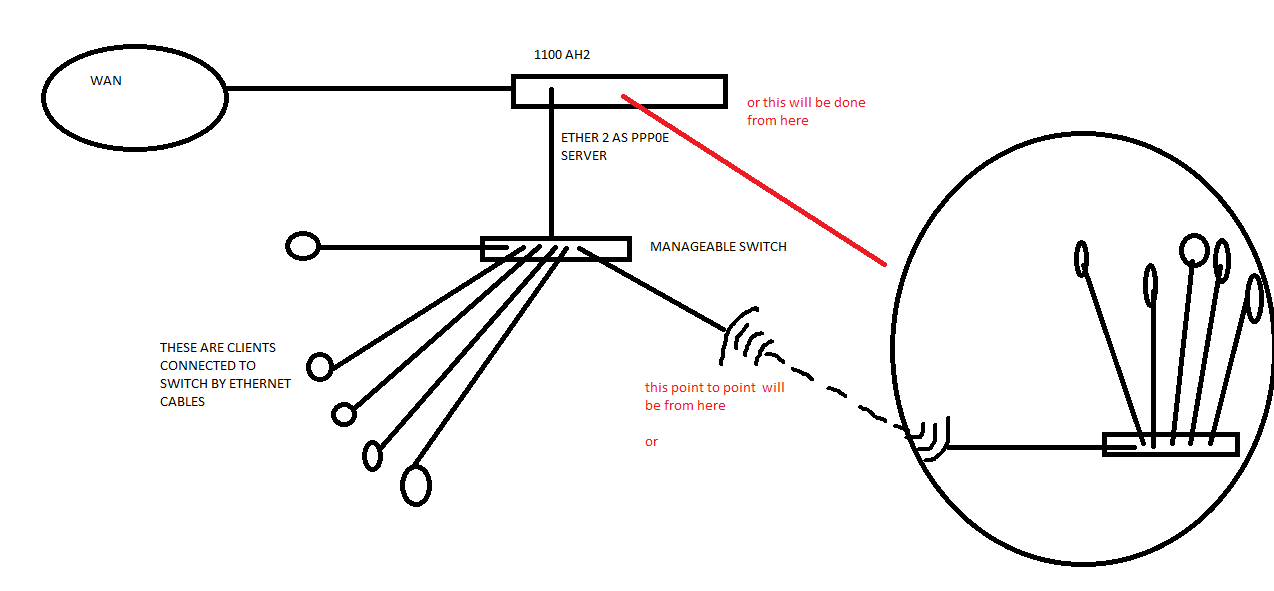
so the question is i have setup the pppoe server for 100 clients for a building,
so that i made a pppoe server with usermanager and after that i distributed to that clients by wire.
note : i want single point of administration not multiple pppoe server )

But now i want to extend(from location A to location B ) the network for backhaul( sxt 5hn r2 is being used for p2p ) and also want to implement mpls /vpls for L2.

Q: mpls and vpls will be used on p2p devies or it will be done on 1100 ah to remote area 450g (450g will be required there for)


should i make a point to pont from switch then how to configure mpls and vpls
or if i configure p2p from 1100ah 3rd port then how it will be done.


the simple process i want to implement because this will be easy to troubleshoot


note : can i use 450 g router for each location (only for l2 bridging purpose)


please point me in a right direction


it will be highly apriciated

thanks


suraj
pppoe network setup.png

Why do you want to use MPLS and not just tag vlan? To have MPLS, you cant use the 450 router. (all 4xxx devices have to small l2mtu)

It seems like your setup is quite simple. Put an ethernet to your rb 1100 conecting to SXT. make a WDS to next SXT nad plugin to a mikrotik device here.

Make a bridge at 1100 and put your pppoe server to interface bridge. Put the interface used today into this bridge.

Make a vlan intergface at interface conecting to sxt, and have this tagged the same at router in the other end. Put this vlan in bridge at 1100. Now you have an interface at the new router, have a l2 to your pppoe. Here you put this vlan to a bridge interface, and put interface where CPE are conected to in same bridge. Now pppoe is working.


Next step is the l2 links you want. Just follow same setup, using another bridge and another vlan tag.

MPLS will just make your setup so more complex. You still need the bridging etc. Just bridge a VPLS interface instead of a interface directly conected.


If you still MUST have MPLS, its possible to setup.


Make a bridge interface at your 1100 call it somethig like loopback, and put a IP to the interface. Lets say 10.0.0.1/32 then make a net connecting 1100 and router at other side to the 1100. Lets say 172.16.1.1/29 at 1100, 172.16.1.2/29 at Sxt1 172.16.1.3/29 at sxt2 and finaly 172.16.1.4 at new router. (lets say a 2011) Then make a bridge here, also called loopback. Give the loopback an ip, lets say 10.0.0.2/32


Now enable mpls LDP and give the loopback ip as LSR ID and transport address (10.0.0.1). set MPLS mtu in MPLS interface to a higer value. Lets say 1590, so you have enough. :smiley:
Do the same at other side juste use the 10.0.0.2 as ID and transport.

Put interface at router pointing to etchother in a l2 trough sxt as LDP interface.

now enable ospf between the routers. just change the ospf instance routerid to have your loopback ip as routerid. put some net to distribute, lets say conected and static as type1. Do the same in both ends. Then put your networks in networks (10.0.0.1/32 and 172.16.1.0/29) at r1 and the same, just .2 at r2.

Then add a ospf interface. Here you use the interface connecting routers together. Do in both ends. Switch to point to point as network type. Use MD5 if you want

Now ospf and MPLS should work. You might be required to reeboot both routers now.

You can put BGP now. But you dont need to unless you want vrf’s and routing tables trough your MPLS.

This is enough to have VPLS interface up running. to have this, just add a VPLS interface, put the other ends loopback IP as remote peer, and give it a VPLS id. To do this in a simple way, just put the loopback ip of one of the sides ( at both sides) and use :something. Lets say 10.0.0.2:2 as VPLS ID in both ends. Do the same at both routers.

Now you should have a l2 between 2 VPLS interfaces. To use this to something. Bridg it in to the interface you want to use for a l2 conection.

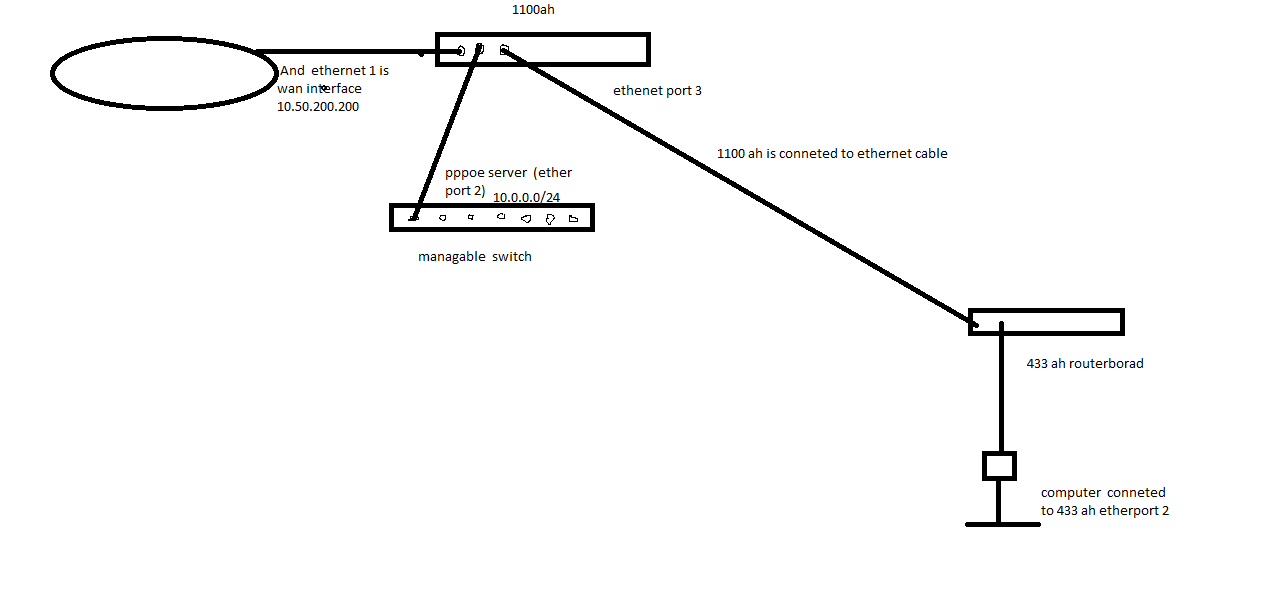
i am trying to make mpls/vpls tunnel between 1100ah(userman is installed here) and 433ah routers.so that i can access the internet through mpls/vpls tunnel.


main access concentrator :

[admin@main access concentrator pppoe server ] > /ip address print
Flags: X - disabled, I - invalid, D - dynamic

ADDRESS NETWORK INTERFACE

0 ;;; wan ip add connected by static route
10.50.200.200/16 10.50.0.0 ether1
1 10.0.0.1/24 10.0.0.0 ether2
2 1.1.1.1/32 1.1.1.1 loopback
3 172.16.0.10/24 172.16.0.0 ether5
4 D 10.0.0.1/32 10.0.0.254


[admin@main access concentrator pppoe server ] > /ip route print
Flags: X - disabled, A - active, D - dynamic,
C - connect, S - static, r - rip, b - bgp, o - ospf, m - mme,
B - blackhole, U - unreachable, P - prohibit

DST-ADDRESS PREF-SRC GATEWAY DISTANCE

0 A S 0.0.0.0/0 10.50.0.1 1
1 ADC 1.1.1.1/32 1.1.1.1 loopback 0
2 A S 1.1.1.2/32 172.16.0.11 1
3 ADC 10.0.0.0/24 10.0.0.1 ether2 0
4 ADC 10.0.0.254/32 10.0.0.1 0
5 ADC 10.50.0.0/16 10.50.200.200 ether1 0
6 ADC 172.16.0.0/24 172.16.0.10 ether5 0


[admin@main access concentrator pppoe server ] > /mpls ldp interface print
Flags: X - disabled, I - invalid

INTERFACE HELLO-INTERVAL HOLD-TIME

0 ether5 5s 15s


[admin@main access concentrat/mpls ldp neighbor print
Flags: X - disabled, D - dynamic, O - operational, T - sending-targeted-hello,
V - vpls

TRANSPORT LOCAL-TRANSPORT PEER SEN

0 DOTV 1.1.1.2 1.1.1.1 1.1.1.2:0 yes


[admin@main access concentrator pppoe server ] > /mpls local-binding print
Flags: X - disabled, A - advertised, D - dynamic,
L - local-route, G - gateway-route, e - egress

DST-ADDRESS LABEL PEERS

0 ADLe 10.0.0.254/32 impl-null 1.1.1.2:0
1 ADG 0.0.0.0/0 impl-null 1.1.1.2:0
2 ADLe 172.16.0.0/24 impl-null 1.1.1.2:0
3 ADLe 1.1.1.1/32 impl-null 1.1.1.2:0
4 ADLe 10.0.0.0/24 impl-null 1.1.1.2:0
5 ADG 1.1.1.2/32 21 1.1.1.2:0
6 ADLe 10.50.0.0/16 impl-null 1.1.1.2:0


[admin@main access concentrator pppoe server ] > /mpls remote-binding print
Flags: X - disabled, A - active, D - dynamic

DST-ADDRESS NEXTHOP LABEL

0 D 10.0.0.254/32 25
1 D 1.1.1.1/32 26
2 D 172.16.0.0/24 impl-null
3 D 10.0.0.0/24 27
4 AD 1.1.1.2/32 172.16.0.11 impl-null
5 D 10.50.0.0/16 28


remote site router b :


[admin@remote site B] > /ip address print
Flags: X - disabled, I - invalid, D - dynamic

ADDRESS NETWORK INTERFACE

0 1.1.1.2/32 1.1.1.2 loopback
1 172.16.0.11/24 172.16.0.0 ether1
2 111.111.111.111/24 111.111.111.0 ether2


[admin@remote site B] > /ip route print
Flags: X - disabled, A - active, D - dynamic,
C - connect, S - static, r - rip, b - bgp, o - ospf, m - mme,
B - blackhole, U - unreachable, P - prohibit

DST-ADDRESS PREF-SRC GATEWAY DISTAN

0 ADo 1.1.1.1/32 172.16.0.10 1
1 ADC 1.1.1.2/32 1.1.1.2 loopback
2 ADo 10.0.0.0/24 172.16.0.10 1
3 ADo 10.0.0.254/32 172.16.0.10 1
4 ADo 10.50.0.0/16 172.16.0.10 1
5 ADC 111.111.111.0/24 111.111.111.111 ether2


[admin@remote site B] > /mpls ldp interface print
Flags: X - disabled, I - invalid

INTERFACE HELLO-INTERVAL HOLD-TIME

0 ether1 5s 15s


[admin@remote site B] > /mpls ldp neighbor print
Flags: X - disabled, D - dynamic, O - operational,
T - sending-targeted-hello, V - vpls

TRANSPORT LOCAL-TRANSPORT PEER

0 DOTV 1.1.1.1 1.1.1.2 1.1.1.1:0


[admin@remote site B] > /mpls local-binding print
Flags: X - disabled, A - advertised, D - dynamic,
L - local-route, G - gateway-route, e - egress

DST-ADDRESS LABEL PEERS

0 ADG 10.0.0.254/32 25 1.1.1.1:0
1 ADG 1.1.1.1/32 26 1.1.1.1:0
2 ADLe 172.16.0.0/24 impl-null 1.1.1.1:0
3 ADG 10.0.0.0/24 27 1.1.1.1:0
4 ADLe 1.1.1.2/32 impl-null 1.1.1.1:0
5 ADG 10.50.0.0/16 28 1.1.1.1:0
6 ADLe 111.111.111.0/24 impl-null 1.1.1.1:0


[admin@remote site B] > /mpls remote-binding print
Flags: X - disabled, A - active, D - dynamic

DST-ADDRESS NEXTHOP LABEL

0 AD 10.0.0.254/32 172.16.0.10 impl-null
1 D 0.0.0.0/0 impl-null
2 D 172.16.0.0/24 impl-null
3 AD 1.1.1.1/32 172.16.0.10 impl-null
4 AD 10.0.0.0/24 172.16.0.10 impl-null
5 D 1.1.1.2/32 21
6 AD 10.50.0.0/16 172.16.0.10 impl-null
7 D 111.111.111.0/24 23
vpls tunnel betwen routers.png

thank you very much Mr samsung.

you have made it working

thanks again :smiley: :smiley:

:smiley: :sunglasses: