Is it possible to set up a GRE tunnel when one of the routers have a dynamic public IP Address?
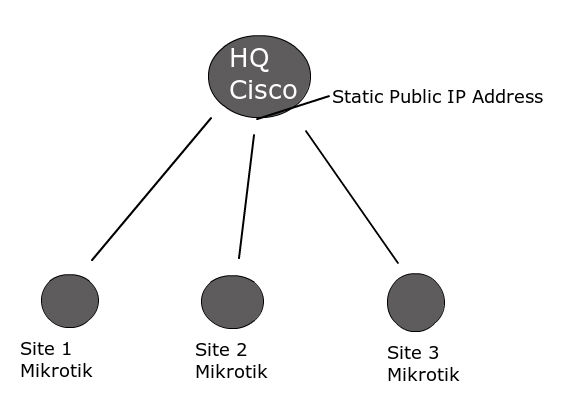
I would like to link the following routers using GRE tunnels in a hub and spoke style topology:
The Cisco HQ Router has a static public IP address. Each site router has a dynamic IP public IP address.
If someone could provide me with documentation on how to do this I would be grateful.
at least as far as RouterOS gre configuration goes - remote-address has to be set to some meaningful address, local address is optional.
On remote end, it is ok, as i understand you can add static main router address as remote, on the main router you have to get the correct remote address to set up the tunnel.
One way is to set up dyndns, so main router resolving dns name gets the address. Other posibility is to make end router to execute remote command via SSH on target host to set ip address somehow (private key login to other router). Not sure you can do that against 3rd party equipment.
I realize this is an old thread at the time of my reply, but thought it a good place to post a simple scripting solution to update the GRE tunnel remote-address when that remote-address is dynamic.
This does assume the GRE tunnel is already functional and that the remote-address WAN ip is registered/obtainable via some type of dynamic DNS service, i.e. DynDns, etc.
The script is a one line statement that only updates the remote-address; it affords no testing for needing the update, logging or error checking. Those can be added if needed . . .. .
Hi Is GRE tunnel work on dynamic public ip? i have same problem here in Malaysia using TM Unify and my network guy told me i must have both public static IP.
Can you advice?
Cisco has GRE multipoint tunnels to handle that specific situation (static server, dynamic client IP), Mikrotik does not offer that possibility. You will have to use L2TP instead, and then either pull the GRE/EoIP tunnel over the L2TP session, or use L2TP without another tunnel on top.
We have some GRE tunnels with a dynamic IP on one site. We doing this by a more or less dirty hack. The Routers with the dynamic IP using the the fetch command+scheduler to poll at script (php). That php script is using the API to talk to the router with the fixed IP and updates the gre interface config if needed.
Below is a slightly more complex script that looks for all GRE tunnels with a comment that begins with the string “Host_”. The second portion of the comment string must be the fqdn of the dynamic host. With this, it will perform a dns resolution of the dynamic hostname, and ONLY if it differs from the current setting will it update the remote-address of the gre interface.
# define variables
:local list
:local thecomment
:local thecommentlen
:local thename
:local newip
:local oldip


:foreach i in=[ /interface gre find where comment~"^Host_" ] do={
   :set thecomment [/interface gre get $i comment]
   :set thecommentlen [ :len $thecomment ]
   :set thename [ :pick $thecomment 5 $thecommentlen ]
   :set oldip [/interface gre get $i remote-address]
   :set newip [:resolve $thename]
   : if ($newip != $oldip) do={ /interface gre set $i remote-address=$newip}
   : if ($newip != $oldip) do={:log info ("Updating " . $thecomment . " from " . $oldip . " to " . $newip . ".")}
}
So, what if you also have IPSec enabled on the tunnel and it’s not using the default policy? (i.e. You can’t just enter the PSK in the Gre Interface Definition). In this case, you’ll need to extend the script to update your IPSec Peer and Policy. Just follow the same comment rule for both ipsec policy, and ipsec peer. This will allow the below script to locate the correct entries and to update them all.
# define variables
:local list
:local thecomment
:local thecommentlen
:local thename
:local newip
:local newipm
:local oldip


:foreach i in=[ /interface gre find where comment~"^Host_" ] do={
   :set thecomment [ /interface gre get $i comment ]
   :set thecommentlen [ :len $thecomment ]
   :set thename [ :pick $thecomment 5 $thecommentlen ]
   :set oldip [ /interface gre get $i remote-address ]
   :set newip [ :resolve $thename ]
   : if ($newip != $oldip) do={ /interface gre set $i remote-address=$newip}
   : if ($newip != $oldip) do={:log info ("gre Interface - Updating " . $thecomment . " from " . $oldip . " to " . $newip . ".")}
}


:foreach i in=[ /ip ipsec policy find where comment~"^Host_" ] do={
   :set thecomment [ /ip ipsec policy get $i comment ]
   :set thecommentlen [ :len $thecomment ]
   :set thename [ :pick $thecomment 5 $thecommentlen ]
   :set oldip [ /ip ipsec policy get $i sa-dst-address]
   :set newip [:resolve $thename ]
   :set newipm ( $newip . "/32" )
   : if ($newip != $oldip) do={ /ip ipsec policy set $i dst-address=$newipm sa-dst-address=$newip }
   : if ($newip != $oldip) do={ :log info ("IPSec Policy - Updating " . $thecomment . " from " . $oldip . " to " . $newip . ".") }
}


:foreach i in=[ /ip ipsec peer find where comment~"^Host_" ] do={
   :set thecomment [ /ip ipsec peer get $i comment ]
   :set thecommentlen [ :len $thecomment ]
   :set thename [ :pick $thecomment 5 $thecommentlen ]
   :set oldip [ /ip ipsec peer get $i address]
   :set newip [:resolve $thename]
   :set newip ( $newip . "/32" )
   : if ($newip != $oldip) do={ /ip ipsec peer set $i address=$newip }
   : if ($newip != $oldip) do={ :log info ("IPSec Peer - Updating " . $thecomment . " from " . $oldip . " to " . $newip . ".")}
}