I’ve spent whole weekend trying configure hairpin nat, which took me like 2 minutes on OpenWRT before. But here it simply doesn’t work. The Hairpin NAT rule shows always “0 packets”. The redirect works correctly from the Internet but not from the LAN. What am I doing wrong?
# feb/13/2022 23:16:41 by RouterOS 7.1.2
# model = RB5009UG+S+
/ip firewall nat
add action=masquerade chain=srcnat out-interface-list=WAN
add action=dst-nat chain=dstnat comment="www" dst-address=!192.168.144.1 dst-address-type=local dst-port=80 protocol=tcp to-addresses=192.168.144.22 to-ports=80
add action=masquerade chain=srcnat comment=HairpinNat dst-address=!192.168.144.1 src-address=192.168.144.0/24

/ip firewall filter
add action=accept chain=forward comment="Allow forward traffic for connection already established/related" connection-state=established,related
add action=accept chain=forward comment="Allow forward traffic for connection from LAN" connection-state=!invalid in-interface-list=LAN out-interface-list=WAN src-address=192.168.144.0/24
add action=accept chain=forward comment="Allow forward traffic for port redirections and DMZ" connection-nat-state=dstnat
add action=drop chain=forward comment="Deny rest of forward traffic"
add action=accept chain=output comment="Allow output traffic"
add action=accept chain=input comment="Allow input traffic for connection already established/related" connection-state=established,related
add action=accept chain=input comment="Allow ICMP ping requests" icmp-options=8:0 protocol=icmp
add action=accept chain=input comment="Allow ICMP messages about too big packet size (fragmentation required)" icmp-options=3:4 protocol=icmp
add action=accept chain=input comment="Allow init connection to winbox service on LAN" connection-state=new dst-address=192.168.144.1 dst-port=8291,22,80 in-interface-list=LAN protocol=tcp src-address=192.168.144.0/24
add action=accept chain=input comment="Allow requests to DNS service from LAN" connection-state=new dst-address=192.168.144.1 dst-port=53 in-interface-list=LAN protocol=udp src-address=192.168.144.0/24
add action=drop chain=input comment="Deny rest of input traffic"
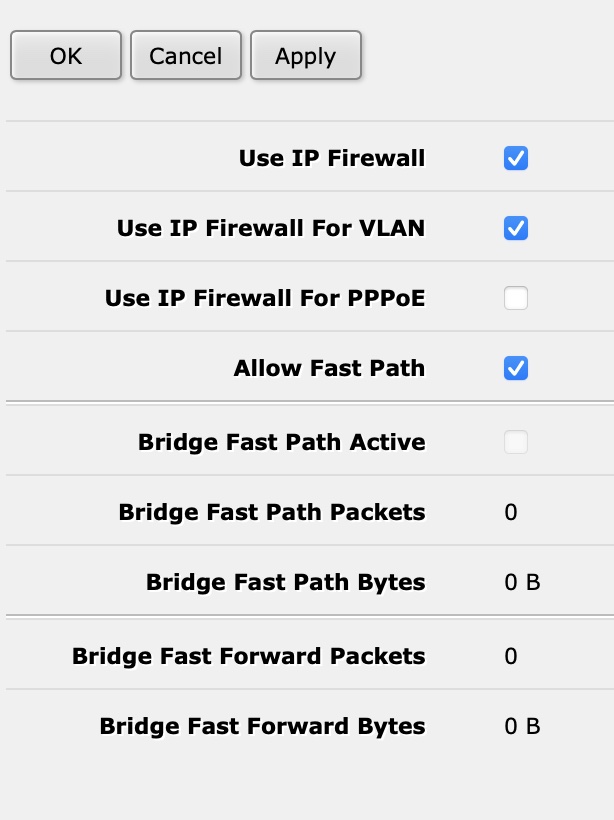
Yes, I have it ticked ON (Bridge | Settings):
should I turn It off? btw, “Use IP Firewall For PPPoE” - should it be turned off (I have PPPoE connection)?
As per my answer in the other post on the same topic…
Not that it may make a difference but worth a shot… change order and modify the rule… /ip firewall nat
add action=masquerade chain=srcnat out-interface-list=WAN
add action=dst-nat chain=dstnat comment=“www” dst-address=!192.168.144.1 dst-address-type=local dst-port=80 protocol=tcp to-addresses=192.168.144.22 to-ports=80
add action=masquerade chain=srcnat comment=HairpinNat dst-address=!192.168.144.1 src-address=192.168.144.0/24
Not that it may make a difference but worth a shot… change order and modify the rule…
tried it already with bunch of other modifications too, but I reconfigured it as you mentioned, just in case I missed something yesterday - same story, it doesn’t work
It takes packets that are bridged (e.g. when you have one LAN spanning over multiple ports and there’s communication between device connected to one, and another device connected to different one) and IP firewall doesn’t normally see them, and runs them through IP firewall as if they were routed. Not something you need often. It’s a big change in how things work, and if you enable it without knowing what it does, results can be unexpected.