hAP ax S low upload speed with 2.5G ONT

Hi everyone,
I’m experiencing a strange issue with a MikroTik hAP ax S after switching FTTH provider and ONT.

Setup:

  • MikroTik hAP ax S (RouterOS 7.22.1 and also tested 7.23beta5)
  • PPPoE over VLAN 100
  • ONT: ZTE F6005v3 (2.5 Gbps Ethernet port)

Previously I was using a ZTE F601 ONT (1 Gbps port) with another provider, and everything worked perfectly (full upload speed).

Problem:

  • Download: ~940 Mbps
  • Upload: ~50–60 Mbps (should be 900 Mbps)

What I tested:

  • Full reset with minimal configuration (only VLAN + PPPoE)
  • No queues, no firewall changes
  • CPU usage ~5% during upload

Additional tests:

  • Forcing clients Ethernet to 100 Mbps → upload reaches full speed (~95 Mbps)
  • Using another MikroTik device (hAP ac3) with same ONT and config → upload ~850–900 Mbps

Has anyone experienced something similar with hAP ax S devices or 2.5G ONTs?

Thanks!

Config would be helpful:

/export file=anynameyoulike

Remove serial and any other private info, post as Preformatted text by using the </> button.
Is the port used as WAN port on the hAP AX S set to auto?

Which port are you using to connect to the ONT?

There are reports that ether1 (port directly connected to hte CPU) has issues on some newish devices, but they should have been resolved in recent Ros, try taking (say) ether2 out of the bridge and use it as WAN connection, see if it changes anything.

Maybe in your case it is the ethernet negotiation that is somehow wrong.

Also - with some devices - you need to set a queue on the Wan intrerface, not the default "only-hardware-queue".

Check /queue interface print.

In /queue type print you should see which queues types you have available, try with "ethernet-default".

Thanks for your answers.

Very simple default configuration, I only added the VLAN and the PPPoE Client.

# 2026-04-04 18:56:35 by RouterOS 7.22.1
# software id = 1234-5678
#
# model = E62iUGS-2axD5axT
# serial number = HKExxxxxxx
/interface bridge
add admin-mac=04:F4:1C:CD:8F:4F auto-mac=no comment=defconf name=bridge
/interface vlan
add comment="FTTH" interface=ether1 name=vlan100 vlan-id=100
/interface pppoe-client
add add-default-route=yes comment="FTTH" disabled=no interface=vlan100 \
    name=pppoe-out1 use-peer-dns=yes user=username
/interface list
add comment=defconf name=WAN
add comment=defconf name=LAN
/ip pool
add name=default-dhcp ranges=192.168.10.10-192.168.10.254
/ip dhcp-server
add address-pool=default-dhcp interface=bridge lease-script=dhcp-alert \
    lease-time=12h name=defconf
/disk settings
set auto-media-interface=bridge
/interface bridge port
add bridge=bridge comment=defconf interface=ether2
add bridge=bridge comment=defconf interface=ether3
add bridge=bridge comment=defconf interface=ether4
add bridge=bridge comment=defconf interface=ether5
add bridge=bridge comment=defconf interface=sfp1
add bridge=bridge comment=defconf interface=wifi1
add bridge=bridge comment=defconf interface=wifi2
/ip neighbor discovery-settings
set discover-interface-list=LAN
/interface list member
add comment=defconf interface=bridge list=LAN
add comment=defconf interface=ether1 list=WAN
add comment="FTTH" interface=pppoe-out1 list=WAN
/ip address
add address=192.168.10.1/24 comment=defconf interface=bridge network=\
    192.168.10.0
/ip dhcp-client
add comment=defconf interface=ether1 name=client1
/ip dhcp-server network
add address=192.168.10.0/24 comment=defconf dns-server=192.168.10.1 gateway=\
    192.168.10.1
/ip dns
set allow-remote-requests=yes
/ip dns static
add address=192.168.10.1 comment=defconf name=router.lan type=A
/ip firewall filter
add action=accept chain=input comment=\
    "defconf: accept established,related,untracked" connection-state=\
    established,related,untracked
add action=drop chain=input comment="defconf: drop invalid" connection-state=\
    invalid
add action=accept chain=input comment="defconf: accept ICMP" protocol=icmp
add action=accept chain=input comment=\
    "defconf: accept to local loopback (for CAPsMAN)" dst-address=127.0.0.1
add action=drop chain=input comment="defconf: drop all not coming from LAN" \
    in-interface-list=!LAN
add action=accept chain=forward comment="defconf: accept in ipsec policy" \
    ipsec-policy=in,ipsec
add action=accept chain=forward comment="defconf: accept out ipsec policy" \
    ipsec-policy=out,ipsec
add action=fasttrack-connection chain=forward comment="defconf: fasttrack" \
    connection-state=established,related
add action=accept chain=forward comment=\
    "defconf: accept established,related, untracked" connection-state=\
    established,related,untracked
add action=drop chain=forward comment="defconf: drop invalid" \
    connection-state=invalid
add action=drop chain=forward comment=\
    "defconf: drop all from WAN not DSTNATed" connection-nat-state=!dstnat \
    connection-state=new in-interface-list=WAN
/ip firewall nat
add action=masquerade chain=srcnat comment="defconf: masquerade" \
    ipsec-policy=out,none out-interface-list=WAN
/ipv6 firewall address-list
add address=::/128 comment="defconf: unspecified address" list=bad_ipv6
add address=::1/128 comment="defconf: lo" list=bad_ipv6
add address=fec0::/10 comment="defconf: site-local" list=bad_ipv6
add address=::ffff:0.0.0.0/96 comment="defconf: ipv4-mapped" list=bad_ipv6
add address=::/96 comment="defconf: ipv4 compat" list=bad_ipv6
add address=100::/64 comment="defconf: discard only " list=bad_ipv6
add address=2001:db8::/32 comment="defconf: documentation" list=bad_ipv6
add address=2001:10::/28 comment="defconf: ORCHID" list=bad_ipv6
add address=3ffe::/16 comment="defconf: 6bone" list=bad_ipv6
/ipv6 firewall filter
add action=accept chain=input comment=\
    "defconf: accept established,related,untracked" connection-state=\
    established,related,untracked
add action=drop chain=input comment="defconf: drop invalid" connection-state=\
    invalid
add action=accept chain=input comment="defconf: accept ICMPv6" protocol=\
    icmpv6
add action=accept chain=input comment="defconf: accept UDP traceroute" \
    dst-port=33434-33534 protocol=udp
add action=accept chain=input comment=\
    "defconf: accept DHCPv6-Client prefix delegation." dst-port=546 protocol=\
    udp src-address=fe80::/10
add action=accept chain=input comment="defconf: accept IKE" dst-port=500,4500 \
    protocol=udp
add action=accept chain=input comment="defconf: accept ipsec AH" protocol=\
    ipsec-ah
add action=accept chain=input comment="defconf: accept ipsec ESP" protocol=\
    ipsec-esp
add action=accept chain=input comment=\
    "defconf: accept all that matches ipsec policy" ipsec-policy=in,ipsec
add action=drop chain=input comment=\
    "defconf: drop everything else not coming from LAN" in-interface-list=\
    !LAN
add action=fasttrack-connection chain=forward comment="defconf: fasttrack6" \
    connection-state=established,related
add action=accept chain=forward comment=\
    "defconf: accept established,related,untracked" connection-state=\
    established,related,untracked
add action=drop chain=forward comment="defconf: drop invalid" \
    connection-state=invalid
add action=drop chain=forward comment=\
    "defconf: drop packets with bad src ipv6" src-address-list=bad_ipv6
add action=drop chain=forward comment=\
    "defconf: drop packets with bad dst ipv6" dst-address-list=bad_ipv6
add action=drop chain=forward comment="defconf: rfc4890 drop hop-limit=1" \
    hop-limit=equal:1 protocol=icmpv6
add action=accept chain=forward comment="defconf: accept ICMPv6" protocol=\
    icmpv6
add action=accept chain=forward comment="defconf: accept HIP" protocol=139
add action=accept chain=forward comment="defconf: accept IKE" dst-port=\
    500,4500 protocol=udp
add action=accept chain=forward comment="defconf: accept ipsec AH" protocol=\
    ipsec-ah
add action=accept chain=forward comment="defconf: accept ipsec ESP" protocol=\
    ipsec-esp
add action=accept chain=forward comment=\
    "defconf: accept all that matches ipsec policy" ipsec-policy=in,ipsec
add action=drop chain=forward comment=\
    "defconf: drop everything else not coming from LAN" in-interface-list=\
    !LAN
/system clock
set time-zone-name=Europe/Rome
/system leds
add leds=poe-led type=poe-out
/system routerboard settings
set auto-upgrade=yes

Tried with both eth1 and eth2, same problem...

/interface ethernet monitor ether1
                      name: ether1         
                    status: link-ok        
          auto-negotiation: done           
                      rate: 1Gbps          
               full-duplex: yes            
           tx-flow-control: no             
           rx-flow-control: no             
                 supported: 10M-baseT-half 
                            10M-baseT-full 
                            100M-baseT-half
                            100M-baseT-full
                            1G-baseT-half  
                            1G-baseT-full  
               advertising: 10M-baseT-half 
                            10M-baseT-full 
                            100M-baseT-half
                            100M-baseT-full
                            1G-baseT-half  
                            1G-baseT-full  
  link-partner-advertising: 10M-baseT-half 
                            10M-baseT-full 
                            100M-baseT-half
                            100M-baseT-full
                            1G-baseT-full
/queue interface print
Columns: INTERFACE, QUEUE, ACTIVE-QUEUE
 #  INTERFACE   QUEUE                ACTIVE-QUEUE       
 0  ether1      only-hardware-queue  only-hardware-queue
 1  ether2      only-hardware-queue  only-hardware-queue
 2  ether3      only-hardware-queue  only-hardware-queue
 3  ether4      only-hardware-queue  only-hardware-queue
 4  ether5      only-hardware-queue  only-hardware-queue
 5  sfp1        only-hardware-queue  only-hardware-queue
;;; defconf
 6  bridge      no-queue             no-queue           
 7  lo          no-queue             no-queue           
;;; FTTH
8  pppoe-out1  no-queue             no-queue           
;;; FTTH
9  vlan100     no-queue             no-queue           

I've tried absolutely everything.
Monitor on eth1 shows no errors during transfers.

Tried but still uploads at 40/50 Mbps

@massinia Do you happen to have any other MikroTik available (specifically NOT using EN7562CT) at your disposal to try?

If you do, please connect it with the exact same configuration as your hap ax-s, and I bet it will work without any problem….

edit: Also, if you do test with a different model, please check Ethernet rx-stats to see if you are receiving pause frames from ONT by any chance. Thanks in advance.

edit2: I see you already confirmed my suspicion by testing against a hap ac3. Isn’t it funny that the same exact config/ont/cabling works fine there, yet people want you change your config? lol. My ask about pause frames still stands.

Yes I also tried with a hAP ac 3 and now with an hAP ac 2, the upload is perfect...

Can I see it from here?
hAP ax S

@massinia You would have to connect one of your other non-broken MikroTik units to confirm the pause frames sent from provider ONT. This is something else I’ve found suspicious - EN7562CT based routers do not report pause frames received, the field is completely missing in the output, but other models do…

Be advised, per MikroTik documentation flow-control should be OFF by default on all models..

Thanks, I'll try again with the hAP ac 3 as soon as I can.

Yes by default it's OFF on all and I have not activated it.

Call it a hunch, but I’m going to take a wild guess that previous ONT (ZTE F601) did NOT send pause frames or use any flow control, and this new ONT (ZTE F6005v3) is.

This should not matter, since flow control is OFF on all MikroTik by default (right?), but for some reason it really seems to matter if you try to use anything with EN7562CT inside connected to anything that send flow control pause frames at you, whether it should or not..

You can find a lot of reports of this exact same problem you and I are seeing (horrendous upload speed for no readily apparent reason) in Amazon reviews, reddit, this forum, etc. MikroTik apparently can’t figure this out for themselves. I have an E50UG Hex Refresh here that does the exact same thing your hap AX S does when I plug it into my Verizon Alcatel-Lucent I-211M-L ONT, which coincidentally, sends flow control pause frames at whatever I connect to it. Funny thing, only the E50UG Hex Refresh has a problem, and I’ve plugged a LOT of other MikroTik routers into my same ONT handoff to confirm this.

Bunch of other forum members tried to tell me it was buffers, queues, or some other such nonsense. I took the E50UG into my work office, plugged it into a Cisco switch (which I control and confirm definitely does not have flow control enabled) and I get 900Mbps+ download and upload using it with the same default config, no problem. Other people have stuck a dumb switch in front of their EN7562CT device and it magically fixes the problem, which is because the dumb switch is receiving the pause frame (and not the MikroTik), and ignoring it, and it never makes it to the MikroTik to cause the malfunction.

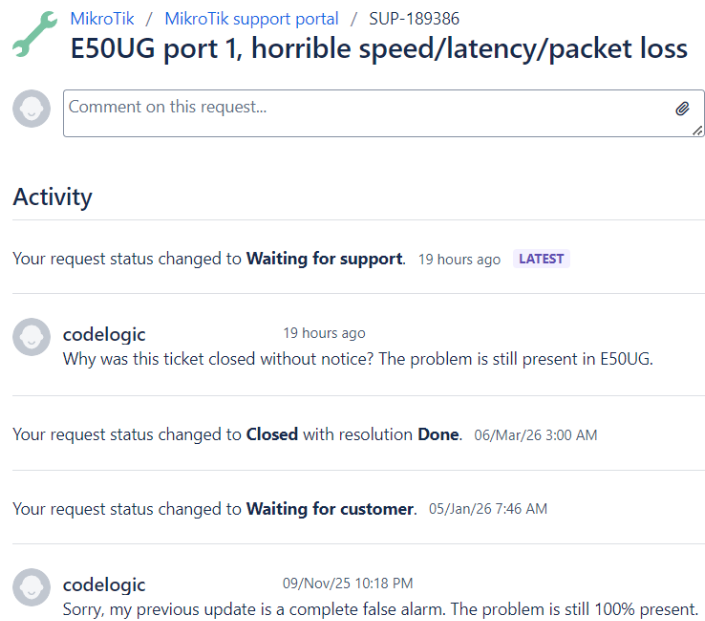
Mikrotik also recently closed my not quite one year old support ticket about this without any explanation, too:

Don’t get me wrong, I LIKE MikroTik, and their products, and really want them to succeed. Having said that, this is the dumbest, most frustrating support experience I’ve had in a long time. Like you, I’ve tested it against all versions including 7.23beta5. The problem remains.

Might be an auto-negotiation issue. I have them with the hap ax s with bidi modules on mikrotik switches like the crs112, fiberbox and such. Disable auto-negotiation and use fixed or stop advertising all but 1G-BaseT-full. Hap ax s is going to claim full duplex but like in my case the crs112 and fiberbox are going to say half-duplex and the link will work like shit.

@kanta if you read the post you’d know he is using ether1 copper port and is negotiating at 1Gb - he gets 900+ Mb download…

I can’t believe it, with a switch between the ONT and the hAP ax S, the upload is perfect. I’ll open a ticket right away to report this.

Thanks everyone for the help, as always this forum is an incredible resource.

lol, imagine that….when the device doesn’t get pause frames it magically works great, even though flow control IS off yeah? lol

Good luck with your ticket, maybe they won’t close yours without a resolution this time?

I really hope so. I've opened a ticket with the link to this discussion.
Thanks again for your help.

Thank you for posting. Perhaps MikroTik will do something about it and not decide to just let god knows how many hex refresh/hex s refresh/hap ax s units ship with completely broken flow control..

Only thinking aloud, but could ether2 and 3 be assembled in a "dumb" switch, and connect ether1 with ether2 and the ONT to ether3?

Or does the switch chip (EN7523) behave the same with pause frames?

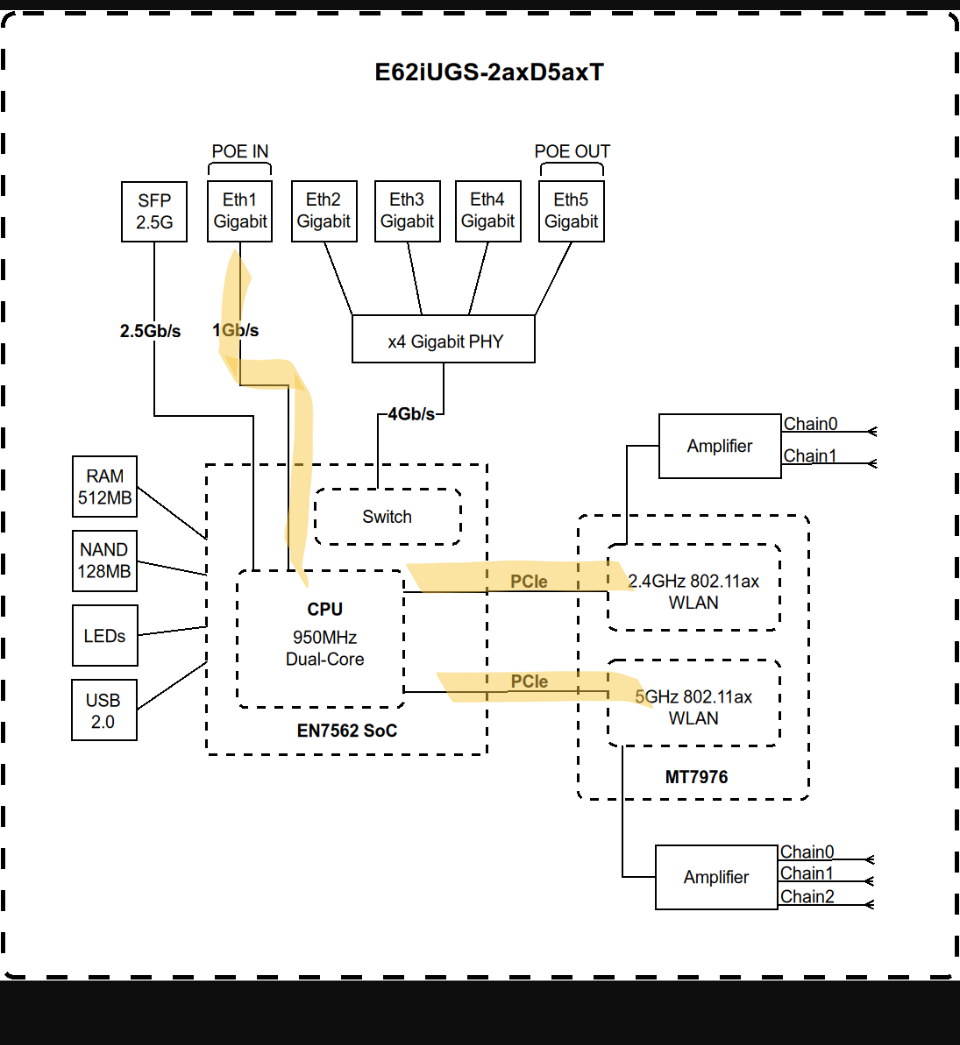
@jaclaz I have a hunch that your proposed experiment might also work - the switch ports don’t appear to behave the same as the ether1 port on EN7562CT, since only the ether1 port is attached direct to SoC per block diagram. Can’t say for sure though. Perhaps I’ll try this with my own E50UG sometime just to see.

@codelogic
I confirm that by using ether5 instead of ether1 as WAN, I achieve full upload speed (940 Mbps) even without a switch between the ONT and the hAP ax S.

Wired clients achieve full upload speed, while wireless clients are still limited to around 50 Mbps.

I don’t understand the reason...

My guess: ether5 is HW offloaded and therefore not going through cpu for wired clients; or first going through switch as seen in block diagram. wifi/wireless is directly connected to cpu (like ether1) and then you probably see the same issue you had on ether1.
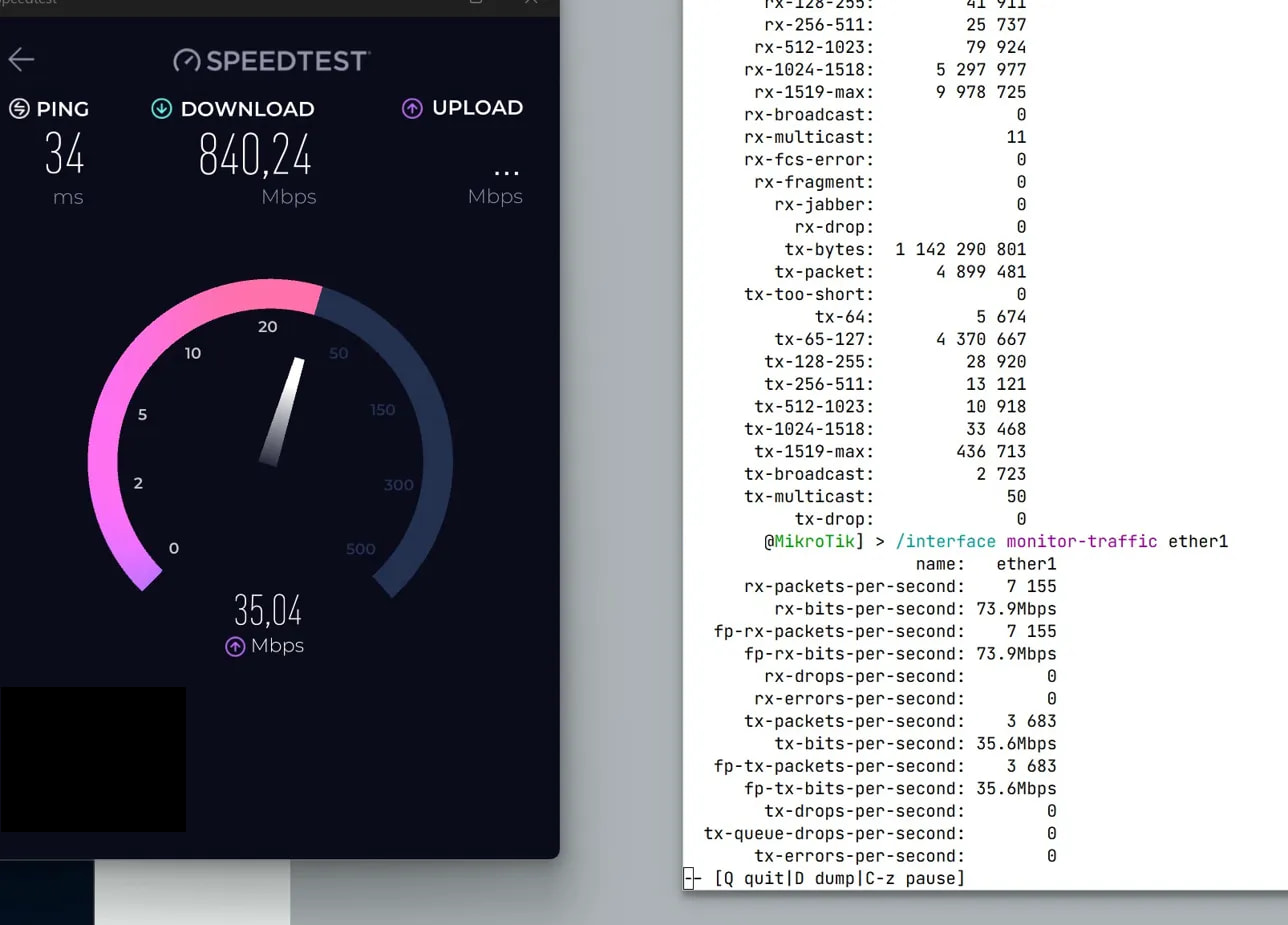
At this point I give up, only MikroTik can fix this bug.
Thanks.