Thank you, but I think this can be excluded, since in the config I posted here HAP AX S ultra-slow wifi performance with VLAN filtering - #5 by jaywalker, the guest wifi works at full speeds, while only the test wifi is slow - both use same frequencies and just different SSIDs.
Of course, I also tried different frequencies. And the issue occurs on both 2.4 and 5GHz (5GHz is pretty free), I double checked with scan and Wifi analyzer on mobile.
Yes, I have looked at the documentation, but the examples do not 100% fit my needs (and do not work with the new wifi drivers), so I adjusted them.
I need a hybrid port, because I want to avoid to restructure my whole existing network. I bought a Mikrotik exactly because I can configure it flexibly to support my use case...
I have the untagged traffic with pvid=10 on ether2, because ether1 on the HAP AX S does not support HW offloarding. That should be reflected in the config I posted.
I did not quite get it. How do you configure several SSIDs without assigning them to a bridge with VLAN Filtering enabled? Or did I get something completely wrong here?
When I take ether1 and sfp1 completely off the bridge, I still get extremly slow upload speeds. The CPU is ~3% load during that time, so it is not a CPU bottleneck due to missing HW offload.
/interface bridge vlan
add bridge=BR1 tagged=ether1,BR1 vlan-ids=10
add bridge=BR1 tagged=ether1,ether2 vlan-ids=20
add bridge=BR1 tagged=ether1,ether2 vlan-ids=30

# untagged can be made explicit, but is already set on /interface bridge port
With this change, you have a trunk port on ether1, a hybrid port on ether2 and you can manage the device (by adding the bridge to vlan id 10).
Be aware that your wifi settings are very limited, basically you say "do whatever". Making things explicit will help you debugging the problem a lot better.
@jaywalker I had similar symptoms few days ago, Old hAP Mikrotik - after enabling VLANs almost unusable WiFi (Configured via CAPSMAN to 10). Tried everything. What I noticed that etherX ports had “Actual Path Cost” higher (19 because of 100Mbit only), than the wlanX. CAPSMAN was unable to change wlanX Path Cost, so I simply defined “Path Cost” on the exterX ports (Bridge => Ports), STP tab lower than those 10 on wlan. Now the speed is perfect.
Thank you all in this thread for your advice and great support!
Since I couldn't manage to get the HAP AX S working properly, I returned it (I had a 14 day hassle-free return period which I used).
Instead, I ordered a HAP AX2 which arrived today.
I uploaded the same config that failed on the AX S (from this post: HAP AX S ultra-slow wifi performance with VLAN filtering - #5 by jaywalker) to the AX2, obviously with references to the SFP port removed.
Result: Everything seems to be working as expected.
So this definitely was an issue with the HAP AX S. However, I cannot tell whether it was an issue with my specific copy, or whether it is a general problem with AX S series.
I was interested to try out hAP AX S but decided to wait for hAP be3.
Anyway, looking through MikroTik website it looks the difference is significant:
ARM 64bit Vs. ARM 32bit
IPQ-6010 Vs. EN7562CT
CPU cores 4 Vs. 2
And block diagrams shows different radio chipset: QCN-5022/5052 Vs. MT7976. Two completely different devices. But have you measured CPU temperature and possible throttling under the load?
I'm working on something else today; I'll do some more testing this weekend.
But from what I've tested so far with the HAP AX S, the maximum download speed is 450 Mbps and the maximum upload speed is 150 Mbps.
Even though my phone is syncing at 2.4 Gbps on the 5.8 GHz Wi-Fi with the 160 MHz band active.
I haven't checked the router's temperature, but I've noticed that the router's CPU usage reaches about 80-85%!
I tested this with the HAP AX S, which manages everything automatically, and even in "bridge" mode, which only handles Wi-Fi and uses the rest in simple bridge mode.
But I'm still getting the same result. I tried with the default configuration, same thing. I installed the latest update, 7.20.7, but it didn't change anything.
It seems the CPU simply isn't delivering... or is it a bug with this router? Who knows. But it's so new that there aren't many posts about it online yet.
In configurations where Wifi worked for me on the AX S (i.e. without vlans), I was reaching about 450mbps download speed and approx. 300mbps upload.
I also noticed the 85% CPU load in these situations. Hence I guess the 450 mbps are already close to the maximum limit imposed by the CPU of the AX S.
I can confirm that the AX 2 is reaching about 800mpbs under the same (rather good) conditions.
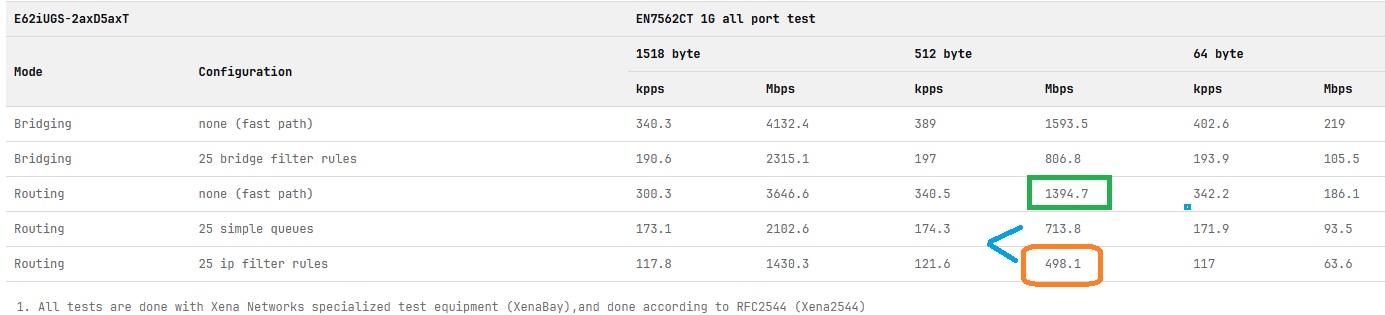
According to Mikrotik, all their test results are not using fasttrack.
In general at least in the past, most here use the 512 byte 25 IP filter rules to get a sense of real world performance. In this case one can see that would be around 500Mbps. They use perfect conditions and equipment and thus the ordinary mortal here probably sees slightly less.
Without any rules, the device claims to have a throughput of around 1.4Gbps
Now recently others have stated that hey you can do bettter if fastrack is enabled.
Although that may be true, on these lower end routers I dont think it makes a significant difference in throughput but perhaps makes the load lighter on the CPU...
What could be extrapolated perhaps is that one could expect to see some number in between (fast path no rules) and 25 ip filter rules and perhaps then the 25 simple queues number becomes closer to the mark. However, the feedback provided by two users Reaffirms the ole standby method of gauging reality.
I can confirm that I'm never able to get speeds higher than 450-500 Mbps on this router.
I tested the router in primary mode, managing the entire internet connection, with and without Fastrack. I've often seen better performance with Fastrack enabled on some lower-end routers. I also tested it in bridge mode, with only Wi-Fi enabled and the network managed by another router, but I always get the same result.
Even with a good Wi-Fi signal between my device and the router, the speed isn't there.
With the same configuration on my HAP AX2 in bridge mode, I can easily get 800 or even 900 Mbps.
I don't know if I'm missing something, or if it's a software bug, but I don't understand how it's possible to get faster Wi-Fi speeds on this router right now.