Support ticket ... why do you resist ? 
Did you try different devices? It might be a compatibility issue with the wifi client.
Yes, I tried with 2-3 devices on the router.
But seeing the CPU load at 85% for 450 Mbps, I don't see how it's possible to handle double that.
Now that I've completed further tests this weekend, I'll report the issue to Mikrotik and follow up with you here afterwards.
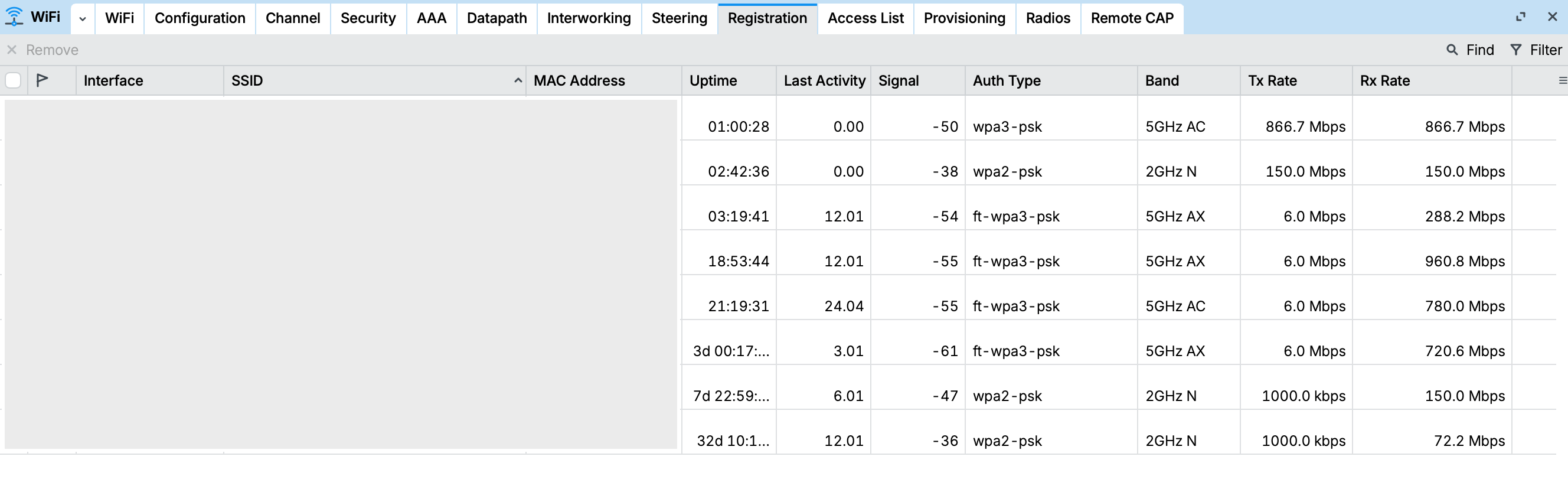
JFYI, another user has just posted about having great improvements with latest-latest development version:
When I compare my synchronization on Wi-Fi, with a hap ax2 I am at 1200 Mbps, then my speed test gives me 800@900 Mbps.
On ax S, if I am at 80 MHz I am also around 1200 Mbps on average, but my speed tests always give 400 @ 500 Mbps.
If I switch the 5.8 GHz network to 160 MHz, I sync over Wi-Fi at 2.4 Gig, but again, the speed never exceeds 400 @ 500 Mbps.
I tried the latest 7.21 update and it's still the same. I took the time this morning to try the development version, but it didn't make any difference for me.
I asked Mikrotik support if my results are what I should expect from the router, or if the 900 Mbps displayed on the product page is really possible. If so, how?
Did you get a response from Mikrotik support?
Yes this:
The 800-900 Mb/s throughput figure was obtained bridging 1500B frames generated by /tool/bandwidth-test in a single stream using UDP packets.
If you're experiencing significantly lower throughput, I would suggest checking:
- What the typical frame size is for test traffic and if IP fragmentation is not inflating the number of ethernet/wifi frames to be forwarded.
- If load is balanced evenly among available cores. To ensure in-order delivery, each connection (source and destination address, port combination) is handled by a single core.
In most real life setups the throughput will be lower than the 800-900 Mbps figure due to the CPU, this is why the hAP ax2 will outperform the hap ax S in both wired and wireless speed test results.
So I guess my results demonstrate the reality for this product.
New entries in 2026 Mikrotikish-English dictionary:
up to = roughly half of
Example sentence:
Mikrotikish:
Triple-chain 5 GHz radio (up to 900 Mbit/s throughput), dual-band Wi-Fi 6, 5x Gigabit Ethernet ports, and a 2.5G SFP.
English:
Triple-chain 5 GHz radio (roughly half of 900 Mbit/s throughput), dual-band Wi-Fi 6, 5x Gigabit Ethernet ports, and a 2.5G SFP.
real-world = only in our laboratories, with specially crafted setup and packets,
Example sentence:
Mikrotikish:
The new hAP ax S features a triple-chain 5 GHz radio that achieves real-world throughput of around 800–900 Mbit/s.
English:
The new hAP ax S features a triple-chain 5 GHz radio that achieves only in our laboratories, with specially crafted setup and packets, throughput of around 800–900 Mbit/s.
Is there already a "rtfum" topic for this dictionary?
I got similar results to you on the latest version (7.22.6), around 400 to 500 Mbps. Out of curiosity I started testing other firmware versions. On the latest LTS (7.21.14) it sits around 600 Mbps. On 7.23rc2 I managed to hit 725 and even 754 Mbps on a few speed tests, but it wasn't very consistent. The best results came from the factory firmware (7.20.6), where I could get speeds over 700 Mbps somewhat consistently, peaking at 724 and 739 Mbps. So the factory firmware ended up being both the fastest and the most stable in my testing.
Jacklaz that was some PURE EFFING GOLD right there………. Post of the day for me!! 
English:
The new hAP ax S features a triple-chain 5 GHz radio that achieves only in our laboratories, with specially crafted setup and packets, throughput of around 800–900 Mbit/s.
As for speeds, matters little if your device can wifi to the router at 900Mbps if the router can only talk to the internet at 400Mbps
Well, one might want to backup phones and laptops to NAS in an isolated from internet environment.
But there are two distinct issues:
- A let's say "very optimistic" speed advertised of 800/900
- The inconsistencies in actual speed achieved in customers setups.
A 400-500 compared to 700-750 in different (but very near) Ros versions makes not much sense, unless the good guys that develop the drivers throw them at the wall and see what sticks.
I don't see these added into the Mikrotikish<->English conversion table/dictionary
@Buckeye
I am thinking if it is fair to do so.
The entries in the existing dictionary are - strictly speaking - "Technical Mikrotikish".
These two are actually "Marketing Mikrotikish" and - all in all - they don't differ much from "Marketing English".
I've bought an hAP AX S recently that I wanted to use as a simple access point. Currently it isn't really usable because there's a weird bug that every 3s I get a latency spike on the wifi interfaces as if some packets can't through for a brief moment. I thought this must be some strange interference on a specific channel, but no, it only happens on the hAP AX S and on every channel. I don't have this problem at all with a different routerboard and with an AP from a different vendor. It also only happens on wifi. Via ethernet everything is fine. Also it happens with a range of different stations / clients like a MacBook, an iPhone, a Chromebook etc. while none of those devices show this problem with a different AP.
The setup is quite vanilla. Does anyone else have a similar problem? It's easier to see when you decrease the ping interval to something 0.05 btw, like this:
$ ping -i 0.05 <someip>
And this is my config:
[admin@hAP] > /export hide-sensitive
# 2026-05-28 20:14:55 by RouterOS 7.24beta1
# software id = <hidden>
#
# model = E62iUGS-2axD5axT
# serial number = <hidden>
/interface bridge
add admin-mac=04:F4:1C:CD:81:A7 auto-mac=no comment=defconf name=bridge
/interface wifi
set [ find default-name=wifi1 ] channel.band=2ghz-ax .skip-dfs-channels=10min-cac .width=20/40mhz configuration.mode=ap .ssid=MikroTik-CD81AC disabled=no security.authentication-types=wpa2-psk,wpa3-psk .ft=yes .ft-over-ds=yes
set [ find default-name=wifi2 ] channel.band=5ghz-ax .skip-dfs-channels=10min-cac .width=20/40/80mhz configuration.mode=ap .ssid=MikroTik-CD81AC disabled=no security.authentication-types=wpa2-psk,wpa3-psk .ft=yes .ft-over-ds=yes
/interface list
add comment=defconf name=LAN
/disk settings
set auto-media-interface=bridge
/interface bridge port
add bridge=bridge interface=all
/ip neighbor discovery-settings
set discover-interface-list=none
/interface list member
add comment=defconf interface=bridge list=LAN
/ip dhcp-client
add comment=defconf interface=bridge name=client1
/system ntp client
set enabled=yes
/tool mac-server
set allowed-interface-list=LAN
/tool mac-server mac-winbox
set allowed-interface-list=LAN
Lacking info, assuming you are on a private subnet on this AP.
For example purpose lets say its 192.168.1.0/24 subnet and you are assigning 192.168.1.2/24 to this device.
The first thing I would do is create the entries for the OffBridge access
- add the ip address for the OffBridge1
- add Offbridge1 to LAN interface list membership that you already have for the bridge
- modify interface ethernet as per below
- Plug your PC into ether1, change ipv4 settings to 192.168.77.2 and with username and password you should be in the router. Then make the rest of the following changes