does not allow to change count of partitions. If your router is unable to boot, it will still be able to boot into your other partitions. No restriction for crash recovery.
Just want to say that Repartitioning is not required. I just did it because I could. Going from 2 to 1 partition.
This is what I had to do. Though I’d share to save other intermediate Mikrotik noobs like me some time.
0. Export of my current configuration.
export show-sensitive file=config_export
1-3. Described above.
4. Noticed that huge chunks of my exported configuration from Step 0 was not imported. Because Device Mode is reset during this process.
5. Reconfigured Device Mode.
Backups of this configuration is half of what is what before Netinstalling. Cached data?
Seemingly better stability. Only my Google Nest Audio device is causing havoc on my 5Ghz WIFI. Moving it to 2.4Ghz is showing promising stability for now. But is not a solution to the issue. It must work on any HAPax2 WIFI interface.
Spoke too soon. Stability is not improving. It just took a little longer than I expected to break.
I’ll update the list if I learn more related to this procedure.
I originally did netinstall all my devices to the latest firmware (without applying a default config) and WiFi issues with Google Nest devices and my PS Portal were causing havoc. So, unfortunately, netinstall is not the solution in this case
As mentioned by some guys earlier, I think the issue is this change introduced in 7.15 → “wifi-qcom - updated driver”
Nonetheless, I’m staying on 7.14.3 until the problem is resolved (like a lot of people in this forum are doing)…
Exactly. I wish Mikrotik would release some test version of the latest ROS with the OLDER Wifi driver, just to prove the point. Sure, it could break some new features in 7.15+ versions, that were maybe implemented based on the updated Wifi drivers, but it would just be a testing version to confirm the problem IS the driver. This would help tremendously not to be chasing ghosts instead of really fixing the issue. Because this can drag for years seeing how Mikrotik actually gives a crap about it.
Just tested 7.19beta5. And had high hopes, but I’m sorry to say. There is no improvement.
Within the first 10 minutes Google devices and iPhones lost connectivity simultaneously. Will keep it running an hour or two before I roll back.
What’s new in 7.19beta5 (2025-Mar-12 12:42):
*) wifi - fixed incorrect attribution of 802.11be capability to 802.11ax APs in output of scan command (introduced in v7.19beta2);
*) wifi - fixed sending of reassociation response frames (introduced in v7.19beta2);
*) wifi - improved stability for wifi interfaces;
I have netinstalled a hAP ac² for other reasons and recreated the configuration from the text exports (i.e. no "invisible" data), nevertheless:
the Intel 201ax gets thrown out from an AP no matter what (20 MHz channels, 40 MHz channels, 80 MHz channels tried, not using those "not recommended" ones, running the latest driver from Intel pages) and has to connect to the other AP after 2-3 days of continuous run,
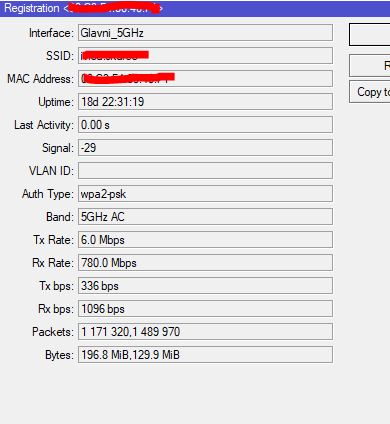
the iPhone keeps disconnecting and reconnecting even with that Apple-optimized dtim-period=3 on the respective /interface/wifi/configuration row, however the latter is only visible on the /interface/wifi/registration-table/print stats output, the user does not complain. Even an incoming "WiFi calling" call makes the phone re-establish the connection, I haven't tried to isolate it from the mobile network yet.
Leaving aside that the above are just the commonly experienced issues; according to this thread, there are more scenarios where a particular station can break things for the other ones. So I would not expect too much from a netinstall.
I don’t think it’s just the intel client’s problem. My Bosch dishwasher and Aqara IoT hub is also having the disconnecting problem and I doubt that it’s using an intel wifi chip.
My RTL8852AE in a Thinkpad L14 is rock solid.
But i also dont have any of the issues people have in this topic here.
And that is with Intel AX210 and BE200 cards too.
The only thing I noticed is that my Intel 2XX cards have a much more limited 5ghz spectrum compared to any other Wi-Fi card I got.
Including older Intel ones like the AC9260
Realtek 7722CE. I also have a Realtek 8832CU Wi-Fi 6 USB adapter and that feels more stable and of course faster. My experience is with hAP ax2 so slightly different setup.
7.19beta6 didn’t solve the problem. I even replaced AX200 with AX210, but nothing helps.
Android devices also lose network, especially on Android 9 or 10. Android 11 network just freezes for a while, but maybe they have a different Wi-Fi module than 9
Rolled back to 7.14.3
For me 7.18.2 seam to solved the problem, for example my Samsung soundbar which behaved the worst before now has 19 days uptime which was not possible after 7.15 update, it would sometimes disconnect several times per day..
I’m on 7.18.2 and the matter is not resolved for me. I still get disconnects. Only now the disconnection message is different “MACADDRESS”@5Ghz_BedroomAP- disconnected, not responding, signal strength -86"