Hap ax3 random wireless disconnects

Yes - I gave it 48 hours, it was unusable for me - Same symptoms with the drops, SSIDs dissappear briefly from the network list…then come back and rejoin. Kicks me off Zoom calls,etc.

Theres never anything meaningful in the logs

Back down to 7.14.3 and all is well again - at this point I think I will just have to accept that there is no point trying the new versions and settle for the stability over the new features. It’s for home use anyway, so not a huge issue, except for say some major as-yet-unknown security issue further down the line.

It is a shame that this has been going on for so long. My other Mikrotik buddies have mostly gone to TP-Link, but I am happy to stick with 7.14.3.

Forget it! The developers have stopped support, they do not use cheap models and are not aware of the problem. They also don’t want to believe that something might not work on their equipment! :frowning:

Any response from MT support? That is not real - so many uses have this issue and no feedback???
Do we have support case number so we can push them?

Today’s practice among developers is not to enter into a discussion about an issue when they have nothing to say and no fix to offer.
I’m afraid we’ll have to wait as long as it takes to get to the cause of the problem, or replace all Mikrotik WiFi devices with some other manufacturer’s.
Personally although I love RouterOS and Mikrotik routers I have lost faith that one day they will be able to offer the stability and capabilities that other WiFi device manufacturers currently offer.
WiFi has never been Mikrotik’s strong point and unfortunately it seems this is still true today.

Mine is SUP-172402. Not much happening. Support has run out of ideas and been quiet for 3-4 weeks now.

Dear all.

I have tried upgrading to last beta one more time using hAP ax3

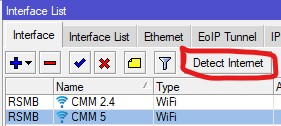
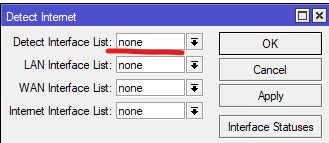
after that disabled “Detect interface list” on my wireless interfaces. Seems I don’t have Wi-Fi disconnects anymore.
Hope it will help you as well.
2.jpg
1.jpg

Rule #5 http://forum.mikrotik.com/t/the-twelve-rules-of-mikrotik-club/182164/1 :slight_smile: :slight_smile:

@mchernyshev Do you have any Chromecast devices in your network? Before upgrade, was your wireless only usable on ROS <=17.4.3?

I don’t have Chromecast devices. before I have used ROS 7.14.3 as last stable and didn’t check stable branch version today.
Last check was made on development branch and I have posted here after I have good results with disabled internet check without any additional checks.

oooo 7.18rc2 good bye :slight_smile:

channel: stable
installed-version: 7.14.3
latest-version: 7.18

Just tested 7.18. No improvement.
Issues after less than 10 minutes (with Google Nest Hub/Audio/Mini Speakers connected) causing full outage for all connected devices on the same WIFI master interface. And no, it is not DHCP related. Lease time is 24 hours.
And as always. Removing the Google Nest devices. Stability returns.
SUP-172402 updated.

I find it quite disconcerting that it’s been pinpointed that some change in 7.15beta9 is causing this (my gut feeling it’s the “wifi-qcom - updated driver” part) and it’s still not fixed / rolled back, almost a year later…

Exactly the same here - as soon as I connect my 2 x Google Nest Hubs and 2 x Google Nest Minis, then my devices start roaming like crazy between my 2 hAP ax2 devices (can easily roam a few hundred times in a day) and I also have loads of disconnects and reconnects as well. When I disconnect all the Nest devices then everything behaves really well on the network. I really don’t want to downgrade to 7.14.3, so sticking to the latest (7.18 as I write this) and keep my Nest devices disconnected for now…

eh I jump to 7.18… when only my mbp connected all works fine (almost - I had to change the country and go back from the new to the old one because I couldn’t connect to 5GHz). Today all pepople in home started working and… BUM. WIFI connected, but no traffic, can’t reconnect.. I fast downgrade to 7.14.3…

As I now mikrotik guys enabled many options that are compliant with the 5GHz ax standard in version higher than 7.14.3 and question is “what we must turn off in configuration on 7.18?” - as I think one/more devices can brick 5GHz - why mikrotik don’t make “fix” for handicapped devices?

Well, that is the key question we’re all trying to get answers on, but the onus seems to be on customers to prove the problem with laborious log gathering and support tickets, whereas you would have thought they could leverage the overwhelming (albeit perhaps anecdotal) evidence showing that everyone reports stability in 7.14.3 but not after and keep reverting back to it. Something must stand out to the devs. Alas, this has been going on for a long time, and my expectation now is to stick with 7.14.3. I value stability over a new UI that’s for sure.

OK, have to report back again. With my Google Nest devices turned off, all was going well, until I started using my PS Portal (Android based). After playing for about an hour, devices started roaming and disconnecting like crazy. Tried again the next day, and after about 30-40 mins of using the PS Portal, same thing - devices roaming and disconnecting.
So, I have actually downgraded my 2 x hAP ax2 units to 7.14.3 and kept my RB5009 on 7.18. Been using it like this for a few days now (with all Google Nest devices and my PS Portal connected) and everything is behaving really well.
As I’m using different versions on my caps (2 x hAP ax2) and my capsman (RB5009), I just have to be aware that some WiFi features will be incompatible (e.g. setting the “reselect interval” on capsman will have no affect on the caps).

As someone who manages a few hundred different sites that all use Mikrotik WiFi, I’ve noticed similar issues to what’s mentioned on threads like this.

One thing I’ve noticed with all Mikrotiks, is the need for NetInstall when anything weird happens. However, nobody ever things or wants to NetInstall as a matter of course for troubleshooting. In my professional experience, factory resets do not fix the problem.

I have seen dozens of “bugs” that are mentioned in this forum and on Reddit, that have been fixed when I perform two NetInstalls, one to the factory firmware that the device shipped with, without a default config, and another one to the latest build, also without a default config, and then I build it with my own script from scratch.

This has fixed a disturbing number of problems, even with brand new, fresh out of the box, Mikrotiks. It doesn’t matter if it’s a WiFi issue, a routing issues, an NTP client issue, a mangle issue, an LTE issue, a ping watchdog issue, a DHCP server issue, DHCP client issue.

Something is wrong with RouterOS, that is fixed with multiple NetInstalls. I think the main problem is, last I checked, NetInstall did not write zeros to the flash memory. While I understand this is not good for the hardware, it’s better than throwing it out and buying a new device.

So, everyone on here is talking about all these problems that aren’t fixed by upgrading.

I can’t really take any of these data points seriously until you guys start NetInstalling and building them from scratch without the default configs. If they still do it after that, then we have eliminated memory corruption from the problem.

There are no tools within RouterOS that have ever detected memory corruption for me. However, I have had all sorts of gremlins disappear over the years with this method.

As much as people will complain that what I’m saying shouldn’t be relevant, I think you guys need to try it, and prove it’s not relevant.

Did like you suggested

Steps

  1. Repartition (includes formating)
  2. Netinstall Factory Firmware (7.6) - No default configuration
  3. Netinstall Latest Firmware (7.19b2) + Configure with Script

and the problem persists.

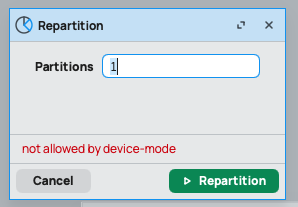
How do you “repartition” before a Netinstall? I just tried on an old RB device:
Screenshot 2025-03-04 at 20.06.56.png

As message indicates: you first have to enable this in device mode.