Capsman config
2025-11-18 13:47:49 by RouterOS 7.21beta8
software id = 5EJC-Z10J
model = RB5009UPr+S+
serial number =
/interface bridge
add name=bridge1
/interface ethernet
set [ find default-name=ether1 ] l2mtu=1514
set [ find default-name=ether2 ] l2mtu=1514
set [ find default-name=ether3 ] l2mtu=1514
set [ find default-name=ether4 ] l2mtu=1514
set [ find default-name=ether5 ] l2mtu=1514
set [ find default-name=ether6 ] l2mtu=1514
set [ find default-name=ether7 ] l2mtu=1514
set [ find default-name=ether8 ] l2mtu=1514
set [ find default-name=sfp-sfpplus1 ] disabled=yes l2mtu=1514
/interface list
add name=LAN
/interface wifi channel
add band=2ghz-ax frequency=2412,2437,2462 name=AX_2G
add band=5ghz-ax frequency=5180,5200,5220,5240,5745,5765,5785,5805,5825 name=
AX_5G
add band=2ghz-ax frequency=2412 name=AX_2G_ch01_2412
add band=2ghz-ax frequency=2437 name=AX_2G_ch06_2437
add band=2ghz-ax frequency=2462 name=AX_2G_ch11_2462
add band=5ghz-ax frequency="5260,5280,5300,5240,5320,5500,5520,5540,5560,5580,
5600,5620,5640,5660,5680,5700,5720" name=AX_5G_DFS
add band=5ghz-ax frequency=5180 name=AX_5G_ch36_5180
add band=5ghz-ax frequency=5200 name=AX_5G_ch40_5200
add band=5ghz-ax frequency=5220 name=AX_5G_ch44_5220
add band=5ghz-ax frequency=5240 name=AX_5G_ch48_5240
add band=5ghz-ax frequency=5745 name=AX_5G_ch159_5745
add band=5ghz-ax frequency=5765 name=AX_5G_ch153_5765
add band=5ghz-ax frequency=5785 name=AX_5G_ch157_5785
add band=5ghz-ax frequency=5805 name=AX_5G_ch161_5805
add band=5ghz-ax frequency=5825 name=AX_5G_ch165_5825
add band=2ghz-ax frequency=2417 name=AX_2G_ch02_2417
add band=2ghz-ax frequency=2422 name=AX_2G_ch03_2422
add band=2ghz-ax frequency=2427 name=AX_2G_ch04_2427
add band=2ghz-ax frequency=2432 name=AX_2G_ch05_2432
add band=2ghz-ax frequency=2442 name=AX_2G_ch07_2442
add band=2ghz-ax frequency=2447 name=AX_2G_ch08_2447
add band=2ghz-ax frequency=2452 name=AX_2G_ch09_2452
add band=2ghz-ax frequency=2457 name=AX_2G_ch10_2457
add band=2ghz-ax frequency=2467 name=AX_2G_ch12_2467
add band=2ghz-ax frequency=2472 name=AX_2G_ch13_2472
add band=2ghz-n frequency=2412,2437,2462 name=N_2G
add band=5ghz-ac frequency=5180,5200,5220,5240,5745,5765,5785,5805,5825 name=
AC_5G
add band=2ghz-n frequency=2412 name=N_2G_ch01_2412
add band=2ghz-n frequency=2437 name=N_2G_ch06_2437
add band=2ghz-n frequency=2462 name=N_2G_ch11_2462
add band=5ghz-ac frequency="5260,5280,5300,5240,5320,5500,5520,5540,5560,5580,
5600,5620,5640,5660,5680,5700,5720" name=AC_5G_DFS
add band=5ghz-ac frequency=5180 name=AC_5G_ch36_5180
add band=5ghz-ac frequency=5200 name=AC_5G_ch40_5200
add band=5ghz-ac frequency=5220 name=AC_5G_ch44_5220
add band=5ghz-ac frequency=5240 name=AC_5G_ch48_5240
add band=5ghz-ac frequency=5745 name=AC_5G_ch159_5745
add band=5ghz-ac frequency=5765 name=AC_5G_ch153_5765
add band=5ghz-ac frequency=5785 name=AC_5G_ch157_5785
add band=5ghz-ac frequency=5805 name=AC_5G_ch161_5805
add band=5ghz-ac frequency=5825 name=AC_5G_ch165_5825
add band=2ghz-n frequency=2417 name=N_2G_ch02_2417
add band=2ghz-n frequency=2422 name=N_2G_ch03_2422
add band=2ghz-n frequency=2427 name=N_2G_ch04_2427
add band=2ghz-n frequency=2432 name=N_2G_ch05_2432
add band=2ghz-n frequency=2442 name=N_2G_ch07_2442
add band=2ghz-n frequency=2447 name=N_2G_ch08_2447
add band=2ghz-n frequency=2452 name=N_2G_ch09_2452
add band=2ghz-n frequency=2457 name=N_2G_ch10_2457
add band=2ghz-n frequency=2467 name=N_2G_ch12_2467
add band=2ghz-n frequency=2472 name=N_2G_ch13_2472
/interface wifi datapath
add disabled=no name=datapath1
/interface wifi security
add authentication-types=wpa2-psk disable-pmkid=yes disabled=no encryption=""
ft=yes ft-over-ds=yes name=sec1
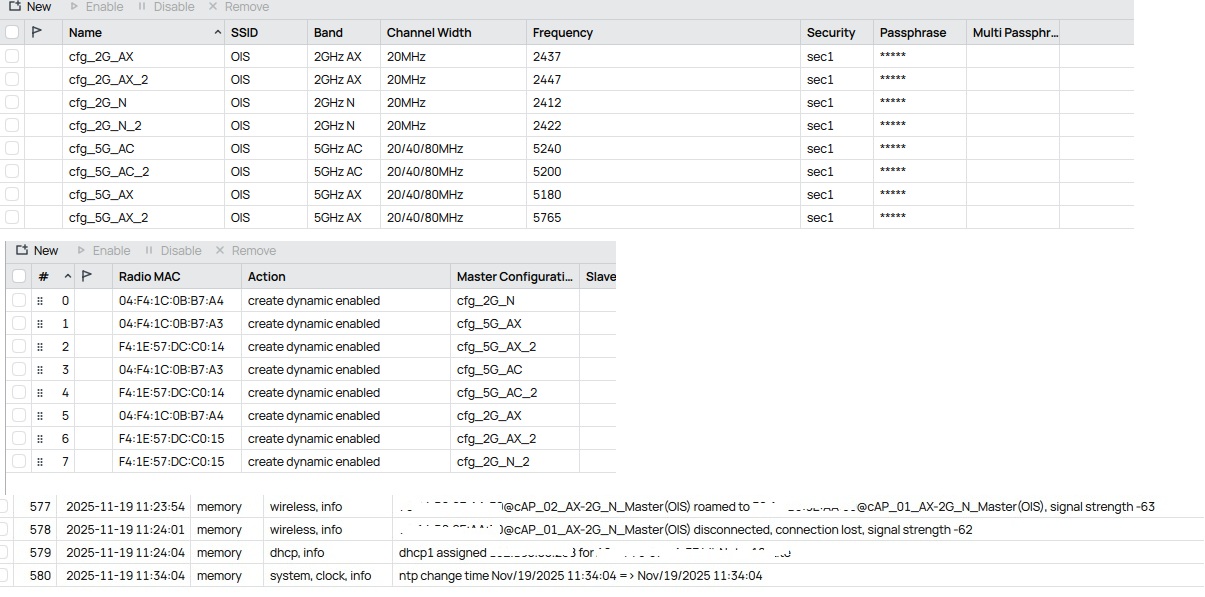
/interface wifi configuration
add channel=N_2G country=Russia datapath=datapath1 disabled=no mode=ap name=
cfg_2G_N security=sec1 ssid=OIS
add channel=AX_2G country=Russia datapath=datapath1 disabled=no mode=ap name=
cfg_2G_AX security=sec1 ssid=OIS
add channel=AX_5G country=Russia datapath=datapath1 disabled=no mode=ap name=
cfg_5G_AX security=sec1 ssid=OIS
add channel=AC_5G country=Russia datapath=datapath1 disabled=no mode=ap name=
cfg_5G_AC security=sec1 ssid=OIS
/interface wifi steering
add disabled=no name=steering1 neighbor-group=dynamic-OIS-dbcadb6c rrm=yes
wnm=yes
/ip pool
add name=dhcp_pool1 ranges=192.168.88.2-192.168.88.254
add name=dhcp_pool2 ranges=192.168.88.2-192.168.88.254
/ip dhcp-server
add address-pool=dhcp_pool2 interface=bridge1 name=dhcp1
/interface bridge port
add bridge=bridge1 comment=LAN interface=ether2
add bridge=bridge1 interface=ether3
add bridge=bridge1 interface=ether4
add bridge=bridge1 interface=ether5
add bridge=bridge1 interface=ether6
add bridge=bridge1 interface=ether7
add bridge=bridge1 interface=ether8
/ip firewall connection tracking
set udp-timeout=10s
/ip neighbor discovery-settings
set discover-interface-list=LAN
/interface list member
add interface=bridge1 list=LAN
/interface ovpn-server server
add mac-address= name=ovpn-server1
/interface wifi capsman
set enabled=yes interfaces=bridge1 package-path="" require-peer-certificate=
no upgrade-policy=none
/interface wifi provisioning
add action=create-dynamic-enabled disabled=no master-configuration=cfg_2G_N
name-format=%I-2G_N_Master supported-bands=2ghz-n
add action=create-dynamic-enabled disabled=no master-configuration=cfg_5G_AX
name-format=%I-5G_AX_Master supported-bands=5ghz-ax
add action=create-dynamic-enabled disabled=no master-configuration=cfg_5G_AC
name-format=%I-5G_AC_Master supported-bands=5ghz-ac
add action=create-dynamic-enabled disabled=no master-configuration=cfg_2G_AX
name-format=%I-2G_AX_Master supported-bands=2ghz-ax
/ip address
add address=192.168.88.1/24 interface=bridge1 network=192.168.88.0
add address=81.90.212.158/30 comment=WAN interface=ether1 network=
81.90.212.156
/ip cloud
set update-time=no
/ip dhcp-server lease
add address=192.168.88.239 client-id=1:4:f4:1c:b:b7:a1 mac-address=
04:F4:1C:0B:B7:A1 server=dhcp1
add address=192.168.88.220 client-id=1:f4:1e:57:dc:c0:12 mac-address=
F4:1E:57:DC:C0:12 server=dhcp1
/ip dhcp-server network
add address=192.168.88.0/24 gateway=192.168.88.1
/ip dns
set servers=81.90.208.3,81.90.208.4
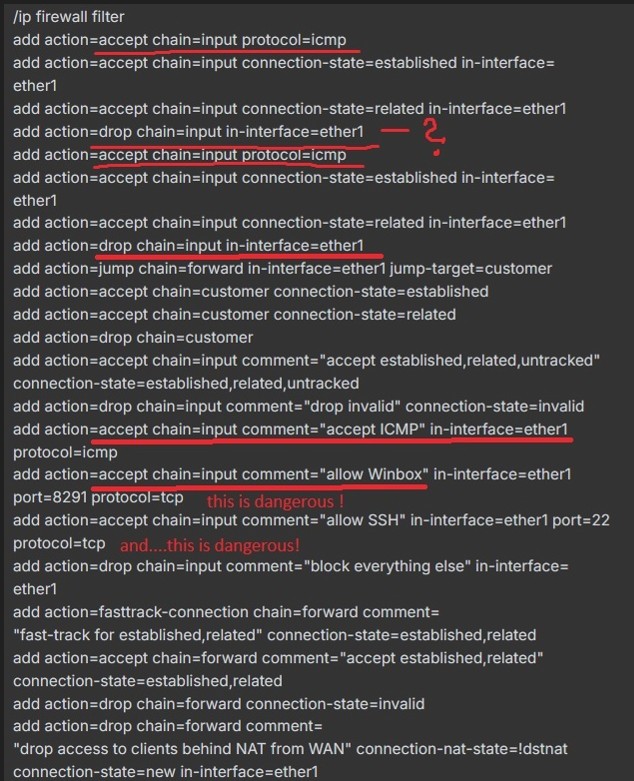
/ip firewall filter
add action=accept chain=input protocol=icmp
add action=accept chain=input connection-state=established in-interface=
ether1
add action=accept chain=input connection-state=related in-interface=ether1
add action=drop chain=input in-interface=ether1
add action=accept chain=input protocol=icmp
add action=accept chain=input connection-state=established in-interface=
ether1
add action=accept chain=input connection-state=related in-interface=ether1
add action=drop chain=input in-interface=ether1
add action=jump chain=forward in-interface=ether1 jump-target=customer
add action=accept chain=customer connection-state=established
add action=accept chain=customer connection-state=related
add action=drop chain=customer
add action=accept chain=input comment="accept established,related,untracked"
connection-state=established,related,untracked
add action=drop chain=input comment="drop invalid" connection-state=invalid
add action=accept chain=input comment="accept ICMP" in-interface=ether1
protocol=icmp
add action=accept chain=input comment="allow Winbox" in-interface=ether1
port=8291 protocol=tcp
add action=accept chain=input comment="allow SSH" in-interface=ether1 port=22
protocol=tcp
add action=drop chain=input comment="block everything else" in-interface=
ether1
add action=fasttrack-connection chain=forward comment=
"fast-track for established,related" connection-state=established,related
add action=accept chain=forward comment="accept established,related"
connection-state=established,related
add action=drop chain=forward connection-state=invalid
add action=drop chain=forward comment=
"drop access to clients behind NAT from WAN" connection-nat-state=!dstnat
connection-state=new in-interface=ether1
/ip firewall nat
add action=masquerade chain=srcnat out-interface=ether1
/ip ipsec profile
set [ find default=yes ] dpd-interval=2m dpd-maximum-failures=5
/ip route
add disabled=no dst-address=0.0.0.0/0 gateway=81.90.212.157 routing-table=
main
/ip service
set ftp disabled=yes
set telnet disabled=yes
set www disabled=yes
set ssh port=2200
set winbox address=192.168.88.0/24
set api disabled=yes
/ip ssh
set strong-crypto=yes
/ip upnp interfaces
add interface=ether1 type=external
add interface=ether2 type=internal
add interface=ether3 type=internal
add interface=ether4 type=internal
add interface=ether5 type=internal
add interface=ether6 type=internal
add interface=ether7 type=internal
add interface=ether8 type=internal
add interface=bridge1 type=internal
/system clock
set time-zone-name=Asia/Yekaterinburg
/system ntp client
set enabled=yes
/system ntp client servers
add address=
add address=
/system package update
set channel=testing
/tool bandwidth-server
set enabled=no
/tool mac-server
set allowed-interface-list=LAN
/tool mac-server mac-winbox
set allowed-interface-list=LAN
1sp Cap
2025-11-18 14:07:41 by RouterOS 7.21beta8
software id = VVUZ-XUK6
model = cAPGi-5HaxD2HaxD
serial number =
/interface bridge
add name=bridgeLocal
/interface ethernet switch
set 0 cpu-flow-control=yes
/interface wifi datapath
add bridge=bridgeLocal disabled=no name=capdp
/interface wifi
managed by CAPsMAN 192.168.88.1, traffic processing on CAP
mode: AP, SSID: OIS, channel: 5745/ax/Ceee
set [ find default-name=wifi1 ] configuration.manager=capsman .mode=ap
disabled=no
/interface wifi
managed by CAPsMAN 192.168.88.1, traffic processing on CAP
mode: AP, SSID: OIS, channel: 2462/n/eC
set [ find default-name=wifi2 ] configuration.manager=capsman datapath=capdp
disabled=no
/interface bridge port
add bridge=bridgeLocal interface=ether1
add bridge=bridgeLocal interface=ether2
/ip neighbor discovery-settings
set discover-interface-list=!dynamic
/ipv6 settings
set disable-ipv6=yes forward=no
/interface wifi cap
set caps-man-addresses=192.168.88.1 enabled=yes slaves-datapath=capdp
/ip dhcp-client
add comment=defconf interface=bridgeLocal
/system clock
set time-zone-name=Asia/Yekaterinburg
/system identity
set name=cAP_01_AX
/system note
set show-at-login=no
/system ntp client
set enabled=yes
/system ntp client servers
add address=
add address=
2nd Cap
2025-11-18 14:09:55 by RouterOS 7.21beta8
software id = WV5I-Q6R7
model = cAPGi-5HaxD2HaxD
serial number =
/interface bridge
add name=bridgeLocal
/interface ethernet switch
set 0 cpu-flow-control=yes
/interface wifi datapath
add bridge=bridgeLocal disabled=no name=capdp
/interface wifi
managed by CAPsMAN 192.168.88.1, traffic processing on CAP
mode: AP, SSID: OIS, channel: 5745/ax/Ceee
set [ find default-name=wifi1 ] configuration.manager=capsman datapath=capdp
disabled=no
managed by CAPsMAN 192.168.88.1, traffic processing on CAP
mode: AP, SSID: OIS, channel: 2462/n/eC
set [ find default-name=wifi2 ] configuration.manager=capsman datapath=capdp
disabled=no
/interface bridge port
add bridge=bridgeLocal interface=ether1
add bridge=bridgeLocal interface=ether2
/ip neighbor discovery-settings
set discover-interface-list=!dynamic
/ipv6 settings
set disable-ipv6=yes forward=no
/interface wifi cap
set caps-man-addresses=192.168.88.1 enabled=yes slaves-datapath=capdp
/ip dhcp-client
add comment=defconf interface=bridgeLocal
/system clock
set time-zone-name=Asia/Yekaterinburg
/system identity
set name=cAP_02_AX
/system ntp client
set enabled=yes
/system ntp client servers
add address=
add address=
 Printer: Brother DCP-T710W
 Laptops: Intel AX201 vs AX211
 Access Points
