ikir
October 31, 2026, 6:37am
1
Hi all! I'm nowhere expert as most users here but I'll do my best!
I've bought my first Mikrotik few weeks ago: hAP be lite, since I wanted a cheap but highly configurable router. I found the configuration quite hardcore but I did it. Sadly I've noticed that after about a day if I game online I see other players often teleporting like there are lost packets, and if I do the server myself is worse for everyone. I run few firewall rules, nothing special. If I reboot the rooter, everything are great again for a while, no lag at all.
I've tried to update my router often in the case it was youth issue... but then 7.25 came and I lost a day because nothing was working at all... then I returned to 7.24 and everything is working at least for a while but the lag issue come back after a while.
Anyone experiencing something similar? Any suggestion?
I was using a FritxBox router before hAP be lite, even if is more home/SOHO it was incredibly stable.
drotz
November 1, 2026, 12:14am
3
start by sending us a configuration export, so we can look at what you (didn't) configured.
/export hide-sensitive file="HapBeLiteIkir"
then you paste it in here using code formatting and putting "RouterOS behind the " ` ".
example code:
/system/device-mode/print
m4rk3J
November 1, 2026, 12:47am
4
The same router (currently 7.26beta1), traffic routed htrough WireGuard VPN (both IPv6 and v4) to the VPS in DC via Dual WAN (failover)... currently over a Wi-Fi ISP.
As the user above me wrote, this will require configuration export and RouterOS version. Personally I have no issues with either a cable or Wi-Fi connection to hAP be lite, but I don’t use defconf ... - I set everything up from 0 myself.
ikir
November 1, 2026, 9:16am
5
Hej via ethernet it works fine (tested with a VM via hypervisor with ethernet) the packet loss happens only via Wi-Fi. Tested on MacBook Pro 14" M5 Pro macOS 27.2 and MacBook Air 13" M5 macOS 27.2, but also on a ProBook with Ubuntu 26 mediated Wi-Fi AX
ikir
November 1, 2026, 9:21am
6
# 2026-11-01 10:09:34 by RouterOS 7.24.5
# software id = 9KTK-0QXB
#
# model = A42G-HbeP
# serial number = HMM0BAM496F
/interface bridge
add admin-mac=D0:EA:11:CA:57:C9 auto-mac=no comment=defconf name=bridge
/interface wifi
add configuration.mode=ap .ssid="Vegan Wi-Fi" disabled=no mac-address=\
    D2:EA:11:CA:57:CC mld-name=mld-d0ea11ca57cc name=mld1 \
    security.authentication-types=wpa3-psk
set [ find default-name=wifi1 ] channel.band=2ghz-be .width=20/40mhz \
    configuration.mode=ap .ssid="Vegan Wi-Fi" disabled=no mld-interface=mld1 \
    security.authentication-types=wpa2-psk,wpa3-psk .ft=no .ft-over-ds=no
set [ find default-name=wifi2 ] channel.band=5ghz-be .skip-dfs-channels=all \
    .width=20/40/80mhz configuration.mode=ap .ssid="Vegan Wi-Fi" disabled=no \
    mld-interface=mld1 security.authentication-types=wpa2-psk,wpa3-psk .ft=no \
    .ft-over-ds=no
add channel.band=2ghz-ax configuration.mode=ap .ssid=iksnet-lab disabled=no \
    mac-address=D2:EA:11:CA:57:CE master-interface=wifi1 name=wifi3
/interface vlan
add comment="VLAN WiC" interface=ether1 name=WAN-VLAN vlan-id=835
/interface pppoe-client
add add-default-route=yes comment="WAN WiC" disabled=no interface=WAN-VLAN \
    name=WiC-PPOE user=ac17624135511
/interface list
add comment=defconf name=WAN
add comment=defconf name=LAN
/interface wifi steering
add 2g-probe-delay=yes disabled=no name=steering-home rrm=yes wnm=yes
/ip pool
add comment="SOHO Pool" name=dhcp ranges=192.168.178.20-192.168.178.199
add comment="VPN Pool" name=vpn_pool ranges=192.168.177.0/26
/ip dhcp-server
add address-pool=dhcp interface=bridge name=defconf
/ppp profile
add dns-server=1.1.1.1,1.0.0.1 local-address=192.168.177.1 name=l2tp \
    remote-address=vpn_pool
/disk settings
set auto-media-interface=bridge auto-media-sharing=yes auto-smb-sharing=yes
/interface bridge filter
# no interface
add action=drop chain=forward in-interface=*B
# no interface
add action=drop chain=forward out-interface=*B
add action=drop chain=forward in-interface=wifi3
add action=drop chain=forward out-interface=wifi3
/interface bridge port
add bridge=bridge comment=defconf interface=ether2
add bridge=bridge comment=defconf interface=ether3
add bridge=bridge comment=defconf interface=ether4
add bridge=bridge comment=defconf interface=mld1
add bridge=bridge interface=*B
add bridge=bridge interface=wifi3
add bridge=bridge interface=wifi2
add bridge=bridge interface=wifi1
/ip neighbor discovery-settings
set discover-interface-list=LAN
/interface l2tp-server server
set authentication=mschap2 default-profile=l2tp enabled=yes use-ipsec=\
    required
/interface list member
add comment=defconf interface=bridge list=LAN
add comment=defconf interface=ether1 list=WAN
add interface=WiC-PPOE list=WAN
/ip address
add address=192.168.178.1/24 comment=defconf interface=bridge network=\
    192.168.178.0
/ip dhcp-client
add comment=defconf interface=ether1 name=client1
/ip dhcp-server lease
add address=192.168.178.7 comment="MacBook Pro di ikir" mac-address=\
    FC:B2:14:AC:83:17
add address=192.168.178.2 comment=pfSense mac-address=00:0C:29:19:9F:8B
add address=192.168.178.200 comment=srvhypervisor mac-address=\
    30:56:0F:09:31:95
add address=192.168.178.250 comment=srviksnet01 mac-address=1C:83:41:32:EA:3D
add address=192.168.178.251 comment=srviksnet02 mac-address=00:0C:29:34:C3:01
add address=192.168.178.252 comment=srviksnet03 mac-address=00:0C:29:F0:38:54
/ip dhcp-server network
add address=192.168.178.0/24 comment=defconf dns-server=192.168.178.1 \
    gateway=192.168.178.1 netmask=24
/ip dns
set allow-remote-requests=yes servers=1.1.1.1,1.0.0.1
/ip dns static
add address=192.168.178.1 comment=defconf name=router.lan type=A
/ip firewall address-list
add address=192.168.178.200 comment="Server list hairpin masquerade" list=\
    "Server masquerade"
add address=192.168.178.2 comment="Server list hairpin masquerade" list=\
    "Server masquerade"
add address=192.168.178.250 comment="Server list hairpin masquerade" list=\
    "Server masquerade"
add address=192.168.178.251 comment="Server list hairpin masquerade" list=\
    "Server masquerade"
add address=192.168.178.252 comment="Server list hairpin masquerade" list=\
    "Server masquerade"
/ip firewall filter
add action=accept chain=forward comment="defconf: accept in ipsec policy" \
    ipsec-policy=in,ipsec
add action=accept chain=forward comment="defconf: accept out ipsec policy" \
    ipsec-policy=out,ipsec
add action=accept chain=input comment="VPN IKE" dst-port=500,1701,4500 \
    protocol=udp
add action=accept chain=input comment="VPN ESP" protocol=ipsec-esp
add action=fasttrack-connection chain=forward comment="defconf: fasttrack" \
    connection-state=established,related
add action=accept chain=forward comment=\
    "defconf: accept established,related, untracked" connection-state=\
    established,related,untracked
add action=drop chain=forward comment="defconf: drop invalid" \
    connection-state=invalid
add action=drop chain=forward comment=\
    "defconf: drop all from WAN not DSTNATed" connection-nat-state=!dstnat \
    in-interface-list=WAN
add action=accept chain=input protocol=icmp
add action=accept chain=input connection-state=established
add action=accept chain=input connection-state=related
add action=drop chain=input in-interface-list=!LAN
/ip firewall nat
add action=masquerade chain=srcnat comment="Hairpin local masquerade TCP" \
    dst-address-list="Server masquerade" in-interface=bridge protocol=tcp \
    src-address=192.168.178.0/24
add action=masquerade chain=srcnat comment="Hairpin local masquerade UDP" \
    dst-address-list="Server masquerade" out-interface=bridge protocol=udp \
    src-address=192.168.178.0/24
add action=masquerade chain=srcnat comment="defconf: masquerade" \
    ipsec-policy=out,none out-interface-list=WAN
add action=dst-nat chain=dstnat comment="MacBook Pro Remio" dst-address=\
    31.25.35.72 dst-port=50007 in-interface=WiC-PPOE protocol=udp \
    to-addresses=192.168.178.7 to-ports=50007
add action=dst-nat chain=dstnat comment="MacBook Pro di ikir VNC TCP" \
    dst-port=5907 in-interface=WiC-PPOE protocol=tcp to-addresses=\
    192.168.178.7 to-ports=5907
add action=dst-nat chain=dstnat comment="MacBook pro di ikir VNC UDP" \
    dst-port=5907 in-interface=WiC-PPOE protocol=udp to-addresses=\
    192.168.178.7 to-ports=5907
add action=dst-nat chain=dstnat comment=\
    "pfSense RemoteDesktop route TCP local" dst-address=31.25.35.72 dst-port=\
    53389 in-interface=bridge protocol=tcp src-address=192.168.178.0/24 \
    to-addresses=192.168.178.2 to-ports=3389
add action=dst-nat chain=dstnat comment="pfSense RemoteDesktop route TCP" \
    dst-port=53389 in-interface=WiC-PPOE protocol=tcp to-addresses=\
    192.168.178.2 to-ports=3389
add action=dst-nat chain=dstnat comment=\
    "pfSense RemoteDesktop route UDP local" dst-address=31.25.35.72 dst-port=\
    53389 in-interface=bridge protocol=udp src-address=192.168.178.0/24 \
    to-addresses=192.168.1.2 to-ports=3389
add action=dst-nat chain=dstnat comment="pfSense RemoteDesktop route UDP" \
    dst-port=53389 in-interface=WiC-PPOE protocol=udp to-addresses=\
    192.168.178.2 to-ports=3389
add action=dst-nat chain=dstnat comment="srvhypervisor HTTPS local" \
    dst-address=31.25.35.72 dst-port=443 in-interface=bridge protocol=tcp \
    src-address=192.168.178.0/24 to-addresses=192.168.178.200 to-ports=443
add action=dst-nat chain=dstnat comment="srvhypervisor HTTPS" dst-port=443 \
    in-interface=WiC-PPOE protocol=tcp to-addresses=192.168.178.200 to-ports=\
    443
add action=dst-nat chain=dstnat comment="srvhypervisor HTTP local" \
    dst-address=31.25.35.72 dst-port=80 in-interface=bridge protocol=tcp \
    src-address=192.168.178.0/24 to-addresses=192.168.178.200 to-ports=80
add action=dst-nat chain=dstnat comment="srvhypervisor HTTP" dst-port=80 \
    in-interface=WiC-PPOE protocol=tcp to-addresses=192.168.178.200 to-ports=\
    80
add action=dst-nat chain=dstnat comment="srvhypervisor SSH local" \
    dst-address=31.25.35.72 dst-port=2222 in-interface=bridge protocol=tcp \
    src-address=192.168.178.0/24 to-addresses=192.168.178.200 to-ports=22
add action=dst-nat chain=dstnat comment="srvhypervisor SSH" dst-port=2222 \
    in-interface=WiC-PPOE protocol=tcp to-addresses=192.168.178.200 to-ports=\
    22
add action=dst-nat chain=dstnat comment="srviksnet01 VNC TCP local" \
    dst-address=31.25.35.72 dst-port=5951 in-interface=bridge protocol=tcp \
    src-address=192.168.178.0/24 to-addresses=192.168.178.250 to-ports=5951
add action=dst-nat chain=dstnat comment="srviksnet01 VNC TCP" dst-port=5951 \
    in-interface=WiC-PPOE protocol=tcp to-addresses=192.168.178.250 to-ports=\
    5951
add action=dst-nat chain=dstnat comment="srviksnet01 VNC UDP local" \
    dst-address=31.25.35.72 dst-port=5951 in-interface=bridge protocol=udp \
    src-address=192.168.178.0/24 to-addresses=192.168.178.250 to-ports=5951
add action=dst-nat chain=dstnat comment="srviksnet01 VNC UDP" dst-port=5951 \
    in-interface=WiC-PPOE protocol=udp to-addresses=192.168.178.250 to-ports=\
    5951
add action=dst-nat chain=dstnat comment="srviksnet01 VNC HTTP" dst-port=5800 \
    in-interface=WiC-PPOE protocol=tcp to-addresses=192.168.178.250 to-ports=\
    5800
add action=dst-nat chain=dstnat comment="srviksnet01 Steam TCP" dst-port=\
    27015 in-interface=WiC-PPOE protocol=tcp to-addresses=192.168.178.250 \
    to-ports=27015
add action=dst-nat chain=dstnat comment="srviksnet01 Steam TCP local" \
    dst-address=31.25.35.72 dst-port=27015 in-interface=bridge protocol=tcp \
    src-address=192.168.178.0/24 to-addresses=192.168.178.200 to-ports=27015
add action=dst-nat chain=dstnat comment=\
    "srviksnet01 Insurgency 2014 Public TCP" dst-port=27050-27060 \
    in-interface=WiC-PPOE protocol=tcp to-addresses=192.168.178.250 to-ports=\
    27050-27060
add action=dst-nat chain=dstnat comment=\
    "srviksnet01 Insurgency 2014 Public UDP" dst-port=27050-27060 \
    in-interface=WiC-PPOE protocol=udp to-addresses=192.168.178.250 to-ports=\
    27050-27060
add action=dst-nat chain=dstnat comment=\
    "srviksnet01 Insurgency 2014 Private TCP local" dst-address=31.25.35.72 \
    dst-port=27070-27080 in-interface=bridge protocol=tcp src-address=\
    192.168.178.0/24 to-addresses=192.168.178.251 to-ports=27070-27080
add action=dst-nat chain=dstnat comment=\
    "srviksnet01 Insurgency 2014 Private TCP" dst-port=27070-27080 \
    in-interface=WiC-PPOE protocol=tcp to-addresses=192.168.178.250 to-ports=\
    27070-27080
add action=dst-nat chain=dstnat comment=\
    "srviksnet01 Insurgency 2014 Private UDP local" dst-address=31.25.35.72 \
    dst-port=27070-27080 in-interface=bridge protocol=udp src-address=\
    192.168.178.0/24 to-addresses=192.168.178.250 to-ports=27070-27080
add action=dst-nat chain=dstnat comment=\
    "srviksnet01 Insurgency 2014 Private UDP" dst-port=27070-27080 \
    in-interface=WiC-PPOE protocol=udp to-addresses=192.168.178.250 to-ports=\
    27070-27080
add action=dst-nat chain=dstnat comment=\
    "srviksnet01 Insurgency Sandstorm TCP local" dst-address=31.25.35.72 \
    dst-port=27090-27100 in-interface=bridge protocol=tcp src-address=\
    192.168.178.0/24 to-addresses=192.168.178.250 to-ports=27090-27100
add action=dst-nat chain=dstnat comment=\
    "srviksnet01 Insurgency Sandstorm TCP" dst-port=27090-27100 in-interface=\
    WiC-PPOE protocol=tcp to-addresses=192.168.178.250 to-ports=27090-27100
add action=dst-nat chain=dstnat comment=\
    "srviksnet01 Insurgency Sandstorm UDP local" dst-address=31.25.35.72 \
    dst-port=27090-27100 in-interface=bridge protocol=udp src-address=\
    192.168.178.0/24 to-addresses=192.168.178.250 to-ports=27090-27100
add action=dst-nat chain=dstnat comment=\
    "srviksnet01 Insurgency Sandstorm UDP" dst-port=27090-27100 in-interface=\
    WiC-PPOE protocol=udp to-addresses=192.168.178.250 to-ports=27090-27100
add action=dst-nat chain=dstnat comment="srviksnet02 TeamSpeak UDP local" \
    dst-address=31.25.35.72 dst-port=9987 in-interface=bridge protocol=udp \
    src-address=192.168.178.0/24 to-addresses=192.168.178.251 to-ports=9987
add action=dst-nat chain=dstnat comment="srviksnet02 TeamSpeak UDP" dst-port=\
    9987 in-interface=WiC-PPOE log=yes log-prefix=TeamSpeak protocol=udp \
    to-addresses=192.168.178.251 to-ports=9987
add action=dst-nat chain=dstnat comment=\
    "srviksnet01 TeamSpeak File Transfer local" dst-address=31.25.35.72 \
    dst-port=30033 in-interface=bridge protocol=tcp src-address=\
    192.168.178.0/24 to-addresses=192.168.178.251 to-ports=30033
add action=dst-nat chain=dstnat comment="srviksnet01 TeamSpeak File Transfer" \
    dst-port=30033 in-interface=WiC-PPOE protocol=tcp to-addresses=\
    192.168.178.251 to-ports=30033
add action=dst-nat chain=dstnat comment="TeamSpeak Server Query local" \
    dst-port=10011 in-interface=bridge protocol=tcp to-addresses=\
    192.168.178.251 to-ports=10011
add action=dst-nat chain=dstnat comment="TeamSpeak Server Query" dst-port=\
    10011 in-interface=WiC-PPOE protocol=tcp to-addresses=192.168.178.251 \
    to-ports=10011
add action=dst-nat chain=dstnat comment="srviksnet03 SSH" dst-port=2223 \
    in-interface=WiC-PPOE protocol=tcp to-addresses=192.168.178.252 to-ports=\
    2223
/ip service
set ssh available-from=192.168.178.0/24
set telnet disabled=yes
set www available-from=192.168.178.0/24
set www-ssl available-from=192.168.178.0/24
set reverse-proxy disabled=yes
/ipv6 dhcp-client option
set fqdn code=39 name=fqdn value="0x00\$(HOSTNAME_LEN)\$(HOSTNAME)"
/ipv6 firewall address-list
add address=::/128 comment="defconf: unspecified address" list=bad_ipv6
add address=::1/128 comment="defconf: lo" list=bad_ipv6
add address=fec0::/10 comment="defconf: site-local" list=bad_ipv6
add address=::ffff:0.0.0.0/96 comment="defconf: ipv4-mapped" list=bad_ipv6
add address=::/96 comment="defconf: ipv4 compat" list=bad_ipv6
add address=100::/64 comment="defconf: discard only " list=bad_ipv6
add address=2001:db8::/32 comment="defconf: documentation" list=bad_ipv6
add address=2001:10::/28 comment="defconf: ORCHID" list=bad_ipv6
add address=3ffe::/16 comment="defconf: 6bone" list=bad_ipv6
/ipv6 firewall filter
add action=accept chain=input comment=\
    "defconf: accept established,related,untracked" connection-state=\
    established,related,untracked
add action=drop chain=input comment="defconf: drop invalid" connection-state=\
    invalid
add action=accept chain=input comment="defconf: accept ICMPv6" protocol=\
    icmpv6
add action=accept chain=input comment="defconf: accept UDP traceroute" \
    dst-port=33434-33534 protocol=udp
add action=accept chain=input comment=\
    "defconf: accept DHCPv6-Client prefix delegation." dst-port=546 protocol=\
    udp src-address=fe80::/10
add action=accept chain=input comment="defconf: accept IKE" dst-port=500,4500 \
    protocol=udp
add action=accept chain=input comment="defconf: accept ipsec AH" protocol=\
    ipsec-ah
add action=accept chain=input comment="defconf: accept ipsec ESP" protocol=\
    ipsec-esp
add action=accept chain=input comment=\
    "defconf: accept all that matches ipsec policy" ipsec-policy=in,ipsec
add action=drop chain=input comment=\
    "defconf: drop everything else not coming from LAN" in-interface-list=\
    !LAN
add action=fasttrack-connection chain=forward comment="defconf: fasttrack6" \
    connection-state=established,related
add action=accept chain=forward comment=\
    "defconf: accept established,related,untracked" connection-state=\
    established,related,untracked
add action=drop chain=forward comment="defconf: drop invalid" \
    connection-state=invalid
add action=drop chain=forward comment=\
    "defconf: drop packets with bad src ipv6" src-address-list=bad_ipv6
add action=drop chain=forward comment=\
    "defconf: drop packets with bad dst ipv6" dst-address-list=bad_ipv6
add action=drop chain=forward comment="defconf: rfc4890 drop hop-limit=1" \
    hop-limit=equal:1 protocol=icmpv6
add action=accept chain=forward comment="defconf: accept ICMPv6" protocol=\
    icmpv6
add action=accept chain=forward comment="defconf: accept HIP" protocol=139
add action=accept chain=forward comment="defconf: accept IKE" dst-port=\
    500,4500 protocol=udp
add action=accept chain=forward comment="defconf: accept ipsec AH" protocol=\
    ipsec-ah
add action=accept chain=forward comment="defconf: accept ipsec ESP" protocol=\
    ipsec-esp
add action=accept chain=forward comment=\
    "defconf: accept all that matches ipsec policy" ipsec-policy=in,ipsec
add action=drop chain=forward comment=\
    "defconf: drop everything else not coming from LAN" in-interface-list=\
    !LAN
/ppp l2tp-secret
add address=192.168.177.0/26
/ppp secret
add comment="iksnet VPN user" name=iksnet-vpn profile=l2tp service=l2tp
/system clock
set time-zone-name=Europe/Rome
/system ntp client
set enabled=yes
/system ntp client servers
add address=europe.pool.ntp.org
/tool mac-server
set allowed-interface-list=LAN
/tool mac-server mac-winbox
set allowed-interface-list=LAN
Your router is maybe the strongest player in the chain. You can do the best configuration if the provider’s device is weak or the wan interconnection is poor, or there is some congestion in the internet exchange point(s)
Ziter
November 1, 2026, 6:52pm
8
Good practice => reconnect the Fritz Box router and check the connection quality again. If everything is fine with the Fritz Box, check for the problem in MikroTik.
ikir
November 1, 2026, 11:05pm
9
wan is fine, indeed it runs great after a reboot or with the Fritzbox.
ikir
November 1, 2026, 11:05pm
10
Indeed with Fritzbox everything is fine.
Ziter
November 2, 2026, 7:45am
11
@ikir , honestly, I stopped considering MikroTik for "home Wi-Fi" a long time ago. They just seem to constantly struggle with wireless performance.
ikir
November 5, 2026, 12:34pm
12
I've substitute it with a new FritzBox 4630 with Wi-Fi 7 with only 5Ghz (as hAp be lite) and everything is incredible fast, stable, no more lag and lost packets. Even with super heavy testing 0% packet lost.
infabo
November 5, 2026, 12:40pm
13
Don't forget to mark you last post as solution. Use whatever works.
ikir
November 5, 2026, 2:25pm
14
I don't know if changing the router is considered a solution. It would be great to have a similar result with Mikrotik hardware and software. At least I was expecting it when I bought hAP be lite.
infabo
November 5, 2026, 2:32pm
15
m4rk3J:
7.26beta1
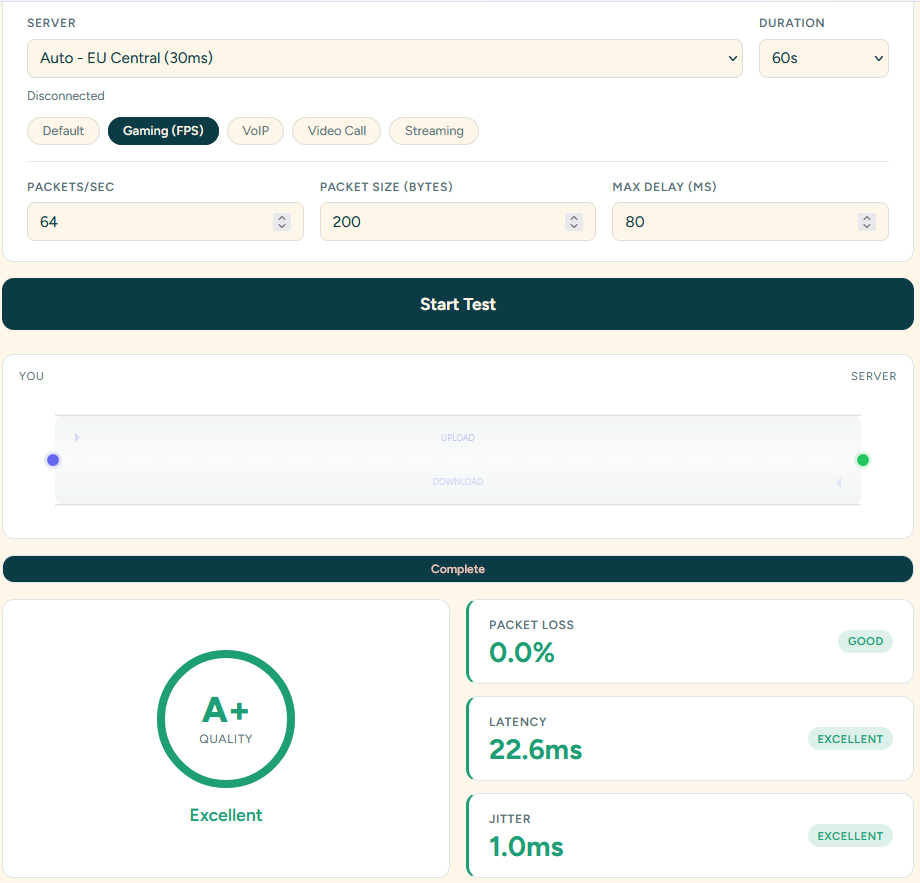
Same A+ result with currently 7.26beta5
ikir
November 5, 2026, 6:23pm
17
So do you think 7.26 improved reliability? 7.25 has been a disaster.
Ziter
November 5, 2026, 8:16pm
18
I don't even know the mikrotik team.
infabo
November 5, 2026, 8:17pm
19
7.26 beta is the currently most stable ROS release.
Ziter
November 5, 2026, 8:21pm
20
How does it sound - then stable is the most unstable.