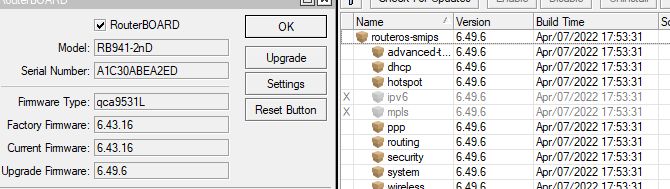
I don’t want to start a question/answer game to use netinstal at the end…
Read this
http://forum.mikrotik.com/t/bug-upgraded-package-signatures/148643/1
I don’t want to start a question/answer game to use netinstal at the end…
Read this
http://forum.mikrotik.com/t/bug-upgraded-package-signatures/148643/1
thanks, I'll try that
It is no longer advised to install “only the needed packages” because that will make the device impossible to update to v7.
Ok, it is not advised to update to v7 anyway on such tiny devices.
My advice is to keep the version 6.47.9 and not touch it anymore until it becomes too insecure, then throw it in the bin.
(updates after 6.47.9 make the wifi slow and unreliable)
Thanks, there still develpment on version6? For example improving the wifi performances? Or all is only focused on version7? and For 6 just will come fixes?
I don’t think there is much development apart from bug fixes.
And in 6.47.10 there was some theoretical WiFi security problem fixed which resulted in a steep drop in performance and hickups of the WiFi on these small devices.
I don’t know if MikroTik is aware of that and planning to fix it, probably not because it is long ago and no fix came in the later versions.
AFAIK wifi was improved with 6.49.
But at the end, everything will move to ROS7.
I don’t expect new material coming out anymore which would not be able to run ROS7.
I have never seen my hAP mini work acceptably after upgrading past 6.47.9 and after some time I gave up and replaced it with a hAP ac2.
Recently I put 6.47.9 back on the hAP mini (netinstall) and it works OK again.
I got it for free at a MUM. Otherwise I would not buy such low-low-end toys. The wAP that I got at an earlier MUM is much better.
You remember? Are only useless problems, all start with “If authenticated user” and end with something like “self-destroy own access point”…

This work for me 100%, thank you !
I managed to upgrade my whole home network to 7.3.1. Two routers were a real pain, but got there in the end.
6.48.6 - moved all files to PC - 6.49.6 - set dns cache to 64kB - 7.1 - 7.3 (oops) - 7.3.1 - set dns cache back to 2048kB - copied files back
6.48.6 - moved all files to PC - set dns cache to 512kB - 6.49.6 - set cache to 64kB - uninstall ppp and wireless - 7.1.1 - 7.3.1 - set dns cache back to 2048kB - copied files back - reconfigured ppp and wireless
I hope this helps someone.
Hello! I have a mikrotik hAP lite. 2 Weeks ago i decided to upgrade it from stable 6.49.6 to 7.3.1 too. But after this i almost every day got a new problem with high cpu usage or low memory. And after such message show up in log very soon device self reboot, and then again in loop. It was caused by several errors such as dns over https or ovpn-udp client connection.Thanks to forum, i manage to downgrade to old firmware 6.49.6 back again. NO problem after this.
People said that ROS7 doesn’t do too well on devices with low resources, such as hap lite.
Want to ask you do you have any problem with perfortmance after ros7 update?
p.s. manage tp upgrade and downgrade by this steps - delete all files on device(backups, etc.), clear dns cache, delete certificates (if you have them), than reboot it. And after it up - begin update or downgrade procedure/
I experienced a lot of that with my RB 751U-2HnD that only has 32MB of RAM. I contacted MikroTik about it and they said ROS7 requires more RAM than ROS6 does.
So if you are running a bunch of memory intensive things on your hap ac lite before upgrading, there is a chance that it won’t work after upgrading.
In my case though my hap ac lite has been running ROS7.3.1 for 26 days now without issues, so it’s possible.
hap lite
32mB ram 16mB storage pakage smips (small mips)
hap ac lite
64mb ram 16 mb storage package mips (full size mips)
RB 751U-2HnD
32mb ram 64mb storage package mips (full size mips)
RB751 has plenty of storage but is short on ram (only 32mb), all recent mips devices have at least 64mb of ram
Hi, I’ve tried all possibilities here and no one works, users tolaked about RAM space, slimming out useless packages, keep only system and security.. all useless words. In my opinion the only way is to flesh it from boot mode with netinstall, that shoudl work finally, but netinstall is not an intuitive program, its doesn’ let me chose packages and help explaing the procedure, so I ddn’t that yet.
Can somebody explain easly the steps? Thank you
You should not update it past version 6.47.9 anyway. That is the last usable version on that device.
Sorry I don’t agree with you, I have several 941-2nd upgraded to the latest, working better on capsman especially for the 100% CPU load bug that freezes router for about 2 minutes. I was able to upgrade them from the first boot, before the become “dirty” (dirty about what I don’t know, I’ve tried to deleted everythig cache DNS included, with no success)
I still waiting knowing how can I upgrade from boot, it looks the only way left.
My experience with this device is that the WiFi stopped working correctly after version 6.47.9
It is easy to see when trying the packet loss test at this website https://packetlosstest.com/ from a client connected to the WiFi.
Set the Duration slider to 1 minute and observe that there are bursts of packet loss. With version 6.47.9 that problem did not yet occur.
I never used capsman on such a device.
Thank you for site, interesting, I’ll test, for now I have this error “Error with WebSocket: Unable to connect to wss://lse.packetlosstest.com/ws” and I use firefox on Windows.
Probably the error you had can be connected to the CPU overload, maybe can be solved with 6.49.6, I’ve read something about on changelog
Hi,
What I do not understand is when I hit this problem, and then try to clear some entries and delete some firewall address list entries, they do not commit to disk!
So basically, as soon as we run out of storage, nothing gets saved anymore.
I now have a Mikrotik hEX S with 0% free and have to now plan a factory reset/netinstall to get back into a working state.
Please find a better solution for this challenge.
I even have a 64Gb micro SD card in this devices, but only can use this for backups.
Please fix this!
Thank you
JE
All settings are saved in a database on disk. When the disk is full, that cannot happen anymore.
Basically you need to make sure the disk never is full. For a hEX S this should be no problem unless you put user files on the flash. Don’t! Use a USB stick.