It’s a very fine line. I’ve been able to upgrade both my hap ac 2 and hap ac lite to 7.9, but I’ve had to do netinstalls etc.
Then at work I upgraded 3 hap ac2s from 7.9 to 7.9.1 and they all 3 bricked. So it’s incredibly temperamental to upgrade at the moment and any upgrades on ROS 7 should be done very carefully and very thoughtfully.
Its so stupid that we need to netinstall basically new purchased devices or even worse getting bricks after simple software update, mikrotik really should address this somehow or test better updates on their lower end routers.(And thats still alot of them with 16mb flash)
Like for example why does my router has to have all those wireless firmware images installed in wireless\lib\firmware which take space when it only needs one of them?
Cant the install process match device with required wifi firmware and only install those files to save space on device?
Small remark.
Nobody is forcing you to change ROS on those 16Mb Flash-devices.
They are perfectly usable on ROS6 (almost nothing has changed for legacy wifi in ROS7).
When you do not specifically change some setting, they will not even go search for ROS7 on their own. They will happily stay on ROS6.
Unless there is a very specific reason why you want to move to ROS7 ?
In that case you might also want to reconsider the HW being used since it is a known fact e.g. hap lite is not recommended for ROS7.
Note: We do not recommend running v7 on hardware that does not have at least 64 MB of RAM.
16Mb for storage might indeed be a deal breaker as well (though I have upgraded various AC3 models without any problem already to ROS7 since I needed wireguard and wifiwave2).
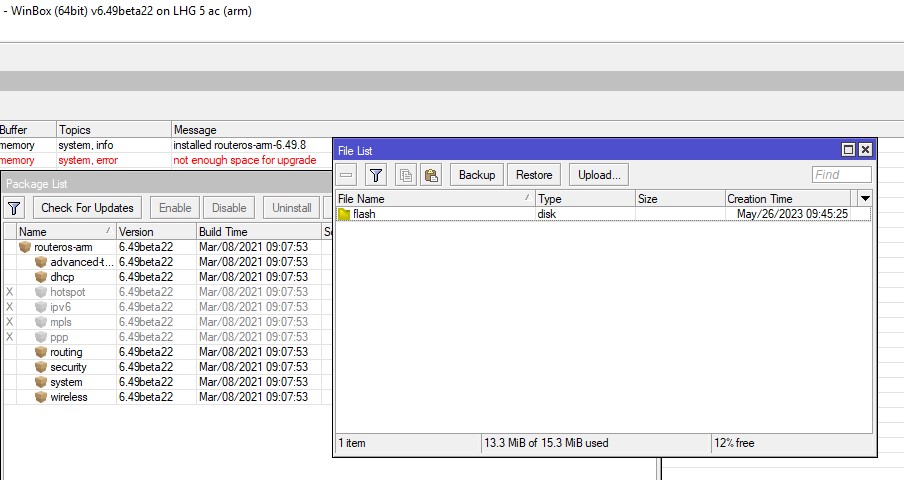
I have still LHG devices which cant be updated even to latest 6.49.8, they literary only have bridged wlan and lan and thats entire config and disk is empty.
So im not allowed to have latest security on my device aginast CVEs and similar.
Im supposed to climb on towers and do netinstalls?
There is simple no excuse for not having brought the ethernet (or fiber) cables to the ground where you can easily do netinstall without even climbing a step,
or I don’t understand how you can’t do it, since also the “LHG” that I use (you haven’t even specified the model) I assume they are identical to yours,
and unless you installed them wrong or add the user-manager and/or the dude there is more than enough room to make updates.
Unless you’re like the usual assholes who install ALL packages for no logical reason (calea, gps, ups, lora, tr069, etc.)…
In summary: unless it’s a SMIPS device, if you can’t update the software from 6.x to 6.48.7/6.49.8 it’s your fault.
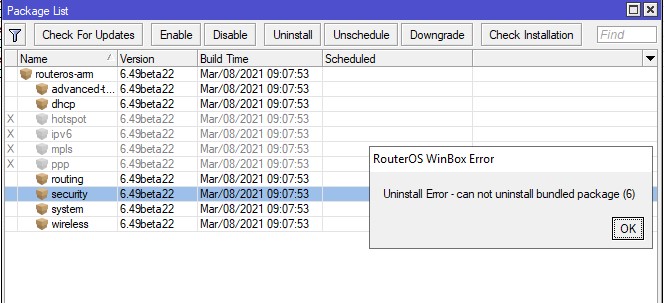
Which part of there is NOTHING on them except bridge is not clear for you?Nothing was ever installed! Latest version which i managed to install on them was 6.49 beta 22, i cant install nothing newer, disabling extra packages etc makes no difference(You cant uninstall them)..
That’s because the version you have loaded, is a bundled version (containing all packages).
Those can effectively not be uninstalled.
It’s a test version, with normal released versions you should not have had this problem.
Test version on a device with accessibility problems, not a smart thing to do.
What I would try:
Download latest ROS6 version 6.49.8.
Only put the routeros npk file on your disk.
Reboot.
All packages should be gone.
ATTENTION: if you need one of those earlier packages to get access to your device (wireless, security, advanced_tools, dhcp, … ?), make sure it is loaded as well before the reboot.
Or you can go climb up that mast … if you have to do so, make sure to take a wire with you for next time.
PS if it is LHG AC 5, there is POE on ether1 ? So you should have access via ethernet ?
I installed test version because latest wouldnt install, i was going in steps downloading older versions until one installed properly, i only did it on that one for test and that one isnt that important for me, i have others stuck on NONE beta versions.
Uploading of npk file is what i did makes no diff.
Anyways, its just bad and there is no reason to defend Mikrotik regarding this, instead me clicking update after working hours and quick reboot, i need to waste so much time going on field, also disrupting customers while neinstall is done etc…
Just because they cant properly organise their install packages and stop putting unused files on every device which take space for NO reason…
Indeed, unfortunately for a long time the units have been shipped with “bundle package”.
That means all packages are always on the unit, except you can disable some of them.
Then they will not appear in the menus and they won’t be running (so they cannot cause security issues), but they still take up space.
When the thing has not yet gone completely haywire, you can still reclaim space by downloading a newer version .zip file, uploading only the packages you need (the ones that are enabled from the list above), and do a /system reboot. It will then install only those individual packages, the bundle will be gone, and there is more space.
Of course when the flash is already (nearly) completely full that isn’t an option anymore because upgrades won’t work. You need netinstall in that case.
When you can still access the unit and have access to the ethernet cable you can do it without climbing the tower. Set “try ethernet once then nand” bootmode and reboot.
I do not think you need “routing” for mpls, bgp & co. on that device. (normal ip routing is not involved on that package)
you can install later advanced-tools, dhcp and security (this last, is used only by dhcp and ppp, if installed)
reboot.
Then I avoid commenting on how smart it is to install a canary/alpha/beta/rc on a device that is difficult to reach…
All the units have been shipped with bundled package, and everitime non-canary/alpha/beta/rc,
this last is not vald for 1st series of Cheateau that have 7.0beta3 because the 7.0 (stable) has not been ready for production when the device has begin produced.
If is not so, someone altered the device.
Must say, this issue remains tremendously frustrating. I wasted several hours today having to repeatedly netinstall a wAP R ac that crashed and failed to upgrade because of this exact issue. The primary reason is because it only has a 16MB flash. This is simply too small for a brand new and super powerful device.
I’m testing a new product line for my company and after this experience I’m having some serious doubts about whether this will be able to give us the long-term stability that we previously had with the RB922s.
For anybody that cares below is a summary of how I’ve been able to upgrade most of these devices to the latest ROS.
install individual packages - even if that means downgrading to a previous version
reduce dns cache to 64kB
then try to upgrade to the latest ros v7
if that fails, download all the ROS v7 binaries and look for the smallest one - in my case this was 7.1.1
upload that one and upgrade to that first
then try to upgrade to the latest ros v7
reset the ip dns cache to 2048kB
Word of caution though, I lost a wAP R AC running v7.10.2 today after doing a routerboard fw upgrade. I was able to recover it via netinstall, but it was massively frustrating as I thought I was over the worst once I finally got v7.10.2 on there, but no.