Hi Guys,
I have a G-52SHPacn that I want to set up as a wireless AP which connects to a LTE Router to provide internet.
I have managed to get the WiFi setup so devices can see it, I wanted it to just offer wireless access and that’s it, it would use the DHCP server on the LTE Router and not itself.
Thus far this i what I’ve tried,
each time I used the quick setup feature.
So I chose Home AP, set the wifi name, location and password.
I then set the Internet address acquisition to Automatic.
It got an IP Adress: 192.168.1.132 which is an address given to it by the router, then the local network is set as IP Address 192.168.0.1 DHCP Server off and NAT turned on.
I save this and I can see the SSID, but when I try to connect I do not get given an IP Address. So no internet connection.
I have turned the DHCP Server on and given it a range of address which seem to give the devices I connect to it an IP but does not allow them to get access to the internet.
Both scenarios I can ping 8.8.8.8 from the AP but I cannot get any internet to the devices I connect to it.
Any help would be greatly appreciated.
Thanks.
Most probably the problem is the LTE router doesn’t know how to reach 192.168.0.0/24.
First chech on Bridge > Ports if both the wlan interface and the ether interface are there; if so, disable the ether bridge port or delete it, and move the DHCP client to the ether port.
Check Ip > Firewall > Nat. Is there any srcnat rule?
if not, add one:
General tab: chain: srcnat out interface: the ether port connected to the LTE router
Action tab: action: masquerade.
Now all traffic leaving the AP will be masqueraded as 192.168.0.1, an the LTE router will know how to reach the AP clients.
I went through the settings you suggested and they all pre-existed.
Attached is a screen shot from WinBox.
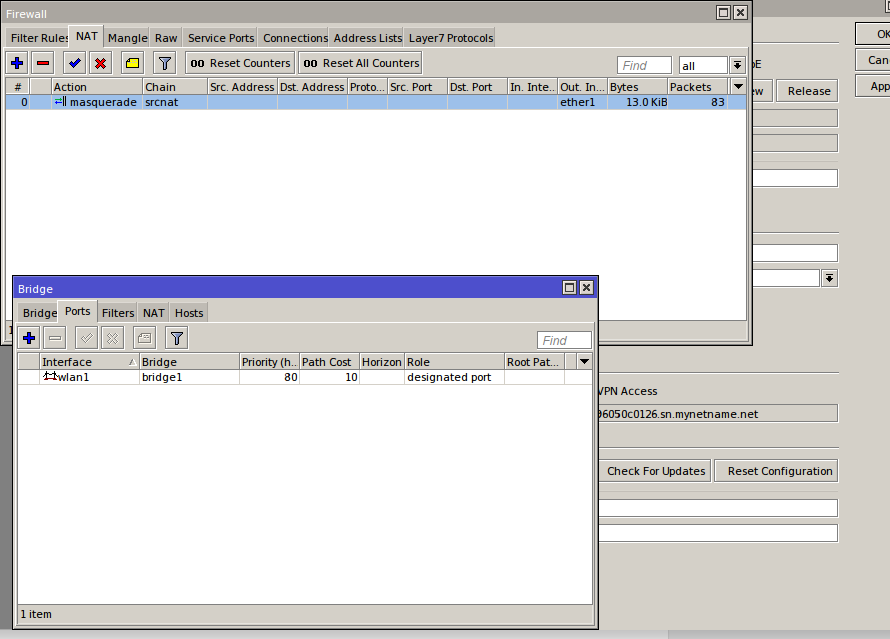
Can you also show your routing table. Check and make sure that on your route table add dst-address=0.0.0.0/0 pref-src=x.x.x.x/x gateway=x.x.x.x/x. replace the x with your corresponding routes. and also make sure your dns config are correct else it will not resolve.
This is what I have right now and DNS is setup with the LTE Gateway address of 192.168.1.1
DST-ADDRESS PREF-SRC GATEWAY DISTANCE
0 A S 0.0.0.0/0 192.168.1.1 1
1 DS 0.0.0.0/0 192.168.1.1 1
2 ADC 192.0.0.0/8 192.168.0.1 bridge1 0
3 ADC 192.168.1.0/24 192.168.1.132 ether1 0
I finally got it. My computer connected finally and got internet.
Thanks guys.