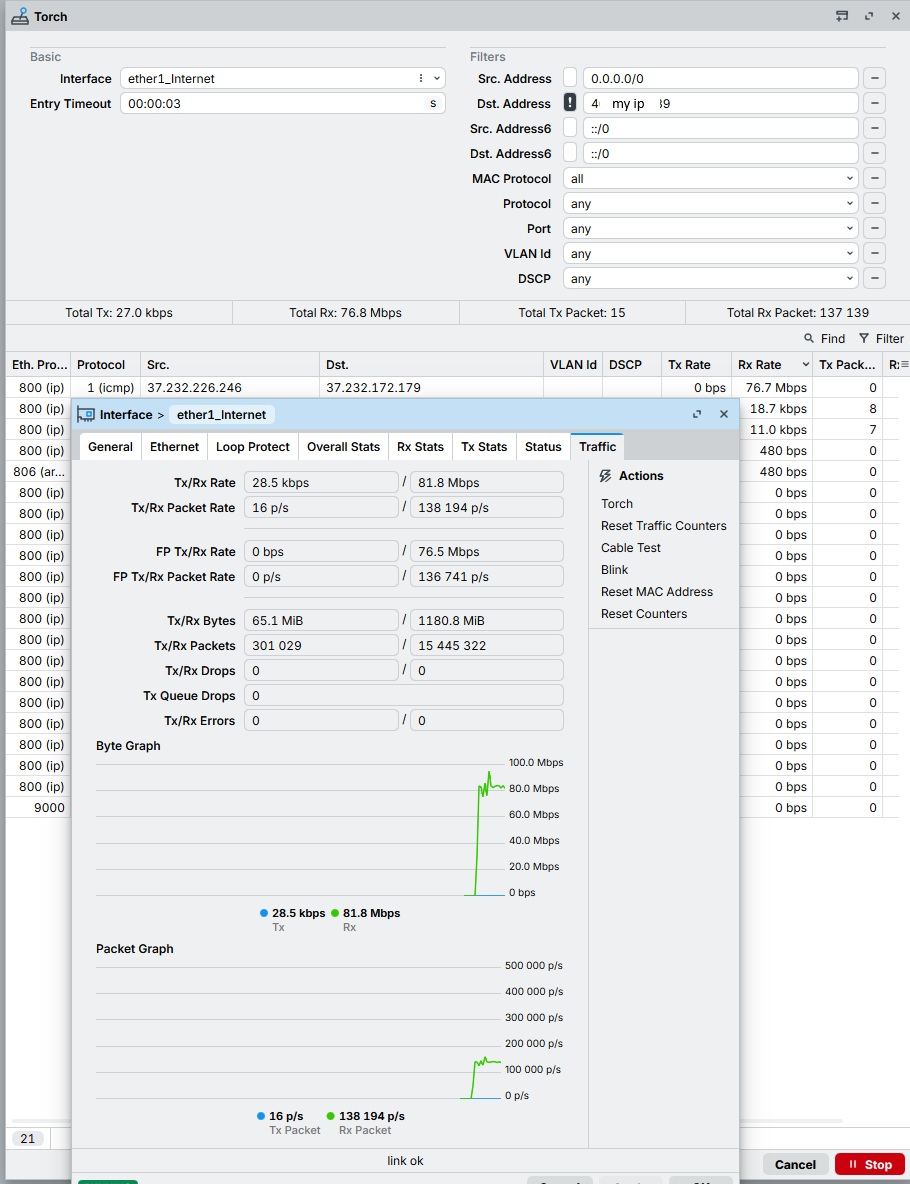
Hello. It looks like someone is accessing my Mikrotik. Maybe I'm wrong – what kind of traffic is this? Gigabytes are being transferred. This doesn't happen all the time. Even when the Mikrotik is alone, with no connected users (computers, Wi-Fi devices).
According to the interface statistics, this is incoming traffic, meaning the client on the network is receiving these gigabytes.
It is necessary to check which internal address this traffic is going to.
This could be a harmless OS or client software update, a hardware configuration error on the provider's end, or the result of a hacked client or router.
If there are no traces of this traffic on other interfaces, it is most likely a provider-side error.
I don't have anything else connected to the router except my computer. The traffic was transmitted even when I turned off the computer and wifi (i.e. everything that can affect the traffic) at night, in the morning I saw the result of the transmission.
For now I've turned off Neighbors and set up prerouting rules to drop ICMP. I'm waiting for the next activity.
What is on the WAN side of your router? What technology is your ISP using to deliver "Internet"?
There are types of connections where every customer e.g. in a block will see all traffic for all other customers if watching closely. In normal configuration that is just ignored and dropped by each individual customer's router.
This is definitely an error on the ISP's side, which causes periodic parasitic traffic (depending on the addresses affected by the error) to arrive at your router's interface.
Because the recipient's address does not match the interface address, no further traffic processing is performed. The router shows this packet in the incoming traffic and simply drops it.
While this technically reduces the available bandwidth of the channel, this issue can only be resolved by the ISP.
If you record traffic with Wireshark, you can see all the details of the "garbage" that occurs on you interface when other ISP client or clients are experiencing issues caused by configuration errors or hardware failures.
I just don't understand why Mikrotik takes this into account in the total amount of traffic consumed and displays download speed, etc. This seems abnormal.
The result is this: There was a data transfer from (dst 37.232.229.8) of approximately 11 GB (via the ICMP protocol). Droping ICMP traffic (prerouting) does not affect the statistics on Ether1. The provider will not investigate this situation. For now, we will simply see this "parasitic" traffic.
Thanks everyone.