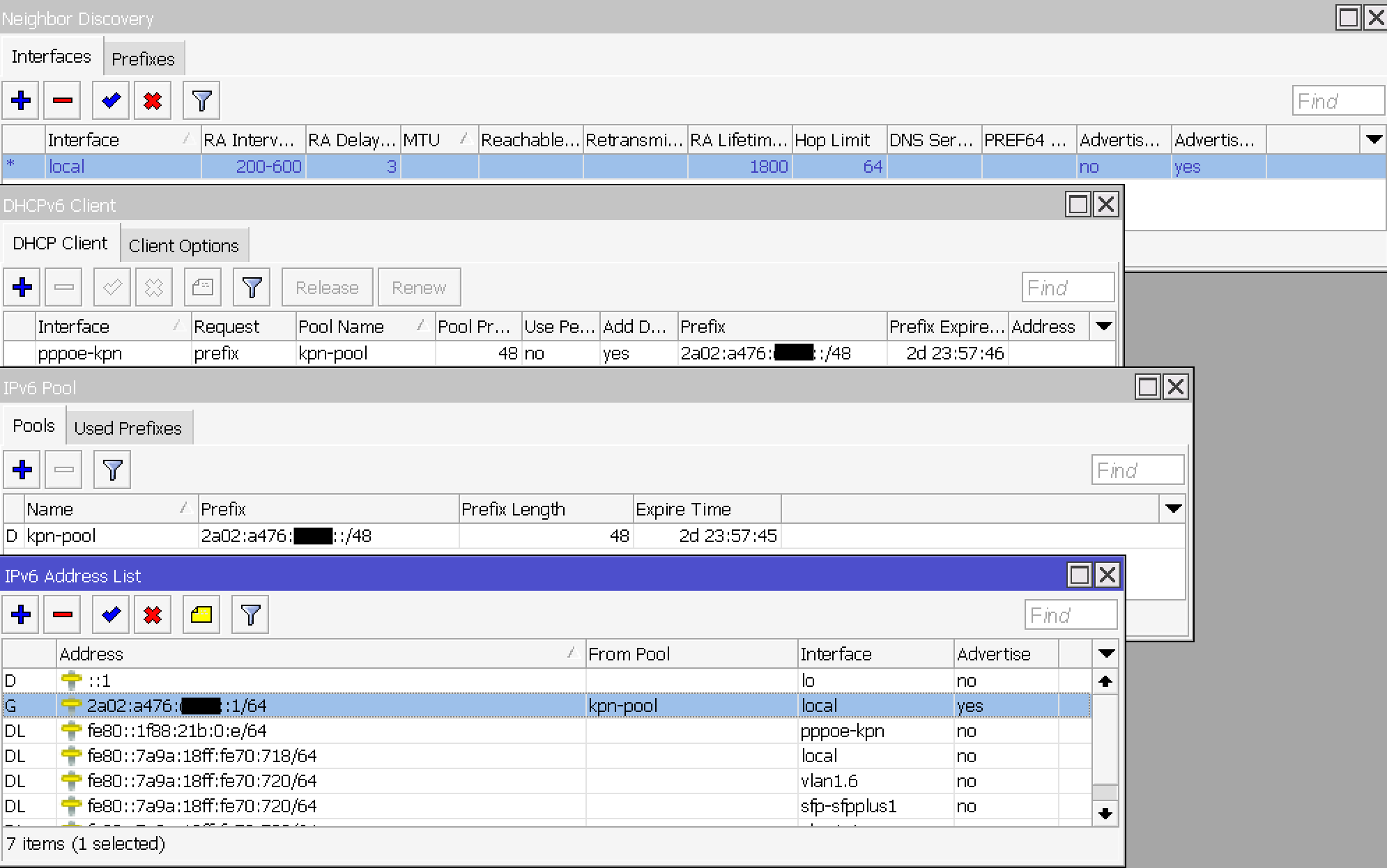
Help needed with IPv6 on DHCPv6 PD / KPN fiber

On my Mikrotik RB5009 router I am trying to get IPv6 working for the devices on my local network. I am connected to the Dutch ISP KPN via fiber connection. The Mikrotik router is connected directly to ISP fiber with an SFP module. Internet via IPv4 works and the TV set-top box also works for devices on the LAN.

First of all my router config: https://gist.github.com/kcleong/21cdddda2bb6c40dfbd15166d27765f4

IPv6 specs according to KPN:

IPv6 address range + DNS servers (IPv6) via DHCPv6 PD request (in PPPoE). Using an address and range for router.

My knowledge about IPv6 / DHCPv6 is limited, this is what seems to be working:

I used https://www.eigenrouter.nl/en/guides/mikrotik/kpn/Mikrotik-toevoegen-van-ipv6-aan-internet-only, https://community.kpn.com/modems-123/probeer-ipv6-werkend-te-krijgen-op-mikrotik-rb5009-via-glasvezel-561336 and https://community.kpn.com/internet-9/ipv6-configuratie-op-mikrotik-router-489153 as resource to find out how to set-up IPv6.

Probably a tiny setting is off, and I am asking the IPv6 magicians :slight_smile: for advice.

This should not be necessary
/ppp profile
set *0 remote-ipv6-prefix-pool=kpn-pool
it is used for PPPoE servers, not clients.

This is likely the issue
/ipv6 dhcp-client
add add-default-route=yes interface=pppoe-kpn pool-name=kpn-pool
pool-prefix-length=48 request=prefix use-peer-dns=no
as DHCPv6 has no mechanism to acquire the gateway address. The add-default-route option is a hack - it is unnecessary for PPPoE WAN connections as a default route will have be added for that interface, and for IPoE WAN connections the gateway should be acquired by accepting Router Advertisments.

My config is nearly identical to yours, except I have added an address from pool KPN to the pppoe interface. I don’t quite recall why this was needed but it might be worth trying.

In case it helps, here’s my setup: (RB5009, ISP using PPPoE, and providing IPv6)

https://github.com/yuripg1/network-toolbox/blob/c3cf8c5f388383fb196e5084a32b8989ff42c2df/mikrotik_routeros/commands.rsc

Some relevant bits include what I consider the “LAN configuration” (lines 79-81), what I consider the WAN configuration (lines 83-84), and some mangle rules that might avoid some PMTUDs and save a tiny amount of time depending on the rest of the configuration (depending on how the ND’s MTU is configured, to be more specific).

P.S.: Yes, some of those properties are default values, and thus are omitted by RouterOS export command, but I like to include them all on my configurations/backups to know exactly how things are set up and not get caught by surprises when defaults change.

Thanks for all the input! I am learning on how IPv6 DHCPv6/SLAAC works but I must say the config is complex.

The IPv6 config is almost working on my local network. The following changes were made:

  • Update IPv6 firewall to allow ICMPv6
  • Specific settings to IPv6 ND
  • Specific setting for MTU values

Without the specific MTU values I can ping IPv6 address, however HTTP connectivity is not working. For example wget https://ubuntu.com will hang without the MTU settings.

The strange thing is, I now have full IPv6 connectivity directly on the LAN ports of the RB5009. However devices connected via a switch or via WiFi accesspoint are not getting router advertisements. I checked this with tcpdump -i eth0 icmp6 and 'ip6[40] == 134'. On my previous ISP (Ziggo) IPv6 was working on the same equipment.

Shortened config:

/interface pppoe-client
add add-default-route=yes allow=pap disabled=no interface=vlan1.6 \
    keepalive-timeout=20 max-mru=1492 max-mtu=1492 name=pppoe-kpn user=kpn

/ip dhcp-server option
add code=26 name=ip-dhcp-server-option-26 value="'1492'"

/ipv6 address
add address=::1 from-pool=kpn-ipv6-pool interface=local
/ipv6 dhcp-client
add interface=pppoe-kpn pool-name=kpn-ipv6-pool pool-prefix-length=48 request=prefix use-peer-dns=no
/ipv6 firewall filter
add action=accept chain=input comment="defconf: accept established,related,untracked" connection-state=established,related,untracked
add action=accept chain=input comment="defconf: accept DHCPv6-Client prefix delegation." dst-port=546 protocol=udp src-address=fe80::/10
add action=accept chain=input comment="defconf: accept ICMPv6" protocol=icmpv6
add action=drop chain=input comment="drop everything else"
/ipv6 firewall mangle
add action=change-mss chain=forward in-interface-list=WAN new-mss=1432 passthrough=yes protocol=tcp tcp-flags=syn tcp-mss=1433-65535
add action=change-mss chain=postrouting new-mss=1432 out-interface-list=WAN passthrough=yes protocol=tcp tcp-flags=syn tcp-mss=1433-65535
/ipv6 nd
set [ find default=yes ] advertise-dns=no advertise-mac-address=no

Complete config: https://gist.github.com/kcleong/426ae7a5c3c5ecb4870bb82966e80ef4

Why do you have managed-address-configuration=yes if you’re not running a DHCPv6 server? It should be disabled so devices can build their own IPv6 addresses from the prefix you’re advertising.

As already stated, you should only set “managed-address-configuration” to yes if you have a DHCPv6 Server configured and delegating addresses, which you don’t seem to have. But I think it’s better to get a grasp of some concepts here.

If you inspect your Router Advertisements, you’ll see that they carry 3 important flags (among many other parameters, of course):


  • “A” flag: Autonomous address configuration (/ipv6 nd prefix default set autonomous=X)
  • “O” flag: Other configuration (/ipv6 nd add other-configuration=X)
  • “M” flag: Managed address configuration (/ipv6 nd add managed-address-configuration=X)

When setting up IPv6, you’ll typically make use of one of these three options:


  • SLAAC: “A” flag set, “O” flag not set, “M” flag not set. The “A” flag set signals that the clients can generate their addresses themselves (within the prefix). No DHCPv6 Server to be seen. DNS can be delivered via RDNSS option in the Router Advertisements.
  • SLAAC + DHCPv6 Stateless: “A” flag set, “O” flag set, “M” flag not set. The “O” flag set indicates that the clients should query a DHCPv6 Server to get more information, such as DNS servers.
  • DHCPv6 Stateful: “A” flag not set, “O” flag not set, “M” flag set. The “M” flag set indicates that the addresses (and all other necessary configurations) are managed by a DHCPv6 Server and thus the clients should query it.

For a home network, I would suggest you stick with SLAAC. This should work fine in most cases. The other 2 options require a DHCPv6 Server in some form (be it only delivering additional configurations or managing everything for the clients)

You have igmp-snooping=yes on your bridge. In that case you should also turn on multicast-querier, otherwise router advertisement will not work correctly. However, my experience with the RB5009 is that it won’t be enough. It might be because of my config (heavy VLAN usage on the bridge, the main bridge/native VLAN has no configured network) but even with multicast querier, after a while the MDB table will miss entries and RA will no longer work or it will take the clients a very long time to acquire adresses. It might be because the RB5009 has hardware accelerated IGMP snooping and it’s not yet fully supported. Indeed, we can see in the change log for the current 7.16beta that some work is currently being done in that version


*) bridge - added L2 MDB support for switch chips with HW offloaded IGMP snooping;

For now, I have to disable IGMP snooping on my RB5009 for RA to work reliably (with VLANs).

You IPv6 firewall filter table is missing quite a few rules, the whole forward chain for instance. I suggest that you build your rules based on the configuration provided by defconf. If you run


/system/default-configuration/print without-paging

in the terminal, you’ll find the default IPv6 filter rules inside the /ipv6 firewall { } block.

I enabled “managed-address-configuration” when trying to get IPv6 to work. I’ll read up further on the SLAAC config. :slight_smile:

The router advertisements are working with the ‘multicast-querier=yes’ setting in the bridge. For now I’ll keep IGMP snooping enabled due to IPTV from my ISP, however I’ll keep in mind this setting can be problematic as told in the previous post.

The MTU settings have been updated to a more sane version, by setting only these values; ppp-oe=1500, vlan1.6=1508 en wan=1512. The IPv6 firewall has been updated from the version in defconf.

I’ve now got a fully working setup with IPv4, IPv6 and IPTV. Very happy that is all working. Again thanks for the help, because it would be impossible for me to figure out all the specific settings! For those interested or for future reference, I’ve updated my config in the Github gist which I posted yesterday.

Hello everyone.
This is my first post to the forum. I’ve been a silent reader for some time but now I felt to give something back.
I’m in the middle of a change of my ISP and I’ve had a hard time the last few weeks getting the provided Fritz!Box replaced by RouterOS (A spare one at the moment, but intention was a proof of concept.)
I could not have done this without this forum. A big thank you!

Up to now, I’ve vodafone via cable as my ISP (Germany (NRW)). I have the modem in bridge mode where it’s not capable of IPv6, so I got a public IPv4 and was happy.
My new provider is Deutsche Giganetz (NOT Deutsche Glasfaser), fibre connection who only does DS-Lite. DS is possible, but at extra costs of 3,90€/month.
Deutsche Giganetz seems to be a reseller of PURtel in germany.
The reason why I’m writing to this post is that it’s the newest one I could find and many others were very helpful but I always found stuff like “needs tweaking” or else. Additionally, somewhere else I read that KPN fibre is supposed to be quite similar to Deutsche Giganetz.

Long story short, It’s working for me (99%).
The most trouble I had was getting traffic through the IPIP6 tunnel other than ping or traceroute. It was possible to ping but websites in browser showed timeouts, even if freemail.de turned to web.de in address bar. IPv6 capable websites worked without problems.

Here is my full config

# 2024-08-01 18:13:36 by RouterOS 7.16beta7
# software id = CTR1-WKHM
#
# model = RB960PGS
# serial number = HEQ0999N8T6
/interface bridge
add admin-mac=78:9A:18:08:52:63 auto-mac=no comment=defconf name=bridge
/interface ipipv6
add clamp-tcp-mss=no !keepalive local-address=:: name=dslite remote-address=\
    aftr.fra.purtel.com
/interface vlan
add interface=ether1 name=vlan7-ether1 vlan-id=7
/interface pppoe-client
add add-default-route=yes allow=chap disabled=no interface=vlan7-ether1 name=\
    pppoe-out1 password=XXXXX use-peer-dns=yes user=\
    XXXXX@dgn.digital
/interface list
add comment=defconf name=WAN
add comment=defconf name=LAN
/interface wireless security-profiles
set [ find default=yes ] supplicant-identity=MikroTik
/ip pool
add name=default-dhcp ranges=192.168.88.10-192.168.88.254
/ip dhcp-server
add address-pool=default-dhcp interface=bridge name=defconf
/disk settings
set auto-media-interface=bridge auto-media-sharing=yes auto-smb-sharing=yes
/interface bridge port
add bridge=bridge comment=defconf interface=ether2 trusted=yes
add bridge=bridge comment=defconf interface=ether3 trusted=yes
add bridge=bridge comment=defconf interface=ether4 trusted=yes
add bridge=bridge comment=defconf interface=ether5 trusted=yes
add bridge=bridge comment=defconf interface=sfp1
/ip neighbor discovery-settings
set discover-interface-list=LAN
/ipv6 settings
set accept-router-advertisements=yes
/interface list member
add comment=defconf interface=bridge list=LAN
add comment=defconf disabled=yes interface=ether1 list=WAN
add disabled=yes interface=pppoe-out1 list=WAN
add interface=dslite list=WAN
/ip address
add address=192.168.88.1/24 comment=defconf interface=bridge network=\
    192.168.88.0
add address=192.0.0.2/29 interface=dslite network=192.0.0.0
/ip dhcp-client
add comment=defconf disabled=yes interface=ether1
/ip dhcp-server network
add address=192.168.88.0/24 comment=defconf dns-server=192.168.88.1 gateway=\
    192.168.88.1
/ip dns
set allow-remote-requests=yes
/ip dns static
add address=192.168.88.1 comment=defconf name=router.lan type=A
/ip firewall filter
add action=accept chain=input comment=\
    "defconf: accept established,related,untracked" connection-state=\
    established,related,untracked
add action=drop chain=input comment="defconf: drop invalid" connection-state=\
    invalid
add action=accept chain=input comment="defconf: accept ICMP" protocol=icmp
add action=accept chain=input comment="defconf: accept ICMP" protocol=tcp
add action=accept chain=input comment="defconf: accept IKE" dst-port=500,4500 \
    protocol=udp
add action=accept chain=input comment="defconf: accept SIP" dst-port=5060 \
    protocol=udp
add action=accept chain=input comment=\
    "defconf: accept to local loopback (for CAPsMAN)" dst-address=127.0.0.1
add action=drop chain=input comment="defconf: drop all not coming from LAN" \
    in-interface-list=!LAN
add action=accept chain=forward comment="defconf: accept in ipsec policy" \
    ipsec-policy=in,ipsec
add action=accept chain=forward comment="defconf: accept out ipsec policy" \
    ipsec-policy=out,ipsec
add action=fasttrack-connection chain=forward comment="defconf: fasttrack" \
    connection-state=established,related hw-offload=yes
add action=accept chain=forward comment=\
    "defconf: accept established,related, untracked" connection-state=\
    established,related,untracked log-prefix="ipv4: "
add action=drop chain=forward comment="defconf: drop invalid" \
    connection-state=invalid log-prefix="ipv4 drop: "
add action=drop chain=forward comment=\
    "defconf: drop all from WAN not DSTNATed" connection-nat-state=!dstnat \
    connection-state=new in-interface-list=WAN
/ip firewall mangle
add action=change-mss chain=forward comment="Rule to crop MSS for DGN" \
    new-mss=1424 out-interface=dslite passthrough=no protocol=tcp tcp-flags=\
    syn tcp-mss=1460-65535
/ip firewall nat
add action=masquerade chain=srcnat comment="defconf: masquerade" disabled=yes \
    ipsec-policy=out,none log=yes log-prefix="IP4 masq: " out-interface-list=\
    WAN
/ip firewall service-port
set sip disabled=yes
/ip hotspot profile
set [ find default=yes ] html-directory=hotspot
/ip ipsec policy
set 0 disabled=yes
/ip ipsec profile
set [ find default=yes ] dpd-interval=2m dpd-maximum-failures=5
/ip route
add disabled=no distance=2 dst-address=0.0.0.0/0 gateway=192.0.0.1 \
    routing-table=main scope=30 suppress-hw-offload=no target-scope=10
/ipv6 address
add disabled=yes from-pool=pool-pd interface=bridge
add address=::1 from-pool=pool-pd interface=bridge
/ipv6 dhcp-client
add interface=pppoe-out1 pool-name=pool-pd pool-prefix-length=56 request=\
    prefix
/ipv6 dhcp-server
add address-pool=pool-pd disabled=yes interface=bridge name=server1
/ipv6 firewall address-list
add address=::/128 comment="defconf: unspecified address" list=bad_ipv6
add address=::1/128 comment="defconf: lo" list=bad_ipv6
add address=fec0::/10 comment="defconf: site-local" list=bad_ipv6
add address=::ffff:0.0.0.0/96 comment="defconf: ipv4-mapped" list=bad_ipv6
add address=::/96 comment="defconf: ipv4 compat" list=bad_ipv6
add address=100::/64 comment="defconf: discard only " list=bad_ipv6
add address=2001:db8::/32 comment="defconf: documentation" list=bad_ipv6
add address=2001:10::/28 comment="defconf: ORCHID" list=bad_ipv6
add address=3ffe::/16 comment="defconf: 6bone" list=bad_ipv6
/ipv6 firewall filter
add action=accept chain=input comment=\
    "defconf: accept established,related,untracked" connection-state=\
    established,related,untracked
add action=drop chain=input comment="defconf: drop invalid" connection-state=\
    invalid
add action=accept chain=input comment="defconf: accept ICMPv6" protocol=\
    icmpv6
add action=accept chain=input comment="defconf: accept UDP traceroute" \
    dst-port=33434-33534 protocol=udp
add action=accept chain=input comment=\
    "defconf: accept DHCPv6-Client prefix delegation." dst-port=546 protocol=\
    udp src-address=fe80::/10
add action=accept chain=input comment="defconf: accept IKE" dst-port=500,4500 \
    protocol=udp
add action=accept chain=input comment="defconf: accept SIP" dst-port=5060 \
    protocol=udp
add action=accept chain=input comment="defconf: accept ipsec AH" protocol=\
    ipsec-ah
add action=accept chain=input comment="defconf: accept ipsec ESP" protocol=\
    ipsec-esp
add action=accept chain=input comment=\
    "defconf: accept all that matches ipsec policy" ipsec-policy=in,ipsec
add action=drop chain=input comment=\
    "defconf: drop everything else not coming from LAN" in-interface-list=\
    !LAN
add action=accept chain=forward comment=\
    "defconf: accept established,related,untracked" connection-state=\
    established,related,untracked
add action=drop chain=forward comment="defconf: drop invalid" \
    connection-state=invalid
add action=drop chain=forward comment=\
    "defconf: drop packets with bad src ipv6" src-address-list=bad_ipv6
add action=drop chain=forward comment=\
    "defconf: drop packets with bad dst ipv6" dst-address-list=bad_ipv6
add action=drop chain=forward comment="defconf: rfc4890 drop hop-limit=1" \
    hop-limit=equal:1 protocol=icmpv6
add action=accept chain=forward comment="defconf: accept ICMPv6" protocol=\
    icmpv6
add action=accept chain=forward comment="defconf: accept HIP" protocol=139
add action=accept chain=forward comment="defconf: accept IKE" dst-port=\
    500,4500 protocol=udp
add action=accept chain=forward comment="defconf: accept ipsec AH" protocol=\
    ipsec-ah
add action=accept chain=forward comment="defconf: accept ipsec ESP" protocol=\
    ipsec-esp
add action=accept chain=forward comment=\
    "defconf: accept all that matches ipsec policy" ipsec-policy=in,ipsec
add action=drop chain=forward comment=\
    "defconf: drop everything else not coming from LAN" in-interface-list=\
    !LAN
/ipv6 firewall nat
add action=masquerade chain=srcnat log=yes log-prefix="ipv6: " \
    out-interface-list=WAN
/ipv6 nd
add disabled=yes interface=bridge
/system note
set show-at-login=no
/system package update
set channel=development
/tool mac-server
set allowed-interface-list=LAN
/tool mac-server mac-winbox
set allowed-interface-list=LAN

I hope I did the code tags right.
The default config has been pretty much left alone, except for the interfaces.

I’d also appreciate if someone could give me a hint what to tweak and how. Right now I’m happy that it works, even with a registered SIP-client in LAN.
the 1% that is not working right now is, that this config does not survive a reboot. dslite interface comes up too early before pppoe-out1 and IPv6 dhcp-client is fully up. I have to disable and than enable the dslite.
If someone has a hint how to achieve that automatically, I’d be happy.

So hopefully I did the code tags right and this post will help someone.

Thank you!
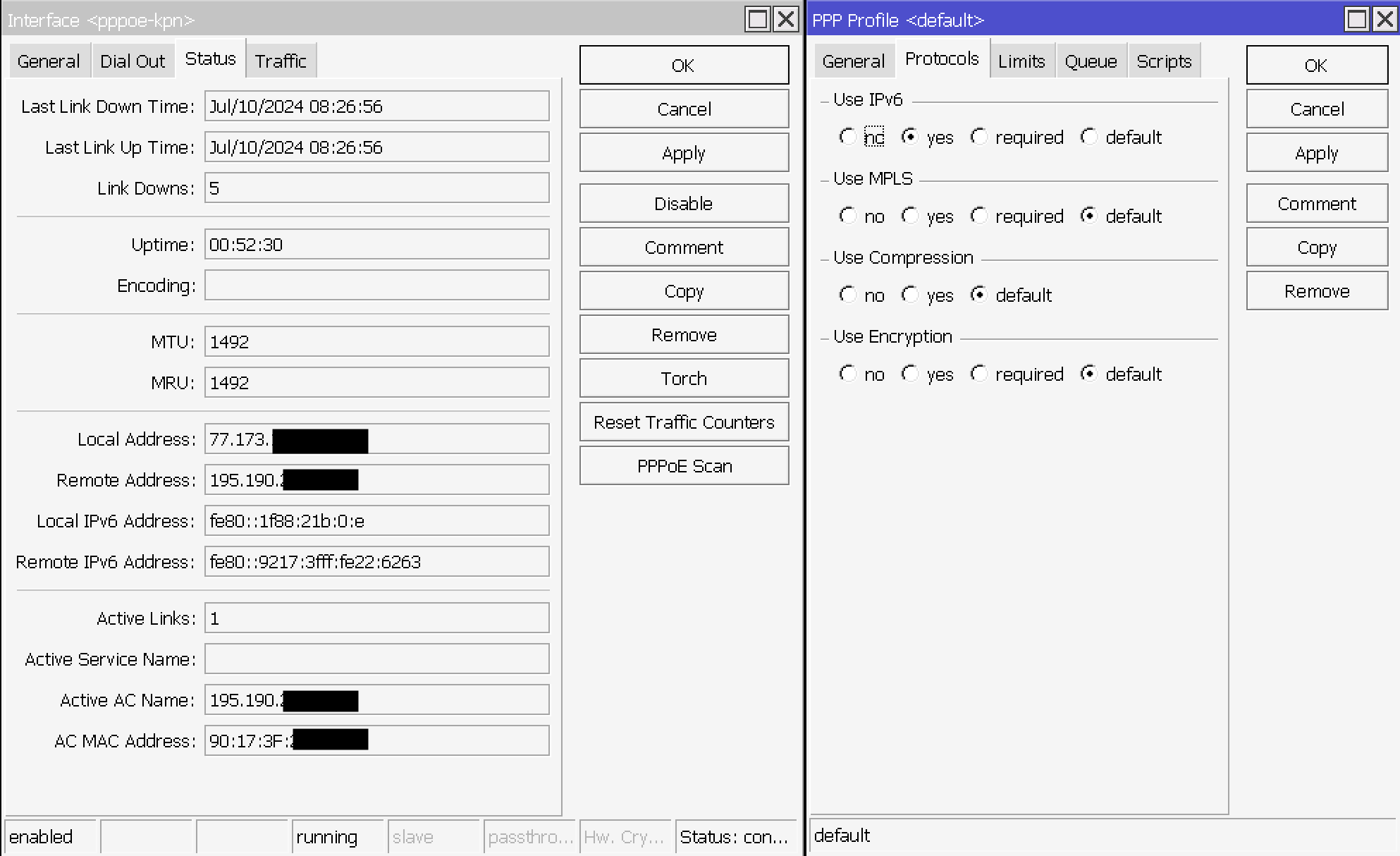
Hello, just few notes…

  • why /ipv6 firewall nat? You probably don’t want NAT on IPv6, you are asking for DHCPv6-PD for LAN (public)
  • interface ipipv6 (at least in the past) was not correctly working with FQDN,
    I would rather use pure IPv6 address there (maybe also your problem with interface start order is cased by this - it cannot resolve FQDN when WAN is not ready)
  • such a problem with webpages are often caused by not correct MTU/TCP MSS
  • What is the value of MTU on pppoe-out1 interface? What is the MTU of dslite interface?
  • in /ip firewall mangle - is this new MSS a correct value? (you should calculate based on MTU), you should
    also change tcp-mss=1460-65535 to tcp-mss=1424-65535 (if 1424 is correct)

Thank you for your notes.

First thing I did today, was rolling back to stable branch. I didn’t have any issues, but I just don’t like having family and homeoffice relying upon development software. I have other playgrounds for that. 7.15.3 is okay

Good point with not NATing IPv6. Since I only had public IPv4 until now, it’s basically my first touch of IPv6 in real life. I’ll see how far I will get with Prefix Delegation.
If WAN-Link is good and stable I have to take care of the LAN-side. There are multiple Subnets (LAN, Guest, VoIP, IoT, DMZ, etc.) to come, but that will be different topics.

I changed the AFTR FQDN to its IPv6 address i got from ping.

ping aftr.fra.purtel.com
PING aftr.fra.purtel.com(2a01:41e3:ffff:cafe:face::2 (2a01:41e3:ffff:cafe:face::2)) 56 data bytes
64 bytes from 2a01:41e3:ffff:cafe:face::2 (2a01:41e3:ffff:cafe:face::2): icmp_seq=1 ttl=60 time=9.71 ms

No difference yet, but I think I will take care of that later.

I think that’s one of the main reasons I registered here and wrote my post. It has not been that obvious to me that MTU and TCP MSS is something I have to manually take care of in 2024.

I took your note, installed the provided Fritz!Box and pinged with DF set

$ ping -M do -s 1425 9.9.9.9
PING 9.9.9.9 (9.9.9.9) 1425(1453) bytes of data.
From 192.0.0.2 icmp_seq=1 Frag needed and DF set (mtu = 1452)

did it again with size of 1424

$ ping -M do -s 1424 9.9.9.9
PING 9.9.9.9 (9.9.9.9) 1424(1452) bytes of data.
1432 bytes from 9.9.9.9: icmp_seq=1 ttl=58 time=7.72 ms

than I replaced Fritz!Box with RouterOS and repeated with Mangle-Rule deactivated. Same results.
I fiddled around with increasing MTU on ether1 and vlan7-ether1 but the results never changed.

MTU of pppoe-out1 is 1492
MTU of dslite is 1452

1424 + 28 (Tunnel header) = 1452
1452 + 40 (TCP/IP header) = 1492
so I think 1424 is the correct value. I changed it in mangle rule.

Thank you.