hi
i want script work in startup and check the schdule tasks if start date & start time + interval time less than next run time then run the schdule immediatley
because i have some schdule tasks not working due to power shortage , so i need to check them after each reboot
Thanks
I did not check this, so I will ask, is next-run in the past if scheduler is not triggered while device is off?
If yes, you can just check if next-run is the past from current date and run schedulers from other startup scheduler that checks next-run date on them. You can search forum how to create timestamp from string date and time to comare them.
If not and next-run is always in the future because it is calculated on ROS startup, then is not that simple, device can be off for unknow time, how can you know when scheduler is last triggered with scheduler start-date + start-time + interval? Start date can be some date in past when scheduler is created, it is not updated on each scheduler run so it cannot be used for comparing with next-run, example of some mine scheduler:
.id=*4;disabled=false;interval=1d00:00:00;name=<some_name>;next-run=2024-02-11 04:00:00;on-event=<script>;owner=admin;policy=ftp;reboot;read;write;policy;test;password;sniff;sensitive;romon;run-count=3;start-date=2022-03-13;start-time=04:00:00
In this case, you save current date and time timestamp to scheduler comment form its script when it runs and create startup scheduler that checks that timestamp if is in the past for each scheduler that needs to be run on startup if not triggered while device was off. You can also update start-date to current date on each scheduler run and then check start-date + start-time + interval (start-date and start-time can be concatenated to single string format and convert to timestamp, for interval you will need to find function to convert it to seconds) if is in the past with same logic described for last run timestamp in comment, see what is simpler for you to create.
hello optio
Thanks sir for your time and reply
yes next run is always in the future
can you help me to make it step by step?
my schedule sample in the attachment
thanks
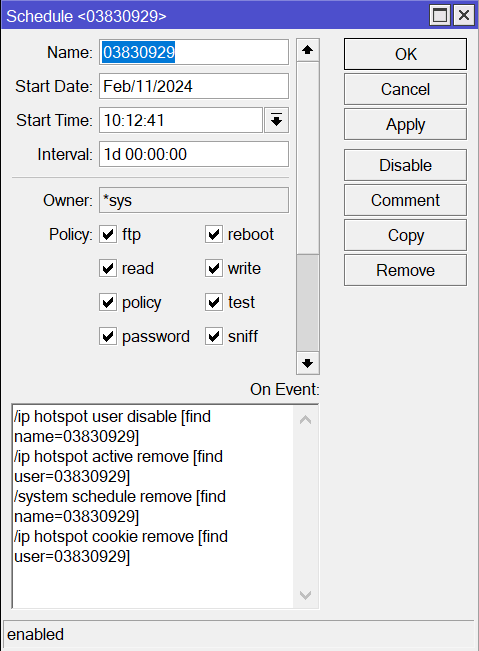
Friend, why do you want this script, what function does it perform?
@abdalgalil this should do:
- Add new script with name: scheduler_helpers:
:global GschedulerHelpersInit
:if (!$GschedulerHelpersInit) do={
  :set GschedulerHelpersInit true
  :global GupdateSchedulerStartDate do={
    /system/scheduler
    :local sched [find name="$1"]
    :if ($sched = "") do={
      :local errMsg "Unable to update scheduler start date - scheduler not found with name: $1"
      :log error $errMsg
      :error $errMsg
    }
    set $sched start-date=[/system/clock/get date]
  }
}
- Edit on-event for each scheduler which you want to check on startup and add next 3 lines at bottom (replace <scheduler_name> with scheduler name that is being edited):
/system/script/run "scheduler_helpers"
:global GupdateSchedulerStartDate
$GupdateSchedulerStartDate "<scheduler_name>"
- Add new startup scheduler with on-event code:
# Here you can add specific scheduler names (eg. [:toarray "sched1_name,sched2_name"]) which you want to check, if empty all non-startup schedulers are checked
:local schedulerNames [:toarray ""]


# Thx to @rextended
:local datetime2epoch do={
  :local dtime [:tostr $1]
  /system clock
  :local cyear [get date] ; :if ($cyear ~ "....-..-..") do={:set cyear [:pick $cyear 0 4]} else={:set cyear [:pick $cyear 7 11]}
  :if (([:len $dtime] = 10) or ([:len $dtime] = 11)) do={:set dtime "$dtime 00:00:00"}
  :if ([:len $dtime] = 15) do={:set dtime "$[:pick $dtime 0 6]/$cyear $[:pick $dtime 7 15]"}
  :if ([:len $dtime] = 14) do={:set dtime "$cyear-$[:pick $dtime 0 5] $[:pick $dtime 6 14]"}
  :if ([:len $dtime] =  8) do={:set dtime "$[get date] $dtime"}
  :if ([:tostr $1] = "") do={:set dtime ("$[get date] $[get time]")}
  :local vdate [:pick $dtime 0 [:find $dtime " " -1]]
  :local vtime [:pick $dtime ([:find $dtime " " -1] + 1) [:len $dtime]]
  :local vgmt  [get gmt-offset]; :if ($vgmt > 0x7FFFFFFF) do={:set vgmt ($vgmt - 0x100000000)}
  :if ($vgmt < 0) do={:set vgmt ($vgmt * -1)}
  :local arrm  [:toarray "0,0,31,59,90,120,151,181,212,243,273,304,334"]
  :local vdoff [:toarray "0,4,5,7,8,10"]
  :local MM    [:pick $vdate ($vdoff->2) ($vdoff->3)]
  :local M     [:tonum $MM]
  :if ($vdate ~ ".../../....") do={
    :set vdoff [:toarray "7,11,1,3,4,6"]
    :set M     ([:find "xxanebarprayunulugepctovecANEBARPRAYUNULUGEPCTOVEC" [:pick $vdate ($vdoff->2) ($vdoff->3)] -1] / 2)
  :if ($M>12) do={:set M ($M - 12)}
  }
  :local yyyy  [:pick $vdate ($vdoff->0) ($vdoff->1)] ; :if ((($yyyy - 1968) % 4) = 0) do={:set ($arrm->1) -1; :set ($arrm->2) 30}
  :local totd  ((($yyyy - 1970) * 365) + (($yyyy - 1968) / 4) + ($arrm->$M) + ([:pick $vdate ($vdoff->4) ($vdoff->5)] - 1))
  :return      (((((($totd * 24) + [:pick $vtime 0 2]) * 60) + [:pick $vtime 3 5]) * 60) + [:pick $vtime 6 8] - $vgmt)
}

:local checkAll ([:len $schedulerNames] = 0)

/system/scheduler
:foreach sched in=[find start-time!="startup" on-event!=""] do={
  :local schedName [get $sched name]

  :if ($checkAll || [:find $schedulerNames $schedName] >= 0) do={
    :local startTs [$datetime2epoch ("$([get $sched start-date]) $([get $sched start-time])")]
    :local nowTs [$datetime2epoch]
    :local intervalSec [:tonum [get $sched interval]]

    :if (($startTs + $intervalSec) < $nowTs) do={
      :log info "Executing missed event for scheduler: $schedName"
      :execute [get $sched on-event]
    }
  }
}
Thanks Optio
its work
thanks very much