Hi, I’m really sorry to post yet another thread about this, since I can find many threads about VPNs and dealing with VLANs and things, and I think I have things, like, 90% of the way there, but I’m struggling to actually get decent performance when it is working, if it works at all.
Overview:
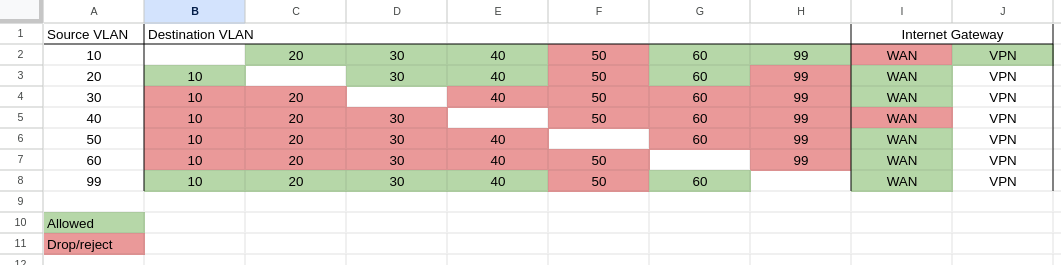
There’s 7 VLANs in my network:
- 99 Management
- 10 My stuff / Always-on VPN (or that’s the goal)
- 20 Normal home users
- 30 IoT
- 40 Stuff restricted from any kind of WAN (printers)
- 50 Guest WiFi
- 60 Servers
What I’m trying to achieve
I want just 1 of my VLANs (VL10) to go to my VPN provider via the Wireguard interface, and everything else (not otherwise blocked) should go out my ISP gateway as normal. And critically, I want to KEEP the ability for machines on my VLANs to talk to each other: VLAN10 can contact VLAN99 and vice versa, and so long as I don’t have any VPN configured, this is currently working.
I think I’m mostly there, but with my configuration as it is, it’s so slow and horrible that there’s something wrong, and I have to turn off the VPN routes.
Currently, my full ISP speed is around 500/20mbps (asymmetric cable internet). If I set my router as below, I can only get about 1/0.01mbps from machines on VLAN 10, and everything else is fine.
I know that there’s something wrong with either the routing, or the connections, or SOMETHING, but I can’t figure out what. I’ve tried figuring out policy routing with Mangle rules, but all that did was break all my connections and I had to revert the change to the RB5009 with the oob console. I have seen in other posts that if I’m trying to route whole subnets, I shouldn’t use mangle, but should use Routing Rules and Tables, so that’s what I’ve tried to achieve here.
# 2024-05-03 16:21:55 by RouterOS 7.14.2
#
# model = RB5009UG+S+
/caps-man datapath
add local-forwarding=no name=vl20 vlan-id=20 vlan-mode=use-tag
add local-forwarding=no name=vl40 vlan-id=40 vlan-mode=use-tag
add local-forwarding=no name=vl50 vlan-id=50 vlan-mode=use-tag
/interface bridge
add admin-mac=48:A9:8A:FD:9E:BC auto-mac=no comment=localBridge name=bridge \
    port-cost-mode=short pvid=99 vlan-filtering=yes
/interface ethernet
set [ find default-name=ether3 ] disabled=yes
set [ find default-name=ether4 ] disabled=yes
set [ find default-name=ether5 ] disabled=yes
set [ find default-name=ether6 ] disabled=yes
set [ find default-name=ether7 ] disabled=yes
/interface wireguard
add comment="Moderate NAT; All blocking; for VLAN 10 connections" \
    listen-port=13231 mtu=1420 name=protonVPN_US-CA183
/interface vlan
add interface=bridge name=AoVPN vlan-id=10
add interface=bridge name=Guests vlan-id=50
add interface=bridge name=IoT vlan-id=30
add interface=bridge name=Management vlan-id=99
add interface=bridge name=NoInternet vlan-id=40
add interface=bridge name=Normies vlan-id=20
add interface=bridge name=PubServers vlan-id=60
/caps-man datapath
add bridge=bridge name=datapath1
add bridge=bridge local-forwarding=no name=vl10 vlan-id=10 vlan-mode=use-tag
add bridge=bridge local-forwarding=no name=vl30 vlan-id=30 vlan-mode=use-tag
/caps-man configuration
add country="united states3" datapath=datapath1 installation=indoor name=cfg1 \
    security.authentication-types=wpa-psk,wpa2-psk ssid=Bree
add country="united states3" datapath=vl10 installation=indoor name=\
    "MyStuff VL10" security.authentication-types=wpa-psk,wpa2-psk ssid=\
    Rivendell
add country="united states3" datapath=vl30 installation=indoor name=\
    "IoT VL30" security.authentication-types=wpa-psk,wpa2-psk ssid=Numenor
/interface list
add comment=defconf name=WAN
add comment=defconf name=LAN
add comment="MAC filter" name=listBridge
add comment="All VLANs" name=VLAN-All
add comment="List of ProtonVPN connections" name=ProtonVPNInternet
/interface wireless security-profiles
set [ find default=yes ] supplicant-identity=MikroTik
/ip kid-control
add name=Kid
/ip pool
add name=vlan01-DHCP ranges=192.168.0.150-192.168.0.250
add name=vlan10-DHCP ranges=192.168.10.150-192.168.10.250
add name=vlan20-DHCP ranges=192.168.20.150-192.168.20.250
add name=vlan30-DHCP ranges=192.168.30.150-192.168.30.250
add name=vlan40-DHCP ranges=192.168.40.150-192.168.40.250
add name=vlan50-DHCP ranges=192.168.50.150-192.168.50.250
add name=vlan99-DHCP ranges=192.168.99.100-192.168.99.200
add name=vlan60-DHCP ranges=192.168.60.150-192.168.60.250
/ip dhcp-server
add add-arp=yes address-pool=vlan01-DHCP insert-queue-before=bottom \
    interface=bridge lease-time=10m name="vlan 01"
add add-arp=yes address-pool=vlan10-DHCP insert-queue-before=bottom \
    interface=AoVPN name="vlan 10"
add add-arp=yes address-pool=vlan20-DHCP insert-queue-before=bottom \
    interface=Normies name="vlan 20"
add add-arp=yes address-pool=vlan30-DHCP insert-queue-before=bottom \
    interface=IoT name="vlan 30"
add add-arp=yes address-pool=vlan40-DHCP insert-queue-before=bottom \
    interface=NoInternet lease-time=1h name="vlan 40"
add address-pool=vlan50-DHCP insert-queue-before=bottom interface=Guests \
    name="vlan 50"
add add-arp=yes address-pool=vlan99-DHCP insert-queue-before=bottom \
    interface=Management lease-time=10m name="vlan 99"
add add-arp=yes address-pool=vlan60-DHCP insert-queue-before=bottom \
    interface=PubServers lease-time=10m name="vlan 60"
/queue type
add kind=fq-codel name=fq-codel
/queue simple
add max-limit=12M/460M name=simple-bufferbloat-q queue=fq-codel/fq-codel \
    target=ether8 total-queue=fq-codel
/routing table
add disabled=no fib name=useProtonVPN
/snmp community
set [ find default=yes ] addresses=192.168.99.0/24 name=LibreNMS security=\
    private
/caps-man manager
set enabled=yes upgrade-policy=suggest-same-version
/caps-man manager interface
set [ find default=yes ] forbid=yes
add disabled=no interface=bridge
add disabled=no interface=Management
/caps-man provisioning
add action=create-dynamic-enabled master-configuration="MyStuff VL10" \
    slave-configurations="IoT VL30"
/interface bridge port
add bridge=bridge comment="Management Backup Port" interface=ether2 \
    internal-path-cost=10 path-cost=10 pvid=99
add bridge=bridge comment=crs326 frame-types=admit-only-vlan-tagged \
    interface=sfp-sfpplus1 internal-path-cost=10 path-cost=10
add bridge=bridge comment="2.5g port" interface=ether1 pvid=10
/ip firewall connection tracking
set udp-timeout=10s
/ip neighbor discovery-settings
set discover-interface-list=LAN
/ipv6 settings
set disable-ipv6=yes
/interface bridge vlan
add bridge=bridge comment=AoVPN tagged=sfp-sfpplus1,bridge untagged=ether1 \
    vlan-ids=10
add bridge=bridge comment=Management tagged=sfp-sfpplus1,bridge untagged=\
    ether2 vlan-ids=99
add bridge=bridge comment=Normies tagged=sfp-sfpplus1,bridge vlan-ids=20
add bridge=bridge comment=IoT tagged=sfp-sfpplus1,bridge vlan-ids=30
add bridge=bridge comment=NoInternet tagged=sfp-sfpplus1,bridge vlan-ids=40
add bridge=bridge comment=Guests tagged=sfp-sfpplus1,bridge vlan-ids=50
add bridge=bridge comment=PubServers tagged=sfp-sfpplus1,bridge vlan-ids=60
/interface detect-internet
set wan-interface-list=WAN
/interface list member
add comment=defconf interface=bridge list=LAN
add comment=defconf interface=ether8 list=WAN
add interface=bridge list=listBridge
add interface=Management list=LAN
add interface=AoVPN list=VLAN-All
add interface=Guests list=VLAN-All
add interface=IoT list=VLAN-All
add interface=Management list=VLAN-All
add interface=NoInternet list=VLAN-All
add interface=Normies list=VLAN-All
add interface=PubServers list=VLAN-All
add interface=AoVPN list=LAN
add interface=Normies list=LAN
add interface=protonVPN_US-CA183 list=ProtonVPNInternet
/interface wifi capsman
set enabled=yes interfaces=bridge
/interface wireguard peers
add allowed-address=0.0.0.0/0 endpoint-address=146.70.174.162 endpoint-port=\
    51820 interface=protonVPN_US-CA183 persistent-keepalive=25s public-key=\
    "xxxxxxxxxxxxxxxxxxxxxxxxxxxxxxxxxxxxxxxxxxxx"
/ip address
add address=192.168.0.1/23 comment=defconf interface=bridge network=\
    192.168.0.0
add address=192.168.10.1/24 interface=AoVPN network=192.168.10.0
add address=192.168.20.1/24 interface=Normies network=192.168.20.0
add address=192.168.30.1/24 interface=IoT network=192.168.30.0
add address=192.168.40.1/24 interface=NoInternet network=192.168.40.0
add address=192.168.50.1/24 interface=Guests network=192.168.50.0
add address=192.168.60.1/24 interface=PubServers network=192.168.60.0
add address=192.168.99.1/24 interface=Management network=192.168.99.0
add address=10.2.0.2/30 interface=protonVPN_US-CA183 network=10.2.0.0
/ip cloud
set ddns-enabled=yes ddns-update-interval=1h
/ip dhcp-client
add comment=defconf interface=ether8
/ip dhcp-server network
add address=192.168.0.0/23 dns-server=192.168.0.1 gateway=192.168.0.1
add address=192.168.10.0/24 dns-server=192.168.10.1 gateway=192.168.10.1
add address=192.168.20.0/24 dns-server=192.168.20.1 gateway=192.168.20.1
add address=192.168.30.0/24 dns-server=192.168.30.1 gateway=192.168.30.1
add address=192.168.40.0/24 dns-none=yes gateway=192.168.40.1
add address=192.168.50.0/24 dns-server=192.168.50.1 gateway=192.168.50.1
add address=192.168.60.0/24 dns-server=192.168.60.1 gateway=192.168.60.1
add address=192.168.99.0/24 dns-server=192.168.99.1 gateway=192.168.99.1
/ip dns
set allow-remote-requests=yes servers=\
    9.9.9.9,149.112.112.112,2620:fe::fe,2620:fe::fe:9 use-doh-server=\
    https://dns.quad9.net/dns-query verify-doh-cert=yes
/ip dns static
add address=192.168.0.1 comment=defconf name=router.lan
add address=192.168.10.5 comment=\
    "DNS Entry so unifi APs can find the controller on vaultzero" name=unifi
/ip firewall address-list
add address=0.0.0.0/8 comment=RFC6980 list=not_in_internet
add address=192.168.0.0/16 comment=RFC6980 list=not_in_internet
add address=169.254.0.0/16 comment=RFC6980 list=not_in_internet
add address=172.16.0.0/12 comment=RFC6890 list=not_in_internet
add address=10.0.0.0/8 comment=RFC6890 list=not_in_internet
add address=127.0.0.0/8 comment=RFC6890 list=not_in_internet
add address=224.0.0.0/4 comment=Multicast disabled=yes list=not_in_internet
add address=198.18.0.0/15 comment=RFC6890 list=not_in_internet
add address=192.0.0.0/24 comment=RFC6890 list=not_in_internet
add address=192.0.2.0/24 comment=RFC6890 list=not_in_internet
add address=198.51.100.0/24 comment=RFC6890 list=not_in_internet
add address=203.0.113.0/24 comment=RFC6890 list=not_in_internet
add address=100.64.0.0/10 comment=RFC6890 list=not_in_internet
add address=240.0.0.0/4 comment=RFC6890 list=not_in_internet
add address=192.88.99.0/24 comment="6to4 relay Anycast [RFC 3068]" list=\
    not_in_internet
add address=192.168.10.0/24 comment="vlan 10 - AoVPN" list=Local-VLANs
add address=192.168.20.0/24 comment="vlan 20 - Normies" list=Local-VLANs
add address=192.168.30.0/24 comment="vlan 30 - IoT" list=Local-VLANs
add address=192.168.40.0/24 comment="vlan 40 - NoInternet" list=Local-VLANs
add address=192.168.50.0/24 comment="vlan 50 - Guests" list=Local-VLANs
add address=192.168.60.0/24 comment="vlan 60 - PubServers" list=Local-VLANs
add address=192.168.99.0/24 comment="vlan 99 - Management" list=Local-VLANs
add address=192.168.10.240 comment="avahi-reflection server" list=avahi
add address=192.168.20.240 comment="avahi-reflection server" list=avahi
add address=192.168.30.240 comment="avahi-reflection server" list=avahi
add address=192.168.10.0/24 comment="ProtonVPN Routed Networks" list=\
    RouteProtonVPN
/ip firewall filter
add action=jump chain=forward comment="jump to kid-control rules" \
    jump-target=kid-control
add action=accept chain=input comment=\
    "defconf: accept established,related,untracked" connection-state=\
    established,related,untracked
add action=drop chain=input comment="defconf: drop invalid" connection-state=\
    invalid
add action=accept chain=input comment="defconf: accept ICMP" \
    in-interface-list=!WAN protocol=icmp
add action=accept chain=input comment=\
    "defconf: accept to local loopback (for CAPsMAN)" dst-address=127.0.0.1
add action=accept chain=input comment=\
    "Allow my trusted stuff access to Router" in-interface=AoVPN
add action=accept chain=input comment="Allow VLAN DNS requests to Router" \
    dst-port=53 in-interface-list=VLAN-All protocol=udp
add action=accept chain=input comment="avahi broadcasts must be allowed" \
    protocol=udp src-address-list=avahi
add action=drop chain=input comment="defconf: drop all not coming from LAN" \
    in-interface-list=!LAN
add action=accept chain=forward comment="defconf: accept in ipsec policy" \
    ipsec-policy=in,ipsec
add action=accept chain=forward comment="defconf: accept out ipsec policy" \
    ipsec-policy=out,ipsec
add action=fasttrack-connection chain=forward comment="defconf: fasttrack" \
    connection-state=established,related hw-offload=yes
add action=accept chain=forward comment=\
    "defconf: accept established,related, untracked" connection-state=\
    established,related,untracked
add action=accept chain=forward comment="shelly EM -> HomeAssistant" \
    dst-address=192.168.10.7 port=5683 protocol=udp src-address=192.168.40.7
add action=accept chain=forward comment="shelly EM <- HomeAssistant" \
    dst-address=192.168.40.7 port=5683 protocol=udp src-address=192.168.10.7
add action=accept chain=forward comment="Allow VLAN 10 to All VLANs" \
    connection-state=new dst-address-list=Local-VLANs src-address=\
    192.168.10.0/24
add action=accept chain=forward comment="Allow VLAN 99 to All VLANs" \
    connection-state=new dst-address-list=Local-VLANs src-address=\
    192.168.99.0/24
add action=accept chain=forward comment="Allow VLAN 20 to 10" \
    connection-state=new dst-address=192.168.10.0/24 src-address=\
    192.168.20.0/24
add action=accept chain=forward comment="Allow VLAN 20 to 30" \
    connection-state=new dst-address=192.168.30.0/24 src-address=\
    192.168.20.0/24
add action=accept chain=forward comment="Allow VLAN 20 to 40" \
    connection-state=new dst-address=192.168.40.0/24 src-address=\
    192.168.20.0/24
add action=accept chain=forward comment="Allow VLAN 20 to 60" \
    connection-state=new dst-address=192.168.60.0/24 src-address=\
    192.168.20.0/24
add action=accept chain=forward comment=\
    "Allow from caddy reverse proxy access to jellyfin and kavita host" \
    dst-address=192.168.10.5 protocol=tcp src-address=192.168.60.5
add action=drop chain=forward comment="Block VLAN 40 from reaching WAN" log=\
    yes log-prefix=vl40-wanblock_ out-interface-list=WAN src-address=\
    192.168.40.0/24
add action=drop chain=forward comment="defconf: drop invalid" \
    connection-state=invalid
add action=drop chain=forward comment=\
    "defconf: drop all from WAN not DSTNATed" connection-nat-state=!dstnat \
    connection-state=new in-interface-list=WAN
add action=drop chain=forward comment=\
    "Drop tries to reach non-public addresses from LAN" dst-address-list=\
    not_in_internet in-interface=bridge log=yes log-prefix=\
    "!public_from_LAN out-interface=!LAN"
add action=drop chain=forward comment=\
    "Drop incoming from internet which is not public IP" in-interface=ether8 \
    log=yes log-prefix=!public src-address-list=not_in_internet
add action=reject chain=forward comment=\
    "Drop new Inter-VLAN connections not otherwise allowed" connection-state=\
    new connection-type="" dst-address-list=Local-VLANs reject-with=\
    icmp-admin-prohibited src-address-list=Local-VLANs
add action=drop chain=forward comment=\
    "Drop packets from LAN that do not have LAN IP" in-interface=bridge log=\
    yes log-prefix=LAN_!LAN src-address=!192.168.0.0/16
/ip firewall mangle
add action=mark-routing chain=prerouting dst-address-list=!Local-VLANs \
    new-routing-mark=useProtonVPN passthrough=yes src-address=192.168.10.0/24
add action=change-mss chain=forward comment=\
    "Clamp MSS to PMTU for outgoing packets" new-mss=clamp-to-pmtu \
    out-interface=protonVPN_US-CA183 passthrough=yes protocol=tcp tcp-flags=\
    syn
/ip firewall nat
add action=masquerade chain=srcnat comment="defconf: masquerade" \
    ipsec-policy=out,none out-interface-list=WAN
add action=dst-nat chain=dstnat comment=pi4-clear_tcp/80 dst-port=80 \
    in-interface=ether8 protocol=tcp to-addresses=192.168.60.5 to-ports=80
add action=dst-nat chain=dstnat comment=pi4-clear_tcp/443 dst-port=443 \
    in-interface=ether8 protocol=tcp to-addresses=192.168.60.5 to-ports=443
add action=masquerade chain=srcnat out-interface-list=ProtonVPNInternet
/ip kid-control device
add mac-address=68:DB:F5:59:3F:E6 name="Kid's Tablet" user=Kid
/ip route
add check-gateway=ping disabled=no distance=1 dst-address=0.0.0.0/0 gateway=\
    10.2.0.1 routing-table=useProtonVPN scope=30 suppress-hw-offload=no \
    target-scope=10
/ip service
set telnet disabled=yes
set ftp disabled=yes
set www address=192.168.99.0/24,192.168.10.0/24,192.168.0.0/23
set ssh address=192.168.99.0/24,192.168.10.0/24,192.168.0.0/23 port=10022
set api disabled=yes
set winbox address=192.168.99.0/24,192.168.10.0/24,192.168.0.0/23
set api-ssl disabled=yes
/ipv6 firewall address-list
add address=::/128 comment="defconf: unspecified address" list=bad_ipv6
add address=::1/128 comment="defconf: lo" list=bad_ipv6
add address=fec0::/10 comment="defconf: site-local" list=bad_ipv6
add address=::ffff:0.0.0.0/96 comment="defconf: ipv4-mapped" list=bad_ipv6
add address=::/96 comment="defconf: ipv4 compat" list=bad_ipv6
add address=100::/64 comment="defconf: discard only " list=bad_ipv6
add address=2001:db8::/32 comment="defconf: documentation" list=bad_ipv6
add address=2001:10::/28 comment="defconf: ORCHID" list=bad_ipv6
add address=3ffe::/16 comment="defconf: 6bone" list=bad_ipv6
/ipv6 firewall filter
add action=accept chain=input comment=\
    "defconf: accept established,related,untracked" connection-state=\
    established,related,untracked
add action=drop chain=input comment="defconf: drop invalid" connection-state=\
    invalid
add action=accept chain=input comment="defconf: accept ICMPv6" protocol=\
    icmpv6
add action=accept chain=input comment="defconf: accept UDP traceroute" port=\
    33434-33534 protocol=udp
add action=accept chain=input comment=\
    "defconf: accept DHCPv6-Client prefix delegation." dst-port=546 protocol=\
    udp src-address=fe80::/10
add action=accept chain=input comment="defconf: accept IKE" dst-port=500,4500 \
    protocol=udp
add action=accept chain=input comment="defconf: accept ipsec AH" protocol=\
    ipsec-ah
add action=accept chain=input comment="defconf: accept ipsec ESP" protocol=\
    ipsec-esp
add action=accept chain=input comment=\
    "defconf: accept all that matches ipsec policy" ipsec-policy=in,ipsec
add action=drop chain=input comment=\
    "defconf: drop everything else not coming from LAN" in-interface-list=\
    !LAN
add action=accept chain=forward comment=\
    "defconf: accept established,related,untracked" connection-state=\
    established,related,untracked
add action=drop chain=forward comment="defconf: drop invalid" \
    connection-state=invalid
add action=drop chain=forward comment=\
    "defconf: drop packets with bad src ipv6" src-address-list=bad_ipv6
add action=drop chain=forward comment=\
    "defconf: drop packets with bad dst ipv6" dst-address-list=bad_ipv6
add action=drop chain=forward comment="defconf: rfc4890 drop hop-limit=1" \
    hop-limit=equal:1 protocol=icmpv6
add action=accept chain=forward comment="defconf: accept ICMPv6" protocol=\
    icmpv6
add action=accept chain=forward comment="defconf: accept HIP" protocol=139
add action=accept chain=forward comment="defconf: accept IKE" dst-port=\
    500,4500 protocol=udp
add action=accept chain=forward comment="defconf: accept ipsec AH" protocol=\
    ipsec-ah
add action=accept chain=forward comment="defconf: accept ipsec ESP" protocol=\
    ipsec-esp
add action=accept chain=forward comment=\
    "defconf: accept all that matches ipsec policy" ipsec-policy=in,ipsec
add action=drop chain=forward comment=\
    "defconf: drop everything else not coming from LAN" in-interface-list=\
    !LAN
/ipv6 nd
set [ find default=yes ] disabled=yes
/routing rule
add action=lookup disabled=no dst-address=192.168.0.0/16 table=main
add action=lookup disabled=no routing-mark=useProtonVPN src-address=\
    192.168.10.0/24 table=useProtonVPN
/snmp
set contact=Chase enabled=yes location=office
/system clock
set time-zone-name=America/Los_Angeles
/system identity
set name=rb5009
/system note
set show-at-login=no
/tool mac-server
set allowed-interface-list=listBridge
/tool mac-server mac-winbox
set allowed-interface-list=listBridge
/tool sniffer
set filter-interface=bridge filter-ip-address=192.168.60.5/32 \
    filter-operator-between-entries=and streaming-enabled=yes \
    streaming-server=192.168.10.10
Can someone point me in the right direction? I feel like I’m so close to success.
Thank you.