HELP wireline cube pro question!

Hello,

How many Wireless Wire Cube Pro can you connect on a network. I need to add another location. The access point is one spot but I know it comes in pairs but I only need to add another cube to talk the other cube. Is there hard to setup ill buy the pair but only need one to connect to existing network. thanks again any help with this. Also Looking to add Starling as fail safe or maybe combine with existing network. pro and cons? thanks

You can (should) have a Cube Pro SA:
https://mikrotik.com/product/cubesa_60pro_ac
as access point and two plain Cubes (a "separated pair" or two bought separately devices) as stations/clients/CPEs:
2 x https://mikrotik.com/product/cube_60pro_ac
or
1 x https://mikrotik.com/product/wireless_wire_cube_pro

List price is the same, sometimes street price may differ and you could save a few $/€ choosing the one or the other.

If you already have a pair, one acting as AP and the other as Station, you can re-use them, both as Station and only buy the SA device using it as central AP.

Cube Pro are for PtP links, Cube Pro SA is for MPtP, the radio beam of a Cube Pro is rather narrow (11°), whilst the Cube Pro SA is wide (60°).

@jaclaz thank you again. I already have a cube PRO SA and wireless wire cube pro pair. If I need to add another I can just buy another cube pro pair and use one and auto connect to the existing setup as long as I have a line of sight. correct?

How many devices do you need?

If you already have a Cube SA as access point and two Cubes connected to it and you need to connect to the SA a third Cube you can buy a single Cube (or buy a pair and keep one as spare).

The Wireless WIre kit is only a convenience with the two devices already paired, if you need to connect to a Cube SA this "factory" pairing will (obviously) be changed.

If you have already the two Cube Pro's connected to the Cube SA you can take the configuration from one of them, and replicate it on the newly added device.

More than three Cubes connected to the same Cube SA will start slowing down the connections, but up to three they should be fine (max, according to Mikrotik is eight).

Line of sight AND within the beam width of the AP.

I forgot to mention it is wireline wireless no SA I found out. So I just want to add another cube or do I need to get a cube SA to replace one of the wireless wireline?
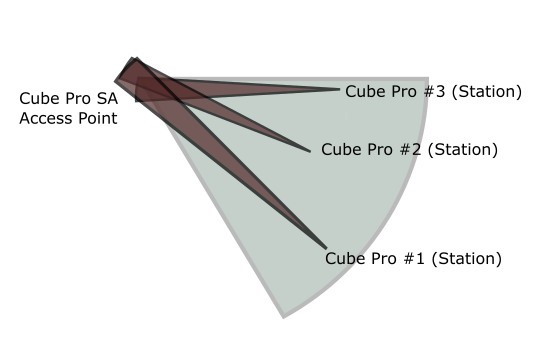
You need a Cube Pro SA as Access Point (PtMP) and three Cube Pros as Stations (PtP).

Loosely:

Yes Thank you for diagram. I am going to make a layout. To make sure the new setup is correct. I'm learning this from a job someone left the client hanging. So right now I need to get a Cube SA so I can make the existing wireless line cube pro that is a pair can I put the existing on the new location I am setting up since I need to buy the Cube SA only and use the leftover cube to put on the new location? Since Cube SA is new I'm buying and replacing an existing cube pro do I have to reprogram it or it should work out of the box. Also at each location for power we use these at each cube point PowerBox Pro. Thanks again

The Cube Pro PAIR is 2 units that have already been setup as sender and receiver. They have it burnt into the board that if you hard reset they will return to that config. HOWEVER, You can manually change the config and make them both receivers of a PtMP device like the WAP 60G AP or a CubeSA 60Pro ac as the SENDER.

Only to avoid confusion:
Receiver=station (actually station-bridge)
Sender=AP (or ap-bridge or bridge)

A Cube Pro (like most wireless Mikrotik devices) can be set as either station (please read as client) or AP (please read as server/access point).

The Access point mode is only one, in v6.x, bridge.
There are several station modes, see here:

You want to choose the station-bridge as it is the most "capable" mode, allowing "true" L2 connection.

There is a thread here:

where the default configuration of a pair has been posted.

You can use them as reference, the configurations of your existing pair won't (shouldn't) be much different.