Hi everyone! I’m struggling to get IPTV to work with my RB5009. I use a french ISP named Bouygues Telecom providing Internet & TV on vlan 100.
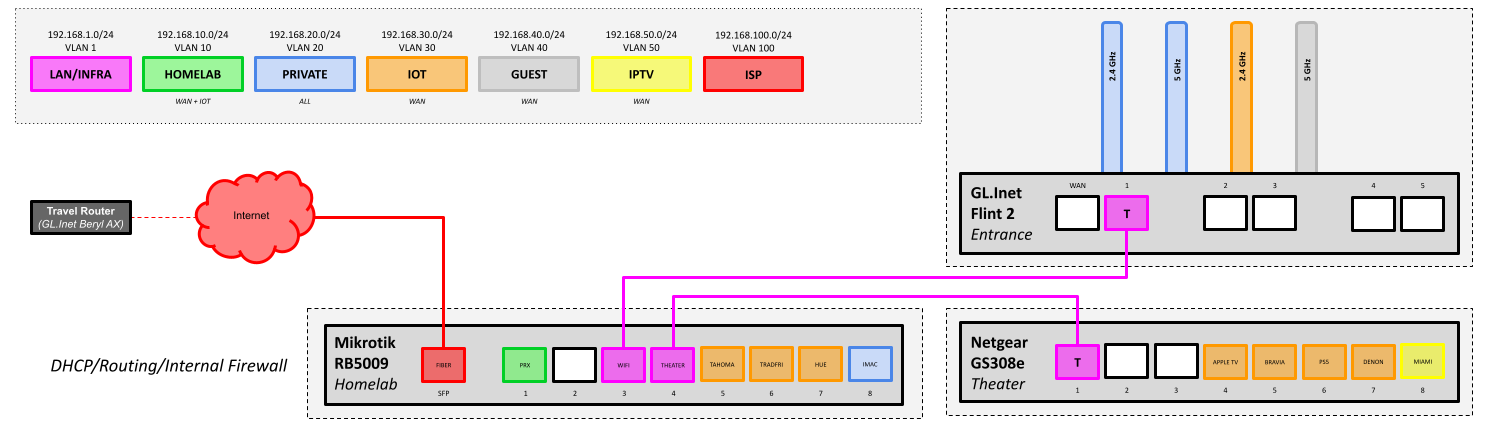
Fiber comes on the SFP (sfp-bouygues port & vlan100-bouygues), port 4 (ether4-trunk-sw-theater) gets a cable from a switch carrying multiple vlans, including vlan 50 that I chose for IPTV. This is where I have my STB (Miami 4K), static IP 192.168.50.50, port 8 (yellow). See schema for global architecture.
IGMP paquets priority is modified via a mangle rule to set it to 5.
[admin@mikrotik-rb5009] > /tool/sniffer/quick interface=vlan50-iptv,vlan100-bouygues,sfp-bouygues  ip-protocol=igmp
Columns: INTERFACE, TIME, NUM, DIR, SRC-MAC, DST-MAC, VLAN, SRC-ADDRESS, DST-ADDRESS, PROTOCOL, SIZE, CPU
INTERFACE         TIME    NUM  DIR  SRC-MAC            DST-MAC            VLAN   SRC-ADDRESS    DST-ADDRESS  PROTOCOL  SIZE  CPU
vlan50-iptv       3.462     1  <-   D0:05:2A:xx:xx:xx  01:00:5E:00:40:24         192.168.50.50  232.0.64.36  ip:igmp     60    3
vlan100-bouygues  3.487     3  ->   D4:B1:10:xx:xx:xx  01:00:5E:00:00:16         176.xxx.xx.x   224.0.0.22   ip:igmp     54    3
sfp-bouygues      3.487     2  ->   D4:B1:10:xx:xx:xx  01:00:5E:00:00:16  100:5  176.xxx.xx.x   224.0.0.22   ip:igmp     58    3
vlan100-bouygues  4.417     5  ->   D4:B1:10:xx:xx:xx  01:00:5E:00:00:16         176.xxx.xx.x   224.0.0.22   ip:igmp     54    3
sfp-bouygues      4.417     4  ->   D4:B1:10:xx:xx:xx  01:00:5E:00:00:16  100:5  176.xxx.xx.x   224.0.0.22   ip:igmp     58    3
vlan50-iptv       12.514    6  <-   D0:05:2A:xx:xx:xx  01:00:5E:00:00:02         192.168.50.50  224.0.0.2    ip:igmp     60    2
vlan50-iptv       12.514    7  ->   D4:01:C3:xx:xx:xx  01:00:5E:00:40:24         192.168.50.1   232.0.64.36  ip:igmp     42    2
vlan50-iptv       13.516    8  ->   D4:01:C3:xx:xx:xx  01:00:5E:00:40:24         192.168.50.1   232.0.64.36  ip:igmp     42    2
vlan100-bouygues  14.547   10  ->   D4:B1:10:xx:xx:xx  01:00:5E:00:00:16         176.xxx.xx.x   224.0.0.22   ip:igmp     54    3
sfp-bouygues      14.547    9  ->   D4:B1:10:xx:xx:xx  01:00:5E:00:00:16  100:5  176.xxx.xx.x   224.0.0.22   ip:igmp     58    3
vlan100-bouygues  14.747   12  ->   D4:B1:10:xx:xx:xx  01:00:5E:00:00:16         176.xxx.xx.x   224.0.0.22   ip:igmp     54    3
sfp-bouygues      14.747   11  ->   D4:B1:10:xx:xx:xx  01:00:5E:00:00:16  100:5  176.xxx.xx.x   224.0.0.22   ip:igmp     58    3
igmp-proxy seems to foward queries correctly:
2025-03-01 21:59:05 igmp-proxy,debug RECV IGMPv2 membership report from 192.168.50.50 to 232.0.64.36 on vlan50-iptv
2025-03-01 21:59:05 igmp-proxy,debug vlan50-iptv Received v2 membership report from 192.168.50.50
2025-03-01 21:59:05 igmp-proxy,debug vlan50-iptv Change IS EXCLUDE for 232.0.64.36 with sources { }
2025-03-01 21:59:05 igmp-proxy,debug joining multicast group 232.0.64.36 on vlan100-bouygues
2025-03-01 21:59:14 igmp-proxy,debug RECV IGMP leave message from 192.168.50.50 to 224.0.0.2 on vlan50-iptv
2025-03-01 21:59:14 igmp-proxy,debug vlan50-iptv Received leave from 192.168.50.50
2025-03-01 21:59:14 igmp-proxy,debug vlan50-iptv Change TO INCLUDE for 232.0.64.36 with sources { }
2025-03-01 21:59:14 igmp-proxy,debug vlan50-iptv Sending group specific query for 232.0.64.36
2025-03-01 21:59:15 igmp-proxy,debug vlan50-iptv Sending group specific query for 232.0.64.36
2025-03-01 21:59:16 igmp-proxy,debug leaving multicast group 232.0.64.36 on vlan100-bouygues
But still no TV 
You can find my config below. Hope someone has the missing piece of the puzzle because I’m stuck and can’t find it by myself.
Thank you!!
# 2025-03-01 17:20:11 by RouterOS 7.17.1
# software id = E916-AXTU
#
# model = RB5009UG+S+
/interface bridge
add admin-mac=D4:01:C3:91:DE:52 auto-mac=no comment=defconf igmp-snooping=yes name=bridge vlan-filtering=yes
/interface ethernet
set [ find default-name=ether2 ] name=ether2-ap-homelab-prx
set [ find default-name=ether3 ] name=ether3-trunk-sw-wifi
set [ find default-name=ether4 ] name=ether4-trunk-sw-theater
set [ find default-name=ether5 ] name=ether5-ap-tahoma
set [ find default-name=ether6 ] name=ether6-ap-tradfri
set [ find default-name=ether7 ] name=ether7-ap-hue
set [ find default-name=ether8 ] name=ether8-ap-imac
set [ find default-name=sfp-sfpplus1 ] mac-address=D4:B1:xx:xx:xx:xx name=sfp-bouygues
/interface wireguard
add listen-port=25311 mtu=1420 name=wireguard
/interface vlan
add interface=bridge name=vlan10-homelab vlan-id=10
add interface=bridge name=vlan20-private vlan-id=20
add interface=bridge name=vlan30-iot vlan-id=30
add interface=bridge name=vlan40-guest vlan-id=40
add interface=bridge name=vlan50-iptv vlan-id=50
add interface=sfp-bouygues name=vlan100-bouygues vlan-id=100
/interface list
add comment=defconf name=WAN
add comment=defconf name=LAN
/ip dhcp-client option
add code=60 name=vendorid_bbox value="'BYGTELIAD'"
/ip dhcp-server
add interface=vlan50-iptv name=dhcp-vlan50
/ip dhcp-server option
add code=6 name=dns-bboxtv value="'194.158.122.10''194.158.122.15'"
/ip pool
add name=dhcp ranges=192.168.1.200-192.168.1.230
add name=pool-vlan10 ranges=192.168.10.200-192.168.10.230
add name=pool-vlan20 ranges=192.168.20.200-192.168.20.230
add name=pool-vlan30 ranges=192.168.30.200-192.168.30.230
add name=pool-vlan40 ranges=192.168.40.200-192.168.40.230
/ip dhcp-server
add address-pool=dhcp interface=bridge name=dhcp
add address-pool=pool-vlan10 interface=vlan10-homelab name=dhcp-vlan10
add address-pool=pool-vlan20 interface=vlan20-private name=dhcp-vlan20
add address-pool=pool-vlan30 interface=vlan30-iot name=dhcp-vlan30
add address-pool=pool-vlan40 interface=vlan40-guest name=dhcp-vlan40
/disk settings
set auto-media-interface=bridge auto-media-sharing=yes auto-smb-sharing=yes
/interface bridge port
add bridge=bridge comment=defconf interface=ether2-ap-homelab-prx pvid=10
add bridge=bridge comment=defconf interface=ether3-trunk-sw-wifi
add bridge=bridge comment=defconf interface=ether4-trunk-sw-theater
add bridge=bridge comment=defconf interface=ether5-ap-tahoma pvid=30
add bridge=bridge comment=defconf interface=ether6-ap-tradfri pvid=30
add bridge=bridge comment=defconf interface=ether7-ap-hue pvid=30
add bridge=bridge comment=defconf interface=ether8-ap-imac pvid=20
add bridge=bridge interface=ether1
/ip firewall connection tracking
set udp-timeout=10s
/ip neighbor discovery-settings
set discover-interface-list=LAN
/ipv6 settings
set disable-ipv6=yes
/interface bridge vlan
add bridge=bridge tagged=bridge untagged=ether2-ap-homelab-prx vlan-ids=10
add bridge=bridge tagged=ether3-trunk-sw-wifi,bridge untagged=ether8-ap-imac vlan-ids=20
add bridge=bridge tagged=ether3-trunk-sw-wifi,ether4-trunk-sw-theater,bridge untagged=ether5-ap-tahoma,ether6-ap-tradfri,ether7-ap-hue vlan-ids=30
add bridge=bridge tagged=ether3-trunk-sw-wifi,bridge vlan-ids=40
add bridge=bridge untagged=ether1,ether2-ap-homelab-prx,ether5-ap-tahoma,ether6-ap-tradfri,ether7-ap-hue,ether3-trunk-sw-wifi,ether4-trunk-sw-theater,ether8-ap-imac,bridge vlan-ids=1
add bridge=bridge tagged=bridge,ether4-trunk-sw-theater vlan-ids=50
/interface list member
add interface=bridge list=LAN
add interface=sfp-bouygues list=WAN
add interface=vlan100-bouygues list=WAN
/ip address
add address=192.168.1.1/24 interface=bridge network=192.168.1.0
add address=192.168.10.1/24 interface=vlan10-homelab network=192.168.10.0
add address=192.168.20.1/24 interface=vlan20-private network=192.168.20.0
add address=192.168.30.1/24 interface=vlan30-iot network=192.168.30.0
add address=192.168.40.1/24 interface=vlan40-guest network=192.168.40.0
add address=192.168.50.1/24 interface=vlan50-iptv network=192.168.50.0
/ip dhcp-client
add comment="Bouygues VLAN" dhcp-options=hostname,clientid,vendorid_bbox interface=vlan100-bouygues
add comment="SFP Interface (macaddr overriden in Quick Set tab)" interface=sfp-bouygues
/ip dhcp-server lease
add address=192.168.50.50 comment="BBox Miami 4k" dhcp-option=dns-bboxtv mac-address=D0:05:xx:xx:xx:xx server=dhcp-vlan50
/ip dhcp-server network
add address=192.168.1.0/24 dns-server=192.168.1.1 gateway=192.168.1.1 netmask=24
add address=192.168.10.0/24 dns-server=192.168.10.1 gateway=192.168.10.1
add address=192.168.20.0/24 dns-server=192.168.20.1 gateway=192.168.20.1
add address=192.168.30.0/24 dns-server=192.168.30.1 gateway=192.168.30.1
add address=192.168.40.0/24 dns-server=192.168.40.1 gateway=192.168.40.1
add address=192.168.50.0/24 dns-server=192.168.50.1 gateway=192.168.50.1
/ip dns
set allow-remote-requests=yes mdns-repeat-ifaces=bridge
/ip dns static
add address=192.168.1.1 comment=defconf name=router.lan type=A
/ip firewall address-list
add address=192.168.0.0/16 comment=lan list=whitelist
add address=176.a.b.c list=wan-interface-ip
/ip firewall filter
add action=drop chain=input comment="Block DNS queries from WAN" dst-port=53 in-interface-list=WAN protocol=udp
add action=fasttrack-connection chain=forward comment="defconf: fasttrack" connection-state=established,related hw-offload=yes
add action=accept chain=input comment="defconf: accept established,related,untracked" connection-state=established,related,untracked
add action=accept chain=forward comment="defconf: accept established,related, untracked" connection-state=established,related,untracked
add action=accept chain=input comment="ICMP (input)" protocol=icmp
add action=accept chain=forward comment="ICMP (forward)" protocol=icmp
add action=accept chain=input comment="IPTV - Accept IGMP (input)" protocol=igmp
add action=accept chain=input comment="IPTV (input)" dst-port=1234,8200,8202 in-interface-list=WAN protocol=udp
add action=accept chain=forward comment="IPTV (foward)" dst-port=1234,8200,8202 in-interface-list=WAN protocol=udp
add action=accept chain=input comment="Accept DNS & DHCP on LAN" dst-port=53,67,68,5353 in-interface-list=LAN log=yes log-prefix=DHCP protocol=udp
add action=accept chain=forward comment="Accept DNS & DHCP on LAN" dst-port=53,67,68,5353 in-interface-list=LAN protocol=udp
add action=accept chain=input in-interface=bridge
add action=accept chain=forward in-interface=bridge
add action=accept chain=forward comment="Internet - Homelab can reach WAN" in-interface=vlan10-homelab out-interface-list=WAN
add action=accept chain=forward comment="Internet - Private can reach WAN" in-interface=vlan20-private out-interface-list=WAN
add action=accept chain=forward comment="Internet - IoT can reach WAN" in-interface=vlan30-iot out-interface-list=WAN
add action=accept chain=forward comment="Internet - Guests can reach WAN" in-interface=vlan40-guest out-interface-list=WAN
add action=accept chain=forward comment="Internet - IPTV can reach WAN" in-interface=vlan50-iptv out-interface-list=WAN
add action=accept chain=forward comment="ACL - Homelab can reach IoT" in-interface=vlan10-homelab out-interface=vlan30-iot
add action=accept chain=forward comment="ACL - Private can reach everything" in-interface=vlan20-private out-interface=all-vlan
add action=accept chain=forward comment="ACL - WAN can reach IPTV" in-interface-list=WAN out-interface=vlan50-iptv
add action=drop chain=input comment="Drop everything else received from WAN" in-interface-list=WAN
/ip firewall mangle
add action=set-priority chain=output new-priority=5 out-interface-list=WAN protocol=igmp
/ip firewall nat
add action=masquerade chain=srcnat out-interface-list=WAN
add action=masquerade chain=srcnat comment="Access to ONU GPON module" dst-address=192.168.1.10 src-address=192.168.20.0/24
add action=masquerade chain=srcnat comment="Hairpin NAT for LAN" dst-address=192.168.0.0/16 src-address=192.168.0.0/16
/ip upnp
set enabled=yes
/ip upnp interfaces
add interface=vlan100-bouygues type=external
/routing igmp-proxy
set query-interval=1m
/routing igmp-proxy interface
add alternative-subnets=0.0.0.0/0 interface=vlan100-bouygues upstream=yes
add interface=vlan50-iptv
/system clock
set time-zone-name=Europe/Paris
/system identity
set name=mikrotik-rb5009
/system logging
add topics=igmp-proxy
/system note
set show-at-login=no
/system ntp client servers
add address=time.apple.com
/tool graphing interface
add
/tool graphing resource
add
/tool mac-server
set allowed-interface-list=LAN
/tool mac-server mac-winbox
set allowed-interface-list=LAN
