hello all,
I am facing an issues with my RB433AH that I am using as a Point to Point for a distance of about 5km.
I want to enable the two radio to autoreboot at a specified time in the day. But the problem i am having is that anytime i reboot the RB it goes to its default time and date of Jan/02/1970, at times i get this message “jan/02/1970 00:00:20 system,error,critical router was rebooted without proper shutdown (cause 1)”
I want to enable the RB to reboot around 21:00 daily but to set it based on this area it defaults to factory date and time.
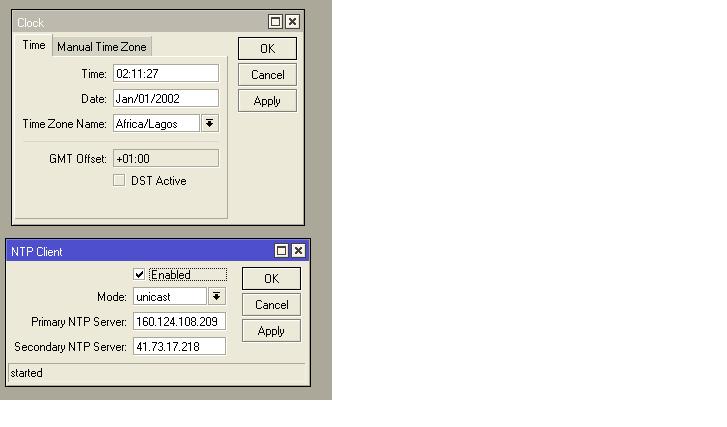
How do i go about it considering the fact that the RB has no internet access as the are just used for wds-bridge. See attached picture below.
Thanks
If you reboot the RBs just one time in every 24hr, and both of them have the same clock time after reboot, You can set schedule to reboot at a certain time. e.g if after reboot at 21:00 the times set to 00:00:00, set the start time of scheduler at 00:01:00 and the interval 24:00:00.
If the RBs have not the same time, you can enable one’s NTP server and the other sync itself with that.
Set up an NTP server within your network that they can reach. They can sync with that and don’t need access to the internet then, just the NTP server does. A lot of the versions have the ability to act as an NTP server, so it could even be your gateway or another AP.
How to Setup a Windows 2008 R2 SNTP/NTP Server
Posted on Monday, December 21, 2009 12:06 AM
Gee, setting up an SNTP/NTP server in Windows is not intuitive.
The good news is: When configured correctly, you can use the Windows Time (W32Time) service as an SNTP/NTP server for both windows and non-windows SNTP/NTP clients.
Here’s how to do it:
Click Start, click Run, type regedit, and then click OK.
Locate and then click the following registry entry:
HKEY_LOCAL_MACHINE\SYSTEM\CurrentControlSet\Services\W32Time\Config\
In the right pane, right-click AnnounceFlags, and then click Modify.
In the Edit DWORD Value dialog box, under Value data, type 5, and then click OK.
Enable NTPServer.
Locate and then click the following registry subkey:
HKEY_LOCAL_MACHINE\SYSTEM\CurrentControlSet
Services\W32Time\TimeProviders\NtpServer\
In the right pane, right-click Enabled, and then click Modify.
In the Edit DWORD Value dialog box, type 1 under Value data, and then click OK.
Exit Registry Editor.
At the command prompt, type the following command to restart the Windows Time service, and then press ENTER:
net stop w32time && net start w32time
This should get you setup with minimal registry hack impact.
Tips
Make sure W32Time is set to Automatic startup mode.
Make sure UDP 123 is allowed through your firewall.
Use this InternetTime program to help you debug connectivity to your SNTP/NTP server.
internettime.zip