Help with troubleshooting poor WiFi speed

It’s probably the best you will get with the old wireless driver. If you want even faster 5GHz speed (500+ Mbps) you may want to test the new wifi driver, but this requires building a new, slightly different wifi configuration from scratch.


Maybe the signal strength was too high(!) in that case, due to the selected channel. Try to moving away some meters from the AP.

I feel very Olympic today, is there a guide how to do this?

Hmmm …

maybe start here and then see how far you get :wink:

https://help.mikrotik.com/docs/display/ROS/WiFi

Going back to channel width, how do I decide which one of these to use:

  • 20/40/80mhz-Ceee
  • 20/40/80mhz-eCee
  • 20/40/80mhz-eeCe
  • 20/40/80mhz-eeeC
  • 20/40/80mhz-XXXX

My assumption is that if auto frequency was suboptimal, the XXXX control channel auto is also suboptimal and I should chose one of the “C” options. Which one?

The C stands for Control channel and every C or e (or X) is 20MHz bandwidth.

In case of Ceee and channel 5500:
5490-5570 used frequencies, where the control channel is frequency 5500.

In case of eCee and channel 5520:
5490-5570 used frequencies, where the control channel is frequency 5520.

A tool like inSSIDer will show exactely what is used in these cases.

In this topic you can find some more info:
http://forum.mikrotik.com/t/understanding-channel-width-options-and-limitations-due-to-country-registrations-plus-interface-vs-capsman-settings/151239/1

iperf3 up and running: https://gist.github.com/zupo/852c0aceeaeb9ba3fe68c7d58b413895

Wired:

[ ID] Interval           Transfer     Bitrate         Retr
[  8]   0.00-10.00  sec  1.08 GBytes   930 Mbits/sec   70             sender
[  8]   0.00-10.00  sec  1.08 GBytes   930 Mbits/sec                  receiver

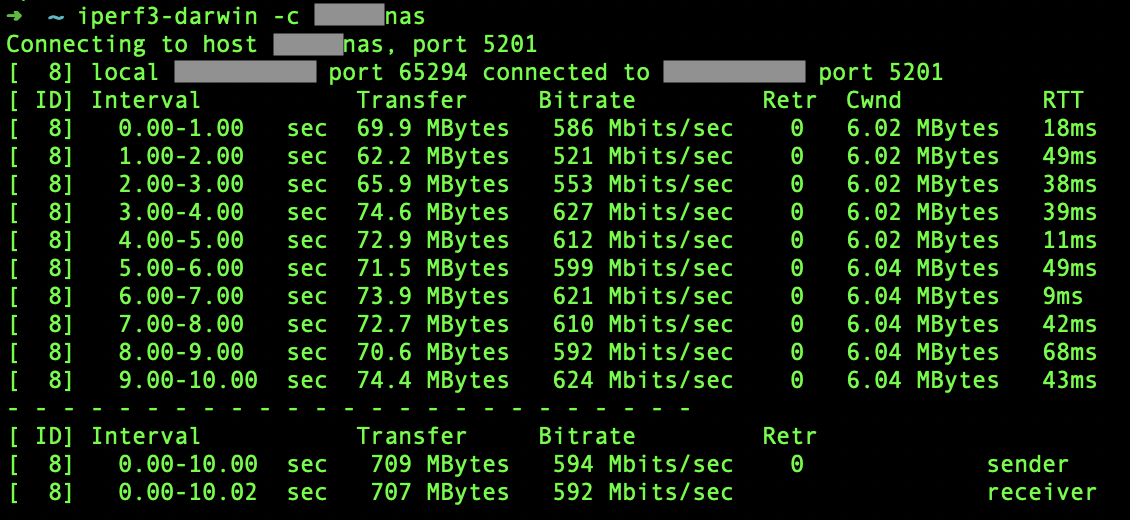
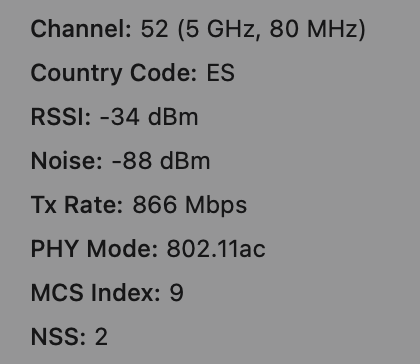
Wireless (Tx Rate 866):

[ ID] Interval           Transfer     Bitrate         Retr
[  8]   0.00-10.00  sec   748 MBytes   628 Mbits/sec    0             sender
[  8]   0.00-10.02  sec   747 MBytes   626 Mbits/sec                  receiver

Wireless (Tx Rate 866) with an iPhone running speedtest next to the MacBook, to add some noise

[ ID] Interval           Transfer     Bitrate         Retr
[  8]   0.00-10.00  sec   550 MBytes   461 Mbits/sec  300             sender
[  8]   0.00-10.01  sec   549 MBytes   460 Mbits/sec                  receiver

Pretty awesome :sunglasses:

Anything above 300mbps, I’m happy.

Nice !
630Mbps on cAP AC is something which could be only dreamed of some years ago.

If you have a capable client device and a real AX AP, you can go up to 700-750Mbps.
But for that difference I would not replace that cAP AC right now, especially not with new wave2 drivers :laughing:

Why is that? Did the firmware improve over the recent years?

FWIW, I’m running RouterOS 6.49.10 LTS on my cAP AC.

OP, you installed the wifi-qcom-ac driver package already (needs ROS 7.13+)? Either way - your iperf3 results look pretty good.

Wait a moment, I was under the assumption you already applied wave2 drivers to that cAP AC ?

So … you’re pushing 630Mbps on cAP AC using ROS6 ?
That’s hard to believe.
Theoretically you can only get data rate (=866 Mbps) divided by 2 as rough estimate for real speed = 433Mbps or about and that’s on wave1 radios.

Using wave2 drivers (ROS7.13 at least and qcom-ac driver), you can get to 700-750Mbps.

I have two more cAP ACs a few meters/walls away to cover the rest of the first floor. I need to choose channels for them.

Looking at https://en.wikipedia.org/wiki/List_of_WLAN_channels, this is my thinking:

  • current cAP AC that I tested above is set to use channel 52. Because I use 20/40/80MHz channel width, channels 54 and 58 are used.
  • on the Wikipedia list I see the next “block” of channels that supports 80MHz is 100. And then the next one is 132. So I should use 100 and 132 channels for the other two cAPs. Correct or am I missing something?

You can also go down to channel 36 (=5180) since your all alone :sunglasses:

No, haven’t switched to wave2, wanted to see what the local maximum is on the old driver, before I go and rip everything apart.

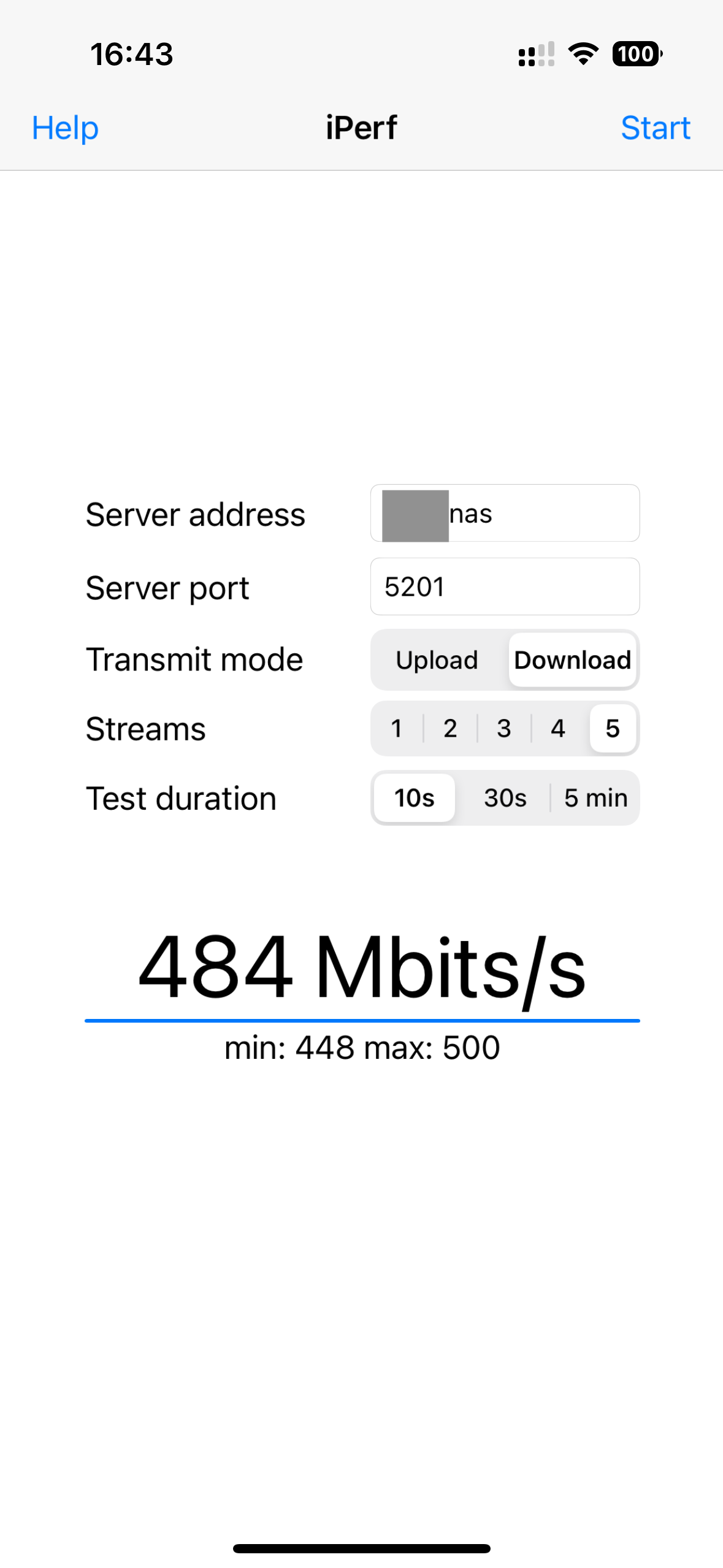
Maybe I am doing some measurements wrong? See screenshots.

Granted, these are the best results. I don’t consistently get 600Mbps, most of the time it’s around 400Mbps.
Screenshot 2024-01-18 at 16.24.05.png
Screenshot 2024-01-18 at 16.25.40.png
Screenshot 2024-01-18 at 16.26.37.png
IMG_0005.PNG

Ah nice, fair point, overlooked that one, thanks!

36,52,68,84

I would try DFS channels on the cAPs that need maybe cover a slightly larger area. Channel 100+ have higher transmit power (but need to adhere DFS).

I get “bad band or frequency” if I try to set 68. I guess country policy limitation?

Should be 36 , 52, 100, 132 (5180 / 5260 / 5500 / 5660 respectively)

68 is not allowed for 40/80 width, only 20.
Definitely not in the list of allowed 80MHz channels according to that earlier linked Wikipedia article.

Thanks holvoetn for correcting my bad!

Why not 116? On https://en.wikipedia.org/wiki/List_of_WLAN_channels it seems that it should be good too?

132 does not seem to work though, I get “bad band or frequency” when I try to set frequency=5660

Fun fact, I also have a wsAP ac lite, and with the same settings as cAP ACs above, I can’t get above 100mbps. Also fiddled around with different channel-widths, distances, etc. Won’t go over 100 mbps. Is cAP AC just that much better hardware?