Help with WireGuard setup behind NAT

Hello,

I am trying to set up a WireGuard VPN on my Mikrotik router.

The topology is simple, I have an edge router which gets the public IP, my Mikrotik is connected to it and gets it's local IP via DHCP from the edge router in ether1 (subnet 192.168.1.0/24), and my machines are connected to the Mikrotik (subnet 192.168.88.0/24).

The Mikrotik is DMZ'd in the edge router.

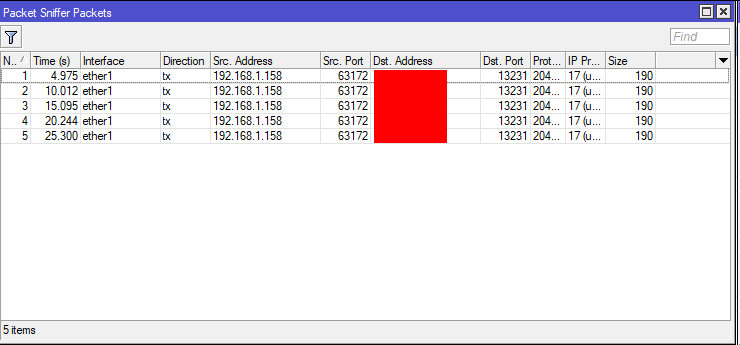
I am trying to set up WireGuard in the 10.10.1.0/24 subnet, and so far I have had no success on connecting from a client. I have quadruple checked the public and private keys from both server and client. When I use packet sniffer on the Mikrotik, I can see packets arriving from 192.168.1.158 to port 13231, but I don't know if they are being processed or blocked or ignored.

This is the pertinent Mikrotik config:

# 2025-08-08 04:07:10 by RouterOS 7.19.4
# software id = XXX
#
# model = RB4011iGS+
# serial number = XXX
/ip firewall filter
add action=accept chain=input comment=\
    "defconf: accept established,related,untracked" connection-state=\
    established,related,untracked
add action=accept chain=input comment="vpn wireguard" dst-port=13231 protocol=udp
add action=accept chain=input comment="vpn wireguard interface input" src-address=\
    10.10.1.0/24
add action=accept chain=forward comment="vpn allow vpn to lan" dst-address=\
    192.168.88.0/24 src-address=10.10.1.0/24
add action=accept chain=forward comment="vpn allow lan to vpn" dst-address=\
    10.10.1.0/24 src-address=192.168.88.0/24
add action=drop chain=input comment="defconf: drop invalid" connection-state=\
    invalid
add action=accept chain=input comment="defconf: accept ICMP" protocol=icmp
add action=accept chain=input comment=\
    "defconf: accept to local loopback (for CAPsMAN)" dst-address=127.0.0.1
add action=drop chain=input comment="defconf: drop all not coming from LAN" \
    in-interface-list=!LAN
add action=accept chain=forward comment="defconf: accept in ipsec policy" \
    ipsec-policy=in,ipsec
add action=accept chain=forward comment="defconf: accept out ipsec policy" \
    ipsec-policy=out,ipsec
add action=fasttrack-connection chain=forward comment="defconf: fasttrack" \
    connection-state=established,related hw-offload=yes
add action=accept chain=forward comment=\
    "defconf: accept established,related, untracked" connection-state=\
    established,related,untracked
add action=drop chain=forward comment="defconf: drop invalid" connection-state=\
    invalid
add action=drop chain=forward comment="defconf: drop all from WAN not DSTNATed" \
    connection-nat-state=!dstnat connection-state=new in-interface-list=WAN

# 2025-08-08 04:09:21 by RouterOS 7.19.4
# software id = XXX
#
# model = RB4011iGS+
# serial number = XXX
/ip firewall nat
add action=masquerade chain=srcnat comment="defconf: masquerade" ipsec-policy=\
    out,none out-interface-list=WAN
add action=masquerade chain=srcnat comment="vpn wireguard" src-address=10.10.1.0/24
add action=masquerade chain=srcnat comment="vpn asquerade vpn to lan" dst-address=\
    192.168.88.0/24 src-address=10.10.1.0/24
add action=dst-nat chain=dstnat comment="RDP (TCP)" dst-address=192.168.1.158 \
    dst-port=5900 protocol=tcp to-addresses=192.168.88.30 to-ports=3389
add action=dst-nat chain=dstnat comment="RDP (UDP)" dst-address=192.168.1.158 \
    dst-port=5900 protocol=udp to-addresses=192.168.88.30 to-ports=3389

# 2025-08-08 04:10:44 by RouterOS 7.19.4
# software id = XXX
#
# model = RB4011iGS+
# serial number = XXX
/ip address
add address=192.168.88.1/24 comment=defconf interface=bridge network=192.168.88.0
add address=10.10.1.1/24 interface=wg0 network=10.10.1.0

# 2025-08-08 04:11:25 by RouterOS 7.19.4
# software id = XXX
#
# model = RB4011iGS+
# serial number = XXX
/interface wireguard
add disabled=yes listen-port=13231 mtu=1420 name=wg0
/interface wireguard peers
add allowed-address=::/0 interface=wg0 name=usr0 persistent-keepalive=25m \
    public-key="XXX"

# 2025-08-08 04:13:18 by RouterOS 7.19.4
# software id = XXX
#
# model = RB4011iGS+
# serial number = XXX
/ip dhcp-client
add comment=defconf interface=ether1 use-peer-dns=no

I am a beginner in RouterOS, so I am unsure whether this configuration if good or not. Also the WireGuard interface is currently showing as disabled because I disabled it since it wasn't working.

This is client config:

[Interface]
PrivateKey = my client private key
Address = 10.10.1.2/32
DNS = 192.168.88.1

[Peer]
PublicKey = my server public key
AllowedIPs = 10.10.1.0/24, 192.168.88.0/24
Endpoint = XXX.sn.mynetname.net:13231
PersistentKeepalive = 25

The output log of WireGuard says: 2025-08-07 23:48:30.019: [TUN] [VPN_NAME] Handshake for peer 1 (MY_PUBLIC_ADDRESS:13231) did not complete after 5 seconds, retrying (try 2)

I will appreciate any help.
Thanks in advance.
I would replace ::/0 with 10.10.1.2

You could put an output passthrough/log rule (perhaps in mangle) with udp, and src-port 13231 to see if it is replying and from what address. There can be issues if you have multiple ip addresses on the outgoing interface. (if this is the case a dst-nat rule of the incoming vpn traffic to 127.0.0.1 might help, or change the port forward on the edge router)

When you provide a proper export, containing the complete config ......
/export file=anynameyouwish (minus router serial number, any public WANIP information, keys)

I will be glad to be of assistance.
No need for IP DHCP leases as well.

I tried what you suggested, and no response from the mikrotik is logged at all when the client tries to connect. I only see one log,

wg0: [usr0] CLIENT_PUBLIC_KEY: Handshake for peer did not complete after 5 seconds, retrying (try 2)

The packets arrive, I can see them with the packet sniffer, but when I add a mangle rule as you suggested no reply is logged.

# 2025-08-08 11:00:32 by RouterOS 7.19.4
# software id = XXX
#
# model = RB4011iGS+
# serial number = XXX
/interface bridge
add admin-mac=XXX auto-mac=no comment=defconf name=bridge \
    port-cost-mode=short
/interface wireguard
add listen-port=13231 mtu=1420 name=wg0
/interface list
add comment=defconf name=WAN
add comment=defconf name=LAN
/interface lte apn
set [ find default=yes ] ip-type=ipv4 use-network-apn=no
/ip ipsec proposal
set [ find default=yes ] auth-algorithms=sha256,sha1 enc-algorithms=\
    aes-256-cbc,aes-128-cbc pfs-group=none
/ip pool
add name=default-dhcp ranges=192.168.88.100-192.168.88.199
/ip dhcp-server
add address-pool=default-dhcp interface=bridge lease-time=10m name=defconf
/ip smb users
set [ find default=yes ] disabled=yes
/port
set 0 name=serial0
set 1 name=serial1
/routing bgp template
set default disabled=no output.network=bgp-networks
/routing ospf instance
add disabled=no name=default-v2
/routing ospf area
add disabled=yes instance=default-v2 name=backbone-v2
/interface bridge port
add bridge=bridge comment=defconf ingress-filtering=no interface=ether2 \
    internal-path-cost=10 path-cost=10
add bridge=bridge comment=defconf ingress-filtering=no interface=ether3 \
    internal-path-cost=10 path-cost=10
add bridge=bridge comment=defconf ingress-filtering=no interface=ether4 \
    internal-path-cost=10 path-cost=10
add bridge=bridge comment=defconf ingress-filtering=no interface=ether5 \
    internal-path-cost=10 path-cost=10
add bridge=bridge comment=defconf ingress-filtering=no interface=ether6 \
    internal-path-cost=10 path-cost=10
add bridge=bridge comment=defconf ingress-filtering=no interface=ether7 \
    internal-path-cost=10 path-cost=10
add bridge=bridge comment=defconf ingress-filtering=no interface=ether8 \
    internal-path-cost=10 path-cost=10
add bridge=bridge comment=defconf ingress-filtering=no interface=ether9 \
    internal-path-cost=10 path-cost=10
add bridge=bridge comment=defconf ingress-filtering=no interface=ether10 \
    internal-path-cost=10 path-cost=10
add bridge=bridge comment=defconf ingress-filtering=no interface=sfp-sfpplus1 \
    internal-path-cost=10 path-cost=10
/ip firewall connection tracking
set udp-timeout=10s
/ip neighbor discovery-settings
set discover-interface-list=LAN
/ip settings
set max-neighbor-entries=8192
/ipv6 settings
set max-neighbor-entries=8192 soft-max-neighbor-entries=8191
/interface l2tp-server server
set default-profile=*1 use-ipsec=required
/interface list member
add comment=defconf interface=bridge list=LAN
add comment=defconf interface=ether1 list=WAN
/interface wireguard peers
add allowed-address=10.10.1.2/32 interface=wg0 name=usr0 \
    persistent-keepalive=25m public-key=\
    "XXX"
/ip address
add address=192.168.88.1/24 comment=defconf interface=bridge network=\
    192.168.88.0
add address=10.10.1.1/24 interface=wg0 network=10.10.1.0
/ip cloud
set ddns-enabled=yes
/ip dhcp-client
add comment=defconf interface=ether1 use-peer-dns=no
/ip dhcp-server lease
add address=192.168.88.30 client-id=XXX mac-address=\
    XXX server=defconf
add address=192.168.88.10 client-id=XXX mac-address=\
    XXX server=defconf
add address=192.168.88.11 client-id=\
    XXX mac-address=\
    XXX server=defconf
add address=192.168.88.31 client-id=XXX mac-address=\
    XXX server=defconf
/ip dhcp-server network
add address=192.168.88.0/24 comment=defconf gateway=192.168.88.1
/ip dns
set allow-remote-requests=yes servers=192.168.88.11
/ip dns static
add address=192.168.88.1 comment=defconf name=router.lan type=A
/ip firewall filter
add action=accept chain=input comment=\
    "defconf: accept established,related,untracked" connection-state=\
    established,related,untracked
add action=accept chain=input comment="vpn wireguard" dst-port=13231 \
    protocol=udp
add action=accept chain=input comment="vpn wireguard interface input" \
    src-address=10.10.1.0/24
add action=accept chain=forward comment="vpn allow vpn to lan" dst-address=\
    192.168.88.0/24 src-address=10.10.1.0/24
add action=accept chain=forward comment="vpn allow lan to vpn" dst-address=\
    10.10.1.0/24 src-address=192.168.88.0/24
add action=drop chain=input comment="defconf: drop invalid" connection-state=\
    invalid
add action=accept chain=input comment="defconf: accept ICMP" protocol=icmp
add action=accept chain=input comment=\
    "defconf: accept to local loopback (for CAPsMAN)" dst-address=127.0.0.1
add action=drop chain=input comment="defconf: drop all not coming from LAN" \
    in-interface-list=!LAN
add action=accept chain=forward comment="defconf: accept in ipsec policy" \
    ipsec-policy=in,ipsec
add action=accept chain=forward comment="defconf: accept out ipsec policy" \
    ipsec-policy=out,ipsec
add action=fasttrack-connection chain=forward comment="defconf: fasttrack" \
    connection-state=established,related hw-offload=yes
add action=accept chain=forward comment=\
    "defconf: accept established,related, untracked" connection-state=\
    established,related,untracked
add action=drop chain=forward comment="defconf: drop invalid" \
    connection-state=invalid
add action=drop chain=forward comment=\
    "defconf: drop all from WAN not DSTNATed" connection-nat-state=!dstnat \
    connection-state=new in-interface-list=WAN
/ip firewall mangle
add action=log chain=output disabled=yes dst-port=13231 log-prefix=WG-OUT \
    protocol=udp
/ip firewall nat
add action=masquerade chain=srcnat comment="defconf: masquerade" \
    ipsec-policy=out,none out-interface-list=WAN
add action=masquerade chain=srcnat comment="vpn wireguard" src-address=\
    10.10.1.0/24
add action=masquerade chain=srcnat comment="vpn asquerade vpn to lan" \
    dst-address=192.168.88.0/24 src-address=10.10.1.0/24
add action=dst-nat chain=dstnat comment="RDP (TCP)" dst-address=192.168.1.158 \
    dst-port=XXX protocol=tcp to-addresses=192.168.88.30 to-ports=XXX
add action=dst-nat chain=dstnat comment="RDP (UDP)" dst-address=192.168.1.158 \
    dst-port=XXX protocol=udp to-addresses=192.168.88.30 to-ports=XXX
add action=dst-nat chain=dstnat disabled=yes dst-port=13231 \
    in-interface-list=WAN protocol=udp to-addresses=127.0.0.1 to-ports=13231
/ip ipsec profile
set [ find default=yes ] dpd-interval=2m dpd-maximum-failures=5 \
    enc-algorithm=aes-256,aes-128 hash-algorithm=sha256
/ip route
add disabled=no dst-address=192.168.88.30/32 gateway=bridge routing-table=\
    main suppress-hw-offload=no
/ip smb shares
set [ find default=yes ] directory=/pub
/routing bfd configuration
add disabled=no interfaces=all min-rx=200ms min-tx=200ms multiplier=5
/system clock
set time-zone-autodetect=no time-zone-name=XXX
/system identity
set name=CapyTik
/system resource irq rps
set sfp-sfpplus1 disabled=no
/tool mac-server
set allowed-interface-list=LAN
/tool mac-server mac-winbox
set allowed-interface-list=LAN
/tool sniffer
set filter-dst-port=13231 filter-interface=ether1

If they are coming in, and nothing is leaving, some possibilities:
wireguard is listening on a different port. (but config looks correct)
Other end has a psk configured.
Public key at one or both ends is wrong.
(If you didn't copy and paste the public keys, they are probably wrong)
copy, paste and emailing the public key (not an image of it) works well.

  1. On the router Peers settings, please remove persistent-keep-alive. That is a setting that should be on the client device not on the router. The interface is shown as disabled, should be enabled!!

  2. Get rid of the mangle rule for wireguard it does not apply here.

  3. Get rid of the NAT rule for wireguard, it does not apply here.

  4. Remove the port forwarding of RDP, it is not a secure protocol and is generally hacked.
    Besides, since you have wireguard there is no need for RDP. If you still think you need it then run it through the wirguard tunnel. Simple as accessing any device on the subnet, which is allowed by firewall rules.

  5. Firewall rules should be, for clarity and avoiding errors, kept within the same chain.

  6. You only need on the forward chain to allow the wg traffic to subnet, the return traffic is permitted.
    Also people on router dont initiate traffic to reach your laptop or smartphone etc..

  7. Please find config adjusted below:


/ip firewall filter
add action=accept chain=input connection-state=established,related,untracked
add action=drop chain=input  connection-state=invalid
add action=accept chain=input  protocol=icmp
add action=accept chain=input dst-address=127.0.0.1
add action=accept chain=input comment="vpn wireguard" dst-port=13231 protocol=udp
add action=accept chain=input comment="vpn wireguard interface input" src-address=\
    10.10.1.0/24
add action=accept chain=input comment="allow LAN to Router"  in-interface-list=LAN
add action=drop chain=input comment="Drop all Else"
+++++++++++++++++++++++++++++++++++++++
add action=fasttrack-connection chain=forward connection-state=established,related
add action=accept chain=forward connection-state=established,related,untracked
add action=drop chain=forward  connection-state=invalid
add action=accept chain=forward comment="internet traffic" in-interface-list=LAN out-interface-list=WAN
add action=accept chain=forward comment="WG to local subnet" in-interface=wg0 dst-address=192.168.88.0/24
add action=accept chain=forward comment="port forwarding" connection-nat-state=dstnat
add action=drop chain=forward comment="drop all else"

/ip firewall nat
add action=masquerade chain=srcnat comment="defconf: masquerade" ipsec-policy=\
    out,none out-interface-list=WAN

/ip address
add address=192.168.88.1/24 comment=defconf interface=bridge network=192.168.88.0
add address=10.10.1.1/24 interface=wg0 network=10.10.1.0

/interface wireguard
add  listen-port=13231 mtu=1420 name=wg0
/interface wireguard peers
add allowed-address=0.0.0.0/0 interface=wg0 name=usr0 public-key="XXX"

/ip dhcp-client
add comment=defconf interface=ether1 use-peer-dns=no