Hello everybody,
I am rather new to Mikrotik but looks like a solid architecture and I am investing into it in term of time to understand its way of doing networking and how to use it.
Bow I have run into an issue. I selected an Hex S in order to run my home network remotely with the intention of using an Acer M3. See: https://www.acer.com/us-en/networking/5g/acer-connect-enduro-m3-5g-mobile-wifi
This access point is recognized by another router (Mikrotik Chateau LTE12) and as soon as I plug it in is seen in /system/resoirces/USB and when I enable tethering, an LTE interface appears.
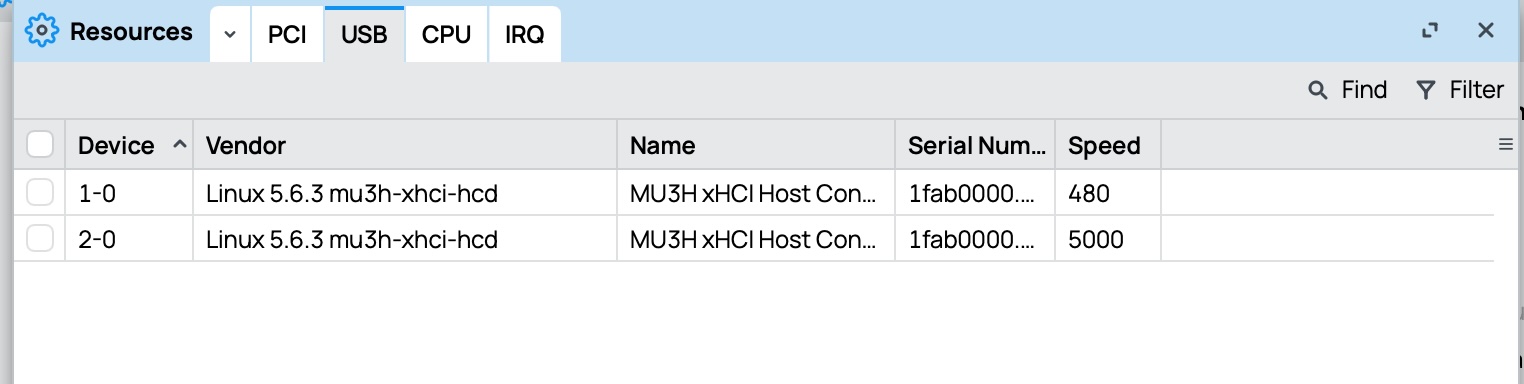
In the HexS the AcerM3 does not show in the system resources USB and therefore cannot be enabled and accessed. Both routers are on 7.19 stable (latest).
I guess I am missing a package?
Is anybody able to tell me what I am missing? Thanks!
You're not missing anything.
Best to create supout.rif and create support ticket with reference to this thread.
Probably some driver which needs to be activated.
It works on Chateau, so it shouldn't be too much work to make it operational as well on Hex S, I would think.
It does seem odd it works one Mikrotik device but not another... Normally LTE modems work same on all devices.
Does it show up as an LTE interface? If it's showing up... you might want to check the APN settings under "APN profiles" for default & make sure the setting match the Chateau.
If you don't see an LTE interface, then a support ticket is order. Make sure to collect a supout.rif using winbox/webfig & attach that to the case. Mikrotik will need that info to even look at the issue.
@Amm0,
unfortunately in system resource USB, the acer does not show. Hence the LTE interface does not appear as well.
The USB window only list the USB bridges. In the Chateau it shows in the connected devices. In the HexS it does not. The USB works because plugging in a USB drive it shows.
This has me kind of perplexed.
Ready to try any ideas while I wait for support ....
I am also doing some trials.
I had been wondering if it could be a power issue and I tried with both PoE (the HexS supports 803.3 af/at) plugged in a cisco 3560G-8) and provided power supply.
No difference.
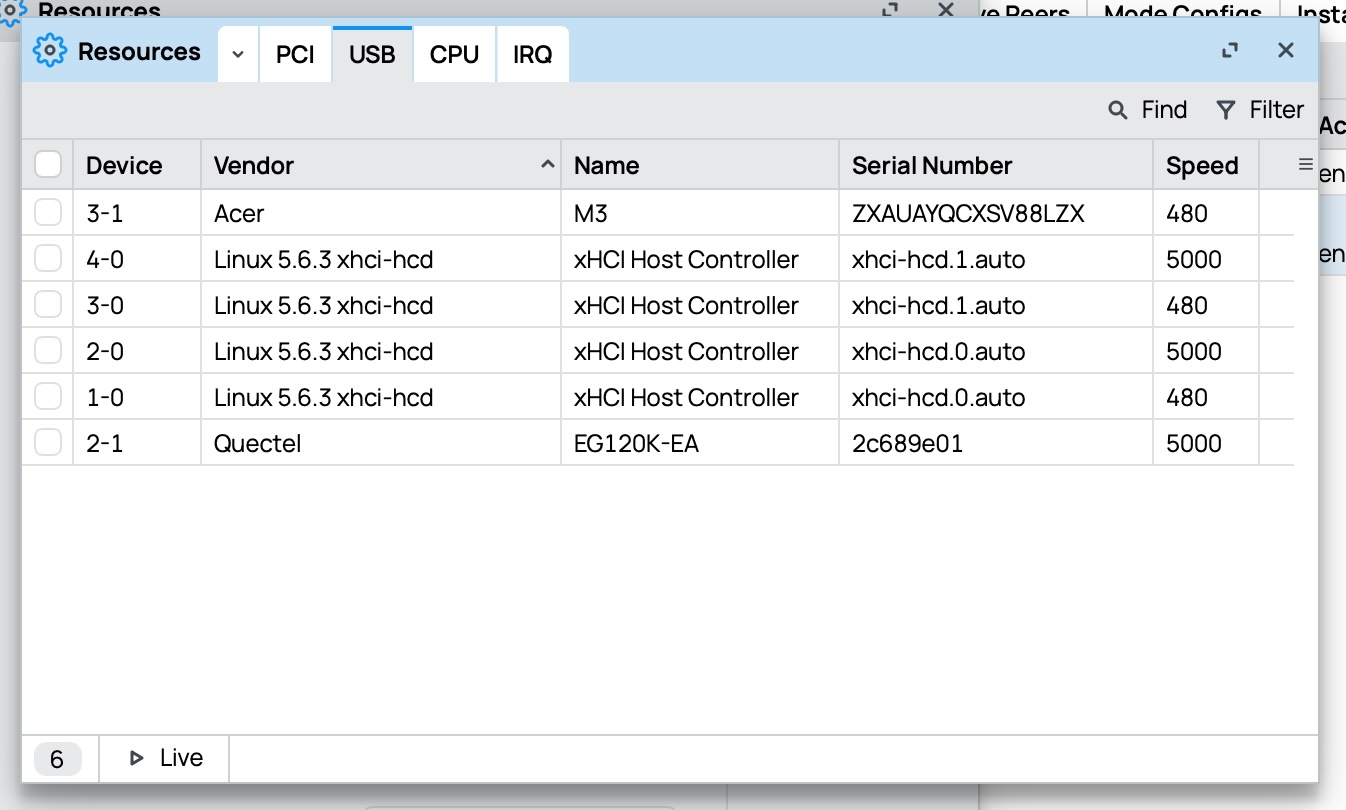
Now this is the screen shot of the Chateau the ACER shows up nicely
You might notice that the USB controller is different from the HexS
Ah... I read that it was showing up in system/resources... My bad.
Only other guess why is the screenshot, the modem is using USB 3.0... So, I'm guessing, the Chateau has USB 3.0 and while the hEX S'2025 claims USB 3.0 support, it's possible there is bug in USB 3 support since there have been a few items that were wrong in the spec sheets for hEX S.
Sometime there are AT commands to switch the modem in the USB 2.0. I don't know for this particular quectel, but might worth a try to see if that gets it detected.
I was recently looking at buying a new 4G USB key to serve as a backup on one of our sites.
I consulted the table at Peripherals - RouterOS - MikroTik Documentation because in the past I have seen that arbitrary sticks that seem the same sometimes do not work.
There I found that e.g. for the Huawei E3372 that we have in use there is the note "Models with suffixes -325 works only with arm cpu" (and this is the type that is now readily available)
Now the hEX S 2025 has an ARM CPU so one would expect it to be no problem, but it could be that there are other cases where it depends on the actual hardware if it will work or not.
Update.
After multiple exchanges of email and trial with collection of support data with 1st level support, the issue has been escalated to the developers for debugging.
It seems it is not the expected behaviour.
Info: today I received an hAP AC3. The ACER M3 was immediately recognised.
Now I have a different problem whit this but I will open a different thread to keep things tidi and clean.
Subject: USB Tethering Not Detected (Charging Only) - hEX S 2025 - ROS v7.22.3
Hello,
I am experiencing an issue with my MikroTik hEX S (2025 refresh model e60iugs) running RouterOS v7.22.3.
Problem: When I connect my Android phone via USB to the MikroTik USB port, it only charges the phone. The lte1 interface does not appear under /interface.
Context:
This setup was working previously for internet access.
I do not know when it stopped working.
I have tried using a high-quality data cable.
The USB port works (I tested a USB drive).
What I have already tried:
Rebooting both the phone and the MikroTik.
Toggling USB tethering on the phone after connecting.
Checking /system resource usb (only lists USB bridges).
Can you please advise on how to get the lte1 interface to reappear?
As you already asked AI to prepare the abstract of a "question" just ask it for the answer.
What is the believe that any Android phone would be recognized as LTE interface based on?
It's so sad that people loose the ability to ask a question and formulate problem by themselves. More sad is they do not even try to look for the solution the other way than AI and give-up when the first "answer" does not solve the problem.