i’m truly new to the Mikrotik Topic and Hardware and maybe I have some understandig issues.
I have a Mikrotik Hex S as my main router. There I have configuried several VLANs and put them into a Bridge. But when I try to copy data from, let’s say, my client VLAN to my server VLAN I only get at max. 176 Mbit/s transfer rate. The offical test results say that the routing speed is around 2 Gbit/s. I don’t use the SFP Port so it should be capable of the 2 Gbit/s.
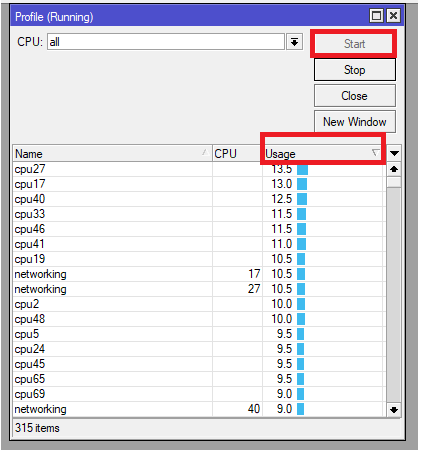
When I look at the CPU Load I can see that one Core is around 90% and the other 3 only around 10 % or less. I thought the Hex S supports HW Offload and on the Bridge Ports it is ticked.
Has anybody a advice or have I some understanding issues right here? Has the Hex S not enough performance to route 1 Gbit between VLANs?
Export config, clean for sensitive / private data.
Probably something not correctly done when setting up vlans meaning you are not using switch chip, only software.
I have hex and using hap ac3 as ap, I can easily reach 500mb over wifi across vlans with wireless being the bottleneck there.
hEX S can do wirespeed switching of intra-VLAN traffic between ether ports (SFP port is not part of this equation). However hEX S can not do wirespeed routing between different IP networks regardless the topology (VLANs, LAN per port, etc.).
So yes, it does seem to be issue of understanding …
BTW, when looking at official test results, one has to keep in mind they’re synthetic, over all ports and with multiple concurrent connections. Many forum members find figure put in “routing 25 ip filter rules, 512 byte [packet size]” to reflect typical real-life performance pretty well. For hEX S that number is 385Mbps and in certain conditions (e.g. single stream SMB connection over TCP) even that can be hard to achieve. In some other conditions (multiple concurrent connections, optimally configured firewall) device can achieve more combined throughput than that number.
And this rule of thumb is applicable for all mikrotik devices.
Now I’m confused.
Surely I am going to test when back home but how come I am able to get close to wifiwave2 limit using inter- vlan and using different subnets on my hex ?
Hex s is basically the same except for sfp port, no ?
I‘m confused too.
Even with an old TP Link Router with OpenWRT and Software Offload I’ve managed to get around 500 Mbit/s when transferring from one VLAN to another.
And what is the purpose of the MT7621 chip? I thought this is the one that is used for hardware offloading?
For the OP, you are only using two ports (wan and lan) so the bridge is not really necessary. I know on a ccr1009 the routing speed and cpu doesn’t really differ with or without a bridge, but it might on your device.
Are you using iperf for some of these tests btw? That would be the best way to test.
But I thought the bridge is necessary to put all the VLANs in?
No, I use a test file and copy it to my server. But that is not the bottleneck. When I use a Fortigate 30E with nearly the same configuration as the Mikrotik I get nearly 950 Mbit/s transfer rate.
A bridge is only necessary if you have to extend a network across multiple interfaces. If you only use one lan port (even with multiple vlan interfaces) you don’t need to use a bridge.
I was just mentioning it as something to consider testing.
It does … for switching between attached ports with proper support for VLANs (it’s offloading bridge vlan-filtering). That’s not routing.
Don’t mix hw vlan offload with L3HW support on high-end line of MT switches (CRS3xx) and some most recent high-end routers.
That’s routing per definition (between two different IP subnets). And as per official test results, hEX S can route in real life scenarios at 380Mbps, give or take. So this device can do 500Mbps for a simple iperf3 test (I guess a multiple connection one and with fasttrack enabled).
If this was switching or L3HW offloaded routing, you’d see 980Mbps …
in summary, on this router is it better to configure the VLANs with VLAN filtering as the chipset does not allow the configuration of the VLANs in VLAN filtering?
I don’t know what the state with current RouterOS is, but when this topic was started it was true that a bridge with VLAN filtering would be implemented in software on this device, while a VLAN configuration in the “switch” menu would be implemented in hardware.
Still, that is NOT “VLAN Routing” (routing of IP traffic from one VLAN to another). That will ALWAYS be in software on this device.
So it does not matter if you use VLAN filtering bridge for that or not.
The difference will only be visible when doing switching/bridging. E.g. you configured port 2 as tagged port with 3 VLANs, and port 3, 4, 5 as untagged ports on those VLANs, then you can still have 1Gbps traffic between ports 2..5 in switch configuration without loading the CPU, but with “VLAN filtering bridge” you will load the CPU and may not be able to achieve 1Gbps.
You can test your VLAN filtering bridge configuration by checking the flags on the bridge ports. There should be a H in that column (amongst others). When there is no H the port is not hardware-accelerated and traffic to other ports is via the CPU.