Hello
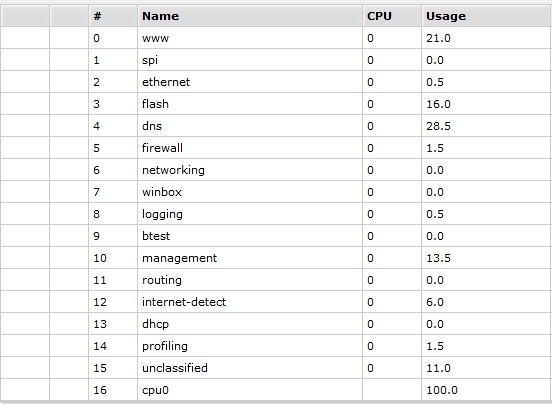
I have 100% CPU usage almost always
This is my router:
routerboard: yes
model: 751U-2HnD
serial-number: 46ED02E1EDC3
firmware-type: ar7240
factory-firmware: 3.02
current-firmware: 3.02
upgrade-firmware: 6.46.2
Check if you have the dns port exposed to the internet or maybe you have something inside your network doing lots of dns requests.
if not, create a firewall rule on input chain, udp port 53, source interface (your wan) action deny
you are also running a 3y old rOS version, update to the latest v6 and dont forget to update the firmware, as you are still running the original from the factory.
there is also suspect with your storage, something is doing a lot of read/write to your flash.
I am using the firewall rules from Reference Manual:
/ ip firewall filter
add chain=input connection-state=invalid action=drop
comment=“Drop Invalid connections”
add chain=input connection-state=established action=accept
comment=“Allow Established connections”
add chain=input protocol=udp action=accept
comment=“Allow UDP”
add chain=input protocol=icmp action=accept
comment=“Allow ICMP”
add chain=input src-address=192.168.0.0/24 action=accept
comment=“Allow access to router from known network”
add chain=input action=drop comment=“Drop anything else”
Follwoing your suggestion to check for DNS, the rule that allows UDP from everywhere seems suspicious.
Should I allow only UDP from inside?
Also I don’t like ICMP from outside. In my opinion that only makes easier an attacker to find my router