After resetting hAP aclite to factory defaults, a host wired on the Ethernet LAN connects to the Internet (at 100 Mbps from host to router). The operating system shows the host IP address is on the public internet, not the expected 192.168.88.0. This happened after releasing the reset button immediately when the the panel light flashed. Previous attempt to use the backup bootloader by holding the reset button for >3 seconds after the start of flashing left the router unreachable. Is the hAP entirely a bridge? Can this router be saved?
If it does something and it’s not clearly dead, maybe all you need is WinBox, check if it sees the device in Neighbors and then connect to its IP or MAC address.
Tried Winbox, which I normally use. But Winbox Refresh button leaves the Neighbors tab empty. I put in a bug report on this, with logs. Is there something in a notebook’s firewall that might block Winbox?
Discovery uses incoming udp port 5678, but first there’s outgoing packet from it, so responses should be allowed automatically. But you can allow the port, or whole WinBox to accept connections, and see if it helps. Or if you find device’s MAC address (it should be on sticker), you can try to type it and connect to it manually.
Explicitly opening port 5678 allowed Winbox to see the hAP ac lite (ROS 6.49.1) as a neighbor. To prevent the router from passing public IPs to hosts, I reset the board to factory defaults (hold reset, apply power, release reset when light flashes) I used the default u and p/w (admin & none) to connect to eth1 (through a desktop switch). Winbox reports “ERROR: could not connect to ”.
I also tried several u-p/w combinations from previous configurations–no connection. Is there a way (without a management connection to the router) to confirm that it is indeed reset to factory defaults? Did I not use the correct procedure to reset this router?
I’m not sure what’s default config for this model, I guess the usual port 1 as WAN and others as LAN (so you should be trying to connect from those). Does the router report any IP address in Neighbours? I’d expect some to be there. Because other possible default config would be blank, so there wouldn’t be any IP address, but it also wouldn’t work as bridge.
This sounds like it is in the CAPS mode. CAPS mode will configure your device into a wifi AP+switch. No routing etc… and it expects to receive configuration from cAPsMAN (A server on your network) Thats probably reason why it passes the WAN IP to your clients .
I saw this few times in the past when people told me they bricked their router… I assume you did not held the button correctly. Check the procedure here please: https://help.mikrotik.com/docs/display/ROS/Reset+Button
connecting via MAC should work as well, but keep in mind that your computer must not have firewall enabled. I have seen MAC connections misbehaving when windows firewall is enabled (and it gets auto enabled as you connect to a new network)
Woudnt the perp, I mean OP, have to have made that selection, its not default from what I understand!
It can be done accidentally. (see the link I posted)
All you need is a inexperienced person who holds the reset button for additional 5 seconds after the LED starts blinking (which isn’t much). Since this behavior is unique to Mikrotik, not everyone will release the reset button on time.
Sounds like a hoof problem 
Inexperienced person, here! I held the reset button too long, went past the “clear config” step. Also was plugged into eth1, since moved to eth2.
Performed the rest to erase config again, releasing the reset button when flashing (of usr LED) started. Winbox still can’t connect.
Reset again, releasing the button 3 s after power was applied. Again, winbox can’t connect. Does the reset button wear out? (This button takes what I consider too much force to hold.)
Is this the definition “bricked”?
Alright, I went to my box of goodies, fished out hAP ac lite and connected it only to my computer (so no DHCP on the network)
****I got into CAPS mode using following procedure:
Disconnect power->press button->connect power->wait until USR starts blinking->wait until USR stays on->release button
This way I got it in the CAPS mode and it actually seemed bricked! I got bit scared myself.
It took several minutes to appear in my list of neighbours, but even after that, I was not able to connect to it with winbox (not quite sure why).
I connected it to another device (still with no dhcp) and I was able to connect with mac-telnet from my another mikrotik device.
I tried to reboot the device, but everytime it was same - several minutes of “looking bricked” (I suspect waiting for DHCP or L2 CAPSMAN) and then connectable via mac-telnet
So, I know what you are going through but I can assure you, your router is not bricked.

So how the heck to get out of this state of misery? Especially if you don’t have second mikrotik on hand?
****In my case, simple factory reset helped:
Disconnect power->press button->connect power->wait until USR starts blinking->release button
To be sure we are on the same page, here is a video for you: https://youtu.be/-fIeNv0Pmzo
If this does not help, you may have some other issue going on. In the worst case, it may need netinstall which is whole new chapter (a lot of things can go wrong).
If you have another routerboard available, try to connect it and see if you can find your device in the neighbour list and connect via mac-telnet
Thank you vecernik for the reassurance that I’m not crazy or bricked. I have reset using a 3 s hold on the button, with no visible benefit. Eth2 appears in neighbors, but won’t connect. I do have another mikrotik router on hand (several, in fact) so I will try using it as a gateway to the hAP ac lite. Won’t get to that until later tomorrow–check back then for another report 
Thanks.
****All right  That sounds like a promising lead - if you see it in neighbours of winbox, you will see it in neighbours of routerOS (same discovery protocol) and hopefully able to connect. Once you are in, you can run
/system reset-configuration
and confirm with “Y”
Just a note on your reset procedure - you mentioned few times “3 seconds” - I would like to stress out that using exact seconds is not recommended. Observing status of USR LED is much better as it signalizes the true status of what will happen. Also, my experience says that 3 sec is not long enough. The USR LED shows approximately this:
- after powerup, it blinks once, for fraction of second
- then turns solid light for approximately 4 seconds. If you release it during this stage, it will load backup bootloader and start with existing config
- Then it starts blinking for approximately 5 seconds. If you release it during this blinking stage, it should factory reset.
- Then it turns solid light for approximately 5 seconds. If you release it during this solid light stage, it should reset config and switch into CAPS mode
- Then it turns the light off. If you release button now, it will go to netinstall mode
If you really hold for 3 seconds, you likely end up in stage “2” which just loads backup bootloader but leaves the config alone.
Added another Mikrotik router (hEX lite) to the network. It shows up as a neighbor, but can’t connect to it from Winbox using MAC address. Opened port 5678 for TCP as well as UDP.
Thanks to vacernik87 for the best summary of the reset procedure of the many I found.
Yup, the pony is real good! I just hang onto the mane and enjoy the ride!!
I am not sure if you followed what I had in mind. (maybe yes, but it isn’t clear whether actions are related to hAP or hEX)
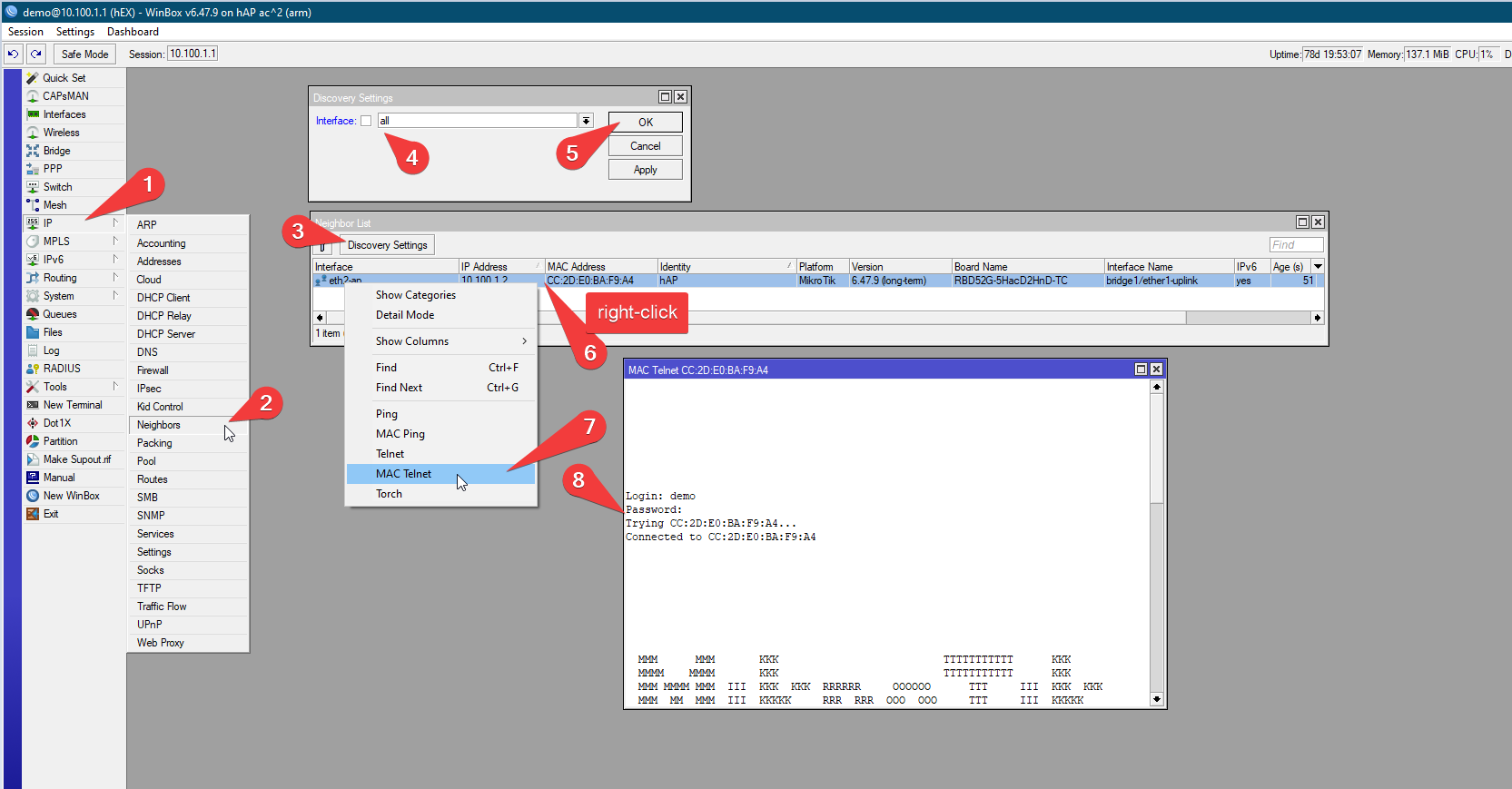
- connect hAP and hEX and make sure they are both turn on. If it is working device, you should be able to connect to the hEX in any way you like: winbox (over IP) is fine. SSH is fine. Telnet is fine…
- Once you are connected to the hEX from your computer check the ****
/ip neighbor
in the hEX. You should see hAP in there. If not, you may need to enable discovery on all ports
3. Right click on the entry with hAP, select MAC telnet, and it should work
This is how it should look like:
If you did this and it did not let you connect, then it becomes interesting…
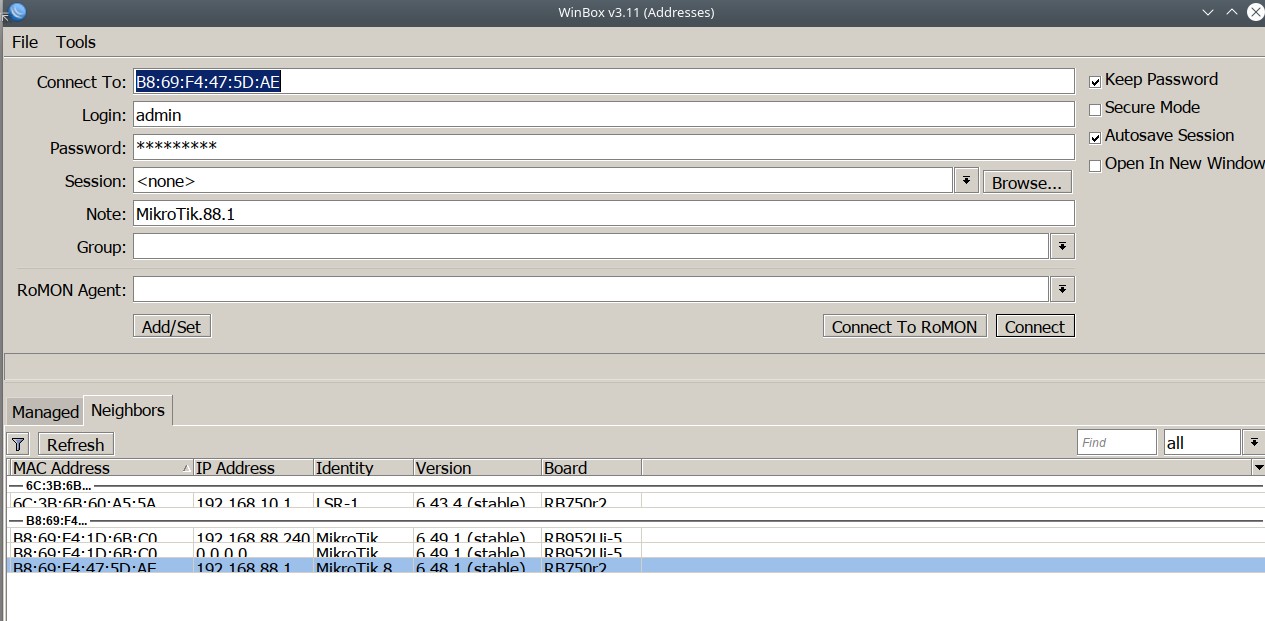
Good info, if only I could get into any of the routers. This screen shot shows where I’m stuck.
The MikroTik is ALIVE powered down for a full day. Reset to default (released button when lighted flashed) and the DHCP server gave an IP to a computer on eth2. And Winbox connected immediately. Except for for the extended time without power, this procedure was performed about 10 time previously without this good result. Thanks for your inputs.