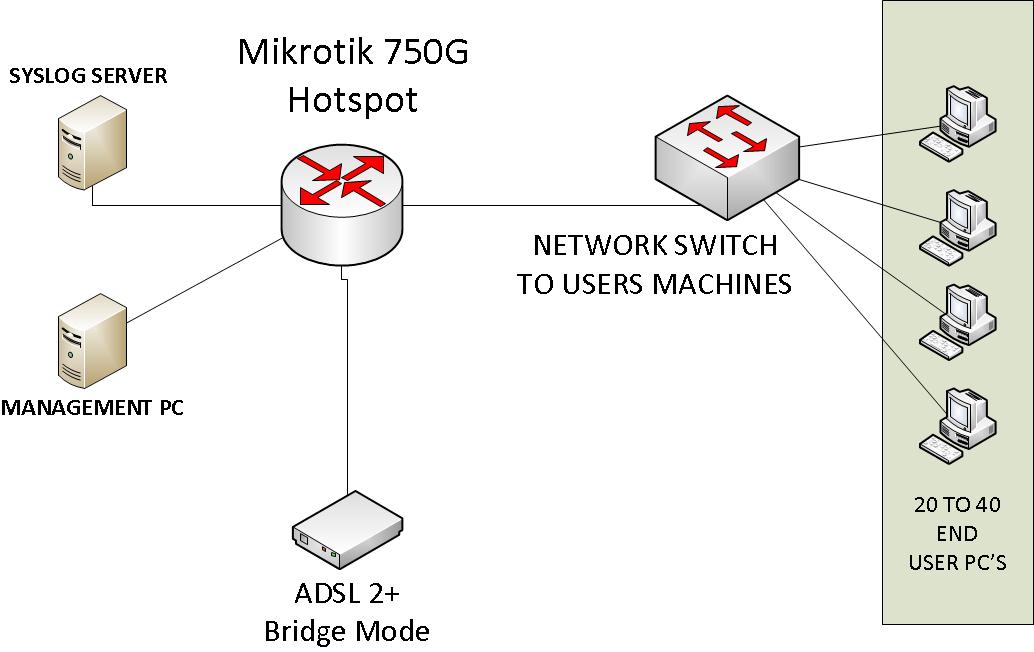
Hi, I am looking for some tips on setting up a hotspot for an office enviroment and would like your input for best practice for the following scenario. See attached picture below for expected network layout.
No wireless clients( All wired for now!).
PC’s can be use internet by authorized users(of course ). pc’s are located in general areas and are not assigned to individual users.
No cash/transactions required for internet useage by users.
I would like the logon screen to re-appear each time a browser is closed and reopended or session not used within 5 min’s (what is best method for both types of senerios ??).
Would like to be able to record web site visited by user(by logon name would be nice) onto the syslog server(or other program ?), what is best approach on this.
What is best method/approach to create / monitor / maintain user accounts ( external radius program or internal userman ??), would also like to set up temporary accounts for users who are only around for few days. This info/data to be managed on the management pc.
Thank you for any input you have..
The 5 minute idle timeout is very easy, just have the idle timeout set that low done in the profile. For the login page every time someone opens a browser, that is more complex, the best way would be to set the homepage of the computers to some site that would hit the logout URL, and subsequently get them to the login page, you could possibly embed the logout URL in the login page and use that, you would need to play around with it.
The second request of seeing what sites certain user names access would have to be a combination. You would need to correlate your authorization logs with your proxy logs. Basically your auth logs would record what username/IP address signed in, and what time they signed out, you would also likely want to use the interm update RADIUS attribute to help with this to keep track of the user better in the auth logs. You then could take that log and see what private IPs requested what websites and compare that to the authlog for the user name. You would need to use a proxy to log where each guest went, the best you can do with the firewall is see what IP addresses they are going to, you need a proxy to see the actual requested URLs. Weather you use the built in proxy or a full featured proxy is up to you and what you need it to do. This is likely the best you can do without massive customization on the back end for you.
It is up to you if you want to use usermanager or some other AAA solution. If you are using a 750G I wouldn’t install usermanager on that due to limited flash disk space, especially if you are using the built in proxy, it may not be able to handle all of it to your satisfaction. One advantage of having a dedicated AAA solution that is centralized is that it scales much better if you need to expand to several locations that may need AAA services.
With the closing of the users browser session and then to open up back to the mikrotik hotspot logon screen, can I utalize a cookies based approach, and by setting a no expiry time on the cookie, will that make the browser consider the cookie as a `session cookie’ ( It my understanding that a no expiry time on any cookie, will be considered by a browser as a session cookie and will be deleted when the browser closes)? , and therefor when the browser re-opens it has to re-auth with the mikrotik-hotspot ??
I see that I will need to probably need corralate data between syslog logs and AAA auth for what user/website is being visited, I wish there was a better way !! ??
Can you recommend a suitable external AAA radius solution/program for a M$oft based enviroment for my senerio ( we are unfortunatly a M$ shop ), I’m happy for a linux solution, but the other techs are not linux inclined (yet) !!
We don’t use the cookie functionality, so I’m not sure that all works. I believe a cookie without an expatriation time will last forever in a MikroTik so you need to set a time limit. You can try playing around with it, like setting it to a few minutes and see what happens. That would be the best method for testing in a lab.
You could potentially get what you are looking for with various scripts that would parse the information for you, and display the information that you wanted. I don’t know how to approach that, so I can’t be of much help how to exactly implement it. I would envision it reading the time of login and logouts of specific user names/IPs from the AAA log, and then scan the proxy log between those time frames for that IP and generate a report for you.
Any compliant RADIUS server should work, but we’ve never used a Windows based Radius server. A hosted solution might be worth trying if development time is short so you have a ready made solution in short order. I’m sure there are Windows Radius servers out there, I’m just not sure what they are. We use this hosted solution, and it automates a lot of the back end AAA services, so it might be worth checking out. http://www.myinnsite.com/