Hi Guys,
I have a problem with hospot login page.
I installed wireless system to a hotel.
On the login page, there is two form. One for registered user which is reguler mikrotik hotspot login.html page. Other is for new users registration page. Registration page works in a local server written with php. After registration script gives a username and insert to UM. And then user should enter username to login page to access internet. Everting works fine until here.
What I want to do is, after registration user should access to internet with a single click.
How can I redirect user to login page automoticly without enter username again into login page?
Thnx…
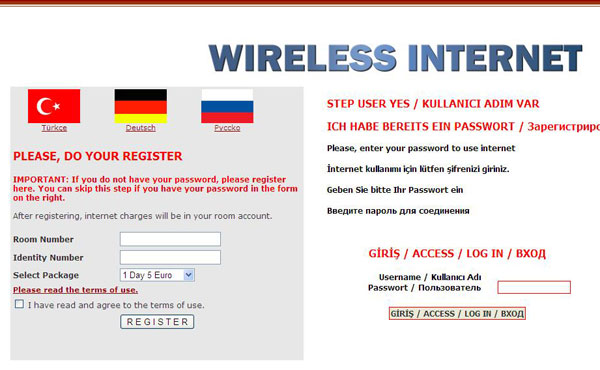
From the external server after sign up have the user go to the router’s /login servlet, passing on two parameters named ‘username’ and ‘password’, with the appropriate values. That is equivalent to filling out the login form and clicking the submit button and will log the user in automatically.
A link such as this would be appropriate:
<a href="http://router.dns.name/login?username=MyUserName&password=MyPassword">Click here to login</a>
You could also automatically redirect the user to that URL via meta refreshes or JavaScript so that it happens automatically without even a single click after the account has been created.
Hi fewi,
Thank you for your quick answer.
I tried Click](http://router.dns.name/login?username=MyUserName&password=MyPassword%22%3EClick) here to login but it gives me following error.
I reset hotspot but nothing changed. I also tested firefox and other notebooks.
web browser did not send challenge response (try again, enable JavaScript)
Either change to HTTP-PAP (over HTTPS, probably), or look at the default HTML pages to see how they integrate CHAP and the md5.js script.
Hi again,
I changed to HTTP-PAP and solved my problem.
Thank you…
Be aware that PAP sends credentials in clear text. That may or may not be appropriate for your situation. Ideally use an SSL certificate on the router to protect the clear text password between all endpoints.
Thanks you