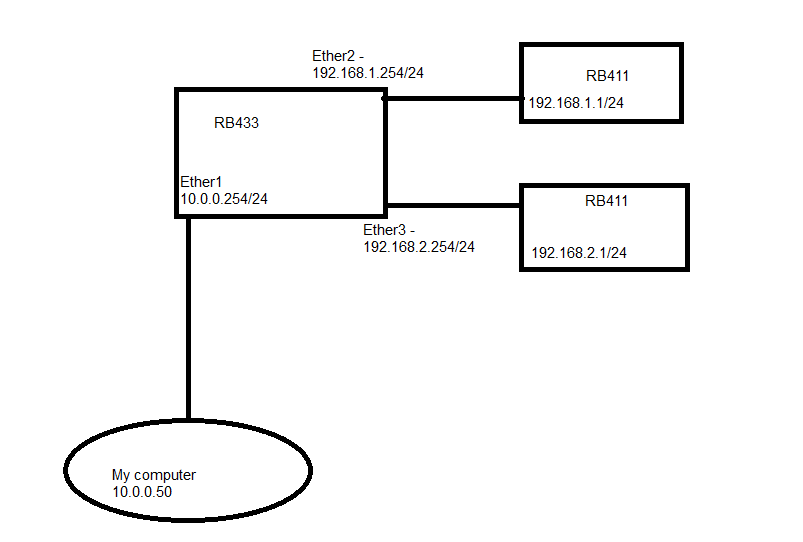
this is the configuration I want to do:
now in my computer the setting are
IP:10.0.0.50/24
DG:10.0.0.254
when I run winbox I want to be able to see all the RB in my network, and bot just the 10.0.0.254
how can I do this ?
(in 10.0.0.254 - there is only one firewall rule nat - masquerade )
… Except it is working somewhat now but after uprate something may change… Everyone has to test before an upgrade to be sure he will not make more damages than expected…
But sure, I have already suggested upgrade as an option.
but about the NAT…
I want to be able to see in WINBOX the 192.168.1 router from my computer
so what NAT should I do ?
I don’t want to change the winbox port
Save the session into managed tab and you will see it always. If you mean the neighbours, note that you need single L2 segment to use that functionality. It cannot work over nat from definition.
And again: the romon can help you too. But according to my opinion it is just a hole into the network so I am not using it at all.
Seems I need to correct my previous statement/joke. In recent RouterOS versions there is internal protection against damage, it will not allow you to set above EEPROM value. You can’t burn it