I have 2 static IP addresses, and want to use both. I run a web server on one, and am going to put my email server on the other. I need both to operate on port 80 for my certificates function properly. what is the best/easiest way to do this? I have tried to find instructions, but haven’t found anything that looks like the right method.
You have a block of IPs from your provider and you want two of them in a 1:1 mapping from public IP to servers??
Yes. Is a one to one NAT the best way to accomplish this?
Can anyone point me in the right direction? I’m sure there is a wiki out there somewhere, but I’m not sure what method is the right method.
For incoming connections it’s easy, just distribute services ss wanted:
/ip firewall nat
add action=dst-nat chain=dstnat comment="SMTP addr1" dst-port=25 dst-address=<public IP 1> protocol=tcp \
    to-addresses=<LAN SMTP server address> to-ports=25
add action=dst-nat chain=dstnat comment="HTTP addr2" dst-port=80 dst-address=<public IP 2> protocol=tcp \
    to-addresses=<LAN HTTP server address> to-ports=80
Replies will have correct src-address when leaving router’s WAN address.
The problem is how to distribute traffic originating from LAN - i.e. src-nated traffic. This includes some important traffic, such as DNS zone transfers (if your LAN host should act as secondary DNS server for certain domain and primary DNS server allows zone transfers from a particular remote IP address, your LAN DNS server should be src-nated to use this particular IP address.
The questions I have are.
a. do we consider load balancing in such a setup (and there is only one ISP but two wanIPs???
b. should we direct lan traffic out a specific WANIP??
c. how do we ensure that dstnat coming in one wanip goes out the same WANIP
etc etc…
We ensure that by deploying connection tracking. Uh, wait, it’s already enabled … for any NAT (either src- or dst- ).
Well I recall in another thread, there was no guarantee we could be sure dstnat coming in one interface, would go out the same interface, unless we had mangled, assigned new connection marks then associated them with routing marks etc…
This was the case when there were two WANIPs and one was primary and the other with a lesser priority.
I tried the NAT rules, but that doesn’t appear to be working. I can’t access the device that the second public IP is NATed to. What I had tried the first time and failed with is to run the modem into a switch and break out 2 connections from there, use one for IP Address 1, and one for IP Address 2, then set up a bridge on 2 ports. one for WAN and one for LAN. I leave the working config untouched on IP 1, and on the new bridge, I set the wan as IP2. In theory, I thought I could basically set up a second 2 port router on its own bridge with just 1 WAn and 1 LAN, but as soon as I set the WAN IP on the new port, I lose access my WAN connection, nothing in or out. Why is that? that seemed lilke an easy solution.
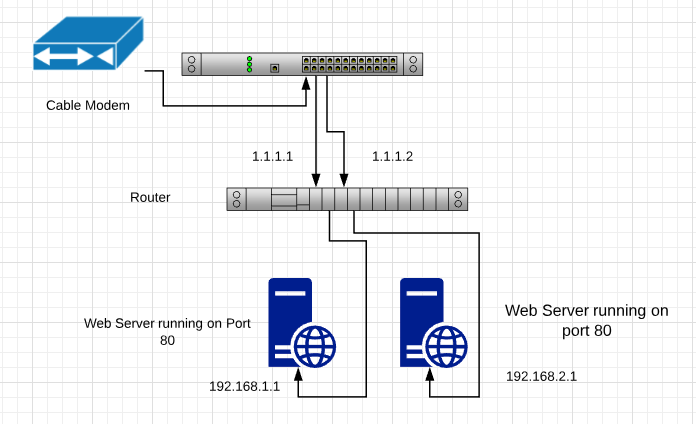
Something like this
Bridge 1
eth 1 Gateway 1.1.1.1/24
eth 2 LAN 192.168.1.1/24
Bridge 2
eth 3 Gateway 1.1.1.2/24
eth 4 LAN 192.168.2.1/24
Does the Hardware Bridge still exist on ports 1-5 and 6-10? If I move my bridge 2 over to ports 6 and 7, would this work?
Okay, I am getting closer. I set my second public IP address on eth 1 along with my other public IP, so x.x.x.40, and x.x.x.41 are both on my eth 1 interface. I am dropping about 99% of my pings to the second address, but every few minutes, one gets a reply. what would cause that? I set 2 statics on a test rb3011 I have, and it worked perfectly. what would be causing the routing issue?
Your router/switch/bridge configurations make no sense to me as typically in my limited experience, bridges are not used to combine WAN and LAN ports.
In terms of the mapping.
For each 1:1 mapping it appears one needs two rules with the action in both cases being netmap.
/ip firewall nat add chain=dstnat dst-address=11.11.11.0/24
action=netmap to-addresses=2.2.2.0/24
/ip firewall nat add chain=srcnat src-address=2.2.2.0/24
action=netmap to-addresses=11.11.11.0/24
In terms of what the OP stated it may look like…
/ip firewall nat add chain=dstnat dst-port=80 dst-address<public WANIP 2> protocol=tcp
action=netmap to-addresses= to-ports=80
/ip firewall nat add chain=srcnat src-address=
action=netmap to-addresses=<public WANIP 2>
/ip firewall nat add chain=dstnat dst-port=25 dst-address=<public IP 1> protocol=tcp
action=netmap to-addresses=(LAN SMTP server address> to-ports=25
/ip firewall nat add chain=srcnat src-address=
action=netmap to-addresses=<public WANIP 1>
It is a problem with solution as you describe it when two interfaces come into play. In this case simple src-address replacement (as done by DST-NAT in reverse direction) does not take care of using correct outbound interface. If, however, both public addresses are using same interface, there’s nothing to be decided upon by routing engine.
My guess is that @kd7vea’s problem with only 1% of pings working is about this … if both public addresses are eventually routed through single WAN interface (north of the switch through cable modem), then it doesn’t make any sense to deploy two WAN interfaces on the main router. After change (assign both public addresses to single interface) router has to flush all tracking information … the easiest way of making sure nothing remains in cache is to reboot the router.