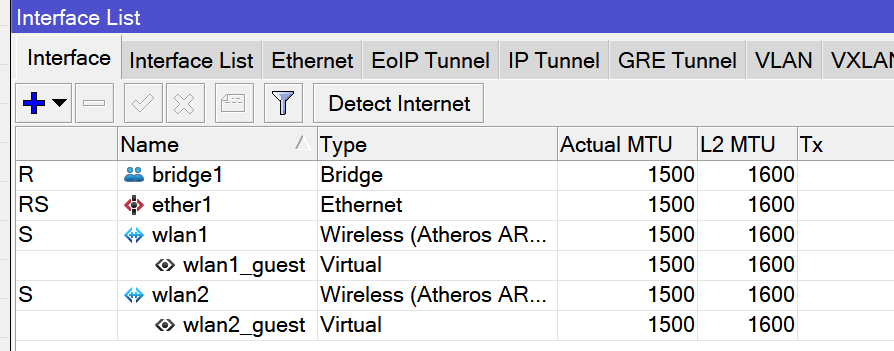
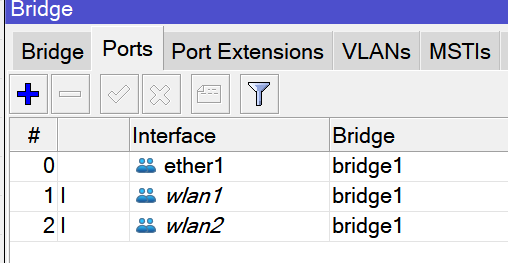
On a ‘wAP ac’, I have dual band setup that gets its IP information from an upstream firewall/router.
It works beautifully.
But, when I add guest networks by adding Virtual WiFi Interfaces, unlike their master interfaces, fail to get DHCP information from upstream firewall/router.
I tried several random things but nothing worked.
Could someone pelase help.
Here is my config.
# oct/31/2022 00:58:17 by RouterOS 7.6
# model = RBwAPG-5HacT2HnD

/interface bridge
add name=bridge1
/interface list
add name=WAN
add name=LAN
/interface wireless security-profiles
set [ find default=yes ] authentication-types=wpa2-psk eap-methods="" mode=\
    dynamic-keys supplicant-identity=MikroTik
add authentication-types=wpa2-psk eap-methods="" mode=dynamic-keys name=\
    Guest_Security supplicant-identity=MikroTik
add authentication-types=wpa2-psk eap-methods="" mode=dynamic-keys name=\
    Main_Security supplicant-identity=MikroTik
/interface wireless
set [ find default-name=wlan1 ] band=2ghz-b/g/n channel-width=20/40mhz-eC \
    disabled=no frequency=auto mode=ap-bridge security-profile=Main_Security \
    ssid=MAIN_2G wds-default-bridge=bridge1 wds-ignore-ssid=yes
add disabled=no keepalive-frames=disabled mac-address=CE:2D:xx:xx:xx:94 \
    master-interface=wlan1 multicast-buffering=disabled name=wlan1_guest \
    security-profile=Guest_Security ssid=GUESTS_2G wds-cost-range=0 \
    wds-default-cost=0 wps-mode=disabled
set [ find default-name=wlan2 ] band=5ghz-a/n/ac channel-width=\
    20/40/80mhz-eCee disabled=no frequency=auto mode=ap-bridge \
    security-profile=Main_Security ssid=MAIN_5G wds-default-bridge=bridge1 \
    wds-ignore-ssid=yes
add disabled=no keepalive-frames=disabled mac-address=CE:2D:xx:xx:xx:95 \
    master-interface=wlan2 multicast-buffering=disabled name=wlan2_guest \
    security-profile=Guest_Security ssid=GUESTS_5G wds-cost-range=0 \
    wds-default-cost=0 wps-mode=disabled
/ip hotspot profile
set [ find default=yes ] html-directory=hotspot
/interface bridge filter
add action=drop chain=output dst-mac-address=\
    01:80:C2:00:00:00/FF:FF:FF:FF:FF:FF out-interface=ether1
/interface bridge port
add bridge=bridge1 interface=ether1
add bridge=bridge1 interface=wlan1
add bridge=bridge1 interface=wlan2
/interface detect-internet
set detect-interface-list=LAN internet-interface-list=LAN lan-interface-list=\
    LAN wan-interface-list=WAN
/interface list member
add interface=bridge1 list=WAN
add interface=ether1 list=LAN
/ip address
add address=10.0.0.99/8 interface=ether1 network=10.0.0.0
/ip dhcp-client
add dhcp-options=hostname,clientid_duid interface=bridge1