I have following scenario
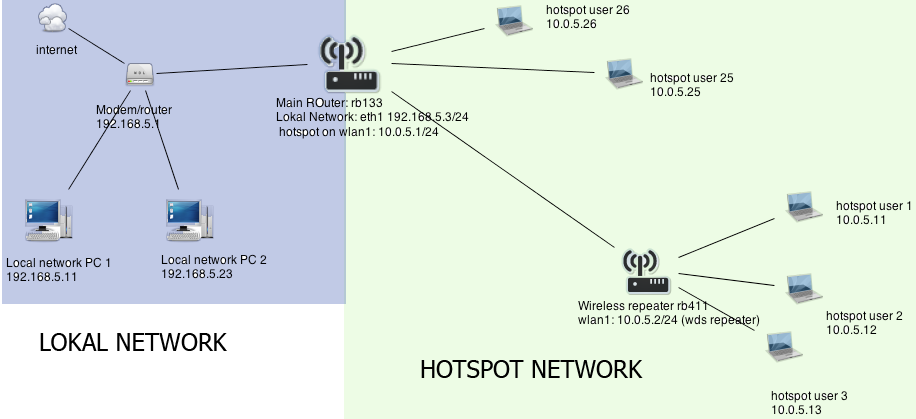
RB133(main router)
Lokal network: Eth1 192.168.5.3/24 (Internet gateway is 192.168.5.1)
Hotspot is running on: wlan1 10.0.5.1/24 (wds enabled)
Did you configure that 10.0.5.2 can bypass the hotspot? Can you ping from 10.0.5.2 outside of his range (like 8.8.8.?
Do you have a default route configured in this repeater?
Yes bypass is configured for 10.0.5.2
Yes now i have configured the default route on the repeater ( i tought i have to configure it only on the main router..)
Yes I am able to ping from 10.0.5.2 outside (8.8.8.8 )
So i am able to access the repeater at adress 10.0.5.2 only if i connect to the hotspot with my laptop,
But if i try to access it from out my lokal network(192.168.5.0/24) at the adress 192.168.5.4, it doesnt work, the ping also doesnt work.
So i guess i have configured the NAT somehow not correctly…
There are no firewall rules created on 10.0.5.2
All firewall rules are at the main router 10.0.5.1
( i tought i dont need to setup firewall on the repeater, because all is configured on the main router, I did all the setup on the 10.0.5.1; hotspot, firewall, nat.. etc)
Now I am able to ping at 192.168.5.4., but still I am not able to connect with winbox, telnet or ssh.
When i try to connect wit winbox i see that the connections state is “syn-sent”, but it is not “established”:
telnet from 10.0.5.1 to 10.0.5.2
/ip firewall connection> print
Flags: S - seen reply, A - assured
 #    PROTOCOL SRC-ADDRESS           DST-ADDRESS           TCP-STATE   TIMEOUT
 0 SA tcp      10.0.5.1:43359        10.0.5.2:23           established 4m57s
1    tcp      192.168.5.245:57609   10.0.5.2:8291         syn-sent    2s
But now when i connect with winbox to 192.168.5.4, it connects me to the main Router(10.0.5.1),
So the dstnat rule is not forwarding(rerouting) the request to 10.0.5.2
edit:
Now no matter how i write the dstnat rule, i am constantly being connected to the 10.0.5.1 router(main router) if i access the address 192.168.5.4. .. very strange.
P.s. I am using RouterOS 4.17 (because i like the old User Manager) so is this a bugg of the old RouterOS versions?
Edit:
I tried to upgrade to v5.24, but the problem is still there…- downgrading again to v4.17
But if you add the route you don’t need it . Disable this nat rule. If you ping 10.0.5.2 from a pc in subnet in 192.168.54.x it must work.
(Don’t forget to add a route in your pc to use gateway 192.168.54.3 for subnet 10.0.5.0/24)
I dont know why it was blocking, because this entry is only to block hotspot users from being able to access our private(lokal) network,
and not the other way around.
But anyways, so i added another entry which has solved the issue:
 ?
?