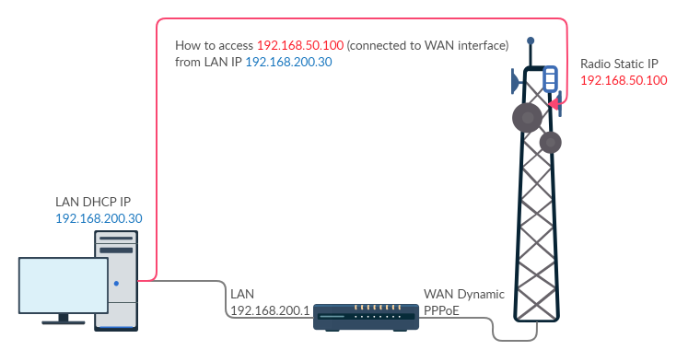
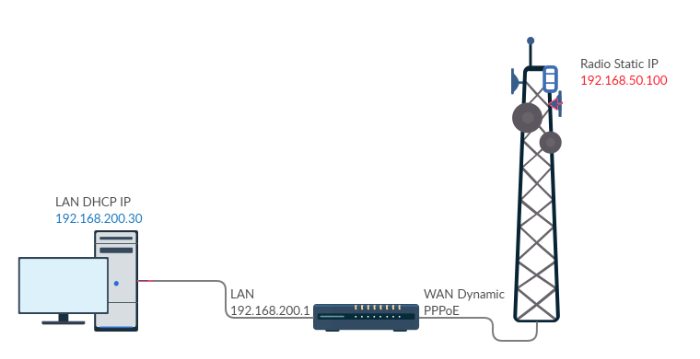
You need to explain a bit more, and show your existing configuration. You drawing shows 192.168.200.30 directly connected to 192.168.50.100, with no network devices in between.
Could you also clarify about changing IP, as you say “I want to access UBNT device from my LAN IPs, without changing my IPs”. Do you mean that you can access 192.168.50.100 if you change your PC’s IP to say 192.168.50.101? If so then it sounds like you want to connect the 192.168.50.x network to an available interface on the Mikrotik, remove that interface from the bridge and give it a IP address on that 192.168.50.x range. Ideally give it the address that the UBNT has as it’s default gateway, but you could work around that with a source NAT rule.
Thanks for reply, I’m very sorry for creating confusion in post, I just removed the RED line.
My PC 192.168.200.30 is behind RB, not directly connected with UBNT device (With red line I was trying to say that I want UBNT device access from my PC. Sorry for this confusion)
I have only one WAN. (as now in diagram)
“without changing my IPs” by this I mean Mikrotik RB itself translate my request from 192.168.200.30 (my LAN PC) to 192.168.50.100 (UBNT) network to access this device configuration page. I don’t have to change my PC IP to 192.168.50.xxx network
Staying behind RB LAN IP … want to access 192.168.50.100 from WAN side (May be this is called port mapping)
Let’s assume you have radio connected to ether1, which is also parent device of pppoe-client. For running pppoe-client ether1 doesn’t need any IP address, but for connecting to radio it does. And let’s assume router setup is pretty much default, which uses interface lists in firewall and NAT rules.
So define IP address on ether1, it should be from same subnet as radio’s, and same subnet mask. Then add ether1 to WAN interface list if it’s not there already. Now you should be able to access radio unit. Because the general masquerade NAT rule affects packets leaving router through WAN interfaces and ether1 niw became WAN interface, radio will see connections as if they originated from router, which is in the same subnet, hende no setup on radio needed.
If you want to restrict access to radio to onky certain LAN hosts, you do that using appropriate firewall filter rules.
I’m very thankful to anav, aesmith & mkx for repling. By just adding second IP address and subnet mask same as radio subnet on ether1, I’m able to access radio configuration page.