Hey,
Good day guys, I’m trying to create a new routing table apart from the main table for PBR, but it appears ROS 6 doesn’t recognize the command or I really miss something obvious
according to the docs here https://help.mikrotik.com/docs/pages/viewpage.action?pageId=59965508 it’s pretty straight forward
Command
1st syntax
/routing/table
add fib name=ISP1
add fib name=ISP2
Output
[admin@HAPAC2] > /routing/table
expected command name (line 1 column 9)
[admin@HAPAC2] > add fib name=ISP1
bad command name add (line 1 column 1)
[admin@HAPAC2] > add fib name=ISP2
2nd Syntax
/routing table
add fib name=ISP1
add fib name=ISP2
output
[admin@HAPAC2] > /routing table
bad command name table (line 1 column 10)
[admin@HAPAC2] > add fib name=first
bad command name add (line 1 column 1)
[admin@HAPAC2] > add fib name=other
bad command name add (line 1 column 1)
[admin@HAPAC2] >
Thanks in advance
Go to IP → routes and rules. Make a new routing mark.
See the screenshot.
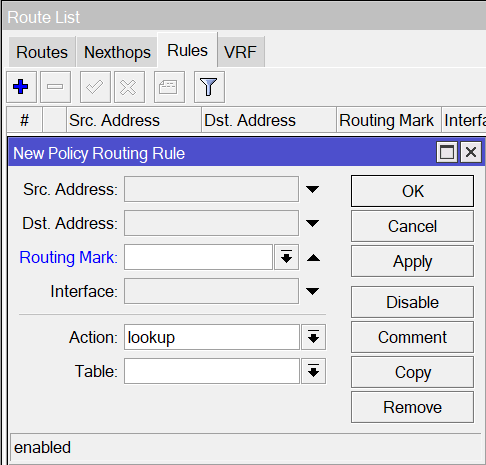
Hey plisken
Thanks for the reply, I think i have to rethink how i deal with mikrotik it’s just a bad habit to break it’s too easy to create as many tables as you want in plain linux, they really sanbox it to the extent you can’t customize it the way you want it to
Hello
Dear all
Hope you are doing well. I’m facing issues when deploy PBR.
I have a 2-WAN
1-LAN with pppoe server
IP assign to LAN
(172.30.30.1/24)
(172.40.40.1/24)
Wan1 user on this network (172.30.30.0/24)
Wan2 user on this network (172.40.40.0724
I have deploy Policy Base Routing
Rule for WAN-1 user
Mangles Prerouting src address (172.30.30.0/24) mark routing new connection mark = Wan1.
Rule for WAN-2 user
Mangles Prerouting src address (172.40.40.0/24) mark routing new connection mark = Wan2.
Mark in IP routes.
But I’m unable to access pppoe user’s router remotely.
And even unable to access my Wireless ubnt & Mikrotik Access Point in web browser
IP of Mikrotik and Ubnt wireless Access point in this network 172.20.20.0/24.
Help..!!