I have a hex - RB750Gr3 runing ROS v6 and I'd like to add NextDNS to it. I think I know how to do it but I just wanted to check here first rather than ask for help fixing it after
According to the insctructions on the NexDNS website, it says to just simply copy and paste the following in the terminal:
And you could consider redirecting all DNS requests (both TCP and UDP on port 53) to the MikroTik:
/ip firewall nat
add action=dst-nat chain=dstnat comment="Redirect DNS to Local Server" dst-port=53 in-interface-list=LAN protocol=udp src-address=!192.168.88.1 to-addresses=192.168.88.1 to-ports=53
add action=dst-nat chain=dstnat comment="Redirect DNS to Local Server" dst-port=53 in-interface-list=LAN protocol=tcp src-address=!192.168.88.1 to-addresses=192.168.88.1 to-ports=53
You might want to consider upgrading to latest LTS or Stable, it has some improvements on certificates (I'm not sure if that is part of V6 as well) so that you don´t have to import the certificate chain (which is bad in my opinion).
Thank you both. Very helpful information. But one more question if I may. What would I have to do if I wanted to reverse or remove this, if at some point I wanted to because it doesn't work right or I no longer need it?
The above code to run I got directly from the NextDNS website but they don't have anything about how to undo it if you ever want to for some reason.
No idea on how NextDNS work, but the snippet you posted is seemingly an "all-in" option.
It looks like it does 3 things:
Remove any existing DNS server and ADD dns.nextdns.io for IPv4
/ip dns set servers=""
/ip dns static add name=dns.nextdns.io address=45.90.28.0 type=A
/ip dns static add name=dns.nextdns.io address=45.90.30.0 type=A
/tool fetch url=https://curl.se/ca/cacert.pem
/certificate import file-name=cacert.pem
/ip dns set use-doh-server=“https://dns.nextdns.io/XXXXXXXXX” verify-doh-cert=yes
You may (or may not) want all three.
Simply export your current dns settings, in a new terminal run:
/ip dns
/export
and copy/paste the output to a text file saved to your PC, this way you can easily get back to the situation you had before.
Personally I use a slightly longer stick to NOT touch DOH than the one that I use to NOT touch ipv6, but of course everyone has his/her personal tastes, so maybe you want first to try only ipv4, than ipv4 with doh, and only as last item ipv6.
I don't use ipv6 (that I know of) so I don't think that's a problem for me. But I would assume that I could just remove those two lines?
But bigger problem. This is going to sound dumb but ... I just logged into my router as usual (webfig since I run linux on my PC) and then I click on terminal on the upper right and then I try to right click and click paste in order to paste in all that code and run it, but there is no paste option. I try ctl+v but that doesn't work either, so I'm guessing there has to be another way to cut and paste code into the terminal, or am I not in the right place?
You can either use SSH to connect to the router (and use the Terminal app of your choice on Linux), or use WinBox 4 that now natively supports Linux and no longer requires WINE like WinBox 3.
OK, you're scaring a little bit there. All my computer life until now I always just manually changed my DNS servers by just changing the numbers in the device. I don't really know what DOH is or why it needs a certificate. Should I not do that? Can you point me to a easy explanation of DOH before I change it please?
Well, it is a privacy and security enhancements, should you need privacy (or security, or both) and actually need to enhance it[1].
If you make a few searches, you will find articles depicting it as the third best thing in the world (after sliced bread and ice-cream) such as this: https://www.ssl.com/faqs/what-is-dns-over-https-doh/
written by highly learned network engineers and security experts.
And you will find quite a few people dissenting (because it is essentially an unneeded complication in practice).
[1] Remember that (as I see it) if they are after you they already pwn you.
Got it. Just did some quick reading. Thank you. So it looks like what it does is download a certificate to my router so it can do dns over https. Doesn't seem too scary. Of course your are probably right that it is a waste of time but being retired and loving to play with stuff it doesn't look like it can hurt anything and might be fun to learn with. That is as long as I am understanding it correctly.
Actually it downloads a whole set of ca certificates (curl's selection of them.) This does cause problems if the router is tight on space...
Generally, the rb750gr3, especially on v6 is not in danger, but e.g. the hAP ac2 is.
About reversing DOH: you simply put a valid (normal) dns server in "/dns servers" and delete the "use-doh..." value. The rest of the things, like the few static entries and the set of ca's don't really bother anyone. Of course they can be removed.
EDIT: Just my biased take on DoH, in case it's helpful. There was a trend, mostly by US ISPs, especially the cable-provider-turned-ISPs, where they decided to make some money by redirecting not found (NXDOMAIN) answers to a landing page with ... you guessed it: advertising. This breaks quite a few things.
Browser makers like Google pushed back by using their own resolvers by default, but the cable companies pushed back by redirecting port 53 to their own servers, and thus DoH was born.
Outside of the US the problem never really existed. At least as far as I know.
Don't let the story behind it discourage you. NextDNS has nice statistics and an easy way to subscribe to blocklists and filters without going all PiHole. So regardless of its origins it can be worthwhile.
So I tried it and I'm not sure I did it right but here's what I did. Can't paste into the terminal in webfig so I downloaded winbox and opened the terminal in there. I tried pasting the entire paragraph of code at once and it failed. I'm assuming that notepad adds empty space or something that screws up the code so it doesn't work.
So I decided to do it one line at a time. Good idea?
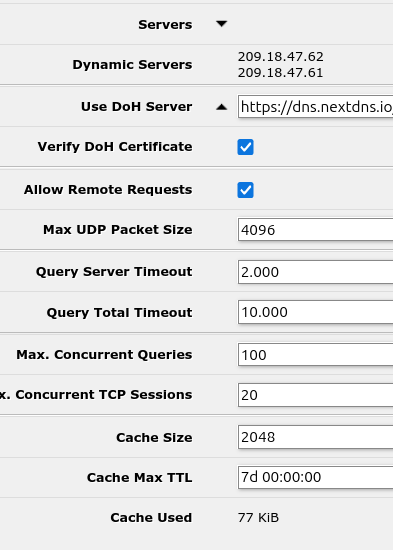
Anyways it "looks like" it worked correctly I guess. I see the numerous certificates in there now and as you can see from the attached pic (if that works) it did something with the DNS entries. But it has "dynamic servers" there that I don't think was there before and I don't recognize those numbers. Should they be there?
Yep. Basically, the canonical config - and the one the directions you found are pushing you toward - is to only have DoH configured with no other static or dynamic dns server. Looking up the DoH server is done using static entries.

 .
.