hi,
my Mikrotik device is identify in my LAN as “ROUTEROS” with its LAN IP.
Also it shows up the name of device (Mikrotik) + the routerboard model
How can I change how my Mikrotik device is seen on the LAN?
I’d like to change both “ROUTEROS” into another nameand also change the model name or, at least, not let show it up.
Thanks
Just set a new identity.:
/system identity set name=NEWNAME
But if you don’t want Clients on the Network identifying your Router as Mikrotik
you will need to do additional Steps like change the MAC, firewall rules etc..
Changing MAC sounds good to me. How can I do that?
Thanks
If you must ask that, probably for you can only go worst.
Why am I supposed to go worse?
Depending on your configuration you will need to change the MAC-Address in different Locations.
I assume you have a “Bridge” active for your LAN and no VLANs
→ Go to Winbox -->> Bridge -->> select bridge -->> Admin. MAC Address
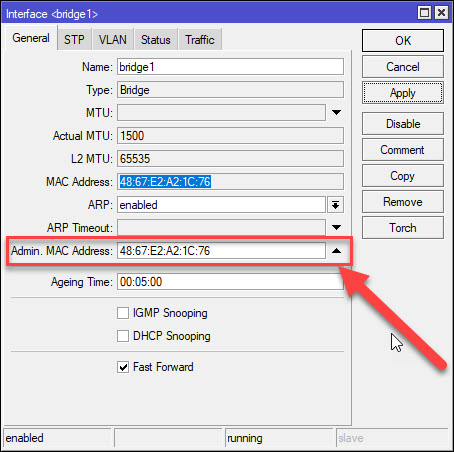
If you want to hide the Mikrotik branding entirely, you need their Branding kit enabled on your Mikrotik account to create a file for your branding, but this is for resellers. The branding package that generated has to be installed on each unit, and will hide the name in SNMP and CDP/discovery “platform”.
As to changing the MAC addresses, that may be more than your bargaining for… Certainly the MAC address may “leak” that the device is a Mikrotik (e.g. MAC address ranges are assigned to manfuactures like Mikrotik in publicly-known blocks). But the branding kit won’t fix that, although, theoretically config could, you’d be asking for innumerable problems. But if the goal was complete hiding Mikrotik-ness, while the bridge MAC would be one place it, you’d have to do the same for non-bridge interface or Wi-Fi depending on the “exposure”. And, make sure there unique across all devices - hard to do with administratively assigned MAC address…