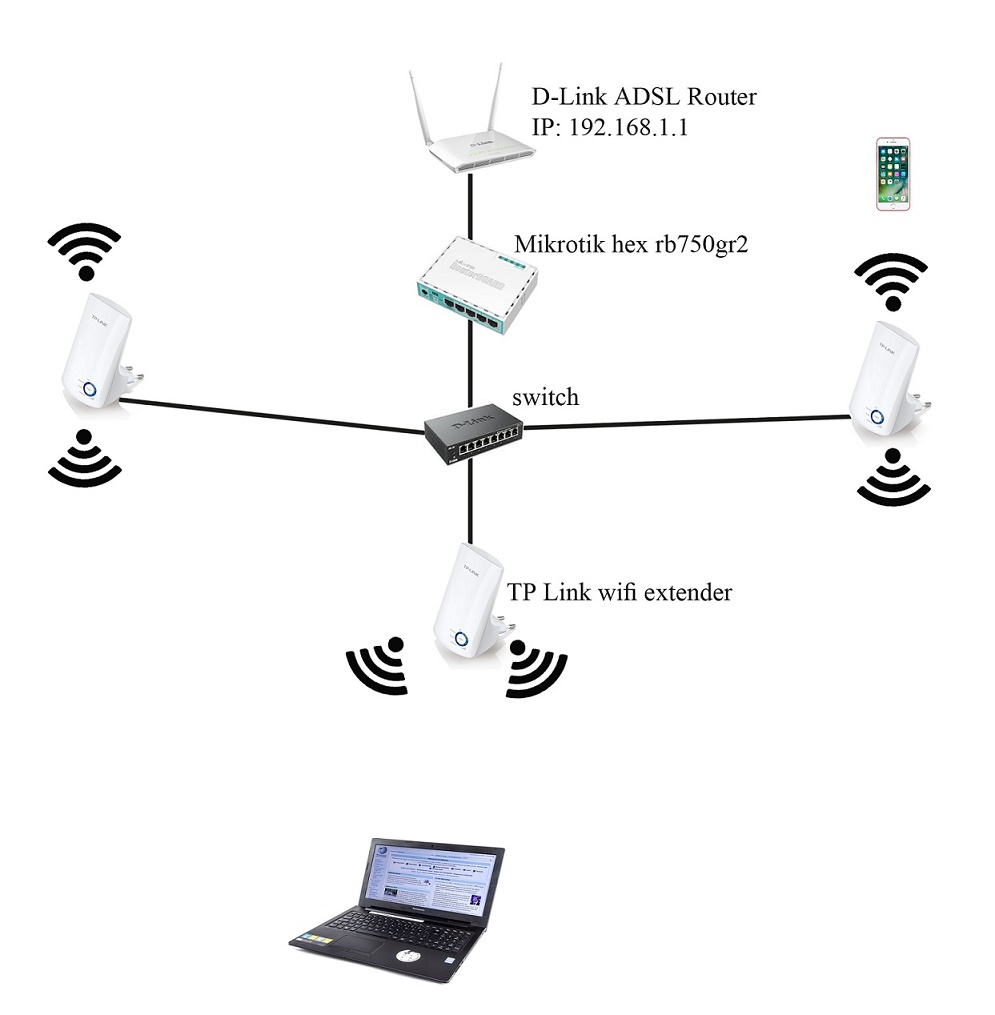
Are you able to bridge the ADSL modem? This would move the public IP to the hex. If you can’t then you’ll be doing an extra layer of NAT.
Other than it’s a very basic config, using the stock configuration on the hex would produce a working setup. You’d just plug the hex eth1 into the ADSL router and the switch into eth2.
You need to tell us what you want the RB750 to do. As your drawing shows, the RB750 serves no useful purpose. As idlemind said, if you can make the ADSL modem behave as a bridge, then the RB750 could (or would) serve as your router with all the intelligence that a router needs. That BTW is how both my DSL and cable internet sources are configured here at home.
D-Link works as a router for yor LAN and we do not know if it is working as AP also.
You want to configure Mikrotik as hot spot for WiFi but RB750Gr2 has no WiFi.
There is no way to use TP-Link extenders for Mikrotik as it does not server WiFi.
WiFi extender does not need switch to work as it repeats WiFi signal it receives. Your drawing shows extenders connected to switch so you mix technologies.
In the end … you want to mix three different manufacturers in one network without proper knowledge of networking … it does not bode well.