How to configure a wifi bridge to passthrou many VLANs as trunk and use one VLAN for management?

Hello,

I am using Mikrotik for a few years now.
But I still have some strange behaviors when I configure a new wifi bridge.

It is in an campus network with many VLANs.

My setup is this:

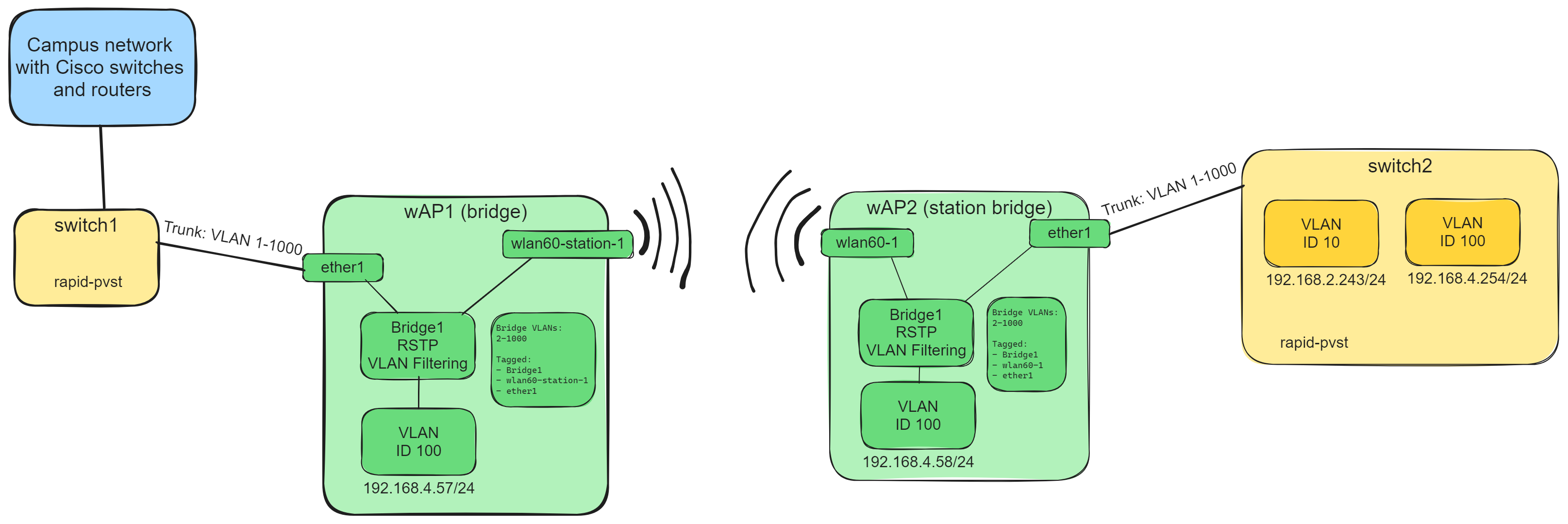
big network → Cisco switch1 → wAP 60G (bridge) → wap 60G (station bridge) → Cisco switch2

The Cisco switches use RSTP.

The switch port on switch1 is configured as trunk with VLANs 1-1000. (that is how we do it)
The same on the switch2.

So the easy way is would be to just connect “ether1” and “wlan60-1” via a bridge and all VLANs should go through, I guess.

But of cause we want to give each wAP a management IP in the VLAN 100.
In the past we configured VLAN interfaces on “ether1” and “wlan60-1” for the management VLAN, connected them with dedicated bridge and defined a management IP on this bridge.
There was also still the main bridge that forwarded every other vlan.

Now I found this tutorial (https://administrator.de/tutorial/mikrotik-vlan-konfiguration-ab-routeros-version-6-41-367186.html#toc-8) wich defines VLAN interfaces and uses Bridge VLANs and VLAN Filtering.

see also: https://www.andisa.net/wp-content/uploads/2018/11/VLAN-configuration-post-firmware-6.41.pdf

I guess my main issue it that I do not want to configure every VLAN as a single VLAN interface.
But the tutorials do not show how to combine one management VLAN and one bridge for everything else.
I tried to just combine both solutions, but the management IP is not reachable reliably. I guess something regarding STP?
I disabled STP on both bridges.

So my question is:
Does anybody have a example configuration to configure a management IP/VLAN and still allow all VLANs without configuring every VLAN separately??

This is how my configuration looks right now and how I think it should be:

wAP1:

/interface bridge
add name=Bridge1 protocol-mode=none vlan-filtering=yes

/interface w60g
set [ find ] disabled=no mode=bridge name=wlan60-1 password=PASSWORD put-stations-in-bridge=Bridge1 ssid=SSID

/interface w60g station
add mac-address=xx:xx:xx:xx:xx:xx name=wlan60-station-1 parent=wlan60-1 remote-address=yy:yy:yy:yy:yy:yy

/interface vlan
add interface=Bridge1 name=VLAN100 vlan-id=100

/interface wireless security-profiles
set [ find default=yes ] supplicant-identity=MikroTik

/interface bridge port
add bridge=Bridge1 interface=ether1
add bridge=Bridge1 interface=wlan60-station-1

/interface bridge vlan
add bridge=Bridge1 tagged=Bridge1,ether1,wlan60-station-1 vlan-ids=100

/ip address
add address=192.168.4.57/24 interface=VLAN100 network=192.168.4.0

wAP2:

/interface bridge
add name=Bridge1 protocol-mode=none vlan-filtering=yes

/interface w60g
set [ find ] disabled=no mode=station-bridge name=wlan60-1 password=PASSWORD ssid=SSID

/interface vlan
add interface=Bridge1 name=VLAN100 vlan-id=100

/interface wireless security-profiles
set [ find default=yes ] supplicant-identity=MikroTik

/interface bridge port
add bridge=Bridge1 interface=ether1
add bridge=Bridge1 interface=wlan60-1

/interface bridge vlan
add bridge=Bridge1 tagged=Bridge1,ether1,wlan60-1 vlan-ids=100

/ip address
add address=192.168.4.58/24 interface=VLAN100 network=192.168.4.0

But I get about 50% packet loss when pinging the management IPs.
And switch2 ist not reachable. :frowning:

EDIT: All non-Management-VLANs are working now. :slight_smile:
I just had to add the whole range of VLAN 2-1000 to the Bridge VLAN.

/interface bridge vlan
add bridge=Bridge1 tagged=Bridge1,ether1,wlan60-1 vlan-ids=2-1000

But the packet loss of the management IPs is still happening. :frowning:
I will investigate further.

EDIT2: Now the management IPs are working, too. :open_mouth:
I just added a management IP in the same VLAN on the switch2 and pinged it.
Then all management IPs worked 100%.
As soon as I deactivate the new management IP on switch2 the problems start again. :frowning:

Can you draw a network diagram detailing from where internet starts ( isp and device(s) ) to the WAPs etc… ports and vlans included…

Here is a a diagram of the relevant devices.
I do not think all other components of the campus network are relevant.
mikrotik_wap_60g_skizze.png
btw: I activated RSTP on the bridges.
But I see no difference in the behavior.

WAP1

/interface bridge
add name=Bridge1 protocol-mode=none vlan-filtering=yes
/interface w60g
set [ find ] disabled=no mode=bridge name=wlan60-1 password=PASSWORD put-stations-in-bridge=Bridge1 ssid=SSID
/interface list 
add name=TRUSTED
/interface list members
add interface=VLAN100  list=TRUSTED
/interface w60g station
add mac-address=xx:xx:xx:xx:xx:xx name=wlan60-station-1 parent=wlan60-1 remote-address=yy:yy:yy:yy:yy:yy
/interface vlan
add interface=Bridge1 name=VLAN100 vlan-id=100
/interface wireless security-profiles
set [ find default=yes ] supplicant-identity=MikroTik
/ip neighbor discovery-settings
set discover-interface-list=TRUSTED
/interface bridge port
add bridge=Bridge1 ingress-filtering=yes  frame-types=admit-only-vlan-tagged interface=ether1 comment="Trunk from switch"
add bridge=Bridge1 ingress-filtering=yes  frame-types=admit-only-vlan-tagged  interface=wlan60-station-1 comment="Trunk to other wAP"
/interface bridge vlan
add bridge=Bridge1 tagged=Bridge1,ether1,wlan60-station-1 vlan-ids=100   comment="trusted vlan"
add bridge=Bridge1 tagged=ether1,wlan60-station-1 vlan-ids=10  comment="user vlan"
/ip dns
set allow-remote-requests=yes servers=192.168.4.1
/ip address
add address=192.168.4.57/24 interface=VLAN100 network=192.168.4.0
/ip route
add  dst-address=0.0.0.0  gateway=192168.4.1
/ip neighbor discovery-settings
set discover-interface-list=TRUSTED
/tool mac-server
set allowed-interface-list=NONE
/tool mac-server mac-winbox
set allowed-interface-list=TRUSTED

wAP2:

/interface bridge
add name=Bridge2 protocol-mode=none vlan-filtering=yes
/interface w60g
set [ find ] disabled=no mode=bridge name=wlan60-1 password=PASSWORD put-stations-in-bridge=Bridge2 ssid=SSID
/interface list 
add name=TRUSTED
/interface list members
add interface=VLAN100  list=TRUSTED
/interface w60g station
add mac-address=xx:xx:xx:xx:xx:xx name=wlan60-station-1 parent=wlan60-1 remote-address=yy:yy:yy:yy:yy:yy
/interface vlan
add interface=Bridge2 name=VLAN100 vlan-id=100
/interface wireless security-profiles
set [ find default=yes ] supplicant-identity=MikroTik
/ip neighbor discovery-settings
set discover-interface-list=TRUSTED
/interface bridge port
add bridge=Bridge2 ingress-filtering=yes  frame-types=admit-only-vlan-tagged interface=ether1 comment="Trunk to switch"
add bridge=Bridge2 ingress-filtering=yes  frame-types=admit-only-vlan-tagged  interface=wlan60-station-1 comment="Trunk from other wAP"
/interface bridge vlan
add bridge=Bridge2 tagged=Bridge1,ether1,wlan60-station-1 vlan-ids=100   comment="trusted vlan"
add bridge=Bridge2 tagged=ether1,wlan60-station-1 vlan-ids=10  comment="user vlan"
/ip dns
set allow-remote-requests=yes servers=192.168.4.1
/ip address
add address=192.168.4.58/24 interface=VLAN100 network=192.168.4.0
/ip route
add  dst-address=0.0.0.0  gateway=192168.4.1
/ip neighbor discovery-settings
set discover-interface-list=TRUSTED
/tool mac-server
set allowed-interface-list=NONE
/tool mac-server mac-winbox
set allowed-interface-list=TRUSTED

Thanks.
I will try this next week.

I found the cause for my issue. :smiley:

We have VLAN Pruning active in our VTP Domain.

So when switch2 does not have a vlan 4 interface, it wants to prune this vlan and sends a VTP information to all connected devies.
the Mikrotik devices do not understand VTP and just relay the packets.
Switch1 receives this information and says: “Ok, if you do not need vlan 4 I will not send vlan 4 packets to you”.
And the Mikrotik devices are left out.

I see two solutions/workarounds:

Disable pruning for vlan 4 on the interface from switch1 to wAP1

interface GigabitEthernet1/2
 switchport trunk pruning vlan remove 4


interface GigabitEthernet1/2
 switchport trunk pruning vlan 2,3,5-1001

Use the same management vlan for Mikrotik and Cisco so it is garanteed that the vlan will not get pruned, because the Cisco devices need that vlan, too.