Of course its an error in syntax should be 50.50.50.0/24
As for lte settings, the only thing i changed are the bands and in lte apn i unchecked use network apn, cause with it on it doesnt get internet at all. Do you want to me to give you a print with the filter rules to check them out? Im trying to make a game work with vpn, cause it seems in few servers i cant, so for now changing to specific servers giving me access to the game and with lower ping than using the internet without vpn at all, but im encountering frequent disconnections. something with mtu? persistent keepalive? handshake? Can i change anything to stabilize it and enjoy gaming?
yes you could try adding this rule in ip firewall mangle.
add action=change-mss chain=forward new-mss=1380 out-interface=wg-nordvpn protocol=tcp tcp-flags=syn tcp-mss=1381-65535
It seems there is stability now, but ping now is higher and changing servers doesnt improve it. The thing aswell is that i tried to disable this action and the results remained the same, so prob this isnt the issue or didnt helped at all?
There is also the similar mangle rule, probably wont help either but worth a shot… disable the other and try this one:
add action=change-mss chain=forward comment=“Clamp MSS to PMTU for Outgoing packets” new-mss=clamp-to-pmtu out-interface=wg-nordvpn passthrough=yes protocol=tcp tcp-flags=syn
I used another server and it got lower. Thanks for all your help <3. Im gonna try it as well. Do you want to see any print, to check if i messed up something?
Sure,
/export file=anynameyouwish (minus router serial number, any public WANIP information, keys)
I believe this one stabilize them into having as much less difference at ups and downs, for example the game goes from 75 to max 79 ping while without it can spike 100+ and go again back into 75 maybe little lower, with the other rule never went above 90, it went as lower as 70 ping, but the difference between pings is high enough to cause lags inside the game.
what could be the public wanip information? for example ip dns?
Any information that identifies the IP address of the ISP internet address you were given, or the ISP gateway IP address etc…
or any passwords or usernmames provided by the ISP.
The rsc doesnt provide such, at least i think 
anynameyouwish.rsc (3.8 KB)
Your config rsc is fine, regarding security,
As for observations, just two…
a. WHy do you have this rule???
add action=accept chain=input comment=“Allow WireGuard” dst-port=51820
protocol=udp
b. why do you have this rule out of the order for forward chain rules and especially when it already exists in the proper order ( aka this is an unecessary duplicate )
add action=accept chain=forward comment=“Allow VPN Traffic” out-interface=
wg-nordvpn src-address=50.50.50.0/24
I ve only rules you pointed me out, didnt add extras. What do you want me to adjust? Oh never mind, those added by the config when i insert it. Just tell me how you want them or to be erased, dunno.
Just remove, delete them LOL. do you use winbox?
Yes brother. Want me to delete those two highlighted?
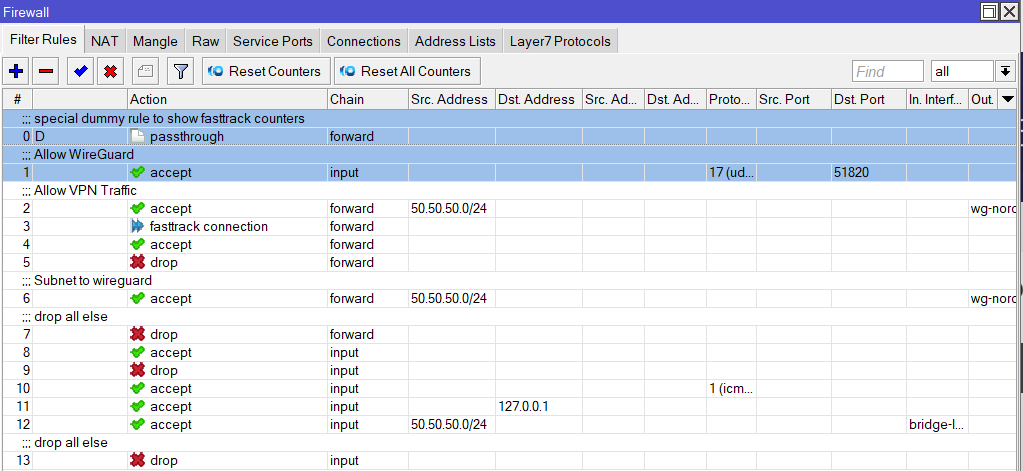
Just the one dealing with wireguard and do you know why it is not required??
You told me, cause right below it there is another rule that does this job, right?
No that is for the firewall rule that is duplicated which you did not highlight, the reason is there is no incoming handshake to the router for establishing the vpn connection, its your router that is sending out the intitial handshake and thus its the remote end (if mikrotik) that would need such a rule.
Flags: X - disabled, I - invalid; D - dynamic
0 D ;;; special dummy rule to show fasttrack counters
chain=forward action=passthrough
1 chain=forward action=fasttrack-connection hw-offload=yes
connection-state=established,related
2 chain=forward action=accept connection-state=established,related,untracked
3 chain=forward action=drop connection-state=invalid
4 ;;; Subnet to wireguard
chain=forward action=accept src-address=50.50.50.0/24
out-interface=wg-nordvpn
5 ;;; drop all else
chain=forward action=drop log=no log-prefix=“”
6 chain=input action=accept connection-state=established,related,untracked
7 chain=input action=drop connection-state=invalid
8 chain=input action=accept protocol=icmp
9 chain=input action=accept dst-address=127.0.0.1
10 chain=input action=accept src-address=50.50.50.0/24 in-interface=bridge-lan
11 ;;; drop all else
chain=input action=drop
Fine now?
Sorry dont read that format.
/export file=anynameyouwish (minus router serial number, any public WANIP information, keys)