What do you mean? I copy paste them from ip firewall filter print command.
anynameyouwish.rsc (3.56 KB)
The config looks just fine to me, all good!!
So i removed the correct ones, those two
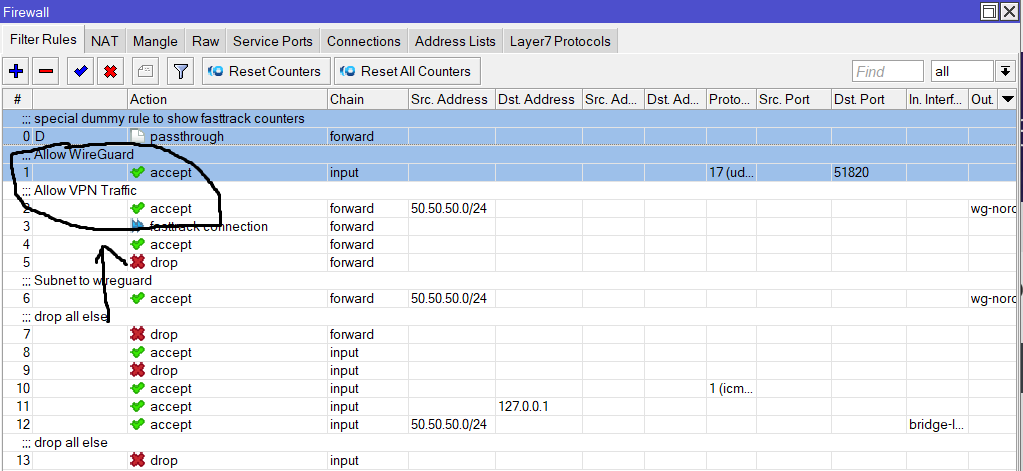
It would appear so, I read scripts better than diagrams LOL
thanks brother for all your help <3
A technical question considering torrenting, i read somewhere that its preferable to connect your vpn to your torrent client in order to avoid leaks, in case like mine that vpn is connected straight to the router, is there a chance for leaks when torrenting?
Everthing should go through the tunnel setup as far as I know.
thanks
I noticed that ipv4 dns shows as unecrypted inside windows, is this a faulty message or something i should look upon? Also do we any guide for the wireless? I want to understand why when i set auto on frequency of my 5ghz i cant see the wifi, but when i set it to a specific freq i can see it. This doesnt happen on 2.4ghz.
I dont care about puke windows puke.  Also why would your windows PC know that the traffic or DNS is even going in an encrypted tunnel???
The question is are the www lookups from the LAN subnet going through wireguard or not.
I am not sure how to test that, but we dont allow your LAN to go anywhere out the WWW.
and we dont have remote requests allowed in IP DNS,
but to be triple sure we could always…
add action=accept chain=input connection-state=established,related,untracked
add action=drop chain=input connection-state=invalid
add action=accept chain=input protocol=icmp
add action=accept chain=input dst-address=127.0.0.1
add action=accept chain=input in-interface=bridge-lan src-address=
50.50.50.0/24 dst-port=!53
add action=drop chain=input comment=“drop all else”
Not wifi trained LOL
Windows showing the dns we add, when we setup it, but next to it has the word unencrypted, saw this and thought i should ask you if its normal or what? I know windows suck, but it is what it is, if all the traffic goes through tunnel. Want these rules on top of the existing ones?
No …all I did was modifying one existing rule, the bit I added is bolded.
Try sniffing traffic on port 53
By no, you mean to not add all these rules on top of the existing i guess. How can i sniff the traffic on port 53?
None of those were new rules, it was an excerpt from your existing rules ( thought you would recognize them LOL ).
When I give you hints, the idea is for you to then go ahead and do some research.
Go to mikrotik documents and in the search put in sniffer. https://help.mikrotik.com/docs/spaces/ROS/pages/328059/RouterOS
Also go to youtube: https://www.youtube.com/watch?v=9UvFG9nUN0Q&pp=ygUQbWlrcm90aWsgc25pZmZlcg%3D%3D
Its not that easy, at least easy as it was for me to learn how to setup bridge lan etc to make my router work on first place. all these rules require knowledge and its not just read and learn thing, at least for me. the basic setup tho was read and learn from the beggining, cause its a standard procedure. I understand you are at your limits. Dont want to push you further, you had helped already tons. So thanks.
Dont mind helping but one has to make efforts as well…
Brother yesterday i had a power issue and had to force reset the router in order to make it work again. Now i paid that i didnt backed up the config we created. I followed the instructions, but as newbie that im, i want to ask when you ve time can you check the conf to tell me if its still fine? Main purpose is to redirect every single data through the vpn tunnel in order to avoid leaks, nothing else. Thanks in advance.
anynameyouwish.rsc (2.4 KB)
Things I would do…
-
Change port settings ( dont favour all because its not true, in terms of perhaps a WAN port or LTE and definetly not your wireguard interface!!
/interface bridge port
add bridge=bridge-lan interface=ether2
add bridge=bridge-lan interface=ether3
add bridge=bridge-lan interface=ether4
add bridge=bridge-lan interface=ether5
add bridge=bridge-lan interface=wlan1
add bridge=bridge-lan interface=wlan2
I assumed ether1 goes to WAN but if not then include
add bridge=bridge-lan interface=ether1 -
Use the DNS of Nordpvn in this setting
/ip dhcp-server network
add address=50.50.50.0/24 dns-server=(NORDVPN provided DNS) gateway=50.50.50.1 -
Not sure why you avoided port here???
SO make it clear’’
add action=dst-nat chain=dstnat dst-port=53 protocol=udp src-address=
50.50.50.0/24 to-addresses=(Nordvpn dns address)
add action=dst-nat chain=dstnat dst-port=53 protocol=tcp src-address=
50.50.50.0/24 to-addresses=(Nordvpn DNS address) -
If the Nordvpn address is not within the network of the wireguard address.
/ip address
add address=w.x.y.z/24 interface=wg1 network=w.x.y.0
aka not within w.x.y.z/24, then you will need to create an extra route for that. It looks like you already’
have a rule for that but since you didnt disclose then numbers I provide an example.
/ip route
add dst-address=nordvpn dns address gateway=wg1 routing-table=main
- Firewall rules are lacking…
/ip firewall address-list
add address=50.50.50.X list=AUTHORIZED comment=“admin PC wired”
add address=50.50.50.Y list=AUTHORIZED comment=“admin laptop/ipad wifi”
add address=50.50.50.Z list=AUTHORIZED comment=admin smartphone wifi"
/ip firewall filter
add action=accept chain=input connection-state=established,related,untracked
add action=drop chain=input connection-state=invalid
add action=accept chain=input protocol=icmp
add action=accept chain=input dst-address=127.0.0.1
add action=accept chain=input comment=“admin access” in-interface=bridge-lan src-address-list=AUTHORIZED
add action=drop chain=input comment=“drop all else”
+++++++++++++++++++++++++++++
add action=fasttrack-connection chain=forward connection-state=established,related
add action=accept chain=forward connection-state=established,related,untracked
add action=drop chain=forward connection-state=invalid
add action=accept chain=forward comment=“WG traffic” in-interface=bridge-lan out-interface=wg1
add action=drop chain=forward comment=“drop all else”
1 Like
-
I add them all in bridge lan cause LTE, no?
-
I use the DNS of nord as you ve already provided above, but i removed them from the rsc
-
Its like that
add action=dst-nat chain=dstnat dst-port=53 protocol=udp src-address=
50.50.50.0/24 to-addresses=103.86.96.100
add action=dst-nat chain=dstnat dst-port=53 protocol=tcp src-address=
50.50.50.0/24 to-addresses=103.86.96.100
- Sorry i dont know about if nord’s address is within network or not
The ip route table is like that
/ip route
add disabled=no dst-address=0.0.0.0/0 gateway=wg1 routing-table=private_route
suppress-hw-offload=no
add disabled=no dst-address=103.86.96.100/32 gateway=wg1 routing-table=main
suppress-hw-offload=no
- For firewall, cause im gonna mess everything with the order, do you want me to delete everything in address-list and in filter, and add those you provided me?
OT
@anav Don’t you even consider the two Profile Picture I sent you?
meow, I will be sure to put water in your bowl and WET cat food too.