I need to use my MikroTik as primary router, to be connected to the WAN from the ISP and then a secondary router connected to the Mikrotik and all devices.
The topology should be as follows:
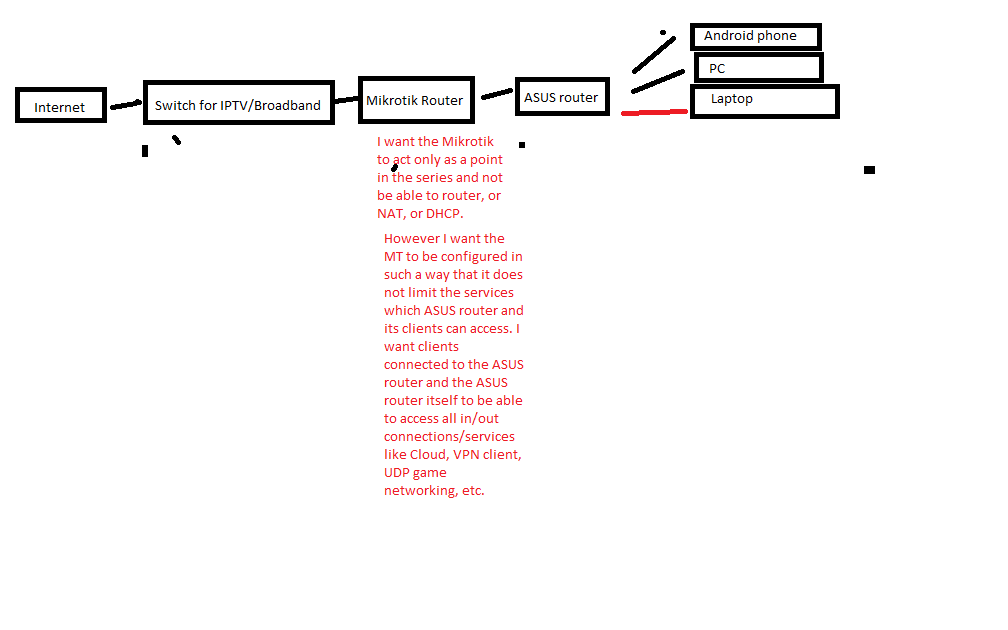
Internet → Modem/Switch → Mikrotik → my new ASUS router → All devices within my home.
Mikrotik is so customizable and has so many ways to be set up that I just don’t know how and actually I don’t know the name of this topology. The MT acts as what?
How should I configure the MT to act as nothing more than a point in the chain and pass-on all internet to the Asus?
Also, I am not sure about the primary (first) router which is connected to the internet ISP modem but the second router must definitely run DHCP and give IPs to the devices.
I’m now dumber after reading the article at that link. The terminology is ridiculous. It’s written by someone who is not a network person.
Disable the DHCP server in the MikroTik, then attach your links to the LAN ports (not port 1). Those are bridged so the MikroTik will behave as a switch.
What exactly is the point of the MikroTik in that diagram then? What you wrote in red text doesn’t make any sense. Just connect the ASUS to the internet if that’s what you want.
Or forget about the ASUS and use the MikroTik. Either way, you’ll accomplish what you wrote in red.
Yeah. I guess you are right. If it is just a bridge it has no function and can be removed from the topology? Is that what you are saying. I guess so.
New status. The Mikrotik should better work in router mode, but then how complicated will the port forwarding be?
I would need different services to run on the second router ASUS and on the clients connected to the ASUS , e.g. gaming, VoIP, access to the ASUS router from their Mobile application, etc?
Would the complexity of port forwarding in the Mikrotik be reasonable?
“Reasonable” is a question that only you can answer because it’s your network. If you explained why you want to use both routers at once, perhaps someone could hazard a guess.
If you need the MT to be a VPN tunnel endpoint, then I expect you can’t use it in a bridge configuration. You’ll need the MT to be a router. If the MT only has one public IP address, unfortunately that will complicate any static NAT and firewall rules you wish to implement.
Yes. I have not established the whole deal but some things are clear.
The MT should be a router. It should get the public IP. From there onwards the ASUS will be one of the clients of the MT and will be in Bridge mode (as advised by ExpressVPN) , then even more the devices will all be connected to the ASUS. How would the port forwarding look like?
Well I’ve been advised that the ASUS should be in bridge mode (by ExpressVPN support) and all devices connected to the ASUS ? Is this correct or nonsense?
I think he’s referring to that ridiculous article at the link in the first post, which talks about a “router” but it’s really a bridge (switch) or access point bridge. Read it at your own peril.
I’m thinking that this VPN support just “gave you something to do” (the OP) and he went off and searched on it and found something even wronger (is that a word?) than what they told him to do.
Waste of time. Hire someone to help that knows something about networking. Or learn about it yourself before asking for help.
There is something very wrong in your post. “Learn about it before asking for help.” What could be crazier? Invest tons of time in self educating yourself and finally when you’re done post a question on the forums?!?!?!
Further: “Hire someone” . Blah. If I were willing to accept the costs for hiring someone I would probably never had heard of Mikrotik brand. Hence never would have had a 60 EUR MT myself.
Enough off topic.
It is clear that ExpressVPN assert by competent knowledge or by experience that it is best to keep your old router and add the new router behind it. As router behind router even sounds crazy I am left, by deduction with the only conclusion that old router is in router mode and new ASUS is in Bridge.
Would one port forwarding rule be enough on the MT or it will require many to get all that is behind, connected to the second router exposed to the internet on specific ports?
I’ve been told by ASUS support that port forwarding would be needed only on the ASUS, but myself as a layman find it counterintuitive that the first router will just forward all traffic to one of it’s LAN ports?
If the Asus is in bridge mode, then there will be no port forwarding on it. Port forwarding is a router function because it involves translating IP addresses and (optionally) ports.
True bridges, switches, and hubs have no concept of IP addresses. They simply do not work at that level. So you need to decide what the requirements for your network are and select the best option.
(If anyone wants to bring up layer 3 switches, save your typing–they are just misnamed routers.).
This is an exceptionally over-convoluted design for something that really should be very simple. What others are saying is your diagram doesn’t make sense, because you have one device too many which 1. adds complexity, 2. adds another point of failure and 3. and reduces the ability for you to do simple NAT’ing for any inbound traffic (with both as routers, and having one sitting behind the other, means double NAT which is just mega ugly).
Realistically, you need EITHER the ASUS OR the MT and have it act as a router for Internet traffic (or bridge/router). The only reason you may want both devices, is if you were wanting to have say one router dedicated to Internet traffic and one router doing routing to some other private network - but they’d have to hang off the same bridge group / be on the same subnet, say 192.168.1.254 as your Internet gateway, and 192.168.1.253 as your private WAN gateway, then PC’s would have their default route set to the Internet gateway, and that router has a route on it that says "to get to remote subnet 172.16.1.0/24, then hop to 192.168.1.253)
A bridge operates at layer 2 (does NOT do routing, never will, ever)
A router operates at layer 3 (does routing between networks)
The Internet facing device (whether it be the ASUS or MT) must be a router (and NAT your private network out to the Internet)
If the Internet facing device IS a bridge, then there must be another device behind it that does the routing to the Internet (then there are many other factors you need to consider, such as your Internet connection type, encapsulation etc)
Now you have to ask yourself, and as others have said - WHY would you need both routers? Having both is possible - but it is totally unnecessary UNLESS that internal router routes to some other location, in which case it should really be connected to the bridge.
So… (hopefully this comes out right… EDIT: nope it didn’t - the bottom line with the ^ points to the Bridge…)
Internet <----> Router <-----> Bridge <----> PC’s
^
|_____> Router <------> { WAN } <—> Remote Router <----> Remote LAN
Both MT and most likely the ASUS can be a bridge and router, depending on the number of LAN ports you need, then that maybe one reason why you’d want one over the other (assuming both had similar features and functionality)
If you can list your requirements, then we can help you with the best design. You mention “ExpressVPN” which makes me assume you want some sort of site-to-site or client VPN tunnel established?
This is getting weirder and weirder. It is reaching the “truly bizarre” region.
To the OP:
They said to keep the old device for (their) convenience sake. They don’t want you asking how to reconfigure wifi, DHCP, DNS and whatnot. Doing this weird setup “solves” this question. For them.
Mikrotik as a router, and Asus as a bridge, will allow you to use its wireless - saving the expense of buying a new one. If you go by the article you posted ($DEITY forgive me), then it will sort of work. Would be cleaner to take the Asus out of the picture, and use the Mikrotik wifi. By the way: does your Mikrotik have a wifi?
If don’t, you could wire things as the first example on the link. It is ugly, but should work. For a given value of “work”.
The better way would be to put the Asus in bridge mode. Some routers do it, some don’t.
But I worked in customer support for years for a very advanced product. Bad knowledge posted on the internet (such as that link you posted) wastes so much time because “everything on the internet is true”. But it isn’t. I suspect “you know what you want” but you don’t know enough about networking to know how stuff actually works (because the text in red makes absolutely no sense) and you leave us to figure it out for you. This is why I said you should learn a few things before posting something like this.
Nobody who has replied can figure out why it is that you need 2 routers yet as far as I can tell.
I read the product guides for some of these new home WiFi “routers” with “gaming protection” and other nonsense and I’m guessing you want some of this whiz bang functionality mixed with the MikroTik functionality.
Please explain what you need, very simply, and maybe someone can figure it out.
Example:
I want a VPN and extra protection for some devices and not others.
Yes and no depending on what you need. Cisco 3750 switches have settings that help decide how to allocate resources (is it a switch or a router?) depending on how you use it. There is a difference if what you’re doing requires enough resources.
I need a MAC table on my router that can handle hundreds of thousands of MAC addresses and arp entries. You need a real router with lots of memory to do that. Some of the latest high dollar “switches” might be able to do it, but you’re talking $25,000 and up, each. And I need redundant line cards. And routers. My routers are about $200K a piece… A layer 3 switch won’t do the job.
It would be fun to drop in the highest CCR to see what it could handle for the heck of it though. If MikroTik wants to send me a few I will test it between Christmas and New Year, heh.
What type of VPN it is will determine what, if any, ports need forwarding.
Where is the VPN terminating? If the ASUS is in bridge mode then there’s no point terminating a VPN tunnel on it, because it’s not routing so it won’t be routing anything down the VPN tunnel.
It would make more sense to terminate the VPN on your existing router rather than adding a router behind it and terminating the VPN on the new router.
I have used expressVPN with a Mikrotik.
They use L2TP+IPSec or OpenVPN.
OpenVPN is not supported in the flavor they use by Mikrotik.
Also many of their Servers have been BLOCKED by services. IE Netflix blocks several of the servers I tried via L2TP. I found one that had not yet been banned by netflix… but it needed a OVPN tunnel.
I feel we lost the focus of the topic and the help I wanted to ask from you.
I was with the intention to use only the ASUS. But then came the recommendation clearly stated on ExpressVPN website “We recommend that you preserve your existing network setup and just connect the ASUS as a second router”. I got this confirmed by their 24/7 support on several live chats with them. There must be a reason why they advise so and I am sure it is a good reason. I dont think all of their 24/7 support is comptent, which they proved they are not, but the technical guys giving out this recommendation probably know what they are doing. So it is clear, that they provide their best service when the new router is added to the old and not just replacing it and this is what they recommend. The reason why I bought the ASUS is that Mikrotik does not support this lzo compression on OpenVPN.
@ someone who mentioned blocked servers. When using L2TP this is true. When using proper OpenVPN of the type ExpressVPN recommends there are no blocked servers. Also there are specific VPN locations from ExpressVPN which they say “are optimized for Netflix” and I guess it might be that they are changing every now and then the IP adresses of some VPN servers to go around blacklisting from Netflix.
I have the brand new ASUS RT-AC87U here but still have not configured it because I got lost. Topologies, Router mode, Bridge mode, Access Point mode. It’s too much.
It remains to be decided which modes should the two routers be. I think I figured out that the primary router (Mikrotik) should not be in Bridge mode because if it is in Bridge mode it is useless, it does not server a function.
However if it is in router mode you might say that it provides some isolation/separation of the VPN router (ASUS) and the outside? is that an advantage? I don’t even know )
 )
)