Hi, Friends;
I have the following network:
Puerto Tipo VLANs
Sfp WAN
ether1 access VLAN11
ether2 trunk 11,20,40 ---> Tplink Festa 65 wall
ether3 trunk 11,20,40 ---> Tplink Festa 65 wall
ether4 access VLAN11
ether5 access VLAN11
ether6 bridge2 independiente 192.168.18.x
ether7 access VLAN11
ether8 access VLAN11
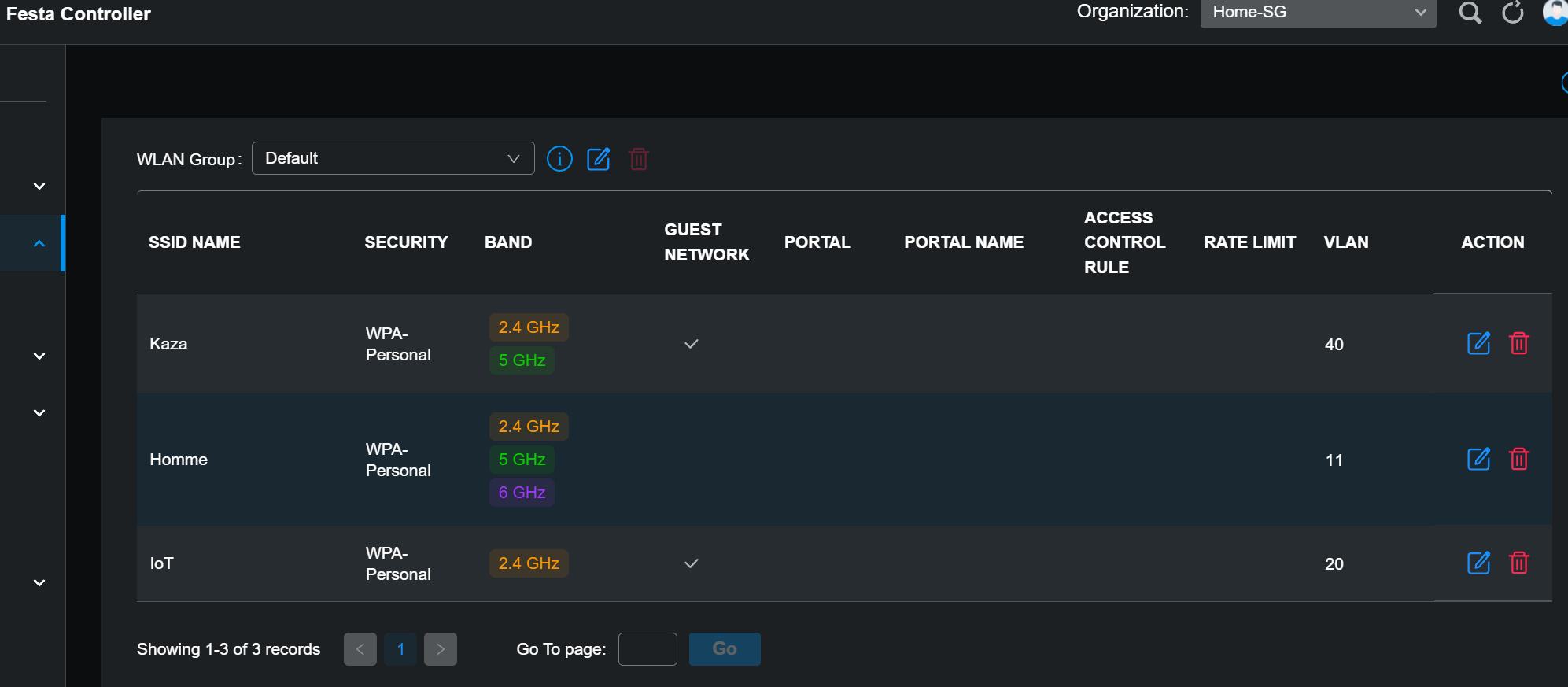
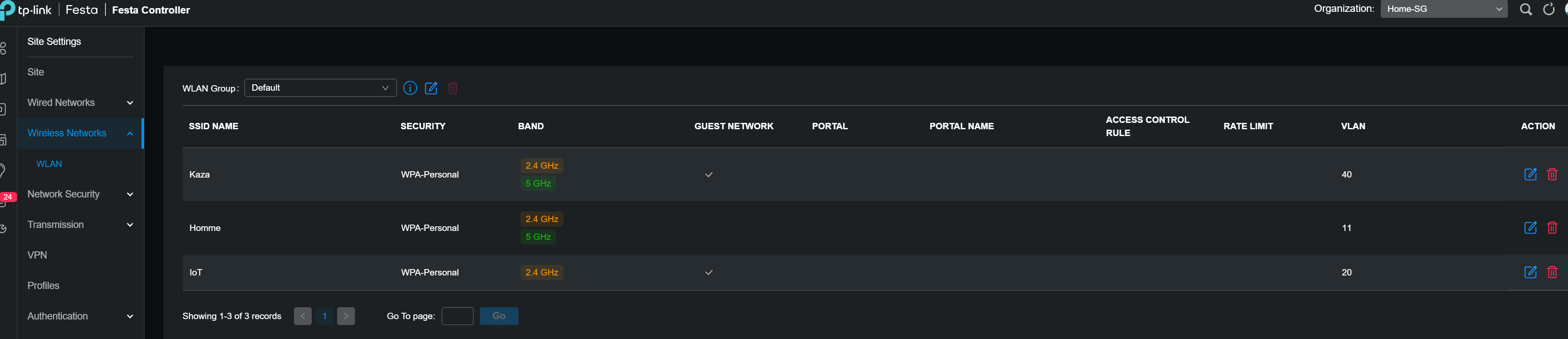
vlan11: Principal Network
vlan20: IoT
vlan40: Guest
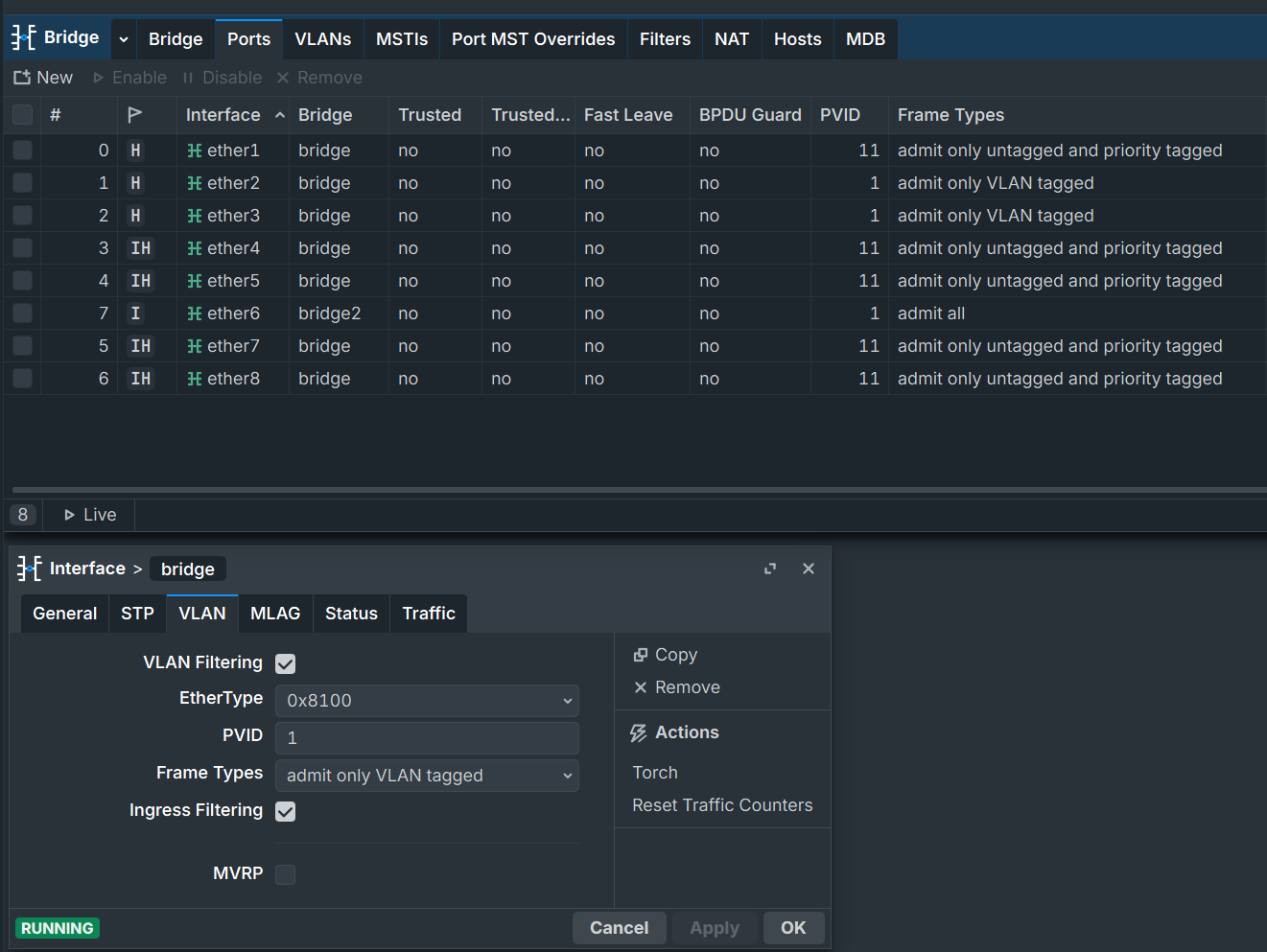
The problem is that when I configure the trunks this way:
interface bridge port

set [find interface=ether2] frame-types=admit-only-vlan-taggedset [find interface=ether3] frame-types=admit-only-vlan-tagged
The Wi-Fi isn't working; it currently works in this mode, but it's not secure. "admit all"
Details:
abc@MikroTik] /interface/bridge/port> print detail
Flags: X - DISABLED, I - INACTIVE; D - DYNAMIC; H - HW-OFFLOAD; Y - MANAGED
 0   H  interface=ether1 bridge=bridge priority=0x80 edge=auto point-to-point=auto learn=auto horizon=none hw=yes auto-isolate=no restricted-role=no restricted-tcn=no pvid=11 frame-types=admit-only-untagged-and-priority-tagged ingress-filtering=yes unknown-unicast-flood=yes unknown-multicast-flood=yes
        broadcast-flood=yes tag-stacking=no bpdu-guard=no trusted=no trusted-ra=no mvrp-registrar-state=normal mvrp-applicant-state=normal-participant multicast-router=temporary-query fast-leave=no

 1   H  interface=ether2 bridge=bridge priority=0x80 edge=auto point-to-point=auto learn=auto horizon=none hw=yes auto-isolate=no restricted-role=no restricted-tcn=no pvid=11 frame-types=admit-all ingress-filtering=yes unknown-unicast-flood=yes unknown-multicast-flood=yes broadcast-flood=yes tag-stacking=no
        bpdu-guard=no trusted=no trusted-ra=no mvrp-registrar-state=normal mvrp-applicant-state=normal-participant multicast-router=temporary-query fast-leave=no

 2   H  interface=ether3 bridge=bridge priority=0x80 edge=auto point-to-point=auto learn=auto horizon=none hw=yes auto-isolate=no restricted-role=no restricted-tcn=no pvid=11 frame-types=admit-all ingress-filtering=yes unknown-unicast-flood=yes unknown-multicast-flood=yes broadcast-flood=yes tag-stacking=no
        bpdu-guard=no trusted=no trusted-ra=no mvrp-registrar-state=normal mvrp-applicant-state=normal-participant multicast-router=temporary-query fast-leave=no

 3 I H  interface=ether4 bridge=bridge priority=0x80 edge=auto point-to-point=auto learn=auto horizon=none hw=yes auto-isolate=no restricted-role=no restricted-tcn=no pvid=11 frame-types=admit-only-untagged-and-priority-tagged ingress-filtering=yes unknown-unicast-flood=yes unknown-multicast-flood=yes
        broadcast-flood=yes tag-stacking=no bpdu-guard=no trusted=no trusted-ra=no mvrp-registrar-state=normal mvrp-applicant-state=normal-participant multicast-router=temporary-query fast-leave=no

 4 I H  interface=ether5 bridge=bridge priority=0x80 edge=auto point-to-point=auto learn=auto horizon=none hw=yes auto-isolate=no restricted-role=no restricted-tcn=no pvid=11 frame-types=admit-only-untagged-and-priority-tagged ingress-filtering=yes unknown-unicast-flood=yes unknown-multicast-flood=yes
        broadcast-flood=yes tag-stacking=no bpdu-guard=no trusted=no trusted-ra=no mvrp-registrar-state=normal mvrp-applicant-state=normal-participant multicast-router=temporary-query fast-leave=no

 5 I H  interface=ether7 bridge=bridge priority=0x80 edge=auto point-to-point=auto learn=auto horizon=none hw=yes auto-isolate=no restricted-role=no restricted-tcn=no pvid=11 frame-types=admit-only-untagged-and-priority-tagged ingress-filtering=yes unknown-unicast-flood=yes unknown-multicast-flood=yes
        broadcast-flood=yes tag-stacking=no bpdu-guard=no trusted=no trusted-ra=no mvrp-registrar-state=normal mvrp-applicant-state=normal-participant multicast-router=temporary-query fast-leave=no

 6 I H  interface=ether8 bridge=bridge priority=0x80 edge=auto point-to-point=auto learn=auto horizon=none hw=yes auto-isolate=no restricted-role=no restricted-tcn=no pvid=11 frame-types=admit-only-untagged-and-priority-tagged ingress-filtering=yes unknown-unicast-flood=yes unknown-multicast-flood=yes
        broadcast-flood=yes tag-stacking=no bpdu-guard=no trusted=no trusted-ra=no mvrp-registrar-state=normal mvrp-applicant-state=normal-participant multicast-router=temporary-query fast-leave=no

 7 I    interface=ether6 bridge=bridge2 priority=0x80 edge=auto point-to-point=auto learn=auto horizon=none hw=yes auto-isolate=no restricted-role=no restricted-tcn=no pvid=1 frame-types=admit-all ingress-filtering=yes unknown-unicast-flood=yes unknown-multicast-flood=yes broadcast-flood=yes tag-stacking=no
        bpdu-guard=no trusted=no trusted-ra=no mvrp-registrar-state=normal mvrp-applicant-state=normal-participant multicast-router=temporary-query fast-leave=no
vlans:
abc@MikroTik] /interface/bridge/vlan> print detail
Flags: Y - MANAGED; X - DISABLED, D - DYNAMIC
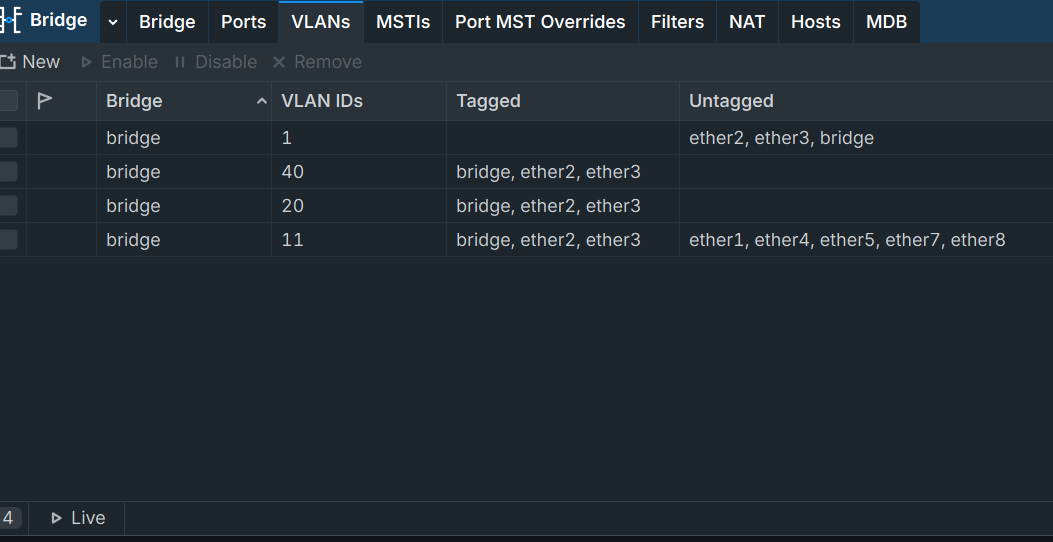
 0    bridge=bridge vlan-ids=11 tagged=bridge,ether2,ether3 untagged=ether1,ether4,ether5,ether7,ether8 mvrp-forbidden="" current-tagged=bridge,ether2,ether3 current-untagged=ether1

 1    bridge=bridge vlan-ids=20 tagged=bridge,ether2,ether3 untagged="" mvrp-forbidden="" current-tagged=bridge,ether2,ether3 current-untagged=""

 2    bridge=bridge vlan-ids=40 tagged=bridge,ether2,ether3 untagged="" mvrp-forbidden="" current-tagged=bridge,ether2,ether3 current-untagged=""

 3    bridge=bridge vlan-ids=1 tagged="" untagged=ether2,ether3,bridge mvrp-forbidden="" current-tagged="" current-untagged=bridge,ether2,ether3
Firewall:
@MikroTik] /ip/firewall/filter> print
Flags: X - DISABLED, I - INVALID; D - DYNAMIC
 0  D ;;; back-to-home-vpn
      chain=forward action=drop src-address-list=back-to-home-lan-restricted-peers out-interface-list=LAN

 1  D ;;; back-to-home-vpn
      chain=input action=accept protocol=udp dst-port=22021

 2  D ;;; special dummy rule to show fasttrack counters
      chain=forward action=passthrough

 3    ;;; defconf: accept established,related,untracked
      chain=input action=accept connection-state=established,related,untracked log=no log-prefix=""

 4    ;;; Permitir Acceso a IPs Confiables
      chain=input action=accept protocol=tcp src-address-list=IPs-Confiables dst-port=8291 log=no log-prefix=""

 5    ;;; defconf: drop invalid
      chain=input action=drop connection-state=invalid log=no log-prefix=""

 6    ;;; defconf: accept to local loopback (for CAPsMAN)
      chain=input action=accept dst-address=127.0.0.1 log=no log-prefix=""

 7    ;;; defconf: accept ICMP desde PC
      chain=input action=accept protocol=icmp src-address=192.168.7.122 log=no log-prefix=""

 8    ;;; defconf: accept in ipsec policy
      chain=forward action=accept log=no log-prefix="" ipsec-policy=in,ipsec

 9    ;;; defconf: accept out ipsec policy
      chain=forward action=accept log=no log-prefix="" ipsec-policy=out,ipsec

10    ;;; defconf: fasttrack
      chain=forward action=fasttrack-connection connection-state=established,related log=no log-prefix=""

11    ;;; defconf: accept established,related, untracked
      chain=forward action=accept connection-state=established,related,untracked log=no log-prefix=""

12    ;;; Vlan-40 Invitados: Aceptar tr  fico desde vlan-40 a Wan
      chain=forward action=accept in-interface=vlan 40 out-interface-list=WAN log=no log-prefix=""

13    ;;; Vlan-20 IoT: Aceptar tr  fico desde Vlan-20 a Wan
      chain=forward action=accept in-interface=vlan 20 out-interface-list=WAN log=no log-prefix=""

14    ;;; Permitir consultas DNS desde la LAN-UDP
      chain=input action=accept protocol=udp in-interface-list=LAN dst-port=53 log=no log-prefix=""

15    ;;; Permitir consultas DNS desde la LAN-TCP
      chain=input action=accept protocol=tcp in-interface-list=LAN dst-port=53 log=no log-prefix=""

16    ;;; Drop peticiones DNS dsd WAN-UDP
      chain=input action=drop protocol=udp in-interface-list=WAN dst-port=53 log=no log-prefix=""

17    ;;; Drop peticiones DNS dsd WAN-TCP
      chain=input action=drop protocol=tcp in-interface-list=WAN dst-port=53 log=no log-prefix=""

18    ;;; Vlan-40: Evitar tr  fico de vlan40 hacia el router
      chain=input action=drop in-interface=vlan 40 log=no log-prefix=""

19    ;;; Vlan-40: Tr  fico iniciado desde Vlan-40 dropear
      chain=forward action=drop in-interface=vlan 40 log=no log-prefix=""

20    ;;; Vlan-20 IoT: Evitar tr  fico de vlan-20 hacia el router
      chain=input action=drop in-interface=vlan 20 log=no log-prefix=""

21    ;;; Vlan-20 IoT: Drop todo tr  fico forward excepto WAN
      chain=forward action=drop in-interface=vlan 20 log=no log-prefix=""

22    ;;; Vlan-20 IoT: Bloquear LAN hacia IoT
      chain=forward action=drop out-interface=vlan 20 in-interface-list=LAN

23    ;;; defconf: drop all not coming from LAN
      chain=input action=drop in-interface-list=!LAN log=no log-prefix=""

24    ;;; Port Scanner
      chain=input action=add-src-to-address-list protocol=tcp psd=10,5s,3,1 address-list=Port_Scanners address-list-timeout=4w2d46m40s log=no log-prefix=""

25    ;;; "Drop Port Scanners"
      chain=input action=drop src-address-list=Port_Scanners log=no log-prefix=""

26    ;;; Dropear todo lo dem  s
      chain=input action=drop log=no log-prefix=""

27    ;;; "Drop Intento a IP no p  blicas desde la LAN"
      chain=forward action=drop dst-address-list=not_in_internet in-interface-list=LAN out-interface-list=!LAN log=no log-prefix="!Public_from_LAN"

28    ;;; "Drop paquetes entrantes desde intenet con ip no p  blica"
      chain=forward action=drop src-address-list=not_in_internet in-interface-list=WAN log=yes log-prefix="!public invalid IPs"

29    ;;; defconf: drop invalid
      chain=forward action=drop connection-state=invalid log=no log-prefix=""

30    ;;; defconf: drop all from WAN not DSTNATed
      chain=forward action=drop connection-state=new connection-nat-state=!dstnat in-interface-list=WAN log=no log-prefix=""

31    ;;; "Drop paquetes desde la LAN fuera del rango IP de la LAN"
      chain=forward action=drop src-address-list=!LAN_Permitidas in-interface-list=LAN log=no log-prefix=""