Hi guys .
How is it going ? .reffering to the image down .I would like to perform a plan which servise me to bridge the running ISP 1 OR ISP2 to ether 1 that connected to my pc.
I will explain my plan /
if ISP1 is not running (off or no internet) →E1 that connected with my pc has been bridged automatically with E3(ISP2)
if ISP2 is not running ( no intrenet) → E1=E2(ISP1..internet ON )
if ISP1 + ISP2 are both have internet →E1 = E2 OR E3
if ISP1 + ISP2 are both have no internet → routerboard make alarm sound
I hope u understand my scenario
need your help please .
Google “Mikrotik Multiple ISP routing” and you will find a number of solutions… except, I dont think that any of them will bridge your private network to ISP (that is not ussual way to do it) but rather route your private subnet to different ISP.
thank you very much ..You mean that my plan actually is not correct .Unless if I do something else like routing and rerouting my private subnet from ISP1→ISP2 and reversally.
You should put all your hardware in private subnet, configure two ISPs and script a simple failover for them (you will find a lot of examples how to do it)
In this case, your machines will always have the same addressess (local subnet) and will not even know that you have changed ISP.
Not to mention that you will have a NAT which is by design a sort of basic (primitive) firewall.. and so on…
The simplest script for failover I know, (for outgoing connections only) is just setting a different route distance for the default route for both ISP. If you get an IP address by DHCP from the ISP or from the modem, you can set the default route distance in the DHCP client of the interface.
thanks .But this is not the accurate issue .You can get an ip address from any router or modem but without internet service !!(ping 8.8.8.8= time out ) because the ISP that connected with the router or modem have a proplem with internet service (no internet service)..
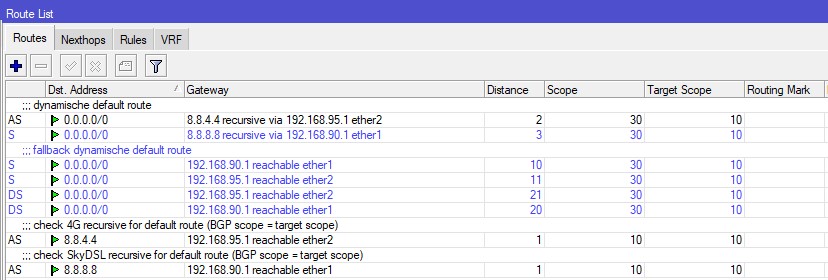
Just for your information. I use a subset of that advanced load balancing setup (as I need no load balancing, only failover and only outgoing connections)
The explanation is in that advanced load balancing setup without scripting. Scope plays an important role, to be able to ping-check a remote server (.e.g. 8.8.8.8) and to enable/disable the corresponding route to the local gateway, based on that remote ping result. No so easy to understand at first sight! It’s about recursive routing.
In my setup:
Route distances 10 and above are only there to still try to connect , even if 8.8.8.8 and 8.8.4.4 would be down, but the rest of internet is up. = fallback
Route distances above 20 are DHCP set routes (when the local gateways are replaced with devices with other addresses) = fallback of the fallback
The distance 2 and 3 define which gateway is preferred. I prefer 4G now, as I have multiple 4G connections on a load balancer, and the satellite has a 700 ms roundtrip delay.
192.168.90.1 and 192.168.95.1 are the LAN side addresses of the modem/gateway towards 4G and the satellite modem.. “90.1” is a satellite connection, “95.1” is a set of 4G SXT kits.