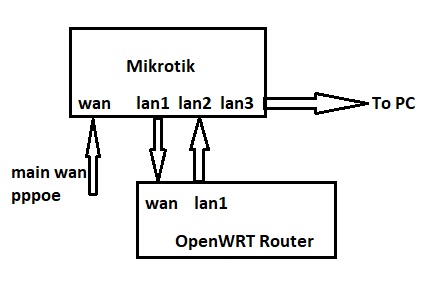
Hello. Please tell me how I can take the Internet as it is on some port (it can be virtual, with VLAN), bypassing NAT and Firewall of the first one?
The idea is this - I want to process traffic going to certain IPs (for example 8.8.8. using an additional gateway in the local network, but this second gateway should take the Internet from the main one unprocessed (bypassing the main routes and rules).
I have configured everything, it works as a gateway, routing too. But if I go to this IP 8.8.8.8 from the local network, I get a “ring”. That is, the traffic is processed on the second gateway, but goes again through NAT of the first one.
simply, I need to distribute one Internet to two gateways, in one it will be processed (rules, routing, etc.), in the second one it will not.
Adjustment must be done on the first gateway (only), as this second is behind the first NAT and Firewall.
Depends on the first gateway setup capability and your access to this.
It might be a solution to swap first and second gateway position , as the MT can bridge, route, NAT any way you want it to do.
Some ISP routers allow to forward the ISP PPPoE connection (subscription user/ authentication) , and allow to delegate the ISP login that way to another router. (Even as a second connection in my case. ISP vdsl-router as DHCP and my MT router behind that as PPPoE, so I have 2 ISP ( CGNAT) IP addresses)
you misunderstood me a little. The second gateway is a separate router that processes traffic to specific IP addresses.
I.e. PPPoE authorization on the MK router.
This is for modifying SNI packets. Mikrotik cannot change them. I.e. I want to send those packets that can be replaced through the second route. If there are 2 providers, it’s easy. But I would like to use one
Probably did indeed. I don’t understand your setup with the 2 routers.
Can you clarify how it is?
ISP -> ISP router with NAT -> LAN connection -> MT router -> some other client devices
                                       \-> some client devices

Is the ISP router something special (VDSL, fibre) ? Or is this setup possible?

ISP - MKT router -> bridged WAN connection -> ISP router -> some client devices
               \-> MKT LAN connection ->  some other client devices
Bridge is just one way to forward WAN (ISP) connection, but having an ethernet port (or just an IP address) with no NAT and some with Src-NAT or masquerade is one of the many other possibilities with RouterOS. (bridge, routing, proxy-arp, Dst-NAT, bridge-Mac-NAT, MACVLAN (is NOT about VLAN but extra MAC on interface!), … etc)
Put a switch on the WAN and attach the gateway WANs to it…
What use would the second gateway have if it doesn’t have to do anything?
Forum users, often, do not do illogical things.
Explain correctly what you want to achieve in the end,
not the intermediate steps that seem absurd, even if they seem correct to you,
without knowing the final goal.
There is a main router - Mikrotik. Local network address - 192.168.0.1
The router receives the Internet via PPPoE. Let the external address be 11.11.11.11 (white, but no static)
Inside, a VPN tunnel is configured as a separate Internet gateway (LAN - 10.10.10.0, external 22.22.22.22). Blocked sites go through it. This is configured in the routing rules.
It all works, but not as fast as I would like, plus there is a substitution of the IP address.
I can use the plugin and the second, external OpenWrt router to process traffic to blocked sites. I can make it a gateway, but with an internal address - 192.169.0.2.
This router is inside the main local network.
But then the routes to these blocked sites will go twice through NAT.
How is this bypass? that’s the question
Main router is connected to internet via PPPoE account/tunnel . OK so far, a quite normal ISP internet connection.
“Inside, a VPN tunnel is configured as a separate Internet gateway (LAN - 10.10.10.0, external 22.22.22.22)”
Lost already …
inside … inside what? Another tunnel inside the PPPoE tunnel? OK.
What are the end-points of this tunnel? One side is the external/internet server (22.22.22.22.22?)
The other side is your second Openwrt router , right? So this traffic inside the tunnel is not handled/terminated by the first router.
The first router only passes the tunnel connection from 22.22.22.22.22 to the OpenWRT router !?
The content in the tunnel is not seen nor manipulated in the Main router
The openwrt router sees that external server through a tunnel. There might be no need to do some NAT on the packets transmitted through the tunnel.
The tunnel itself goes from the OpenWRT router (as client of the Main mikrotik router), to some internet connection.
Yes this is as any client using internet, and normally requires NAT or PNAT , unless you have a public IP address for every client device.
The whole idea is to terminate the 2nd tunnel on the OpenWRT router and not in the first Main Router.
PNAT : one TCP/UDP port of the main router WAN IP will be forwarded (DST-nat) to the OpenWRT router IP and tunnel port.
A diagram would be helpful but basically, a big I THINK…
a. the mikrotik has a public IP and internet
b. an openwrt router gets a private IP on its WAN side from a LAN on the MT. (ETHER1 on OPENWRT, ETHER2 on MT)
c. the openwrt connects to a third party provider VPN (could be multiple site choices).
d. the openwrt uses the Thirdparty VPN connection, internet out third party location as second WAN input so to speak.
e. the open wrt creates a private LAN which gets its connection solely from the VPN side
f. the open wrt private LAN connects back to the MT router ether2 on openwrt to ETHER5 on MT as a secondary WAN input on the MT).
So now users on MT have two WAN connections to the internet, local, and remote.
OpenWRT processes only traffic to certain sites (IP).
Everything works separately. When routing I get a “ring”. Since Mikrotik routes traffic in a circle
That is, if I use the OpenWRT gateway in this connection on the computer (removing the routes in Mikrotik), everything works. But if I add routes to Mikrotik, the traffic does not pass
If we can abstract for a moment from the fact that having more than one bridge on a single Mikrotik device Is usually not advised, you could have:
bridgeWAN with ether1 and ether2 in it
and
bridgeLAN with ether3-ether_n_ in It
It Is a good idea (particularly when fiddling with bridges) to keep one interface out of any bridge to have a "safe" management port to access the router and it's configuration.
But then, what Is the plan?
Which device (the Mikrotik OR the Openwrt one) will be (optionally) the DHCP server and the gateway for the devices on the (single) LAN?
The main gateway is Mikrotik (DHCP). It receives internet via VLAN and PPP.
I don’t know how to combine 2 ports into a bridge, since PPPoE doesn’t allow this. You can’t add this interface to the bridge.
I can install OpenWRT at the beginning. But there is a problem with IPTV. Mikrotik works better with multicast
the question is, can mark and prerouting-postrouting solve the problem? transparent proxy?
google.com → mikortik → wan
amazon → mikrotik → OpenWRT → Mikrotik - wan
Mikrotik routing allows you to send traffic to different internal gateways. Mikrotik’s internal gateway1 is a PPPoE connection. And the second gateway is an IP OpenWRT
We need Mikrotik internal setup to understand what is wanted here.
Ethernet ports in mikrotik as such have no special meaning as WAN or LAN , unless defined by their internal setup
So we have Mikrotik,
PPPoE from internet, is connected via ethernet port labeled as WAN
That Mikrotik WAN ethernet port is not a port on the bridge (then create PPPoE with that ethernet WAN interface as master interface)
we name ithat bridge now WAN bridge
WAN bridge here now is with ports set : PPPoE and Mikrotik ethernet port labeled as LAN1 in your diagram
WAN bridge
– port PPPoE
– port LAN1
BUT ethernet WAN connection itself may be needed also on the bridge as alternative Internet connection
(only then add ethernet WAN as port on the bridge and create the PPPoE interface with the bridge as master interface !)
(either the PPPoE interface or the ethernet WAN interface can be defined as port on the WAN bridge.
(Mikrotik does not need it to be a port on the bridge to use it, but that interface is needed as port on the bridge to forward it unprocessed to the OpenWRT)
(Make the not-as-port interface member of the WAN interface list, as needed)
That WAN bridge is made member of the default WAN ‘interface list’ , not the LAN interface list
(because the default firewall rules are defined for the WAN interface list (eg Masquerade, blocking input and not forwarding traffic that is not DSTNAT (outgoing connection))
That WAN bridge has a DHCP client if needed as PPPoE would need it.
Remark general rule: (All L3 functions like DHCP server, DHCP client, IP addresses, PPPoE, and also interface list membership … are defined on a bridge, and not on the ports of a bridge)
(A PPPoe client interface can be created with the bridge as master interface, but not with an ethernet interface, if it is set as port of a bridge, as the PPPoE master interface)
The OpenWRT WAN port has a DHCP client if needed (or set the addresses and fields manually)
The PPPoE link must allow for 2 IP addresses , as both the Mikrotik and the OpenWRT have a WAN IP address
NAT (Masquerade) could reduce that requirement to only 1 IP address. But NAT is what you wanted to avoid.
Both the Mikrotik and the OpenWRT could have their own PPPoE client (and corresponding IP address) if the ethernet WAN is forwarded via the WAN bridge.
extra bridge, the LAN bridge (add that 2nd bridge)
LAN bridge is made member of the default LAN ‘interface list’ to use the default firewall rules (eg which allow input and forward traffic)
LAN bridge
– port LAN2
– port LAN3
Mikrotik ethernet ports labeled LAN2 and LAN3 are ports on the LAN bridge
LAN bridge has a DHCP server set up, to service the Mikrotik LAN clients
avoid having 2 DHCP servers on the same Layer2 LAN (so stop either the mikrotik DHCP server or stop the OpenWRT DHCP server)
OpenWRT lan1 and Mikrotik lan2 and Mikrotik lan3 and Mikrotik LAN-bridge are all on the same Layer2 network
 using an additional gateway in the local network, but this second gateway should take the Internet from the main one unprocessed (bypassing the main routes and rules).