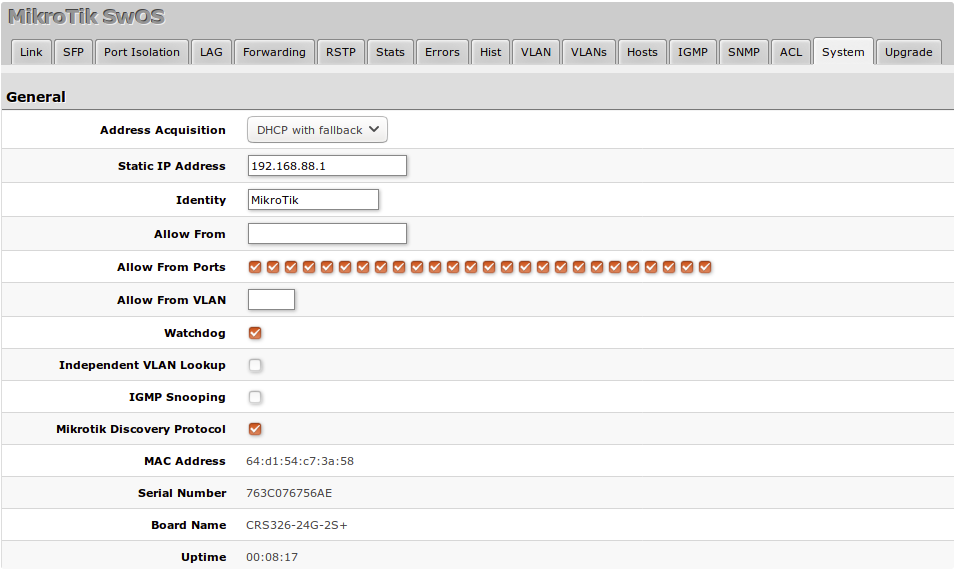
I have another question regarding SwOS. This time it is a Mikrotik css318-16g-2s+in. I have configured the switch to use DHCP to get his IP address. I also created a DHCP reserveration in the DCHP server of VLAN 1. But the switch requests his IP address from the DHCP server of VLAN 2.
I think this might happen because said DHCP server of VLAN 2 is directly connected to said switch. The DHCP server of VLAN 2 is two hops way, as it is connected to a neighboring switch.
Is there a way to force the switch to request his IP only on VLAN 1?
No idea about SwOS, but in RouterOS, you define the interface [which can be a vLAN] on which the DHCP server operates and similarly you define the interface [which can be a vLAN] on which the DHCP client makes its request. And you can have clients for each of a number of interfaces.
Remember that the switch or a router does not have an IP address. IP addresses are properties of interfaces.
The only SwOS switch I have is a CSS106-5G-1S (aka RB260GS).
Take a screenshot of the system tab (and edit out the MAC and Serial number if you want).
I use a static IP myself. But have used dhcp with fallback.
Questions:
If you connect to your "vlan 2" with winbox, are you seeing the CSS show up. You can't connect to it with winbox, but winbox is very useful to be able to see what ip address it chose to use, from the UDP port 5678 MNDP packets.
Another thing you can check is if you look at the host tab, where do you see the mac address of the dhcp server it is getting it ip address from, (also if on the SYSTEM tab you have IVL (independent vlan learning) checked, then you will also see the "vlan" that the switch assumes the packet is coming from).
Do you see the mac address of the dhcp server you want the CSS to obtain its ip address from in the host table?
Depending on how you have your VLAN and VLANs tab screens configured, it is possible that the switch is seeing what you think is vlan 2 as vlan 1 (the switch is connecting to an access port of vlan 2).
I agree with your statement when talking about a routers and even that ip addresses are properties of interfaces. But switch-ports are not interfaces (that you can apply an ip address to).
A switch doesn't have an ip address. A managed switch does have a mac address and an ip address; but it is the ip address of the internal interface associated with the management "host" that only be accessed through the switch, or in the case of a switch with a console port, the console. That mac address and ip address are only used when you are connecting to the management address of the management "host". And in that case the ip address is the same no matter which switch-port you access it through.
I don't see anything in the SwOS for CRS3xx and CSS3xx series Manual that explains exactly how SwOS does its DHCP discover. I don't know if if sends out discovery on every configured vlan, or just a single vlan.
But if you haven't seen the manual, it is at least worth a look, and it does have some examples.
I checked some more aspects. And now I have this picture.
WinBox (running an a PC in VLAN 1) detects the switch as a neighbour and prints the switch’s IP address as one from the subnet of VLAN 2. The switch itself isn’t reachable from that PC.
The IP the switch got from the wrong DHCP server (on VLAN 2) is accessible from all VLANs. Naturally the gateways on those other VLANs use other IP subnets. But if I connect a laptop with static IP from that IP subnet (of VLAN 2) to any VLAN I can reach the switch.
I have DHCP enabled on two VLANs (1 and 2) at my site.
The switch in question has access (edge) ports to VLAN 2 and VLAN 1. The DHCP server of VLAN 2 is attachted to one of those access ports on the said switch. The DHCP server of VLAN 1 is attached to an other switch and reachable over a fibre uplink.
So I think magicc12 is quite right. The switch seems to “ignore” the VLANs. He is reachable on all VLANs with the active IP. I haven’t checked it finaly but I assume the switch also sends DHCP requests on all VLANs and uses the IP from first responding DHCP server.
The DHCP server on VLAN 2 is much quicker to respond because it is directly attachted to said switch. So next I wanted to test two options. First trying to restrict the Access VLAN and second to use a static IP configuration.
In the system tab this was / is the IP setting.
After also setting this value on the same systems tab, all following reboots produce an IP received from DHCP server on VLAN 1 and the switch is reachable from that IP of VLAN 1.
So my first try was a solution. Restricting the allowed VLAN on the system tab also seems to solve the DHCP race. Now everything is fine… The switch got the right IP and isn’t responding on the other VLANs anymore.
Thanks for all your suggestion and hint. If I got some technical terms wrong… I said the switch has the IP, and so on… I’m sorry, but I’m no native english speaker.
You can restrict what port can be used for management. I don't know if that would also limit what ports it could receive DHCP offers on, but it may.
I am not sure if the Allow from VLAN can limit it. It may.
Those are at least some things worth trying if you want to limit it. It may or may not work.
Ticking "Independent VLAN Lookup" is useful, as even it the port's VLAN mode is set to "optional" it will still report which vlan the mac address was associated with. On my CSS106-5G-1S if the IVL is unchecked, then the vlan isn't part of the MAC table lookup, and isn't displayed. Using IVL consumes more of the MAC table entries, because each mac:vlan tuple acts as the "key", so a trunk port with 5 vlans will possibly consume more mac entries. But it worthwhile to use in my opionion, and makes each vlan operate independently from the others. Normally you won't have multiple interfaces with the same mac address, but you can with for example DECnet IV (which encodes the "node number" into the mac address, and unlike IP, the node number is associated with the node, not the interface).
When a switch-port receives untagged traffic, that will be associated with the vlan that is specified by the "Default VLAN ID" specified for the port (this is SwOS's term for the PVID).
“Independent VLAN Lookup” is and was active. But it didn’t stop the switch from acting as it did. On the VLAN tab I use “strict” VLAN for all ports and have set the correct VLANs per port bases on the following tab. Also the “default VLAN” is properly set for all ports in “only untagged” mode, which by the way are all ports except the fibre uplinks which are in any mode.
I also assumed for a while that the “default VLAN” of port 1 may be the issue. Because port 1 was untagged on VLAN 2 and it was the port where the “wrong” DHCP server resides. So I changed two ports, putting a device with VLAN 1 on port 1 and moved the DHCP server of VLAN 2 to port 8… did’nt fix it.
What helped so far was the “allowed VLAN” in the system tab.
Without putting a tap on each access port and seeing what the switch sends (on a reboot), it's hard to know what it is really doing.
The MikroTik documentation isn't very clear, and the MikroTik SwOS basics video on youtube also didn't address that.
I know that the cheap "Smart" switches (like the TP-Link SG108E and Netgear GSx0xE (I have GS908E) have problems if you have multple dhcp servers, so I always set those to static ip, but they are also accessible from any port as long as the ethernet frames are not tagged. And at least on the SG108E and GS908E you can't limit who can connect to the web interface (if they know what the address is, they can connect if they set the ip manually to the same subnet). At least with the CSS switches you can limit by port and by vlan.
Is there some reason you want to use dhcp instead of static? You can still set up a reservation with the switches MAC with the ip address you want (just for documenation and to prevent some other host from getting the switches ip address).
A fair point. Looking more closely at this,I am using a CRS 8P-4S as a switch, which is router capable, runs routeros and is therefore not a true switch. So that misled me a little.
I no longer use dhcp allocated addresses on network kit because you have to find the kit on the network. If something has its own console eg a desktop, you generally find it on its desk or eg a phone where you last put it or with the thief who took it. In these cases, dhcp has no potential to make things more difficult.
Of course I use static DHCP reservations for my network equipment. But that doesn’t help if the switch talks with the wrong DHCPs server. The two DHCP servers are seperate hosts.
Like I posted before, since restricting the switch to “allowed VLAN” it didn’t happen.
And yes, I assumed that the switch will send a DHCP discover to all VLANs. That is because it was reachable with it’s IP from ALL VLANs. Which was also kind of freaky for me to realize.
Then set the CSS to use static for address aquisition in the System tab
Address Acquisition Specify which address acquisition method to use:
DHCP with fallback - switch is trying to request an IPv4 address from a DHCP server. If the requests are unsuccessful, then the switch can be accessed using a Static IP Address value
static - address is set as a Static IP Address value (IPv4 only)
DHCP only - switch uses DHCPv4 client to acquire address